

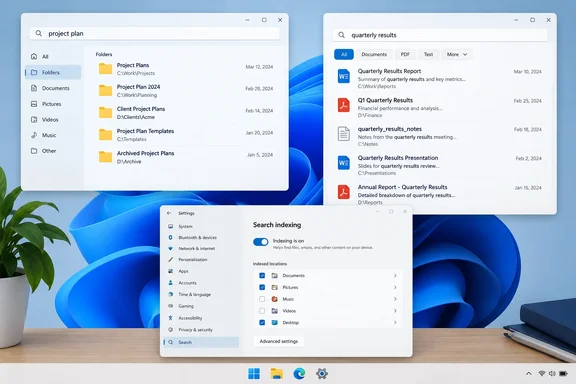
Document7.docx is not much help when you are hunting for last month’s meeting notes. But if you remember a distinctive word inside the document, its name becomes less important. Everything and Agent Ransack offer ways to search file contents—although the differences between them are more nuanced than “one finds PDFs, the other finds Office files.” Voidtools’ documentation explicitly supports Word-document content searches, while Mythicsoft lists IFilter-powered document searching for Agent Ransack.XDA’s João Carrasqueira explored this problem after abandoning useful filenames. His experience makes a practical case for keeping both tools available. It also illustrates why a failed search on one PC should not be mistaken for a universal software limitation.
What the comparison actually found
Carrasqueira reported that Everything found text inside .txt, .ps1, and .yml files, plus some PDFs, but missed his .docx, .xlsx, and .odt documents. Agent Ransack Lite found text in his Word and Excel files, although a search through Documents slowed while scanning a Windows 11 ISO stored there.
Those are useful observations, not a controlled benchmark. The report provides no measured timings, exact application versions, file counts, or filter configuration. It therefore supports a workflow recommendation more strongly than a definitive speed ranking.
The important question is not simply which application is fastest. It is what each application must read before it can answer your particular search.
Everything: fast names, on-demand contents
Voidtools distinguishes filename lookup from content searching. Everything does not index file contents in the documented workflow; a content query reads candidate files when you run it. Plain text is supported natively, while formats such as Word documents and PDFs use installed Windows IFilters—components that extract searchable text. Without a suitable filter, Everything falls back to reading the file as text.
Consequently, the Office-document failures in XDA’s test do not establish that Everything cannot search those formats. The documentation even supplies a DOCX content-search example. The particular failure remains unexplained.
Try a restricted content search
In Everything’s search box, try:
*.pdf \downloads content:invoice
This searches PDFs in Downloads paths for invoice inside their contents. For Word documents, try:
*.docx content:vanilla
Replace the example word with one you remember. Add a folder restriction where possible. Voidtools recommends narrowing by extension, path, or modification date because unrestricted content searches can be extremely slow. Success means a matching document appears in the results; an empty result alone does not prove the text is absent, particularly when document extraction depends on a filter.
The takeaway: Everything’s quick filename results and its content searches are different workloads. Do not expect the latter to behave like the former.
Agent Ransack Lite: useful, but not single-threaded
Agent Ransack remains a relevant alternative for document searches. Mythicsoft identifies Lite as free, lists IFilter-powered Office/PDF searching, and says the application is free for personal and commercial use. Its history stretches back to April 2000—a reassuringly long career for software whose name sounds like a suspicious process in Task Manager.
One claim in XDA’s comparison needs correcting: Lite should not be described as lacking multithreaded searching. Mythicsoft’s feature comparison describes a multithreaded search engine for the product, and its release history records a thread-configuration option for switching multithreading off. The publisher’s documentation does not support blaming the free edition’s performance on a single-thread restriction.
The ISO incident offers a more useful lesson: restrict the candidate files before searching their contents. A document search does not need to examine an operating-system image merely because both occupy the same folder. This is workflow advice drawn from Carrasqueira’s experience, not a promise of a particular speed improvement.
Professional offers additional capabilities, including specialized Word/Excel processing and optional indexing. Those are reasons to evaluate it against a specific need—not evidence that ordinary Lite searches are inherently inaccurate.
Give Windows Search a configuration check
Windows Search can index file contents, rather than rereading every candidate for each query. Microsoft says initial indexing can take up to a couple of hours, with subsequent changes handled in the background. Classic mode covers common personal folders; Enhanced provides broader coverage but may consume more resources. That makes blanket claims that Windows Search is always slow too simplistic.
For Windows 11, Microsoft documents this configuration check:
- Open Settings > Privacy & security > Search.
- Under Classic’s Find my files settings, select Customize search locations.
- Use Modify to include the folder you need.
- Open Advanced > File Types.
- Select the relevant extension and choose Index Properties and File Contents.
- Confirm the changes and allow indexing to finish.
Microsoft’s documentation also uses Searching Windows when describing indexing settings, so the wording may differ across interfaces. Properties-only indexing makes filenames searchable, not the text inside them.
A content-indexing checkbox is not a universal document decoder, either. Microsoft Learn explains that filter handlers extract document text; its plain-text fallback does not understand structured document formats. Opening a document in an office suite and exposing its text to Windows Search are separate capabilities.
Choose a workflow, not a winner
The sensible conclusion is less dramatic than declaring Windows Search obsolete:
- Use Everything’s restricted content queries when you remember a word and can narrow the location or format.
- Consider Agent Ransack Lite when its document-search interface suits your work.
- Check Windows indexing coverage and file-type settings before dismissing the built-in option.
Keeping both free applications is a reasonable editorial recommendation, not a benchmark-proven necessity. And once you recover that elusive document, give it a useful name. Search tools can rescue a filing system; they need not become its permanent emergency services.
References
- I stopped giving my files useful names, but these free apps found them anyway XDA · 2026-10-01T18:00:17+00:00
- Agent Ransack – Information – Mythicsoft mythicsoft.com
- Searching - voidtools voidtools.com