

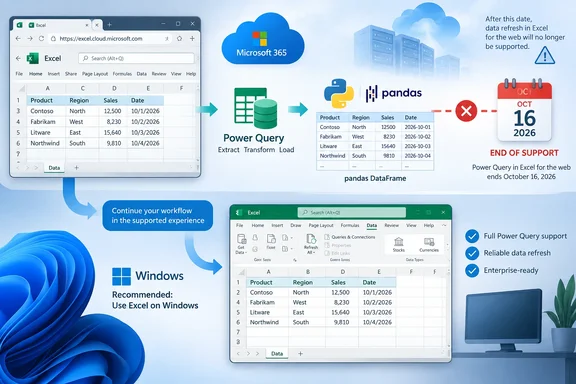
The change was first reported by Neowin from Microsoft’s admin-center notice. Microsoft has not offered a technical explanation beyond saying the retirement aligns its Python in Excel investments with “supported experiences.” What the notice does make clear is more important than that vague rationale: there is no tenant setting, policy, or admin intervention that keeps the web feature alive after the cutoff.
For organizations that built browser-first reporting or analysis workbooks around Power Query and Python, this is a functional retirement rather than a cosmetic feature trim. Existing workbooks may still open in the browser, but the portion of a workbook that passes a Power Query query into the Python runtime will no longer behave as designed.
The capability being removed is narrower than Power Query itself
Microsoft is not removing Power Query from Excel for the web. The web app will continue to support importing, transforming, managing, authenticating, and refreshing a defined set of data sources through Power Query. Microsoft’s Excel support documentation still describes browser-based query refreshes, credential management, Power Query Editor access, and imports from sources including CSV, XML, JSON, SQL Server, SharePoint Online lists, and OData.
The retired feature is the bridge between those queries and Python in Excel. Today, a Python formula can use Excel’s xl() function to reference workbook objects, including a named Power Query query. That lets a user take data that Power Query has already extracted and transformed, represent it as a pandas DataFrame in the Python runtime, then perform analysis or generate visual output in the workbook.
That connection matters because Python in Excel intentionally has tight restrictions on external access. Microsoft’s own documentation says common Python functions for reading external files or URLs, such as pandas.read_csv and pandas.read_excel, are incompatible with Python in Excel. The Python environment runs in Microsoft’s cloud in an isolated container, with no ordinary network access and no access to a user token.
In other words, Power Query is not merely a convenient import button for Python in Excel. Microsoft describes it as the supported route for bringing external data into Python calculations. Removing the query-to-Python handoff in the web app therefore creates a more consequential limitation than the Message Center notice’s short wording suggests: browser users lose the sanctioned way to send a live external query directly into a Python formula.
Microsoft’s documentation already reflects the web restriction
There is an awkward timing issue in Microsoft’s public documentation. As of September 17, Microsoft’s support article for using Power Query to import data for Python in Excel already says that importing external data with Power Query for use with Python in Excel is unavailable in Excel for the web. The Message Center notice, however, gives October 16 as the retirement date.
That does not prove Microsoft has disabled the feature early. Support pages are frequently updated ahead of a rollout or retirement, and the Message Center announcement remains the operative notice to administrators. But the wording removes any reason for IT teams to assume this is a distant plan that might be softened before implementation. Microsoft’s published documentation is already describing the desktop-oriented behavior as the expected state.
There is another detail administrators should avoid overlooking: the Message Center notice expressly protects Excel for Windows desktop. It does not promise equivalent support for Excel for Mac. Microsoft’s broader Python in Excel documentation lists Python availability across Windows, the web, and Mac, but organizations with Mac-heavy analyst teams should verify the exact Power Query-to-Python behavior in their deployed Excel builds rather than treating the Windows carve-out as a blanket desktop guarantee.
The distinction is especially relevant for companies that standardize on Microsoft 365 web apps to reduce local software support. A workbook author may have assumed that the browser edition was an adequate substitute for the desktop client because Python in Excel itself remains available on the web. It will remain available, but it will be less capable for data pipelines that begin outside the workbook.
Existing workbooks need an inventory before October 16
Microsoft says no administrative action is required, which is true only in the narrow sense that administrators cannot block or reverse the retirement. Operationally, there is work to do.
The affected population is likely smaller than the entire Excel user base, but potentially difficult to find. A workbook may contain a Power Query connection created months ago by an analyst who has since moved teams, while a Python cell may simply reference a query name through xl(). Those dependencies are not necessarily apparent to a user opening a dashboard and pressing Refresh All.
Administrators and workbook owners should identify files that combine all three elements: Excel for the web, Power Query connections, and Python formulas. Priority should go to shared workbooks in SharePoint and OneDrive, departmental reporting files, recurring finance or operations models, and workbooks opened by users who do not have a licensed Windows desktop installation.
A practical pre-retirement review should include the following steps:
- Identify browser-accessed workbooks that contain Python cells and Power Query queries or connections.
- Test each candidate workflow in Excel for the web before October 16 and record whether Python references a query directly or instead reads ordinary worksheet ranges and tables.
- Open the same workbook in Excel for Windows and verify that refresh, calculation, data types, charts, and any downstream formulas still produce the expected output.
- Document which users need the Windows desktop client, because a browser-only workflow can no longer be assumed to cover every Python-enabled workbook.
- Update internal runbooks so help-desk teams do not misdiagnose the expected post-retirement failure as a broken credential, expired connector, or Python service outage.
The last point matters. Power Query refresh can remain healthy while the handoff into Python fails, and Python formulas can remain valid while their former query input is no longer available. Treating the failure as a generic refresh issue could send teams into unnecessary connector troubleshooting.
Moving to Windows is Microsoft’s stated answer, but workbook redesign may be necessary
Microsoft directs affected users toward supported desktop experiences, specifically Excel for Windows. For organizations already assigning Microsoft 365 desktop apps to analysts, the immediate migration may be as simple as changing where a workbook is opened and refreshed.
That does not make the transition frictionless. Python in Excel runs in Microsoft’s cloud even from the desktop application, and access depends on a qualifying Microsoft 365 license, connected experiences being enabled, and the relevant update channel and build. Microsoft lists support for commercial Windows users beginning with Version 2408 on Current Channel and Monthly Enterprise Channel, with Semi-Annual Enterprise Channel support beginning at Version 2502. A desktop deployment frozen on an older build may not be a usable fallback.
Licensing can also affect performance and calculation controls. Microsoft 365 subscriptions include standard Python compute, while premium compute and manual or partial recalculation require the Python in Excel add-on license. A team forced from occasional browser viewing into frequent desktop calculations could discover a compute or licensing constraint that had not been visible when workbooks were lightly used.
Some authors may consider changing their models so Power Query loads transformed data into an ordinary Excel table, with Python reading that table rather than referencing the named query directly. Microsoft’s general Python in Excel documentation says xl() can read ranges, tables, queries, and named objects. But that is a redesign to validate, not an officially announced web workaround. Microsoft explicitly warns that workflows combining Power Query data and Python in Excel for the web will no longer function as expected, so teams should not promise that an intermediate-table approach will preserve a browser-only solution without testing it against the post-retirement behavior.
For users who only need to inspect a workbook, the impact may be limited. For users who need a cloud-hosted refresh-to-analysis pipeline, the retirement shifts the center of gravity back to the Windows desktop application.
Microsoft has set October 16, 2026 as the cutoff. The immediate consequence is straightforward: any Excel for the web workbook that depends on a Power Query query feeding Python needs to be tested, documented, and either moved to Excel for Windows or redesigned before that date.
References
- Microsoft is killing an Excel for the web feature Neowin · 2026-09-17T13:16:01+00:00