

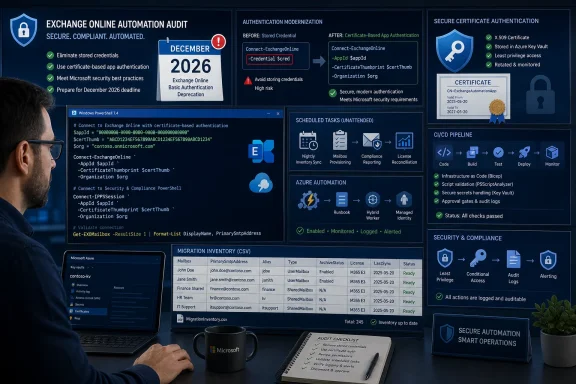
-Credential to Connect-ExchangeOnline or Connect-IPPSSession must be found and rewritten before the December 2026 client-side cutoff. Start with unattended jobs: scheduled tasks, Azure Automation runbooks, Azure DevOps pipelines, GitHub Actions workflows, GitLab pipelines, compliance jobs, and scripts launched from network shares or unmanaged utility folders.WindowsForum users tracking the retirement reported that Microsoft moved the client-side deadline from July 2026 to December 2026, giving administrators six additional months to migrate. Microsoft’s Exchange Team confirmed the delay in its Microsoft Tech Community announcement, making that public notice the primary source for the revised date. Tenant administrators should also verify tenant-specific wording and timing in Message Center advisory MC1248389 through the Microsoft 365 Message Center.
The reprieve is useful, but it is not a reason to defer discovery. WindowsForum’s migration discussion has consistently treated the retirement as urgent rather than optional. That urgency fits a broader pattern familiar to Windows administrators: as WindowsForum users discussing the retirement of PowerShell 2.0 have noted, well-signposted platform changes can still expose forgotten scripts and legacy dependencies when organizations delay inventory work.
The password-based Resource Owner Password Credentials flow behind this use of -Credential cannot satisfy authentication requirements that require user interaction, including multifactor authentication and Conditional Access. The parameter is being retired, so affected automation needs a supported replacement rather than a renamed password variable or a longer-lived stored credential.
First 48 hours: establish the inventory
Under time pressure, complete these steps in order:
- Export scheduled-task actions and task XML from every in-scope Windows host.
- Search repositories, script directories, deployment artifacts, and network shares using the supplied connection and credential patterns.
- Enumerate Azure Automation accounts and runbooks, then identify schedules, workers, modules, and referenced credential assets.
- Inspect pipeline definitions, shared templates, inline scripts, variable groups, secret names, artifacts, and self-hosted runners.
- Populate the common CSV with one row per production job, assign an owner, and prioritize by business impact.
Do not wait for authentication redesign to finish before building the inventory. Discovery, ownership assignment, and technical design can proceed in parallel.
Temporary-pin rule: If an older Exchange Online PowerShell module must remain in place briefly, record the pin as a temporary control with a named owner, documented reason, technical enforcement, monitoring, and an expiry or mandatory review date. A pin is not a completed migration.
Build a migration inventory, not a list of grep matches
Text search is only the beginning. The useful output is one record per production job, with enough context to assign ownership, choose replacement authentication, test it, and schedule the migration.
Capture at least these fields:
- Job name and unique identifier
- Business or technical owner
- Host, automation account, or CI/CD runner
- Execution schedule or trigger
- Source location
- Connection command
- Credential origin
- Installed or selected Exchange Online PowerShell module version
- Module update path
- Business impact if the job fails
- Replacement authentication method
- Test evidence
- Migration status
- Temporary module pin, if any
- Pin owner
- Pin expiry or mandatory review date
- Notes and dependencies
Use this copyable CSV header as the common schema:
JobId,JobName,Owner,Platform,HostOrRunner,ScheduleOrTrigger,SourceLocation,ConnectionCommand,CredentialOrigin,ModuleVersion,ModuleUpdatePath,BusinessImpact,ReplacementAuthMethod,TestEvidence,MigrationStatus,ModulePinned,PinOwner,PinExpiryOrReviewDate,LastReviewed,Notes
Example controlled status values include:
DiscoveredOwner verification pendingAuthentication design pendingReady for testTestingProduction change scheduledMigratedRetiredException approved
Do not use Pinned as a migration status. Apply the temporary-pin rule above and keep the actual migration state visible.
For every candidate, answer these triage questions:
- What launches the job?
- Where is the complete source?
- Which connection command is actually invoked?
- Where does the credential object originate?
- Which host or runner executes it?
- How is the Exchange Online module installed and updated?
- What fails if authentication stops working?
- Which supported authentication design will replace it?
- Has that design been tested in the production execution context?
- Who owns the migration, and what is its current state?
Search source repositories and shared script locations
The following paths and commands are current command examples—verify them in your environment and PowerShell version.
Search for both affected connection commands and code that constructs or retrieves credentials. A wrapper may accept a generic $Credential parameter while another file creates the PSCredential object and a pipeline supplies the secret.
Run an initial scan from a trusted workstation or controlled build agent:
$roots = @(
 'C:\Scripts',
 'C:\Source',
 'C:\Automation'
)

$patterns = @(
 'Connect-ExchangeOnline',
 'Connect-IPPSSession',
 '-Credential',
 'Get-Credential',
 'PSCredential',
 'New-Object\s+.*PSCredential',
 '\[System\.Management\.Automation\.PSCredential\]',
 'Get-AutomationPSCredential'
)

Get-ChildItem -Path $roots -Recurse -File -ErrorAction SilentlyContinue |
 Where-Object {
 $_.Extension -in '.ps1', '.psm1', '.psd1', '.txt',
 '.json', '.yml', '.yaml', '.cmd',
 '.bat', '.vbs', '.xml'
 } |
 Select-String -Pattern $patterns |
 Select-Object Path, LineNumber, Line
These roots are examples, not an inventory boundary. Add locations discovered from Task Scheduler, service definitions, pipeline artifacts, deployment tools, operator documentation, environment variables, registry-configured paths, and network shares. Likely investigation targets include user profiles, application directories, C:\ProgramData, custom drive roots, temporary administration folders, and UNC paths such as \\server\share\operations.
Treat every match as a lead rather than an automatic failure. Get-Credential may support an unrelated interactive task, and a PSCredential object may authenticate to another system. The affected chain is one in which a credential object eventually reaches Connect-ExchangeOnline -Credential or Connect-IPPSSession -Credential.
Also search for wrapper function names, dot-sourced files, imported private modules, service-account naming conventions, and variables such as:
$Credential
$UserCredential
$ExchangeCredential
$EXOCredential
$Password
$SecurePassword
$AdminAccount
$ServiceAccount
Once a connection call is found, trace backward until the credential’s origin is known. Record the origin as an asset name or secret reference, not as the secret value.
Inspect Windows Task Scheduler completely
The most dangerous scripts are often absent from Git. They may run overnight under an old service identity, write output to a network share, and receive attention only when they fail.
The following portal paths, UI labels, and commands are current examples—verify them on the Windows versions and management tools used in your environment.
In Task Scheduler:
- Open Task Scheduler.
- Select Task Scheduler Library and expand its subfolders.
- Open each relevant task’s Properties.
- Record the task name, path, author, run-as account, triggers, execution conditions, and available history.
- On the Actions tab, record the executable, arguments, and Start in directory shown by the current UI.
- Follow every wrapper until the actual PowerShell source and connection command are identified.
Do not limit the review to actions that directly launch powershell.exe or pwsh.exe. Production tasks may launch:
cmd.exe /c something.cmd- A
.cmdor.batfile that launches PowerShell cscript.exeorwscript.exewith VBScript- An executable that invokes a script indirectly
- A PowerShell script on a UNC path
- A local wrapper that maps a drive and launches a network script
- A script outside standard roots such as
C:\Scripts - An encoded or dynamically assembled PowerShell command
Create a first-pass action report:
$taskActions = Get-ScheduledTask | ForEach-Object {
 $task = $_

 foreach ($action in $task.Actions) {
 [PSCustomObject]@{
 ComputerName = $env:COMPUTERNAME
 TaskName = $task.TaskName
 TaskPath = $task.TaskPath
 Execute = $action.Execute
 Arguments = $action.Arguments
 WorkingDir = $action.WorkingDirectory
 UserId = $task.Principal.UserId
 }
 }
}

$taskActions |
 Export-Csv -Path '.\ScheduledTaskActions.csv' -NoTypeInformation
Where supported in the environment, export task XML as a second source of evidence:
$exportRoot = Join-Path $PWD 'TaskXml'
New-Item -Path $exportRoot -ItemType Directory -Force | Out-Null

Get-ScheduledTask | ForEach-Object {
 $safeName = ($_.TaskPath.Trim('\') + '_' + $_.TaskName) -replace '[\\/:*?"<>|]', '_'
 $xml = Export-ScheduledTask -TaskName $_.TaskName -TaskPath $_.TaskPath
 $xml | Set-Content -Path (Join-Path $exportRoot "$safeName.xml") -Encoding UTF8
}
Review the exported definitions for command, argument, working-directory, principal, trigger, and settings information. Field names and representation can vary, so verify the exported data rather than relying on a single expected XML path. Store exports in an access-controlled investigation directory because task arguments may contain sensitive operational data.
For each .cmd or .bat wrapper, inspect commands such as call, start, powershell, pwsh, cscript, wscript, mapped-drive operations, and environment-variable expansion. For VBScript, look for shell execution calls and dynamically constructed command lines. Resolve relative paths using the task’s working directory and the wrapper’s own location.
If a script is launched from a UNC path, record both the UNC source and the account used by the task. Inspect the source without modifying it, identify who controls the share, and determine whether version history or backups exist. Do not copy a production script elsewhere and assume the copy represents what the task currently executes.
Scan every source location discovered through this tracing process, even when it falls outside the initial example roots.
Discover affected Azure Automation runbooks
The portal paths and Az commands below are current UI and command examples—verify them in your tenant, current portal layout, permissions model, and installed Az module version.
For each Azure Automation account, locate its runbook inventory. A commonly used path is:
Azure portal > Automation Accounts > select the account > Process Automation > Runbooks
Portal organization can change, and labels may differ by tenant or interface revision. Use the account’s runbook listing even if it appears under a different menu location. Include every runbook type visible in the account because one runbook may invoke another or call code stored in a module.
For every runbook:
- Record its name, type, state, tags, and available modification metadata.
- Review linked schedules.
- Review recent jobs and output only to determine usage and execution context.
- Inspect draft and published content when authorized.
- Search for:
Connect-ExchangeOnlineConnect-IPPSSession-CredentialGet-AutomationPSCredentialGet-AutomationVariablePSCredential- Child-runbook calls
- Imported helper-module functions
- Trace variables passed into wrappers or child runbooks until the connection command and credential origin are known.
Do not enable additional diagnostic output merely to expose authentication data. Avoid editing, publishing, or starting runbooks during discovery. If authorized investigators retrieve definitions for static analysis, use a restricted working directory and preserve available metadata such as runbook name, account, resource group, subscription, type, and modification time.
This example can help build an initial map where the installed Az modules and permissions support it:
Get-AzAutomationAccount | ForEach-Object {
 $account = $_

 Get-AzAutomationRunbook `
 -ResourceGroupName $account.ResourceGroupName `
 -AutomationAccountName $account.AutomationAccountName |
 Select-Object @{
 Name = 'AutomationAccount'
 Expression = { $account.AutomationAccountName }
 }, @{
 Name = 'ResourceGroup'
 Expression = { $account.ResourceGroupName }
 }, Name, RunbookType, State, LastModifiedTime
}
Test the command against your module version before relying on it for completeness. Subscription context, permissions, disabled accounts, or naming differences can affect results.
If your permissions and change procedures allow source retrieval or export, send output only to a controlled location. Treat it as sensitive source code and do not automatically commit it to a repository. Keep discovery read-only; test migration and import procedures separately under approved change control.
Inspect the Automation account’s shared credentials and variables using the current portal’s corresponding Shared Resources pages. Record asset names and references, not values. Investigators should never add code that prints credential objects, secure strings, access tokens, private keys, or decrypted data.
Also investigate:
- The Exchange Online module version available to the runbook
- How the organization updates or deploys modules
- Identities assigned to the Automation account
- Hybrid Runbook Worker groups and worker hosts
- Webhooks and schedules that trigger affected runbooks
- Child runbooks and modules containing wrapper functions
- The actual execution location for each production job
Do not assume that an account-level module listing proves what every execution target loads. Record observed module versions from controlled test evidence or the real execution context where possible.
Inspect Azure DevOps, GitHub, and GitLab pipelines
Do not mark CI/CD as reviewed after searching only repository YAML. Pipelines can also refer to inline PowerShell, shared templates, variables, secure assets, externally stored scripts, packages, or build artifacts.
The UI paths and labels below are current examples—verify them in your organization because permissions, product updates, and project configuration can alter the available navigation.
Azure DevOps
For YAML pipelines:
- Open the organization’s pipeline listing and select the pipeline.
- Locate the referenced repository definition.
- Inspect the primary YAML and every
templateorextendsreference. - Search for
PowerShell@2,AzurePowerShell,pwsh,powershell,filePath,inline,Connect-ExchangeOnline,Connect-IPPSSession, and-Credential. - Follow every script path, checkout, template repository, package, and downloaded artifact.
For pipelines managed through a graphical or classic editor, inspect each available stage, job, and task. Review inline scripts and referenced files, then trace artifacts back to their source.
Where authorized, inspect variable groups, pipeline variables, secure-file references, service connections, environment configuration, and parameter defaults. Record names and relationships without revealing values. Useful leads include:
EXO_USERNAME
EXO_PASSWORD
EXCHANGE_CREDENTIAL
SERVICE_ACCOUNT
ADMIN_UPN
APP_ID
TENANT_ID
CERTIFICATE_THUMBPRINT
Exact menus and editing behavior depend on the pipeline type and the permissions granted to the investigator. If a definition cannot be viewed, record the access gap and assign it to an authorized owner rather than marking the pipeline clean.
GitHub Actions
Inspect:
.github/workflows/*.ymland.yaml- Referenced local actions
- Reusable workflows invoked with
uses - PowerShell in
runblocks - Checked-in
.ps1,.psm1,.cmd, and.batfiles - Downloaded artifacts or scripts fetched during a workflow
- Organization, repository, and environment secret names
- Organization, repository, and environment variables
- Self-hosted runner labels and maintenance ownership
A current UI path for repository-level Actions secrets and variables is Settings > Secrets and variables > Actions, but verify it in the repository and under the investigator’s access level. Review names and scope without displaying, replacing, or rotating values during discovery.
Trace expressions such as ${{ secrets.NAME }} and ${{ vars.NAME }} into the PowerShell command that consumes them. A secret named PASSWORD is only a lead; confirm whether code turns it into a PSCredential supplied to an affected Exchange connection command.
GitLab
Inspect:
- The root
.gitlab-ci.yml - Files pulled through
include - Parent-child and multi-project pipelines
scriptandbefore_scriptPowerShell commands- Referenced
.ps1, module, package, and artifact files - Project, group, and environment-scoped CI/CD variable names
- Protected or masked variable configuration
- Runner tags and the hosts behind self-managed runners
A current project-level path is Settings > CI/CD > Variables, subject to permissions and UI changes. Where authorized, inspect group-level and environment-scoped configuration as well. Record variable names, scope, protection, and masking status without exposing values.
Across all three platforms, inspect logs only for command structure and execution evidence. Do not disable masking, echo secret variables, serialize credential objects, or rerun production pipelines with diagnostic output that could disclose credentials.
Module upgrades can turn routine maintenance into an outage
The December 2026 date is a client-side cutoff associated with the Exchange Online PowerShell connection behavior. Microsoft’s public Tech Community delay announcement is the primary source for the move from July to December 2026; Message Center advisory MC1248389 remains the place for tenant administrators to check tenant-specific communications.
A job may be exposed when its execution environment changes. During discovery, record the module version actually selected and how that environment receives dependencies. Possible update paths to investigate include:
Install-ModuleorUpdate-Modulein a script- Pipeline dependency installation
- Prebuilt runner or virtual-machine images
- Automation-account module administration
- Hybrid worker maintenance
- Configuration-management deployment
- Manual installation by administrators
- Container image rebuilds
- Module copies included with application artifacts
These are investigation categories, not proof that a particular platform automatically updates the module. Confirm each job’s real behavior from its scripts, image definitions, deployment records, host configuration, and owner testimony.
A controlled temporary pin may limit exposure to a client-side change while migration is completed, but it does not replace migration. Apply the temporary-pin rule stated above and keep the job’s status open until replacement authentication succeeds in production.
Replace unattended passwords with an appropriate authentication design
For unattended automation, evaluate application-based authentication using an application identity and certificate. Microsoft’s supplied app-auth guidance describes that authentication model, while the current Connect-ExchangeOnline cmdlet reference documents the available connection parameters.
The following is a current command example—verify it against your tenant configuration and installed Exchange Online PowerShell module version:
Connect-ExchangeOnline `
 -AppId '<application-id>' `
 -CertificateThumbprint '<certificate-thumbprint>' `
 -Organization '<tenant>.onmicrosoft.com'
This is not a mechanical replacement for -Credential. For each job, determine:
- Which Exchange operations it performs
- Which application permissions or Exchange role assignments it requires
- Whether the invoked commands work with the selected authentication model
- Where the certificate and private key will reside
- Which host or runner can access the private key
- How renewal and rollover will be handled
- How failed authentication will be detected
- How access will be revoked when the job is retired
Avoid carrying the password-based architecture forward under new variable names. Do not grant broad application access merely to reproduce what a highly privileged service account could do. Document the required operations, design the narrowest workable access, and have the result reviewed by the appropriate Exchange and identity owners.
Build a test path before modifying production. Run the replacement in the same security and execution context as the real task, runbook, or pipeline. Validate the specific Exchange commands and resulting business output, not merely a successful connection.
Acceptable test evidence can include:
- Timestamped test-run identifier
- Host or runner used
- Module version
- Authentication method
- Commands or workflow stages exercised
- Expected object count or output artifact
- Confirmation that no interactive prompt occurred
- Confirmation that assigned permissions were sufficient
- Reviewer approval
- Rollback test or documented rollback procedure
Remove secrets, tokens, certificate material, and personal data from retained evidence.
WindowsForum’s report on the six-month delay should be read as additional implementation time, not permission to postpone discovery. Other WindowsForum user reports—covering PowerShell 2.0 retirement and Exchange Online’s move to require EAS 16.1 for affected mobile connections—show why administrators should treat announced compatibility deadlines as inventory and testing events. The common operational lesson is to identify hidden dependencies before enforcement reaches production.
Frequently Asked Questions
Will every use of Get-Credential break in December 2026?
No. Get-Credential itself is not the retirement target. Investigate cases in which a PSCredential object ultimately reaches Connect-ExchangeOnline or Connect-IPPSSession through -Credential.
Can an organization avoid the deadline by pinning an older Exchange Online PowerShell module?
No—not as a completed solution. A temporary pin may provide short-term containment for a client-side change, but the job remains unmigrated. Apply the temporary-pin rule above and schedule replacement authentication.
Which jobs should be reviewed first?
Prioritize unattended jobs with high business impact: compliance and eDiscovery exports, mailbox provisioning, offboarding, scheduled reporting, incident-response tooling, and deployment pipelines. Also prioritize jobs with unknown owners, scripts on UNC shares, Hybrid Runbook Workers, self-hosted CI/CD runners, and environments whose dependency behavior has not been documented.
How do we inspect secret-backed jobs without exposing passwords?
Record secret or credential asset names, scope, and references rather than values. In Azure Automation, inspect credential and variable metadata without adding output code. In CI/CD platforms, inspect secret names, scopes, and consumers without disabling masking or echoing variables. Never place secret values in the migration CSV.
Is finding Connect-ExchangeOnline enough?
No. Trace the complete path from the job trigger through wrappers, modules, templates, artifacts, and credential retrieval. Also search for Connect-IPPSSession, which may be owned by compliance or Purview teams rather than the Exchange administration team.
Should we rely only on Message Center for the deadline?
No. Microsoft’s public Tech Community announcement is the primary accessible source for the move from July 2026 to December 2026. Tenant administrators should then check MC1248389 in Message Center for tenant-specific wording or subsequent updates.
Does a successful connection prove the migration works?
No. Authentication success proves only that a session could be established. Test the commands the job actually runs, verify expected outputs and side effects, confirm that permissions are sufficient, and retain sanitized evidence from the real execution context.
What proves that a job has been migrated?
A migrated job has a documented replacement authentication method, reviewed permissions, successful testing in the real execution context, validated business output, an assigned owner, and production evidence. A script that merely connects successfully in an administrator’s interactive console is not complete. Migration succeeds only when the unattended production job runs on schedule without -Credential, produces the expected result, exposes no secrets, and can be operated, monitored, renewed, and revoked by its assigned owners.
References
- Exchange Online PowerShell -Credential Retirement: Which Automation Scripts Will Break Before December 2026? learn.microsoft.com
- techcommunity.microsoft.com techcommunity.microsoft.com