

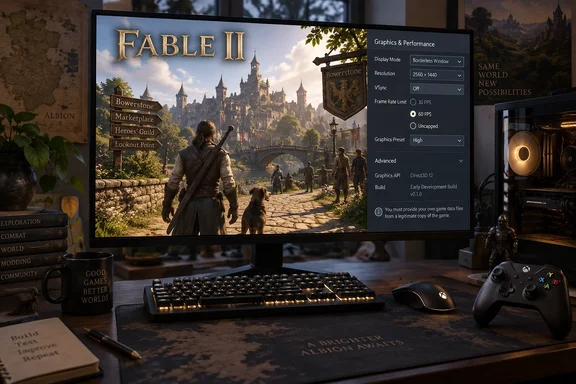
Fable 2’s Windows release changes how the Xbox 360 code runs
Fable 2 originally appeared on Xbox 360 in 2008. The new fan project uses static recompilation: DSOGaming describes the original PowerPC game code being converted into C++ at build time, producing a native PC executable rather than asking players to run the original executable inside a conventional Xbox 360 emulator. The current released build is aimed at Windows.
That distinction explains both the achievement and its limits. Recompilation changes how the program is built and executed, but it does not automatically supply working replacements for everything the game expected from its original console. Graphics, input and other platform-dependent behavior still need supporting implementations.
ReXGlue’s own Getting Started documentation makes that engineering burden explicit. Developers must point its configuration at an Xbox 360 XEX executable, generate code and rebuild the project. Unresolved functions are expected: developers may need to identify function boundaries manually, implement missing kernel imports and repeatedly refine the output.
Consequently, “native PC port” is a useful description of the intended execution model, not a promise of commercial-release polish. DSOGaming explicitly describes the Fable 2 project as early-stage software that may exhibit bugs and glitches. Neither its report nor Wccftech’s provides a hardware test matrix establishing reliable operation across Windows PCs.
There is also a prerequisite that changes the download decision: according to DSOGaming, the project does not contain the original in-game assets and requires players to supply their own ISO, a disc-image file containing the game data. The recompilation download is not a free copy of Fable 2. Possession of the runtime alone is insufficient to play, and the reporting does not establish a complete, verified extraction procedure or compatibility list for different game editions.
Fable 2 version 1.1.0 makes frame-rate patches configurable
Wccftech identifies the reported release as version 1.1.0 and quotes its release notes describing two configuration files: fable2_config.toml and fable2_patches.toml. DSOGaming independently describes the same two-file configuration system, although its report does not establish that version number. Previously hard-coded settings can now be changed through these files.
The documented frame-rate choice is straightforward, within that limited scope. According to the release notes quoted by Wccftech, fps_60 = true makes the game try to run at 60 FPS; setting it to false returns it to 30 FPS. Both publications also report an uncapped mode, but the available material does not establish its exact configuration key or how it interacts with the 60 FPS toggle. It would therefore be misleading to invent a complete uncapping procedure.
The wording “try to run at 60 fps” is important. A higher frame-rate setting changes the game’s intended behavior; it does not demonstrate that a particular CPU and GPU can sustain that rate. The reporting supplies no benchmark system, frame-time measurements or repeatable performance results for the released build. Readers should distinguish a supported frame-rate option from a measured outcome.
The configuration change has value even without a benchmark. It gives users an exposed 30-versus-60 FPS choice rather than requiring changes to hard-coded settings. Wccftech’s quoted notes also identify gamepad mapping, mouse sensitivity and guild-chest item settings, while DSOGaming reports configurable window size, fullscreen mode and content folders. These are concrete PC controls rather than an unspecified claim of “enhancements.”
Fable 2’s PC controls are clearer than its Vulkan readiness
According to DSOGaming, the build supports keyboard and mouse input by allowing keyboard keys to act as Xbox controller buttons. Those controls can be remapped, and mouse movement controls the camera through the right-stick input path. Mouse sensitivity is adjustable, while a physical gamepad remains supported alongside the keyboard.
That implementation detail helps set expectations. The documented keyboard-and-mouse support supplies a way to operate the existing game controls from a PC; the reporting does not establish a wholesale redesign of the interface around desktop conventions. Someone who prefers a controller can continue using one, while someone without one gains another input option.
The graphics choices need a similarly precise reading. DSOGaming reports that Direct3D 12 is the default renderer and is available through a prebuilt GPU plugin. It describes Vulkan as work in progress: a basic pipeline works, but full-game rendering through Vulkan is still being developed. Those are different readiness levels, even though both graphics APIs appear in the feature description.
For a Windows player evaluating the release, Direct3D 12 is therefore the documented default path. Vulkan should be understood as development work, not an established equivalent or a proven remedy for rendering faults. The evidence also does not support a recommendation to buy a particular graphics card or change drivers specifically for this project.
DSOGaming further reports that saves and caches are stored beside the executable, making the build portable. That location is useful to understand when managing the game folder: it contains player state and generated data, not merely replaceable program files. The reporting does not establish save compatibility with an Xbox console or with other Fable 2 recompilation projects.
Similar Fable 2 repositories do not establish the released build’s compatibility
Several public projects use closely related Fable 2 recompilation names. That creates a practical identification problem: a repository about the same game is not automatically the repository for the particular downloadable build described in current coverage.
The public Fable2Recomp/Fable2Recomp README, for example, describes an active effort to bring the game to Windows and Linux using ReXGlue. It identifies Fable 2 Game of the Year with Title Update 1 as its basis and describes higher resolutions and frame rates up to 240 FPS as plans. Its ambitions cannot be treated as demonstrated capabilities of the separately reported version 1.1.0 release.
Another repository, Loreaxe/refii, identifies itself as “Fable II: Recompiled” and also names a Game of the Year and Title Update 1 basis. That record is useful evidence of a related effort, but it does not establish that its supported game data, build instructions or update requirements apply to the release covered by Wccftech and DSOGaming.
The consequence is narrow but important: do not combine different projects’ requirements into one installation recipe. Windows and Linux targets in one README, a 60 FPS release setting in another report and a particular game-edition requirement elsewhere do not collectively prove a single build supports all three.
The same boundary applies to the official series. This fan release does not announce an Xbox-backed Windows edition of Fable 2, nor does it establish Microsoft’s intentions toward one. Its value can stand on the concrete PC work without speculation about why an official release has or has not happened.
What this means for Fable 2 players on Windows
Treat this as an enthusiast release to evaluate if you already have suitable, lawfully obtained game data—not as a drop-in replacement for a supported commercial PC edition. Players who want a verified installation path, established hardware requirements and predictable compatibility have reason to wait for more complete release documentation and testing.
- The reported download excludes the original game assets, so obtaining the recompilation alone will not make Fable 2 playable.
- Wccftech’s quoted release notes document
fps_60 = trueand afalsesetting for 30 FPS, but neither report establishes sustained 60 FPS on a specified PC. - DSOGaming reports keyboard remapping, mouse camera control and continued gamepad support, giving players a choice of input devices.
- Direct3D 12 is the reported default renderer; Vulkan’s full-game rendering remains work in progress.
- Keep build identity and requirements together, because similarly named Fable 2 repositories do not establish interchangeable game data, configuration files or saves.
These checks define what can be decided now without fabricating a troubleshooting guide. The available evidence does not establish supported Windows versions, exact hardware requirements, a complete asset-import procedure or documented fixes for particular failures. Those omissions matter most to players expecting a predictable first installation.
ReXGlue’s manual work puts the AI claim in perspective
Wccftech quotes the developer describing the project as an experiment with local, open-source AI. In that account, the game initially ran after roughly an hour, followed by substantial human trial and error before enough functions were mapped to complete it. That is the developer’s account of the process, not an independently timed development result or a documented end-to-end test.
The distinction is consistent with ReXGlue’s primary documentation, which explicitly calls its workflow “not a push-button process.” The toolkit can generate code while unresolved calls remain, but the developer must still work through those issues. Generating a program and producing a dependable game build are separate milestones.
For developers interested in contributing, ReXGlue’s documented Windows prerequisites include CMake 3.25 or newer, Ninja, and Visual Studio 2022 Community Edition with the Desktop development with C++ workload. It also specifies the C++ Clang compiler version 20 or newer and MSBuild support for the LLVM clang-cl toolset. These are development requirements, not established prerequisites for a player running the reported prebuilt release.
Fable 2’s fan recompilation is meaningful because it exposes concrete PC choices: configurable frame rates, keyboard-and-mouse input and a Windows rendering path. Its immediate audience is the player willing to supply game data and accept an evolving build. Broader adoption depends on the next practical layer of work—clear release-specific requirements and reproducible compatibility results—rather than on stronger claims about abandonment, AI or guaranteed performance.
References
- Fable 2 Has Been Ported To PC by Fans, Running at 60 FPS Years After Xbox Abandoned the Classic Wccftech · 2026-09-22T10:03:14+00:00
- Fable 2 Unofficial Native PC Port Available for Download dsogaming.com
- Getting Started · rexglue/rexglue-sdk Wiki · GitHub github.com