

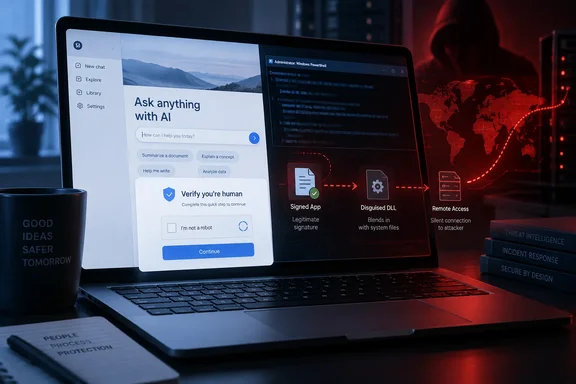
Security firm Huntress has documented a campaign that used OpenAI's custom GPT feature as the front end of a ClickFix attack. Victims were pushed toward a PowerShell command that silently installed a remote access trojan (RAT) on Windows. The main lesson for Windows users hasn't changed: a real domain and a Cloudflare-style check don't make a pasted command safe.
A fake model on a real domain
Threat actors are abusing ChatGPT's Custom GPT feature to funnel victims into a ClickFix attack that ends with a full-featured remote access trojan (RAT), according to new research from Huntress. The attackers created a Custom GPT titled "Plus 5.6", designed to pass as a genuine ChatGPT model. Because Custom GPTs are hosted on chatgpt.com, the lure sits on OpenAI's legitimate domain.
The name was a trap aimed at anyone looking for the newest model. Huntress points out one clue that should have given it away: the page identified its creator as a "community builder." People who know what custom GPTs are would spot that. Casual users probably wouldn't.
Here is how victims arrived:
- Paid search. In some of the incidents that Huntress investigated, the attack started when victims searched on Google for "chatgpt." A sponsored result then led them to the Custom GPT page on the legitimate ChatGPT domain. According to Huntress, the landing URL carries Google Ads click-tracking parameters, which shows the traffic came from a paid ad.
- A canned reply. Whatever the user types, the GPT replies with a fake "Service Availability Notice" directing them to a "backup domain" hosted on Google Sites.
- The ClickFix step. That page poses as a Cloudflare CAPTCHA and instructs the victim to paste a command into their terminal.
So the attackers used three trusted brands: Google Ads, ChatGPT and Google Sites, plus Cloudflare's look. None of those services was compromised. Each one was simply a convenient place to host the lure.
Section summary: The weak point was user trust, not a software bug. A paid ad led to a fake "model" on the real ChatGPT site, and that page sent people to a fake Cloudflare check.
How many victims?
Read the numbers carefully. Huntress investigated at least 40 incidents using the campaign's Google Sites infrastructure, including two infections traced to malicious Custom GPTs. That is 40 incidents linked to the Google Sites lure, of which Huntress confirmed only two came through a custom GPT. It is not 40 custom-GPT infections.
Huntress notified OpenAI about the first observed malicious "Plus 5.6" Custom GPT, after which that Custom GPT was taken down. Huntress says it was gone by September 25. On September 27, researchers found a second GPT tied to the same campaign. It was still live when Huntress published.
Help Net Security later reported that this second Custom GPT is still online, though it doesn't point to the malicious ClickFix lure anymore, based on the outlet's own check. That lowers the immediate risk from that page. It doesn't end the campaign, because according to the researchers, however, the attackers are already working on a new installer.
Custom GPTs as a feature have a limited future. OpenAI's Help Center says they are scheduled to retire on December 11, 2026. Enterprise workspaces with an approved deferral get until February 11, 2027. Until then, existing GPTs stay usable. The retirement is a product decision, not a security fix, and nothing links it to this campaign. The underlying trick of hosting a lure on a trusted AI platform will probably outlast the feature. Huntress has already reported attackers abusing shared ChatGPT and Grok conversations and Claude Artifacts in similar ways.
Inside the eight-stage chain
Huntress says most ClickFix chains take two or three hops. This one took eight, and each stage hid the next. The main steps:
- PowerShell stager. The PowerShell that runs references its server as a decimal-encoded IP address, a trick that slips past rules looking for dotted IPs, and pulls down a heavily obfuscated script that silently installs a malicious MSI. In the samples Huntress analyzed,
1614733393resolves to96.62.224[.]81. The script is saved to%TEMP%under a random number, decoded in memory, and deletes itself once done. - A silent MSI. The first-wave installer,
ISOSimple.msi, calls itself "Advanced Printer Configuration Reader." It installs to%LOCALAPPDATA%\Programs\Advanced Printer Configuration Reader\, usesARPSYSTEMCOMPONENT=1to stay out of Programs and Features, and launches its host app immediately. - Signed binary, poisoned DLL. The package runs Canon's genuinely signed
COTFileReadApp.exe. Sitting next to it is a modified, unsignedceiinfolog.dllwith one extra import that pulls in the maliciousrdCore.dll. This is classic DLL sideloading. - Loader hidden in a WAV file. Encrypted shellcode sits in the second half of an otherwise valid-looking audio file.
- Evasion. The loader implemented an AMSI bypass, ntdll unhooking, anti-virtual-machine checks, and in-memory .NET execution before opening monitor.raw, a custom encrypted archive containing persistence logic and the final RAT.
- A homemade encrypted file system. Huntress singles out
monitor.raw. It is a custom archive with its own folder tree and a 1,128-entry index, and it decrypts to 315 folders and 806 files. One of those files is a script in the malware's own scripting language. Huntress believes this points to a maintained framework: operators can change persistence names or payloads by shipping a new archive, with no recompiling. - Persistence that fights back. The malware created an HKCU Run value and scheduled task named "Canon Configuration Reader," repeatedly rebuilding them if removed. Huntress says the Run key is checked every 150 seconds and the scheduled task every 875 seconds.
- The RAT. Its RAT supports remote desktop access, camera and microphone capture, file searches, browser launching, system reconnaissance, and additional EXE, DLL, MSI, PowerShell, or script payload execution. It also resolves command-and-control infrastructure using DNS-over-HTTPS through Cloudflare, Google, and Quad9, so those lookups never appear in local DNS logs.
Two findings stand out for Windows admins. First, in at least one incident Microsoft Defender quarantined ISOSimple.msi, detecting it as Trojan:Script/Wacatac.H!ml. By then the installer had already run, and the persistence entries kept the chain going. Removing the dropper doesn't remove the infection. That is one observed case, not proof that Defender always misses this malware.
Second, the most common follow-on activity Huntress saw was that the RAT dropped a legitimately signed GOMCam2024.exe (GOM & Company) into %LOCALAPPDATA%\AppstorageFile\, which then launched chrome.exe with a throwaway browser profile under %TEMP%.
Section summary: The chain runs mostly in memory and hides behind signed binaries, files that look harmless, and persistence that keeps restoring itself. Signature-only defenses are likely to miss it.
Version two: new disguise, same RAT
Once the first GPT was taken down, the attackers switched costumes. Huntress found that the second wave swapped Canon's host for Stardock's legitimately signed DeElevate64.exe and its patched DeElevator64.dll. The loader moved from a WAV file into a real Microsoft NuGet package (Build.dat), and the persistence name became "Stardock DeElevation Tool." Huntress says the RAT itself is identical to version one down to the last byte.
Delivery got more robust too. The stager now fetches a second-stage script that is freshly obfuscated for every request, which makes file hashes useless as indicators. It retries downloads and removes the Mark-of-the-Web from the MSI before running it, which gets around SmartScreen-style "downloaded from the internet" warnings. The same delivery server also hosted a third installer. The delivery server hosted UltraFreeISOCreateWizardSolution.msi, indicating that the operators may have rotated signed application components and installer disguises used in the campaign.
The takeaway is simple: a detection rule keyed to Canon filenames will stop firing the moment the attackers switch to Stardock.
What defenders should hunt for
Huntress recommends watching process behavior rather than file names. The indicators below come from its report, and the behavioral patterns are the ones it says have held up across variants so far:
- PowerShell spawning msiexec.
powershell.exelaunchingmsiexec.exe /i %TEMP%\<32 hex characters>_ISOSimple.msi /qn /norestart. In version two the file is_IconEdit2Turb.msi. More broadly, flag any GUID-named MSI installed quietly from%TEMP%by PowerShell. - Signed apps in odd places.
COTFileReadApp.exeorDeElevate64.exerunning from%LOCALAPPDATA%\Programs\instead of a real Canon or Stardock install, especially whenmsiexec.exeis the parent process. - Matching persistence pairs. An HKCU Run value and a scheduled task that share one name (Canon Configuration Reader or Stardock DeElevation Tool) and come back after deletion.
- Suspicious neighbor DLLs. An unsigned
ceiinfolog.dll, or any ofrdCore.dll,WPFLocalizeExtension.dllorWMPCL.dll, in the same folder asCOTFileReadApp.exe.
Huntress also warns against blocking the legitimate Canon executable everywhere. Its folder, parent process and neighboring files are the real signals. A valid signature tells you who built the binary, not who dropped it in a user-writable folder.
Cleanup order matters. For the first variant, Huntress advises stopping the implant process before removing the Run value and scheduled task. If you delete them while it's running, the malware's script restores them within minutes. Any host that ran this RAT should be handled under your normal incident-response process, not just tidied up. The RAT can capture the screen, camera and audio and can install more payloads, so assume credentials and data on that machine may be exposed.
What users should take away
The advice for end users is simple: no legitimate website, CAPTCHA, or "fix" will ever ask you to copy something and paste it into the Run dialog, Terminal, PowerShell, or a command prompt.
A few more habits help:
- Don't open ChatGPT through ads. Type the address yourself or use a bookmark. A sponsored result can point to a real domain and still land you on attacker-made content.
- Look for the creator label. Real OpenAI models don't show a "community builder" byline. A "model" that only ever gives you a service outage notice isn't a model.
- No real service sends you to a backup site on Google Sites. Ask yourself when a major AI service last moved you to a free website builder during an outage. The answer is never.
For admins, the defensive layers from earlier ClickFix waves still apply: limit who can run PowerShell interactively, watch script-to-installer process chains, and train users that "verify you are human" never involves the keyboard shortcut for Run. Huntress's earlier ClickFix research makes the point bluntly: ClickFix attacks depend on the user pasting a command into this dialog - if it doesn't open, the attack fails at step one.
The bigger picture
Some perspective helps. The confirmed custom-GPT infections number two, the first lure was taken down after Huntress reported it, and the second no longer points to the payload, according to Help Net Security. This is not a flaw in ChatGPT, and nothing here shows the GPT platform itself was breached. Some important things are still unknown: who is behind the campaign, how many victims there are in total, and where the RAT's command-and-control server sits. Huntress couldn't recover that address from any of the files.
The long-term trend is the real worry. AI assistants have become the default place people go for help, and attackers are hosting lures on those same platforms. The lure also moves: one week it's a shared conversation, then an Artifact, now a custom GPT, and after custom GPTs retire it may well be something else. Blocklists will always trail new disguises. What catches this campaign is behavior monitoring and users who refuse to paste commands.
References
- Custom ChatGPTs push ClickFix attacks to deploy RAT malware BleepingComputer · 2026-09-29T16:59:39-04:00
- Attackers Abuse ChatGPT Custom GPTs to Deliver RAT via ClickFix | Huntress huntress.com
- Custom GPT retirement and migration FAQ | OpenAI Help Center help.openai.com