

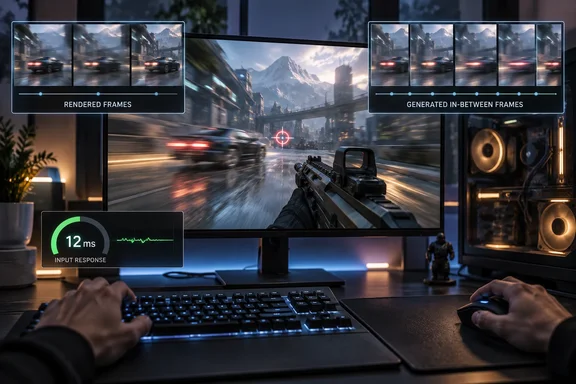
But the answer is not simply to dismiss generated frames as “fake.” They can improve visual fluidity. The question is whether that improvement comes with acceptable responsiveness, image quality, and processing overhead in the game you actually play. Intel describes frame interpolation as a way to improve smoothness, paired with a separate low-latency system to address responsiveness. The FPS counter alone cannot settle both questions.
Upscaling and frame generation do different jobs
The branding can be confusing because DLSS, FSR, and XeSS encompass more than one graphics feature.
Upscaling reconstructs a higher-resolution image from a lower-resolution rendered input. Frame generation creates additional images between game-rendered frames. Intel’s XeSS 3 documentation lists Super Resolution, Frame Generation, and Xe Low Latency as distinct technologies. They work together, but they are not the same operation.
Consequently, enabling an upscaling option is not proof that frame generation is active. Check the game’s individual controls and any applicable driver or application overrides rather than inferring the configuration from the umbrella brand name. NVIDIA, for example, documents separate application controls for frame-generation mode.
There is also an important terminology trap: a game-rendered frame does not necessarily mean a native-resolution frame. A frame can be rendered at a lower resolution and upscaled without being an interpolated frame. When investigating performance, use “rendered FPS” for the game’s rendering throughput and reserve “native resolution” for the resolution setting. Intel’s documentation distinguishes resolution scaling from frame interpolation.
What 120 FPS does—and does not—tell you
Consider a simplified illustration, not a benchmark:
- A game renders 60 frames per second.
- A 2X generation mode inserts one additional frame per rendered frame.
- The resulting output can approach 120 frames per second.
The arithmetic gives approximately 16.7 milliseconds between rendered frames and 8.3 milliseconds between output frames. Those intervals describe cadence; they do not measure the complete journey from a button press to a visible response. NVIDIA’s Reflex documentation separates input, simulation, render submission, driver, queue, and GPU-render stages when describing latency measurement.
Frame generation therefore does not establish that the game processes fresh input or advances its simulation at the displayed FPS. Equally, the original report’s assertion that game logic is necessarily tied to rendered FPS is too broad: the defensible point is that the displayed number does not reveal those timings. Intel’s documentation treats application rendering, generated presentations, and latency management as separate parts of the pipeline.
Nor does every overlay necessarily count the same thing. Before treating an FPS reading as rendered performance, establish what that counter measures. Intel’s XeLL guide provides a concrete example: with conventional frame generation, an application can render at 30 FPS while presenting 60 FPS through additional generated frames.
Multipliers need version and hardware labels
The available multiplier depends on the technology, hardware, and game integration—not merely the GPU manufacturer.
| Technology | Documented generation capability | Important boundary |
|---|---|---|
| NVIDIA DLSS 4.5 Multi Frame Generation | Up to five generated frames per rendered frame: 6X total | RTX 50-series GPUs and compatible titles |
| Intel XeSS 3 Multi Frame Generation | Up to three generated frames: four total | Multi-frame generation is Intel-device-only |
| AMD FSR 3 | One interpolated frame between existing frames: up to 2X | A version-specific description, not a permanent AMD-wide ceiling |
NVIDIA additionally distinguishes general 4X-compatible Multi Frame Generation titles from games using sufficiently recent frame-generation DLLs for 6X. Intel distinguishes cross-vendor conventional XeSS-FG support from Intel-only multi-frame generation. AMD’s published FSR 3 description establishes its one-frame interpolation model.
These differences make “divide the FPS by two” a poor universal diagnostic. It is only a rough estimate when you know conventional 2X generation is operating as expected. It cannot identify the rendered rate under an unknown or changing multiplier.
Generation has costs, but latency is not a blanket verdict
Frame generation involves actual GPU work. AMD’s FSR 3.1.4 documentation describes optical-flow and frame-generation workloads, including different scheduling approaches with performance and memory-overhead tradeoffs. It is not a cost-free switch that simply duplicates the output number.
However, a lower-than-expected generated FPS does not prove thermal throttling, nor does it reveal precisely how much rendered performance was lost. Treat MakeUseOf’s example of 60 rendered FPS becoming 50 rendered and 100 displayed FPS as hypothetical arithmetic—not a measured result.
Latency also deserves a qualified explanation. NVIDIA Reflex synchronizes CPU and GPU work for just-in-time rendering and can reduce render-queue delay. Intel requires XeLL integration for XeSS-FG and uses it for frame pacing. Those mechanisms mean a fair comparison must account for the latency settings as well as the generation toggle.
More output frames do not guarantee lower latency; frame generation does not guarantee worse total latency either. Compare equivalent configurations rather than letting the FPS number deliver the verdict.
A practical comparison for your Windows gaming PC
Use the following as an A/B evaluation, not a substitute for instrumented latency testing:
- Record the settings. Note resolution, upscaling preset, generation mode, multiplier, and any supported low-latency option.
- Establish a generation-off baseline. Keep upscaling and other graphics settings unchanged so that you isolate frame generation rather than changing several features simultaneously.
- Repeat the same scene with generation enabled. Prefer a repeatable benchmark or the same gameplay route.
- Check the metric labels. If the tool distinguishes rendered and displayed FPS, record both. Do not rename an unexplained FPS reading “native performance.”
- Evaluate control response and moving detail. Compare camera movement, aiming, interface readability, and any distracting visual instability.
- Keep the setting only if the overall result improves. A larger number is not a requirement to enjoy a worse experience.
These are comparison recommendations synthesized from the documented separation of rendering, presentation, and latency—not claims of firsthand testing.
The familiar “start at 60 FPS” advice is useful but not universal. AMD’s original FSR 3 guidance recommends at least 60 FPS before generation for an optimal low-latency experience. Intel’s XeSS-FG developer guide specifies a 40-FPS minimum input recommendation. Those are implementation-specific guidelines, not a single threshold governing every game and GPU.
Dynamic generation adds another variable
For supported RTX 50-series configurations, NVIDIA’s DLSS 4.5 Dynamic Multi Frame Generation changes the multiplier to target a chosen frame rate or display refresh rate. Its March 31, 2026 launch documentation specifies Game Ready Driver 595.97 WHQL or newer.
NVIDIA documents the setup under Graphics → DLSS Override – Frame Generation Mode → Dynamic, followed by Max refresh rate or Custom. It also states that Dynamic mode is incompatible with frame-rate limiters and V-Sync. Missing options require checking game compatibility and the software prerequisites—not assuming every DLSS title supports the feature.
The takeaway is straightforward: judge frame generation as a visual-smoothness feature with implementation-dependent tradeoffs. For latency-sensitive play, prioritize measured responsiveness; for visually demanding games, weigh smoothness alongside image quality. Your FPS counter remains useful—just do not ask one number to describe the entire experience.
References
- Your FPS counter is telling you only half the story MakeUseOf · 2026-10-04T10:00:14+00:00
- NVIDIA Home nvidia.com
- DLSS 4.5 Dynamic Multi Frame Generation & Multi Frame Generation 6X Available Now nvidia.com