

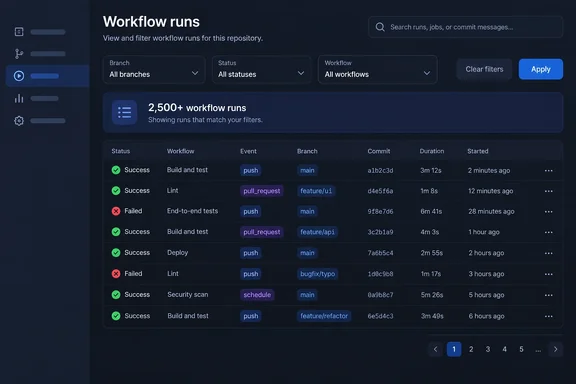
GitHub posted the change in its official changelog as an "Improvement." It is short, but the gap between the old behavior and the new one explains why. By GitHub's own account, the old large counts were often wrong.
GitHub Actions Stops Counting Workflow Runs Past 2,500
The change covers workflow-run queries in two places: the Actions tab in the GitHub web interface and the GitHub Actions REST API. It applies when a search filters by one of five dimensions: the workflow, the triggering event, the run status, the branch, or the actor (the user tied to the run).
The rule is simple. If a filtered query matches 2,500 runs or fewer, you get the exact count as before. If it matches more than 2,500, GitHub reports "2,500+" and stops trying to calculate the real figure.
Pagination is not changing. GitHub says it will keep returning paginated results of up to 1,000 items. The 2,500 figure controls when the count stops being exact. It does not change how many runs you can page through.
The rollout covers github.com and GitHub Enterprise Cloud. The changelog does not mention GitHub Enterprise Server. Self-hosted Enterprise Server admins should not assume the change has reached their instances, and should not assume it never will. The announcement also gives no finish date for the staged rollout, so some repositories may still show exact large counts for a while.
Why GitHub Traded Precision for Accuracy in Workflow-Run Totals
GitHub's explanation is the most useful part of the announcement. It says queries that match more than 2,500 records "frequently timeout," and when they do, they return the number of records found before the timeout rather than the true total.
In other words, the big counts were already unreliable. A repository with 40,000 matching runs might have shown 6,213 or 11,870, depending on how far the count got before it timed out. Nothing flagged the number as partial. Anyone who compared counts across days, or built a chart from them, may have been graphing timeout behavior rather than build activity.
The new "2,500+" is a floor, and it says so. It tells you there are at least 2,500 matching runs and makes no promise beyond that. GitHub says the cap will make counts more accurate and improve performance for customers. That is believable, since the backend no longer has to run a count it often couldn't finish.
This is the core trade-off. Before, you got a precise-looking number that could be quietly wrong. Now you get a vague number that is correct. For almost every real use, the second is better. The only people who lose anything are those whose tooling relied on large counts that happened to finish. Those people had no way to know which of their counts were complete.
The 1,000-Result Ceiling on the List Workflow Runs Endpoint
To see who is actually affected, look at the endpoint most scripts use. GitHub's REST reference documents GET /repos/{owner}/{repo}/actions/runs, which lists workflow runs for a repository. Its response includes a total_count field next to the workflow_runs array, and that field is where scripts read the total.
The reference already says the endpoint returns up to 1,000 results per search when you use any of these parameters: actor, branch, check_suite_id, created, event, head_sha or status. Pages are set by per_page, which defaults to 30 and allows a maximum of 100, and page, which picks the page number.
These are three separate limits, and it helps to keep them apart:
| Limit | What it controls | Where it's documented |
|---|---|---|
| 100 per page | The most runs in a single response page | REST reference (per_page) |
| 1,000 results | The most runs a filtered search can return across all pages | REST reference and the September 25 changelog |
| 2,500 | The point where the reported total becomes "2,500+" | September 25 changelog |
Here is our own inference from these limits. For filtered queries, a single search already couldn't return more than 1,000 runs. So no script was paging through 2,500 or more runs from one filtered query. The code most likely to break is code that uses the total for something else: capacity or usage reports, comparisons between branches or actors, loop logic that works out how many pages to fetch from total_count, or alerts that fire when a count crosses a threshold.
The changelog does not show how "2,500+" appears in the API response. In GitHub's documented example, total_count is a plain integer. Whether over-threshold responses put a string in that field, cap it at a number, or add a separate flag decides how a strictly typed client will react, and GitHub hasn't published that detail. Until it does, script owners should test against a large, heavily filtered repository instead of guessing.
The documented permissions stay the same. Anyone with read access to a repository can call the list endpoint. For private repositories, OAuth app tokens and classic personal access tokens need the repo scope. Fine-grained personal access tokens and GitHub App user or installation tokens need the Actions repository permission set to read. The endpoint works without authentication for public resources.
Slicing Queries by Date With the created Parameter
GitHub's advice is direct. If your integrations or scripts depend on getting more than 2,500 matching workflow runs from one query, narrow your filters, for example with a date range, so you get the runs you actually need.
The REST reference supplies the tool: the created parameter, which returns runs created within a given date-time range and follows GitHub's standard search syntax. You can combine it with the other filters. actor takes the login of the user who created the push behind the run. branch takes the push's branch name. event takes a trigger such as push, pull_request or issue. status takes a status or conclusion, including completed, success, failure, cancelled, timed_out, in_progress, queued and waiting.
Keep in mind that two thresholds matter when you split a query. Keeping each slice under 2,500 matches gets you an exact count for that slice. Keeping each slice under 1,000 matches means pagination can actually return every run in it. If you need the runs themselves and not just a total, the 1,000-result ceiling is the one to plan around.
Reworking a script that depends on large counts
- Find every place your tooling reads
total_countfrom a workflow-run query, or shows the run count from the Actions tab. Pay particular attention to queries on busy branches such asmain, on common events such aspush, and on automation accounts that trigger many runs. - Find any logic that works out a page count from the total. Once a query passes the threshold, that math has nothing reliable to work with.
- Change pagination loops to stop based on the data returned. For example, stop when a page comes back with fewer items than your
per_pagevalue. This is a general pagination technique, not something GitHub prescribes in this change. - Split broad queries into consecutive
createddate ranges small enough that each slice stays under 1,000 matching runs. Busy repositories may need daily or even hourly slices. Quieter ones may be fine with weekly slices. - If you need an exact total across a long period, add up the exact counts from the individual slices. That total is built from sub-2,500 queries that finished, so it is more trustworthy than any single large count, old or new.
- Test against a repository big enough to trigger "2,500+" and confirm how your client handles the over-threshold response before relying on it in production.
A correctly partitioned job needs more API calls than a single broad one. Each call is cheaper and more likely to finish, but teams running such jobs on a schedule should factor the extra requests into their API rate-limit budget.
The GitHub Actions Retention Change Will Shrink Many Result Sets Anyway
The count cap arrives a week before a bigger change to the same data. Starting October 1, 2026, checks, workflow runs, and statuses will be governed by the same Actions retention setting that already controls how long artifacts and logs are kept, with a default of 90 days. Until now, checks, workflow runs, and statuses were retained for 400+ days regardless of your retention configuration.
Our inference is that for many repositories the two changes combine. Once runs older than the retention window are removed, a lot of queries that pass 2,500 matches today will drop below the threshold again and show exact counts. The flip side matters more: any historical reporting that depended on querying runs more than 90 days old, or older than your configured retention, will lose that data no matter how the queries are written. The change is not retroactive. Adjusting your retention setting will not restore data that was previously evicted due to a retention policy. For public repositories, the maximum retention for checks, workflow runs, and statuses is 90 days.
If your organization needs long-term run history for compliance, cost allocation or engineering metrics, the practical answer to both changes is the same. Export run data regularly in small, date-bounded slices into storage you control, instead of expecting to query years of history from the Actions API later.
This fits a pattern of GitHub setting firm limits to protect Actions infrastructure. In April, GitHub capped workflows at 50 reruns and said it added the limit in response to some automations that attempt hundreds of retries on a given workflow, adding additional load to the system. The retention change is framed the same way: it reduces the amount of stale data stored across GitHub Actions, helping keep checks, workflow runs, and statuses fast and reliable for everyone. The "2,500+" cap follows the same approach. GitHub prefers a clear, enforced limit to a request that fails quietly or a number that is quietly wrong.
What this means for you
Only teams that feed workflow-run totals into code or reports need to act now. If you use the Actions tab now and then to find a failed build, you'll notice "2,500+" on busy filters and can ignore it. The run list and the runs themselves work as before.
The people who should check their tooling this week are platform engineers, DevOps teams and anyone who owns dashboards built on the Actions REST API, especially for large monorepos, busy default branches or bot-driven pipelines. Enterprise Cloud admins should also let internal tooling teams know the rollout has started. GitHub Enterprise Server admins are not named in this announcement.
- Treat "2,500+" as a lower bound, never an exact count, and never read it as exactly 2,500 matching runs.
- Remove any page-count math based on
total_countfor workflow-run queries, and stop pagination based on what each page returns. - Split large queries with the
createddate-range parameter, keeping each slice under 1,000 matches if you need the runs themselves and under 2,500 if you only need an exact count. - Review historical run counts from before this change with suspicion, because GitHub says large queries often timed out and reported partial totals.
- Before October 1, 2026, export any workflow-run history older than your Actions retention window that you want to keep, since the default for runs becomes 90 days.
- Test your client against a repository big enough to trigger the new behavior, because GitHub has not published how "2,500+" appears in the API response.
GitHub's September 25 change is small, but it reverses a long-standing habit. GitHub now admits large workflow-run counts can't be calculated cheaply, instead of quietly returning partial ones. Combined with the October 1 retention change, it pushes Actions tooling toward narrow, date-bounded queries and local archives of run history. Teams that make that shift now will have more reliable numbers than they had before this change.
References
- Changes to query results in the GitHub Actions API and UI GitHub Changelog · 2026-09-25T18:17:06+00:00
- REST API endpoints for workflow runs - GitHub Docs docs.github.com
- Actions retention will cover checks, workflow runs, and statuses - GitHub Changelog github.blog