

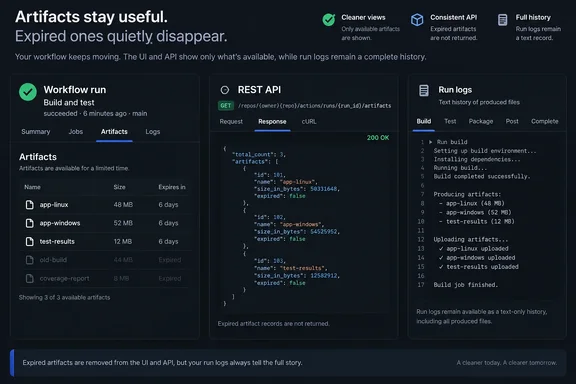
Most people who open a run summary will simply see a shorter list. The people who need to pay attention are those whose scripts, dashboards or audit habits read expired artifact records. For them, an expired artifact is no longer a flagged row. It is simply missing.
GitHub Actions Drops Expired Artifacts From Run Summaries and the REST API
According to GitHub's changelog entry, expired artifacts are hidden in two places:
- The artifact list on a workflow run summary page no longer shows them.
- The REST API endpoints "list artifacts for a repository" and "get an artifact" no longer return them.
GitHub introduces these two items with the word "including," so they read as examples of run data where expired artifacts are hidden, not necessarily a complete list. GitHub's REST documentation also has a separate "list workflow run artifacts" endpoint, which returns the artifacts for one run. The changelog does not name that endpoint. If a tool depends on it, test it against current behaviour rather than assuming either way.
In GitHub's REST documentation, the artifact endpoints are how you download, delete, and retrieve information about workflow artifacts in GitHub Actions. The documentation describes the repository-level list as one that lists all artifacts for a repository. Anyone with read access to the repository can use this endpoint. After this change, "all artifacts" in practice means all artifacts that have not expired.
The changelog gives no separate effective date, staged rollout schedule or plan-tier boundary. It also does not say whether or when GitHub Enterprise Server will get the same behaviour. Readers on GitHub.com and GitHub Enterprise Cloud should treat the September 24 announcement as the reference point.
Why the "Expired" Pill Raised Billing Questions
GitHub's stated reason is plain. The leftover "Expired" pill made some users unsure whether they were still paying to store artifacts that no longer existed. The underlying files were already gone, but the interface still listed them in a way that looked like stored data.
That confusion goes back years. In a 2022 GitHub Community discussion, a user asked what an expired artifact even was. They could see it marked as "Expired" and I have no option to delete it and remove the Artifact (for space issues). A community respondent explained that "Expired" means the artifact has already been deleted after its retention period (90 days by default) expired. The respondent guessed the entry was still shown to make it clear that the run did produce the artifact when it ran. The original poster then asked whether those megabytes counted against their free allotment. That is exactly the ambiguity GitHub now says it is removing.
The two sides of the change are straightforward. The old display kept a record that an artifact had existed, at the cost of looking like billable storage. The new display drops the ambiguous entry and moves the historical record somewhere else, covered below.
Which Artifact Endpoints Change, and What Scripts Should Expect
The REST change is the part most likely to break something in practice. GitHub's documentation shows artifact objects with fields such as id, name, size_in_bytes, expired, created_at and expires_at. A typical example response lists artifacts with "expired": false next to their creation and expiry timestamps. Tooling built on that shape could filter on expired: true to find stale artifacts, or count expired entries for a report.
Once expired artifacts stop being returned, that pattern no longer finds anything. Filtering the repository list for expired: true should come back empty. A dashboard that counted expired artifacts will show zero. A script that fetches a known artifact ID and checks its expired flag may no longer get an object back at all. That last point is our reading of the announced behaviour. GitHub has not published migration guidance.
Several details are not documented, and they matter for anyone writing the error handling:
- GitHub's announcement does not say which HTTP status code "get an artifact" now returns for an expired artifact ID.
- It does not describe any change to the response schema. It says expired artifacts are not returned. It does not say the
expiredfield is removed from artifacts that are returned. - It says nothing about pagination, permissions or API versioning.
For comparison, the separate "download an artifact" endpoint already documents a 410 Gone response alongside its normal 302 redirect. That endpoint is not part of this change, and 410 should not be read as the new behaviour for "get an artifact". Until you have seen what your own calls return, code should treat "not found" and "expired" as the same outcome.
The expires_at field is still the tool for acting before expiry. GitHub's documentation notes that you can use the API to confirm the date that an artifact is scheduled to be deleted. For more information, see the expires_at value returned by the REST API. Scripts that need to warn about, archive or re-upload artifacts should check expires_at while the artifact still exists, because they can no longer catch it afterwards.
Run Logs Now Record Which Artifacts a Workflow Produced
The run summary used to double as a history of what each run had built. GitHub now points users to the workflow run's logs to find out which artifacts a run produced after they have expired.
That is only a record that the artifacts were produced. The files themselves were deleted when the artifacts expired, and no log entry brings them back. The logs tell you an artifact named build-output came out of a run. They do not let you download it.
Logs have limits of their own. GitHub's documentation says that by default, GitHub stores build logs and artifacts for 90 days, and this retention period can be customized. Logs and artifacts are governed by the same retention settings. If log retention is set no longer than artifact retention, the logs will not outlast the artifacts for long, and the record goes with them. Teams that need a durable list of build outputs for compliance or release forensics should record that information somewhere they control, not in the Actions UI.
This also affects troubleshooting. An artifact missing from a run summary used to point to a failed upload step. For older runs, it is now also what normally happens after expiry. Before concluding that the workflow never uploaded anything, check the run's age against the retention period, then check the log.
Retention Settings and retention-days Still Decide When Artifacts Disappear
The mechanics of expiry have not changed. GitHub's documentation states that retention periods for artifacts and logs can be configured at the repository, organization, and enterprise level. Workflow authors can also set a shorter period per artifact. According to the documentation, you can also define a custom retention period for individual artifacts using the actions/upload-artifact action in a workflow. This is done with the action's retention-days input, within whatever limit the repository, organization or enterprise allows.
A retention change does not rescue artifacts that have already expired. GitHub's retention documentation says configuration changes apply to new objects rather than retroactively. Raising the limit today protects future artifacts. It does nothing for artifacts that have already disappeared from the run summary.
Manual deletion also works as before. GitHub notes that you can reclaim used GitHub Actions storage by deleting artifacts before they expire on GitHub, and warns that once you delete an artifact, it cannot be restored. Write access to the repository is required to perform these steps. Deleting a whole run removes its artifacts too: when a workflow run is deleted all artifacts associated with the run are also deleted from storage.
On billing, GitHub says directly that this change does not affect it. The artifacts that disappeared from view were already deleted from storage before the update. Hiding them adds no charge and removes none.
What this means for you
If anything automated reads GitHub Actions artifact data, audit it this week. If you only use the web UI, there is nothing to do beyond knowing why older runs now show fewer artifacts.
Release engineers, platform teams and anyone maintaining artifact cleanup jobs, storage reports or "latest build" download links should check whether their code expects expired records. Pay particular attention to code that filters on expired: true or fetches artifacts by a stored ID. People who only download fresh artifacts from recent runs are unlikely to notice any difference.
- Expired artifacts are no longer shown on workflow run summary pages or returned by the "list artifacts for a repository" and "get an artifact" REST endpoints, as of GitHub's September 24, 2026 announcement.
- Scripts that filter on
expired: trueor fetch a known artifact ID should treat a missing artifact as the normal result for an expired one. GitHub has not documented the exact response code. - Use
expires_atto act on artifacts before they expire, because after expiry the API no longer returns them. - The run logs are now the record of which artifacts a run produced. They follow the same retention rules, so keep your own record if you need one for longer.
- Raising repository, organization or enterprise retention, or
retention-daysinactions/upload-artifact, protects only new artifacts. Expired ones cannot be restored. - Seeing fewer artifacts in the UI does not mean a billing change. GitHub says storage billing and retention are unaffected.
GitHub has removed a long-standing source of confusion: an entry for data that no longer existed, which looked like data you might be paying for. The run summary and API now show only artifacts that still exist. Anyone who needs proof that an artifact once existed has to get it from the run logs while those last, or from their own records. Teams with artifact automation should check it now, against their own retention windows, before a cleanup job or dashboard quietly starts reporting nothing.
References
- Expired GitHub Actions artifacts no longer shown in UI and API GitHub Changelog · 2026-09-24T19:13:02+00:00
- REST API endpoints for GitHub Actions artifacts - GitHub Enterprise Cloud Docs docs.github.com