

What changed
Per the GitHub changelog, the update covers organization and enterprise administrators and has three parts:
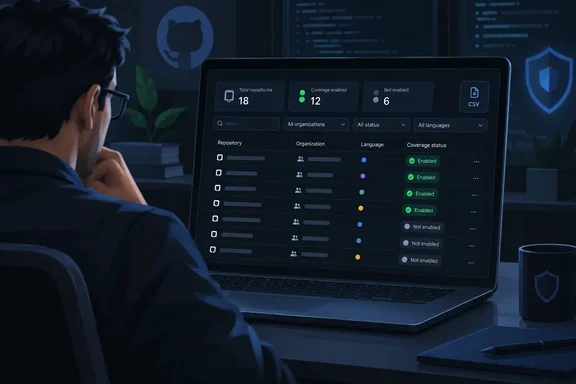
- Summary counts. The code scanning summary in Coverage shows how many repositories have AI Scan for pull requests enabled and how many do not.
- Per-repository status. Each repository row shows its effective AI Scan enablement.
- Filters and export. Two query qualifiers are available:
code-scanning-ai-scan-pr-scan:enabledandcode-scanning-ai-scan-pr-scan:not-enabled. Coverage CSV exports also now include a dedicated Code Scanning AI Scan for pull requests column with enabled and not-enabled values.
The announcement does not say the change enables AI Scan, alters scan behavior or adds AI Scan to the enablement trend charts. Treat it as an inventory tool.
What "enabled" and "not enabled" mean
GitHub's adoption documentation says the status is an effective one. It reflects enterprise policy, organization configuration, prerequisites and any repository opt-out, all applied together. The same page says a "not enabled" status can include repositories that are ineligible for AI Scan. Security overview does not tell you why a given repository is not enabled.
That limits how you should read a long "not enabled" list. It is not a to-do list of misconfigured repositories. A repository could be missing from the enabled count because of any of these:
- The enterprise has not allowed the feature.
- The organization has not turned it on.
- A repository administrator opted out.
- Code scanning is not enabled on the repository.
- The repository is simply ineligible.
"Enabled" is also not proof that scans are running or finding anything. According to GitHub's AI Scan documentation, a scan runs when three things are true:
- Code scanning is enabled for the repository.
- The repository's effective AI Scan setting is enabled.
- An eligible pull request contains qualifying changes in a supported language or framework that CodeQL does not cover.
How AI Scan works and where it stops
The docs describe AI Scan as an AI-based engine that finds vulnerabilities in pull requests for languages and frameworks CodeQL does not cover. Examples include PHP, Shell/Bash, Terraform (HCL) and Dockerfiles. Framework gaps such as JSP for Java and Blazor for C# are also named. Several limits matter when you read the coverage numbers:
- It is in public preview and subject to change.
- During the preview it needs a GitHub Advanced Security license and a GitHub Copilot license.
- Usage consumes AI credits.
- It analyzes pull requests only, so there are no full-repository scans.
- It does not run on pull requests from forks or on those created by Dependabot.
- Findings are advisory. They cannot yet be used in rulesets to enforce merge requirements.
- Findings appear on pull requests rather than as backlog alerts in the repository's security view.
The credit consumption makes an accurate enabled count more than a bookkeeping exercise. Broad enablement has a billing side as well as a security side.
Where the settings come from
The enablement hierarchy explains most of the rows you will see. Per GitHub's docs, AI Scan is not allowed at the enterprise level by default. It is disabled at the organization and repository levels by default. Enterprise owners must allow it before organization administrators can enable it. An organization-level setting applies it to eligible repositories where code scanning is enabled, and repository administrators can opt out individual organization-owned repositories. For an eligible public repository owned by a personal account, a repository administrator must enable it directly.
A related change is worth knowing about. On September 16, GitHub said AI Scan no longer requires CodeQL default setup. The changelog says code scanning and AI Scan must still be enabled at the applicable level. The change is in public preview on github.com for organization-owned and personal repositories for GitHub Advanced Security customers. GitHub Enterprise Server is not supported for that release. Organizations that had already enabled AI Scan did not need a new setup step, so it now runs more broadly across their eligible repositories. If your enabled count rose after mid-September without anyone touching a setting, that change is a plausible reason. This is my inference, and GitHub does not link the two announcements.
Who can see it
GitHub's documentation lists these access requirements for the Coverage view:
- Organization views require write access to repositories in the organization.
- Enterprise views are for organization owners and security managers.
The same page lists plan requirements: a GitHub Team account with GitHub Secret Protection or GitHub Code Security, or a GitHub Enterprise account. If the Coverage view or its rows look incomplete, check your role first.
How to use it
- Open the organization's main page and click the Security and quality tab. For an enterprise, go to the enterprise account and use the same tab.
- Click Coverage in the sidebar to open the "Security coverage" view.
- Check the AI Scan counts in the code scanning summary. Clicking the enabled or not enabled number in the header filters the list.
- For precise filtering, type
code-scanning-ai-scan-pr-scan:not-enabledorcode-scanning-ai-scan-pr-scan:enabledinto the search box. Combine it with other filters such as team or archived status. - In an enterprise, the owner filter narrows results to one organization.
- Export the CSV and look for the Code Scanning AI Scan for pull requests column. This lets you join the data with other datasets, such as repository ownership or language inventories.
GitHub's documentation also points out that some repositories legitimately do not need every feature. Its example is Dependabot on ecosystems it does not support. The same logic applies here. A repository containing only languages CodeQL already covers may gain little from AI Scan.
Practical advice
- Sort the "not enabled" list by cause. Check enterprise policy, then organization settings, then repository opt-outs, then code scanning status. The view will not do this for you.
- Prioritize repositories with languages CodeQL misses. Examples are PHP services, shell-heavy tooling, infrastructure-as-code and Dockerfile-driven repositories. These are where AI Scan is designed to add coverage.
- Budget for credits and licenses. Preview use needs both licenses and consumes AI credits, so wider enablement means more spend.
- Do not treat enabled as protected. The status says nothing about findings, scan quality or whether eligible pull requests have occurred. Findings are advisory and prone to false positives, as with any AI-based tool.
- Use the CSV for tracking. The Coverage view shows current status. GitHub's separate enablement trends view covers Dependabot, code scanning and secret scanning, and the announcement does not say AI Scan has been added to it. Periodic CSV exports are one way to build your own history.
GitHub also documents a REST API for managing the organization and repository AI Scan settings. Tech Times has noted that this makes scripted rollouts possible. Together with the new Coverage column, the API and the CSV give administrators a way to measure a rollout and then act on it.
Bottom line
This is a small but useful change. AI Scan for pull requests now has the same kind of adoption reporting as GitHub's other security features. The numbers show where the setting is effectively on, not whether it is working. Administrators should read "not enabled" as a prompt to investigate, since policy, eligibility and licensing can each explain it.
References
- Code scanning AI Scan enablement status in security overview GitHub Changelog · 2026-10-06T10:23:38+00:00
- AI Scan for pull requests - GitHub Docs docs.github.com
- Assessing adoption of security features - GitHub Docs docs.github.com