

The main lesson isn't about typing prompts. It's about checking an AI agent's work before you believe it. The course's own README says it treats the app as a place to guide and review work, not a magic code button.
What the GitHub Copilot app is for
A fair first question: if you already use Copilot in VS Code or Copilot CLI, why add another app? Wahlin says he had the same doubt. His answer is that the app helps you keep track of agent work, which gets messy once more than one task is running.
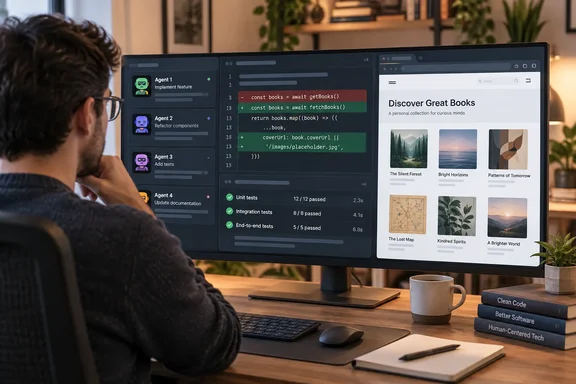
You may know the problem. Two agent tasks edit the same folder on the same branch. The plan is buried in a chat, the diff is in your editor, test output is in some terminal, and the pull request is in a browser tab. The course README describes the app as a desktop cockpit for agentic coding work, one that brings together sessions, plans, diffs, tests, browser previews, AI chats, issues, pull requests, and more so you can guide that work without bouncing between multiple tools.
According to the announcement, you can:
- Run project sessions in separate git worktrees, so tasks running side by side don't overwrite each other
- Choose a session mode (Interactive, Plan or Autopilot) depending on how much control you want to keep
- Check the diff, run tests and preview the app in a built-in browser
- Start work from GitHub issues and pull requests in the My work view
- Add capabilities with skills, custom agents, MCP servers, plugins and canvases
- Turn prompts you use often into automations that run on demand, on a schedule or when a GitHub event happens
You don't have to give up your editor. The app can open the same project in VS Code whenever you want to read or change code yourself.
GitHub's Copilot Agents application card adds some detail. It says the app works with local repositories, git worktrees and cloud sandboxes, and it's built on Copilot CLI and the Copilot SDK. So app sessions inherit the CLI's model limitations and its safety controls for file access, file changes, running commands and connected tools. The same document says you control which MCP servers, skills, canvas extensions and automations the app can use. It advises reviewing them before use because they can affect what tools, data and background actions a session has.
Section summary: The app puts agent sessions, the evidence each one produces, and GitHub workflows in one window. It works alongside your editor rather than replacing it.
The sample project and a typical exercise
Every chapter uses samples/book-app-web, a small book collection app built with React, Vite and TypeScript. You can search books, filter by genre and reading status, and see reading stats for whatever is on screen. It's small enough to read in a few minutes, but it has real tests and a build step. That matters once an agent starts changing things.
This is a change from the earlier CLI course. That course has you work with a single Python book collection app throughout all chapters. The app course keeps the book-collection idea but moves it to a web stack, which makes sense because the desktop app has a built-in browser preview.
Here's how one exercise from the development chapter works:
- The setup script creates a practice branch that contains a bug: the reading stats ignore the active filters.
- You start a session from that branch and attach the matching issue with
#. - You switch to Plan mode and ask Copilot to treat the issue as the source of truth, review
@samples/book-app-web/src, find the root cause and write a short fix and validation plan. - When the plan looks right, you switch to Interactive mode and have Copilot make the fix.
- You check the work: read the diff in the Changes tab, run the tests in Terminal, and open the app in the Browser tab to confirm the unread count changes when you filter.
Wahlin's warning here is practical: Copilot will happily tell you the bug is fixed, and the course makes you confirm it yourself.
Chapter by chapter
| Chapter | Topic | What you do |
|---|---|---|
| 00 | Setup | Install the app, sign in, fork the course repo, and create practice issues and pull requests |
| 01 | Tour the App | Why you'd use the app, chats versus project sessions, session modes, model and reasoning settings |
| 02 | Sessions, Worktrees, and Context | Isolated sessions, git worktrees, and using @, # and / to give Copilot context |
| 03 | Development and GitHub Workflows | Inner loop (change, diff, test, preview) and outer loop (issues, PRs, review comments, failing checks) |
| 04 | Skills and Custom Agents | Update a reusable review skill; build a read-only custom agent that explains code without editing it |
| 05 | MCP Servers and Plugins | Get up-to-date documentation through the Context7 MCP server; use a skill that ships in a plugin |
| 06 | Canvases | Use /create-canvas to build a session board that tracks plan steps and validation results |
| 07 | Automations | Turn a manual status report into an on-demand automation, schedule it, and learn about event triggers and cloud automations |
The read-only custom agent in Chapter 04 is worth noting. An agent that can explain code but can't change it is a good way to use AI on a codebase you don't want touched.
Section summary: The course goes from installing the app to automations in eight steps, all on one realistic sample app.
Who should take it, and what you need first
The course is aimed at developers who want to direct agents and review their work, not just chat with them. It also suits:
- People who already use Copilot in an editor or terminal and want to know where the desktop app fits
- Teams deciding how much work to hand to agents while keeping a person involved
- Students and self-taught learners. New terms are explained when they first appear, there's a glossary, and every chapter ends with an assignment
Prerequisites:
- You don't need any background in AI or agentic development
- Some familiarity with GitHub, Git and npm helps. If you can clone a repo and run
npm test, you're ready - The course repository recommends the current Node.js LTS for the sample app
- You need a Copilot plan or your own model provider
For enterprise admins: the course README says Business and Enterprise accounts need the GitHub Copilot app policy turned on, and that this policy is separate from the Copilot CLI policy. If a developer can use Copilot CLI but can't get into the app, check that policy first.
If you bring your own model: GitHub's application card says that when you use your own provider, prompts, code context and responses go straight to that provider and not through GitHub. You're responsible for that provider's terms and data handling. The card also says that without GitHub sign-in, some features aren't available, such as /delegate. Those notes describe CLI behavior. Since the app is built on the CLI, it's reasonable to expect similar limits, but don't assume every course exercise works the same way with every provider.
How the course teaches
Each chapter follows the same pattern: why the topic matters, a real-world analogy, the core concepts, hands-on exercises with the sample app, then key takeaways and an assignment.
All the analogies come from a recording studio, which will either charm you or make you groan. The session modes are a producer in the control room:
- Interactive: directing a take with frequent check-ins
- Plan: charting the arrangement before anyone plays a note
- Autopilot: handing a well-defined task to someone you trust
Worktrees are separate recording booths, so the drummer and the vocalist don't bleed into each other's tracks. Skills are song charts. Canvases are the arrangement board on the wall. Automations are a sequencer that plays a programmed pattern. These are teaching aids, not promises about how the model will behave. The repository also notes that model output varies with app version, model, reasoning setting, repository context and enabled tools, so your results may not match the screenshots.
The main lesson: trust the evidence
Wahlin says the one idea he'd most like readers to remember is trust the evidence. A confident answer from Copilot isn't working software. Before you call something done, look at:
- The diff
- The test and build output
- The running app
- The checks on the pull request
GitHub's responsible-use documentation says the same thing. It warns that agent output can be inaccurate, incomplete or insecure, and tells users to check it against their own requirements.
The course also has you practice judgment calls that don't have one right answer. Should this be a quick chat or a full project session? Is this a Plan task or an Autopilot task? Do you run this prompt often enough to make it an automation?
Our take: The course comes from GitHub and Microsoft, so it naturally presents the app favorably. It doesn't say much about when the app is overkill. For a single quick fix, the editor or CLI may be faster. Worktrees also have limits: they keep parallel changes apart, but they don't combine that work for you, and you still have to merge it and review it. To its credit, the course focuses on checking the agent's work, which is the right emphasis.
Getting started
- Download and install the GitHub Copilot app.
- Fork the
github/copilot-app-for-beginnersrepository. It's MIT-licensed. - Start with Chapter 00. The announcement estimates about 20 minutes, after which you should have a session running against the sample app.
- If something breaks, the repo includes appendices on git worktrees, a troubleshooting reference and a glossary.
For more, GitHub's own blog has a separate getting-started guide. It describes the app as a workspace for managing multiple agent sessions, switch between tasks without losing momentum, and work with AI agents across the different parts of your workflow. If you prefer the terminal, the earlier Copilot CLI course covers that side. The Microsoft for Developers post for that course says it works with GitHub Copilot Free, which is available to all personal GitHub accounts. The app course asks for a Copilot plan or your own provider, so check which one fits your account before you start.
References
- Get started with the GitHub Copilot app: a free, hands-on course Microsoft Developer Blogs · 2026-09-28T18:05:00+00:00
- GitHub - github/copilot-app-for-beginners: Learn how to get started using the GitHub Copilot app! · GitHub github.com
- Get started with GitHub Copilot CLI: A free, hands-on course - Microsoft for Developers developer.microsoft.com