

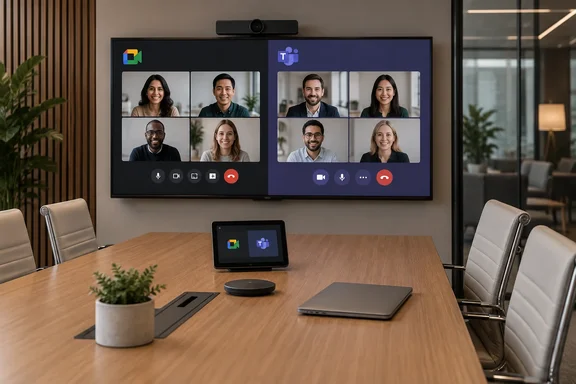
What Google announced
Google Meet had already added Direct Guest Join compatibility with Teams Rooms on Windows. Android support came later. Google's Workspace Updates post for October 1, 2026 makes two directions generally available. Android (AOSP)-based Google Meet hardware can join Microsoft Teams meetings. Android (AOSP)-based Microsoft Teams Rooms devices can join Google Meet meetings.
One DEKOM report said Android-based Teams Rooms systems, including Poly Android kits, were not supported at first because the feature relied on Chrome-based rendering. It said Google planned Android support for the second half of 2026. The October 1 launch fits that timeline.
This is a device-class expansion, not the first time the two services have interoperated. Google's September 2 preview post said the feature had already launched on Chrome OS-based Google Meet Rooms and Windows-based Microsoft Teams Rooms. The new part is the Android hardware.
Rollout and availability
Google lists a full rollout starting October 1, 2026, with feature visibility taking one to three days. The feature is available to all Google Workspace customers with Meet hardware devices running Android/AOSP.
Android Authority stresses that "Android" here means dedicated room hardware. It does not mean the Meet or Teams apps on your phone or tablet. If you mostly join from a laptop or phone, nothing changes.
Don't confuse this with the September preview schedule. The preview's admin-console setting also had a one-to-three-day window, but device visibility was limited to Early Preview devices on Rapid Release domains, with completion expected by September 7.
What admins should know
Google's preview post said the setting would be on by default. Admins can turn it off at the organizational unit (OU) level. It also said the feature does not replace existing Pexip settings in any OU that already has them. That guidance comes from the September preview, and the October post points admins to the Help Center instead of restating it.
Google's admin documentation separates two mechanisms for Meet hardware joining Teams calls:
- Teams Direct Guest Join. Google's admin help says this is turned on by default for your organization's users, including all organizational units.
- Pexip Connect. This is a separate, optional route. In the Device Settings tab, under Built-in Interoperability, admins pick Microsoft Teams (Powered by Pexip) and add a Pexip Customer ID. To check that it works, tap Enter a code or nickname on the room controller. The Teams option should appear in the drop-down.
How to join a Teams meeting from Meet hardware
Google's Meet hardware help page describes three routes.
Scheduled meeting
- On the Meet hardware device, go to the room that has a Teams interop call scheduled.
- Tap the meeting whose subtitle reads "Via Microsoft Teams."
- Select it with the touch controller or remote.
- The meeting begins when the Teams host joins.
Putting a Teams meeting on a room's schedule
- Create a Google Calendar event that contains the Teams meeting details, then add the Meet hardware room.
- If the Teams meeting was started by someone outside your organization, or with other scheduling software, adding the room directly may not work. Duplicate the event in Google Calendar, add the room to the copy, and remove participants from the copy so nobody gets multiple invitations.
- You can also create your own event, paste the Teams join details into the description instead of adding a Meet link, and add the room. The device recognizes the details and shows the meeting on its schedule.
Meeting code
- Tap Enter a code or nickname.
- Open the Join a meeting drop-down and choose Teams.
- Enter the meeting ID from the Teams invitation, then tap Join.
- Enter the passcode if prompted, then tap Join again.
Google says this works for scheduled and impromptu meetings as long as credentials are provided. It also warns that some Teams features might not work.
The Microsoft side
The Teams Rooms to Google Meet direction depends on Microsoft's third-party join setup. Microsoft documents two methods. One is a SIP video-based solution called cross-platform meetings via SIP join. The other is a WebRTC-based solution called Direct Guest Join. Microsoft's comparison table lists Google Meet under both methods for the join button. It lists Google Meet under Direct Guest Join for join by ID.
Microsoft's prerequisites include:
- Configure the Teams Rooms resource account's Exchange mailbox to process invites for third-party and externally scheduled meetings.
- Make sure no tenant policies block devices from connecting to third-party meeting services.
- Configure the Teams Rooms devices themselves to allow third-party meetings.
SIP and WebRTC behave differently. Once SIP calling is enabled, a Teams Room uses SIP instead of WebRTC for enabled third-party meetings. It falls back to Direct Guest Join over WebRTC if the invite has no SIP dial string.
Direct Guest Join is more limited. Pexip, which sells a competing interop product, says that its Pexip Connect adds HDMI content sharing, dual screen support and up to 1080p video, none of which Direct Guest Join provides. Treat that as vendor positioning. Microsoft's own comparison table also lists Direct Guest Join as limited to 720p at 30 fps, with no HDMI content sending and one front-of-room display.
Analysis
The value here is operational. A client's Teams invite no longer forces a laptop onto the table in a Meet-equipped room, and the reverse holds for Teams rooms. For mixed-platform organizations, that removes a common source of meeting-start delays and help-desk calls.
The limits are practical:
- Interop means joining a meeting. It does not mean full feature parity. Google itself says some Teams features may not work.
- The Android requirement matters. Chrome OS and Windows rooms were already covered, but a fleet of older Android room kits needs checking against your vendor's support.
- Calendar details can break one-touch joining. Google's duplicate-the-event workaround shows that externally scheduled invites are a weak spot.
Before telling staff a room is ready, confirm the hardware runs Android/AOSP and check the OU setting. Then test a real Teams invite on the Meet room and a real Meet invite on the Teams room. Check content sharing and display behavior in particular. If you pay for Pexip, check whether the new built-in route changes anything for you.
References
- Google Meet and Microsoft Teams just got better at working together - Android Authority Android Authority · 2026-10-02T07:44:46+00:00
- Join Microsoft Teams meetings with Google Meet hardware - Google Meet hardware Help support.google.com
- Google Meet Adds Direct Guest Join with Teams Rooms · DEKOM dekom.com