

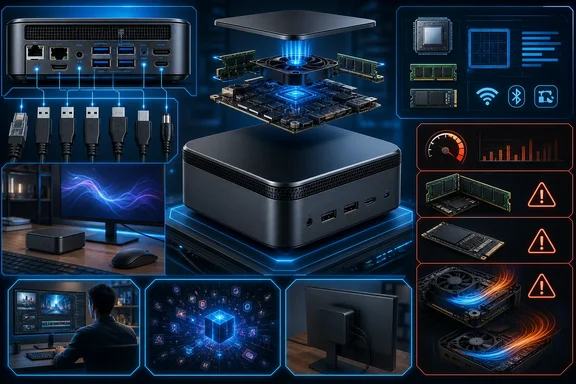
That makes configuration scrutiny essential. “OmniDesk Mini” describes a family with different system boards, processors, memory implementations, wireless choices, and connectivity capabilities. For Windows buyers, the relevant question is not whether the machine resembles a Mac mini on a desk. It is whether a specific configuration has enough memory, storage, ports, networking, and platform compatibility for the software and peripherals they actually use.
One small chassis, several platform variants
HP’s configurable U.S. OmniDesk Mini M05-0000t listing identifies a system with Windows 11 Home, an Intel Core 3 304 processor, 8GB of onboard LPDDR5X-8533 memory, and a 256GB PCIe Gen3 NVMe M.2 SSD. The listing also permits purchase-time customization, an important detail because the base hardware should not be assumed to represent every unit sold under the same family name.
The non-Ultra Core models are more than a processor substitution for the Core Ultra model. HP documents Uran board variants for the Core 3 and Core 5 systems, while Core Ultra configurations use an Astro board. That board-level distinction has practical consequences: HP associates Thunderbolt 4 and 2.5GbE networking with the Astro/Core Ultra hardware, whereas the Uran-based design is documented with Gigabit Ethernet and a 100W USB-C GaN power adapter.
A buyer planning to attach fast external storage, use a premium dock, or connect to a multi-gigabit network should therefore verify the exact board-linked capabilities. The OmniDesk Mini label alone does not establish that Thunderbolt 4 or 2.5GbE is included.
The product’s launch history also benefits from precise wording. Intel announced Core Ultra Series 3 at CES on January 5, 2026. HP’s Computex material, published June 1, 2026, identifies the OmniDesk Mini as a new product. Those are related developments, but they do not mean HP launched the OmniDesk Mini at Intel’s CES processor announcement.
What Intel Core 3 304 means in this desktop
The Intel Core 3 304 is a launched processor formerly codenamed Wildcat Lake. Intel specifies five cores and five threads: one Performance-core and four low-power Efficient-cores. Its listed processor base power is 15W, and it includes one Xe graphics core and an NPU rated at 15 TOPS.
Those specifications put the Core 3 version in a low-power, mainstream-oriented segment rather than the Core Ultra tier. Intel positions its non-Ultra Core line for mainstream mobile systems at lower price points, but that broader positioning is not a direct price comparison between comparable HP Core and Core Ultra OmniDesk Mini configurations. It is more accurate to describe this as the lower-tier Intel Core option in the product range.
Practical workload guidance, rather than a measured performance finding, suggests where the system is likely to fit. A compact Windows PC with this class of processor can be a sensible match for web applications, Microsoft 365 work, streaming, video calls, basic coding projects, and light photo tasks. It is less reassuring as a default choice for workloads that need abundant memory, substantial local storage, intensive graphics processing, virtual machines, or heavy multitasking.
The 15-TOPS NPU also establishes that the platform has dedicated AI acceleration hardware. It does not, by itself, demonstrate a particular AI experience. Application support, the type of task, available memory, graphics resources, and the rest of the system all affect real use. A TOPS figure should not be read as a benchmark result.
HP’s family documentation lists Core 5 315 and Core 5 320 options as well as the Core 3 304. That makes exact processor naming important when comparing retailer listings or configured systems. There is no sound basis for describing the range as a fixed number of universal configurations, because processor, memory, storage, wireless hardware, and board variant can change the machine being offered.
Mac mini-sized, but the comparison has limits
The physical parallel with Apple’s desktop is straightforward. HP specifies the OmniDesk Mini at 5.12 by 5.12 by 1.89 inches. Apple specifies its announced M6 and M5 Pro Mac mini models at 5.0 by 5.0 by 2.0 inches. Both are unusually compact square desktops that can sit discreetly beside a monitor and are easier to move between rooms or workplaces than a conventional tower.
The performance comparison is not similarly settled. Apple announced M6 and M5 Pro Mac mini models on August 25, 2026. As of September 13, 2026, they remain prospective for buyers awaiting general availability, which is scheduled to begin September 22. Apple specifies a 12-core CPU and 16GB of unified memory for the M6 model, while M5 Pro configurations can scale to an 18-core CPU and 64GB of memory.
On specifications alone, the Core 3 OmniDesk Mini’s five-core, 15W processor and 8GB starting memory place it in a materially different segment from Apple’s announced M6 and M5 Pro range. But this is not a benchmark conclusion. No matched independent testing in the available evidence establishes a categorical HP-versus-Mac performance verdict for the Core 3 OmniDesk Mini against an M6 Mac mini. Claims that one is definitively faster across the board would go beyond the evidence.
The operating system may be the decisive difference anyway. The HP is a Windows 11 Home PC, which matters for households and organizations dependent on Windows applications, PC peripherals, games, enterprise management software, or Windows-specific workflows. The Mac mini belongs to macOS and Apple’s ecosystem. For many prospective owners, software compatibility and existing devices will matter before raw processor specifications do.
Connectivity is a notable strength—within its scope
The U.S. Core 3/Core 5 configurable model lists a generous collection of ports for a machine this small:
- Three USB-C ports rated at 10Gbps, two of them supporting DisplayPort 2.1
- Two USB-A ports rated at 10Gbps
- HDMI 2.0b
- Gigabit Ethernet
- A headset combo jack, a dedicated microphone-in jack, and a line-out jack
The audio provision deserves emphasis because abbreviated specification lists can obscure it. This configuration has three analog audio connections, rather than only a single 3.5mm jack. That can be useful for people who want separate speakers and a microphone, or who regularly alternate among wired audio devices.
The two USB-C ports with DisplayPort 2.1 make a tidy monitor-centered setup plausible, and HDMI maintains compatibility with many existing displays and televisions. This is practical guidance, not a promise that every display, dock, or cable combination will deliver identical results. Buyers should check their monitor’s inputs and the dock’s stated requirements.
The absence of documented Thunderbolt 4 capability on the Uran-based Core 3/Core 5 configuration remains important. People relying on high-end docks or external PCIe-oriented workflows should not infer Thunderbolt support from the presence of USB-C ports. HP’s documentation ties that feature to the distinct Core Ultra/Astro platform.
Wireless hardware is also configuration-dependent. HP documents Intel Wi-Fi 6E AX211 with Bluetooth 5.3 as an option on applicable Uran variants. The default configurable-store wireless option is instead Realtek Wi-Fi 6 with Bluetooth 5.4. Neither specification should be assumed for every OmniDesk Mini listing without checking the selected configuration.
Memory and storage require careful buying decisions
The base configuration’s 8GB of onboard LPDDR5X memory may be adequate for a straightforward office or browsing machine, but it is the clearest constraint for longer-term use. Larger browser sessions, simultaneous productivity apps, creative software, local development tools, and virtual machines can all benefit from more memory.
HP lists 8GB, 12GB, and 16GB onboard LPDDR5X options for the relevant Uran_L and Uran_LU boards. Practical buying guidance is simple: where available, choose memory for the machine’s expected lifespan and workload at purchase rather than assuming it can be expanded later.
That said, it would be inaccurate to declare every OmniDesk Mini permanently non-upgradeable. HP also documents a Uran_SU variant using a DDR5 module. The family spans more than one memory implementation, so the precise product number and configuration sheet should guide any upgrade plan.
Storage calls for the same discipline. HP’s family documentation supports M.2 SSD options up to 2TB and, on applicable Uran variants, 128GB or 256GB UFS options. This supports a 2TB ceiling in HP-documented factory configurations; it does not establish two user-accessible M.2 bays, dual 8TB drives, or 16TB of internal capacity.
For large media libraries, engineering files, virtual machines, or game installations, verify the factory SSD choice and plan for external USB storage if needed. Do not make a purchase on the expectation of undocumented internal expansion.
Judge value at checkout, not from a family name
Dynamic configuration pages and changing promotions make durable price claims unreliable without a stable direct record. The safer purchasing method is to compare the exact processor, RAM, storage, wireless option, and connectivity included at checkout.
That comparison can change the value judgment substantially. A compact system that appears appealing in a base configuration may become less suitable once the buyer accounts for the memory and storage needed for real work. Conversely, paying for a configuration with sufficient capacity, the right wireless hardware, and the needed ports may be more sensible than choosing the lowest visible specification.
The Core 3 OmniDesk Mini is best understood as a very small Windows desktop for ordinary productivity and space-constrained setups. Its footprint is genuinely close to the announced Mac mini dimensions, its port selection is strong for its size, and Windows compatibility can be more important than processor comparisons for many buyers.
Its limits are equally clear. The starting 8GB memory and 256GB SSD are modest, the Core 3 configuration is below the Core Ultra branch of the family, and capabilities cannot be carried automatically from one OmniDesk Mini board variant to another. For a Windows-first home office, reception desk, classroom, or compact personal workspace, that may be an appropriate compromise. For demanding creative work, extensive local storage, fast networking, or advanced dock-based expansion, scrutinize the Core Ultra/Astro version and other compact PCs with those capabilities explicitly documented.
Update: Core Ultra OmniDesk Mini configurations reportedly reach U.S. retail (September 14, 2026)
According to Notebookcheck, HP’s Core Ultra-based OmniDesk Mini configurations are now available through Best Buy in the U.S., marking a retail arrival for the Astro-platform branch rather than another listing of the lower-tier Core 3 model.
The reported options pair a Core Ultra 5 325 or Core Ultra 7 356H processor with 16GB of LPDDR5X memory and a 512GB SSD. Notebookcheck lists them at $1,089.99 and $1,509.99, respectively. That gives prospective Windows buyers a clearer baseline: the Core Ultra versions start with twice the memory and storage of HP’s Core 3 configurable model described above.
The retailer specifications reportedly include two Thunderbolt 4 ports, supporting external-GPU and high-bandwidth dock use cases that should not be assumed on Uran-based Core 3/Core 5 systems. The listed Astro configuration also adds HDMI 2.1 and is said to support up to four displays.
These retail listings reinforce the need to compare the exact OmniDesk Mini platform, not merely its name. Buyers needing Thunderbolt-based expansion or stronger default capacity should look specifically for the Core Ultra/Astro configuration; those needs are not addressed by the Core 3 entry model.
References
- HP releases Panther Lake-powered mini PC with eGPU support Notebookcheck · 2026-09-14T08:08:00+00:00
- HP OmniDesk Mini Desktop PC M05-0000 series specifications HP Inc.
- HP OmniDesk Mini Desktop M05-0000t PC HP Inc.