

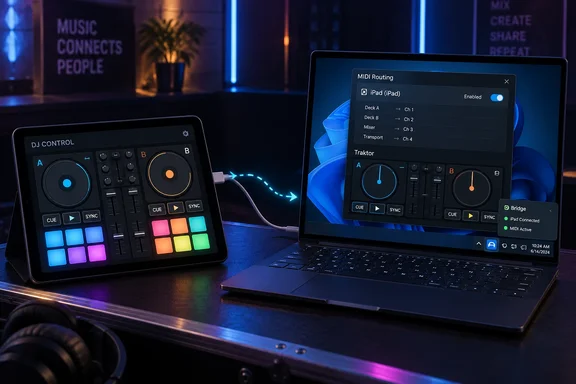
What was released
Interaktiv Tap has been updated to version 1.3. It plays Traktor Pro 3 and 4. Alongside it comes Interaktiv Bridge, a free companion app for Windows. Mixdown reports that Bridge shipped on 28 September together with Tap 1.3, and that it brings the instrument to Windows for the first time.
The gap it fills is easy to state. Mixdown explains that on a Mac, the iPad-to-Traktor cable connection works because Apple built both ends of it. On Windows that connection never existed, and the iPad can't create it alone. Windows DJs asked for it within weeks of Tap's June launch.
According to Mixdown, the bridge takes the MIDI over the connection Apple's own software already uses on that cable. It then hands it to Traktor through Windows MIDI Services, Microsoft's new MIDI system for Windows 11, so there is no third-party MIDI driver to install.
Why Windows MIDI Services matters here
Microsoft announced general availability of Windows MIDI Services in February 2026. Microsoft's Windows Experience Blog says it supports both MIDI 1.0 and MIDI 2.0. The core components are built into Windows 11 and are rolling out through a phased enablement process.
Two of Microsoft's stated features explain why a bridge like this is now practical:
- Multi-client ports. Microsoft says every MIDI 1.0 port and MIDI 2.0 endpoint is now multi-client. Several apps can use the same port at once, and vendor-specific drivers are mostly unnecessary.
- Custom endpoints and port names. Microsoft says you can control port names. Bridge exposes a port called "iPad (iPad)", the same name a Mac gives an iPad, according to Interaktiv. That lets the existing Traktor mapping bind to it automatically.
The Windows MIDI Services launch was not entirely smooth. Microsoft's known-issues post, last updated 30 April 2026, lists problems on Windows 11 retail 24H2, 25H2 and 26H1. Fixes for several of them, such as dynamic ports not always being visible, began rolling out that day through a 30-day controlled feature rollout. Microsoft's post does not mention Bridge, so none of this should be read as a Bridge-specific warning. It is background for anyone troubleshooting MIDI on a PC they also gig with.
Requirements
Interaktiv's own documentation lists these:
- An Intel or AMD PC running Windows 11 24H2 or newer. You can check with Windows+R, then
winver. - Windows 10 has no path, and ARM PCs are unsupported. Interaktiv says Traktor doesn't support Windows on ARM.
- Apple's free Apple Devices app from the Microsoft Store, opened once. iTunes also works but is slower to notice an iPad that was already plugged in.
- Traktor Pro 3 or 4.
- An iPad running Interaktiv Tap, and a USB cable that syncs. A charge-only cable shows up as "no iPad".
KVR Audio's product listing for Bridge gives the same basic requirements. The Microsoft Store listing also says it is for an Intel or AMD PC with Windows 11 24H2 or newer.
Setup
Interaktiv describes a one-time setup, and the app's window names whatever is missing, in order:
- Install Bridge from the Microsoft Store and open it once. It sits in the tray and starts with Windows.
- If Windows MIDI Services isn't installed, the window shows a warning and offers an install button. Interaktiv says this downloads Microsoft's runtime (about 209 MB) from Microsoft's release page and checks its size and SHA-256 before running it. Windows asks for approval once.
- If Apple Devices isn't installed, a button opens its Store page. Open it once and accept the terms, or its device service won't be running.
- Plug in the iPad and open Interaktiv Tap. The window moves from waiting for the iPad, to waiting for Tap, to waiting for MIDI.
- Start Traktor and merge Tap's settings into it. Interaktiv says Traktor's own term for this step is Import, under Preferences → Controller Manager. Your existing mappings carry over, because Traktor exports your settings, the app adds its device to that copy, and you import it back.
- In Controller Manager, both In-Port and Out-Port should read iPad (iPad). Per Interaktiv, the status dot turns green only when Traktor actually answers, not merely when a cable is connected.
Troubleshooting
Interaktiv's FAQ lists the common failure points:
- Traktor doesn't see the port. Traktor reads its MIDI ports once, at start. Restart it the first time Bridge runs if Traktor was already open. Also restart it after a Repair, or when the window says Traktor lost the port.
- "Traktor not answering." Update Traktor settings if the iPad app offers it. Check that both ports are set to the iPad rather than None. Then check Traktor's audio device under Preferences → Audio Setup, because Interaktiv says Traktor ignores all MIDI without saying so when the audio device is missing or invalid.
- Admin prompt from an "unknown publisher". Interaktiv says this is its Repair MIDI helper, and the Store signs the package rather than the helper inside it. Declining changes nothing.
- Cable kicked mid-set. The dot goes gray, and Interaktiv reports about five seconds to green after replugging, with no Traktor restart.
- Lid closed. Closing it suspends the PC and stops MIDI. Locking the screen or letting the display sleep is fine.
What it changes on your PC
Interaktiv says Bridge adds one entry to Windows' MIDI configuration file at %ProgramData%\Microsoft\MIDI\WindowsMidiServices.midiconfig.json. It does this at every start, and leaves other entries alone. It first makes a backup copy ending in .interaktiv-backup. The Repair button writes two MIDI registry values and restarts the MIDI service, which briefly interrupts MIDI for every app. The company also says there is no telemetry, no account and no update check of its own.
The latency claims
Mixdown and Interaktiv report these figures:
- iPad to Traktor: about 1.1 ms typical, under 2 ms at the 99th percentile.
- Traktor to iPad: about 1.2 ms typical.
- Bridge code: about 45 microseconds per message.
- Reliability: no lost or out-of-order messages in 215,832 messages over 30 minutes, 36,001 cable round trips, or more than half a million burst messages.
The caveats are significant. These are vendor measurements, not independent benchmarks. The cable's share is half a round trip timed on the iPad, which assumes equal latency both ways. That run used a development build of Tap. The PC-side test used stand-ins for the iPad and Traktor. Treat the numbers as plausible and well disclosed, not proven. A claim of "roughly like a 5-pin MIDI cable" also fits Microsoft's own description of classic MIDI at about a millisecond per message.
Limits
- Tap only. Interaktiv says the iPad side speaks only to Tap. Another iPad MIDI app cannot send through Bridge. The Windows-side port is a normal MIDI port that other software can listen to.
- MIDI, not audio. Interaktiv says Windows has no equivalent of Apple's IDAM, and Bridge doesn't carry the iPad's sound.
- One iPad and one Tap session at a time.
- Untested: two Windows users signed in at once.
Tap 1.3 changes
According to Mixdown and KVR Audio:
- The four FX units are playable by touch. An effect switches on when a finger lands on its pad and off when it lifts, and HOLD keeps it on hands-free.
- Holding LOOP on a playing deck turns the hot cues into eight loop rolls, from 1/32 to 4 beats.
- Traktor Pro 3 is supported alongside Pro 4, and every iPad on iPadOS 18 or later plays the full surface, iPad mini included.
On price, KVR Audio says Tap is a free download with 15-minute sessions and a 7-day trial, plus a $14.99 one-time unlock. Bridge is free.
Bottom line
Wi-Fi MIDI tools such as rtpMIDI and TouchOSC Bridge are the usual route for iPad control on Windows. Interaktiv's pitch is that a wired path removes the venue network from the equation. Bridge only helps if you use Interaktiv Tap, and it needs a current Windows 11 build. For those users it removes a long-standing gap. The first step is to check your Windows version with winver.
References
- Interaktiv Tap now plays Traktor on Windows - mixdownmag.com.au mixdownmag.com.au · 2026-10-05T06:00:10+00:00
- Interaktiv Bridge - Free download and install on Windows apps.microsoft.com
- iPad USB MIDI on Windows — Interaktiv Bridge for Traktor interaktivaudio.com