

| iOS app build and protection method | Minimum version required |
|---|---|
| Xcode 16 app using the Intune App SDK | Intune App SDK 20.8.0 or later |
| Xcode 16 app using the Intune App Wrapping Tool | App Wrapping Tool 20.8.1 or later |
| Xcode 26 app using either SDK integration or wrapping | Version 21.1.0 or later |
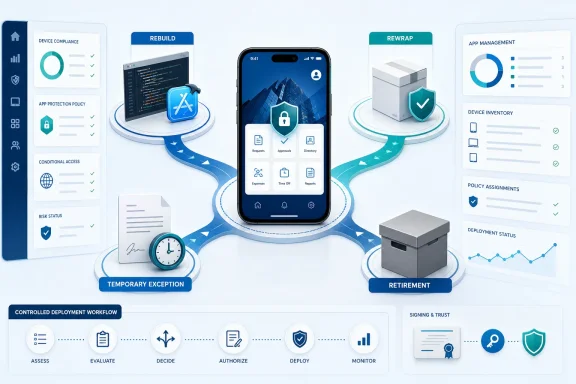
WindowsForum’s two reports on the Intune MAM change focus on these minimum SDK and wrapping-tool requirements and the consequences for organizations that have not updated protected apps. For each affected iOS line-of-business app, use four decision criteria immediately:
- Rebuild when source code, dependencies, a reproducible build pipeline, signing materials, and an accountable development owner are available.
- Rewrap when the existing IPA remains supportable, its identity and signing requirements are understood, and the organization can reproduce an authorized wrapping and signing process.
- Temporary exception when the app is business-critical, remediation cannot be completed in time, and the security or data owner explicitly approves a narrowly scoped and expiring change.
- Retire when the app has no credible technical owner, no supportable build or wrapping path, or a function that should move to a maintained replacement.
The rest of the work is evidence collection and decision execution. Do not classify an app from its display name, age, or installation status. Require the app owner to identify the artifact users actually receive, how it was protected, how it was built, and whether it launches under the intended policy and assignment.
Use one gated decision matrix for every app
This matrix is the portfolio record, technical evidence checklist, prioritization worksheet, and approval log. Copy it into a spreadsheet, ticket template, or service-management form and complete one row set per application.
| Decision field | Required entry or gate | Score or result |
|---|---|---|
| Intune app identity | Exact display name and the identifier used to match the managed app record to the released artifact | Required |
| Signed IPA identity | File name, app version, build version, bundle identifier, and signing identity for the tested IPA | Required |
| Business owner | Named person or role authorized to fund remediation, accept interruption, or approve retirement | Required |
| Technical owner | Named team able to build, wrap, sign, package, or troubleshoot the app | Required |
| Source and pipeline | Yes: repository and pipeline are accessible and reproducible. Partial: source exists but the pipeline is incomplete. No: source or pipeline cannot be produced. | Yes = 2, Partial = 1, No = 0 |
| Protection method | Confirmed Intune App SDK integration or Intune App Wrapping Tool protection | Required |
| Embedded component | Exact embedded SDK version or wrapper version associated with the distributed artifact | Required |
| Xcode generation | Confirmed Xcode 16 or Xcode 26 from an app-owner build record or reproducible build evidence | Required |
| Version floor | Compared with the applicable minimum in the table above | Pass/Fail |
| Signing chain | Current certificate, provisioning profile, entitlements, authorization, and packaging process can be validated | Yes = 2, Partial = 1, No = 0 |
| Affected policy | Policy name or identifier supplied by the Intune owner, plus the reason it applies | Required |
| Affected assignment | Included population, test population, and any relevant exclusion or overlapping assignment | Required |
| Launch test | Tested artifact installs and opens for a representative assigned user | Pass/Fail |
| Protected workflow | Authentication and a representative protected-data workflow operate as approved | Pass/Fail |
| Business criticality | Critical, High, Medium, or Low, with the affected process named | Critical = 3, High = 2, Medium = 1, Low = 0 |
| Fallback | Tested manual process, supported replacement, web workflow, or no fallback | Tested = 2, Untested = 1, None = 0 |
| Exception eligibility | Security or data owner records whether a temporary policy change is permissible | Approved/Rejected/Not requested |
| Disposition | Rebuild, Rewrap, Temporary exception, or Retire | Required |
| Delivery or exit date | Release date, retirement date, or exception expiration date | Required |
| Acceptance evidence | Named tester, device context, test date, artifact identity, and result | Required |
The numerical score helps sequence work; it does not authorize deployment or reduced protection. Three gates override any total:
- If the protection method, embedded component version, Xcode generation, or tested IPA identity is unknown, the app cannot be declared ready.
- If the launch test or protected-workflow test fails, the app cannot move to completed status.
- If a temporary exception lacks approval from the designated security or data owner, the exception is unavailable regardless of business criticality.
Prioritize critical apps with no tested fallback, but do not confuse urgency with evidence. A high-priority app with an unknown binary history needs rapid investigation, not an assumed compliance result. An app with no source pipeline may still be evaluated for rewrapping, but only after its artifact, signing chain, ownership, and compatibility are established. An app with no source, no supportable wrapping route, no owner, and no fallback needs an executive business decision because the Intune administrator cannot create a sustainable maintenance path.
Evidence to collect from the app owner
Use the following procedure before choosing rebuild, rewrap, exception, or retirement. The app owner should provide evidence for the exact artifact in production or proposed for production—not a component installed on a developer workstation and not an unrelated test build.
1. Obtain the build record
Request a build or release record that connects the app’s version and build number to:
- The source revision or release tag.
- The build pipeline or documented manual build process.
- The build date and responsible team.
- The Xcode generation used.
- The resulting IPA.
- The release approval or deployment record.
If the owner cannot produce this chain, record the Xcode generation and build provenance as unknown. Do not infer them solely from the app’s age or from its presence in Intune.
2. Confirm the embedded SDK or wrapper version
The owner must state whether the app uses direct Intune App SDK integration or was processed with the Intune App Wrapping Tool. Record the exact version associated with the released artifact and the evidence used to establish it.
A team’s current development environment does not prove what is embedded in or applied to an older production IPA. The decision matrix must refer to the artifact users receive.
3. Match the signed IPA identity
Collect the signed IPA intended for testing or release and record:
- Bundle identifier.
- Marketing version and build version.
- Signing identity.
- Relevant entitlement and provisioning information.
- File hash or another organization-approved artifact identifier.
- The managed app record to which the artifact is expected to correspond.
This step prevents teams from testing one binary while preparing to distribute another.
4. Confirm the Xcode generation
Require the app owner or build team to identify whether the artifact was produced with Xcode 16 or Xcode 26 because the applicable Intune component floor differs. Acceptable internal evidence may include a reproducible build record, pipeline output, or another artifact record approved by the organization’s release process.
If the Xcode generation remains unknown, treat the version gate as unresolved. The Intune inventory may help identify the managed app, but it should not be treated as conclusive build-toolchain evidence unless the organization has separately validated that its tenant records expose and reliably preserve that information.
5. Validate the signing chain
Ask the technical owner to confirm that the organization can still perform the authorized packaging and signing work required for the chosen route. Record the status of:
- Signing certificate.
- Provisioning profile.
- App identifier and entitlements.
- Access to the authorized signing process.
- Ownership of signing credentials.
- Ability to reproduce the signed release.
“Certificate exists” is not enough if no accountable team can use the release process or verify its output.
6. Identify the affected policy and assignment
The Intune administrator should supply the policy and assignment context, while the app owner confirms the intended user population and business workflow. Capture:
- The policy or policies believed to apply.
- Included test and production populations.
- Relevant overlapping assignments.
- The expected app-protection behavior.
- The exact users and devices selected for validation.
Administrative navigation and labels can vary by tenant configuration, permissions, service updates, and portal experience. Treat paths such as Apps, All apps, iOS/iPadOS, App protection policies, Assignments, and Monitor as environment-dependent examples rather than universal instructions. The administrator should verify the current Microsoft Intune documentation and the labels displayed in the organization’s tenant before changing configuration.
7. Record the launch-test result
Test the signed artifact with a representative user receiving the intended policy and assignment. The evidence should state:
- Which IPA version and build were tested.
- Which user and test population were used.
- Which policy and assignment were expected.
- Whether installation or update succeeded.
- Whether the app opened.
- Whether authentication completed.
- Whether a representative protected-data workflow worked.
- Whether closing and reopening the app changed the result.
- Who accepted the test and when.
A deployment status alone is not functional acceptance. The app owner owns workflow acceptance; the Intune administrator owns configuration and deployment evidence.
Execute the selected track
Track 1: Rebuild
Choose rebuild when the organization can reproduce and maintain the app. The technical owner should update the Intune App SDK to the applicable minimum, build with the confirmed toolchain, sign through the authorized release process, and provide the resulting IPA and evidence package.
The test must cover more than application startup. It should include authentication and a representative operation involving protected business data. If the app depends on back-end APIs, certificates, device capabilities, or identity configuration, include those dependencies in the release test.
A rebuilt app should not be considered complete until the decision matrix identifies the exact accepted artifact, applicable policy, assigned test population, workflow result, production plan, and accountable owner.
Track 2: Rewrap
Choose rewrap only after determining that the existing app is an appropriate candidate for the organization’s supported wrapping process. For Xcode 16-built apps, the cited minimum is Intune App Wrapping Tool 20.8.1 or later. For Xcode 26-built apps, the cited minimum is version 21.1.0 or later.
Rewrapping is not merely an administrative upload. The technical owner must produce and sign the resulting artifact, document the tool version, preserve the required application identity, and test the protected workflow.
Do not assume that creating a separate managed app record will produce an in-place update or a side-by-side installation. Deployment behavior depends on the artifact identity and the organization’s configuration. Validate the result in a controlled test population before deciding how to migrate users or remove the previous release.
Track 3: Approved temporary exception
An exception is a temporary risk decision, not an app repair. It should be considered only when:
- The business owner documents the operational need.
- A compliant build cannot be delivered by the required date.
- The security or data owner reviews the affected data-handling model.
- The exception can be narrowly defined.
- A fallback, replacement, rebuild, or retirement plan has a firm date.
- An owner is assigned to restore the intended protection state.
Whether a policy or assignment change can remove or alter particular controls depends on the tenant’s policy design, overlapping assignments, targeted apps, and user population. Do not promise that excluding one app or one group will have a single isolated effect. The Intune administrator must evaluate the organization’s actual configuration and verify the result through testing.
The exception record should identify:
- Affected app and artifact.
- Included users and test population.
- Affected policy and assignment.
- Proposed configuration change.
- Controls expected to apply differently, subject to validation.
- Alternate data-handling procedure.
- Business and security approvers.
- Service desk instructions.
- Start and expiration dates.
- Owner responsible for remediation or retirement.
- Test evidence showing the actual effect of the exception.
If the organization’s requirements do not permit the proposed data-handling state, reject the exception. The remaining choices are a compliant artifact, an approved alternate workflow, or suspension or retirement of the affected process.
Track 4: Retire
Retire an app when there is no maintainable build or wrapping path, no accountable technical owner, or no defensible reason to preserve the workflow. Retirement is a managed business change, not simply deletion of an app record.
The retirement plan should address:
- Replacement or manual workflow.
- Preservation, export, or migration of required business data.
- User and service desk communication.
- Removal of production availability or assignments.
- Handling of previously installed copies.
- Closure of back-end access where appropriate.
- Records-retention requirements.
- Confirmation that temporary exceptions have ended.
The business owner approves the end of the application or funds its replacement. The Intune administrator executes the approved tenant changes. Security verifies that no temporary gap remains open.
Validate Intune configuration without relying on fixed portal paths
The Intune portal changes over time, and available pages depend on permissions, tenant configuration, app type, and service updates. Any path in this article is therefore an environment-dependent example, not an authoritative universal sequence.
Administrators will commonly begin in areas labeled similarly to Apps, All apps, iOS/iPadOS, or App protection policies. Use the tenant’s current interface and Microsoft’s current Intune documentation to locate:
- The managed application record.
- App metadata and identity.
- Existing assignments.
- Relevant app protection policies.
- Included and excluded populations.
- Application and policy status information.
- The organization’s approved package upload or update operation.
Before editing anything, export or otherwise record the current state according to the organization’s change process. Match the managed record to the signed IPA supplied by the technical owner. Record the existing assignments and policies so the replacement plan preserves them or changes them deliberately.
Portal-reported inventory and status are useful evidence, but they are not substitutes for app-owner build records. Unless independently validated in the organization’s environment, do not use Intune inventory alone to prove the Xcode generation, embedded SDK version, or wrapping-tool version of a distributed IPA.
Similarly, treat package upload behavior as something to verify in the current tenant and Microsoft documentation. Whether an artifact can update an existing record, requires another record, preserves assignments, or behaves as an in-place upgrade depends on the app identity, package, configuration, and supported Intune behavior. Test rather than assume.
Use a controlled test and staged production decision
Create a representative test population using the organization’s approved assignment model. The population should be small enough to contain failure but broad enough to exercise the policies and workflows that matter.
Before testing, confirm:
- The test user belongs to the intended population.
- Relevant policy and app assignments are documented.
- Overlapping assignments have been reviewed.
- The device and account represent a supported scenario.
- The expected IPA version is available.
- The service desk knows the test window and escalation route.
- A fallback exists for a critical workflow.
During the test, collect both administrative and user-facing evidence. Administrative views may show deployment, installation, user, device, app-protection, or policy status, but exact report names and locations are environment-dependent. Verify the reporting view in current Intune documentation and in the tenant.
The application test owner then confirms installation, launch, authentication, the main protected workflow, close-and-relaunch behavior, and any required data-transfer behavior. Capture screenshots, logs, timestamps, and artifact identifiers according to organizational policy.
After acceptance, expand production deployment in controlled stages. Define stop conditions in advance, such as failed authentication, an unacceptable workflow error, unexpected assignment behavior, or a mismatch between the expected and installed artifact.
Do not close the change solely because an upload completed. Close it when the intended production population has received the accepted artifact or approved disposition, required tests have passed, support communications are active, and any temporary configuration has an owner and expiration date.
Why ownership matters as much as the version floor
The hardest cases are usually not apps with a known old component. They are apps still used by the business but detached from the team that created them. Source may exist without a functioning pipeline. A certificate may exist without an authorized signing owner. An IPA may be deployed without a release record connecting it to a toolchain or embedded component.
WindowsForum’s coverage of the Intune MAM enforcement places the focus on keeping protected mobile tooling above the stated minimums. For a LOB portfolio, that requirement exposes a broader maintenance problem: an app cannot be sustainably managed when nobody can show how it was built, protected, signed, tested, and released.
Assign ownership explicitly:
- Business application owner: chooses and funds rebuild, replacement, or retirement; requests any exception.
- Application technical owner: produces build, SDK, wrapper, IPA, Xcode, and signing evidence; delivers the corrected artifact.
- Intune administrator: identifies tenant configuration, executes approved deployment or policy changes, and records administrative status.
- Security or data owner: approves or rejects any temporary reduction or alteration in protection.
- Application test owner: accepts launch, authentication, and business-workflow behavior.
- Service desk owner: prepares user instructions, triage questions, fallback guidance, and escalation.
- Change owner: tracks the delivery date, retirement date, or exception expiration and prevents indefinite “in progress” status.
This allocation prevents a legacy application from becoming an undefined platform problem. Intune administrators can deploy an approved artifact and implement an approved configuration, but they cannot establish an unknown app’s source provenance, reconstruct an abandoned signing process, or accept business risk on behalf of the app owner.
Company Portal is not the iOS artifact remediation
WindowsForum separately describes Microsoft Intune Company Portal for Android as the application users employ to search, browse, and install apps made available by their organization. That role should not be confused with remediation of an internally developed iOS IPA.
Updating Company Portal does not replace an outdated Intune SDK embedded in an iOS LOB app and does not reprocess an old IPA with a newer wrapping tool. The technical correction belongs in the affected application artifact, followed by controlled deployment and validation.
User communications should therefore name the affected app, expected version, required user action, deployment window, fallback, and support route. Avoid telling users only to “update Intune.” That instruction does not identify which business application is changing or what the user should do if the replacement fails.
Every temporary exception needs an exit date
A temporary exception can become a permanent unmanaged gap if nobody owns its closure. Tie every approved exception to one of three end conditions:
- A compliant rebuilt or rewrapped artifact enters production.
- Users migrate to an approved replacement workflow.
- The legacy app and its assignments are retired.
Review the exception before its expiration, not after it. The review should compare the approved scope with the actual tenant configuration and confirm whether the affected population, app, policy behavior, and business need remain the same.
If remediation is late, require a new decision rather than silently extending the old one. The business owner must explain the continuing need, the technical owner must report progress or blockers, and the security or data owner must decide whether renewed exposure is acceptable.
Frequently Asked Questions
Does this affect every iOS app managed by Intune?
No. The enforcement notice discussed in WindowsForum’s reports covers iOS apps integrated with the Intune App SDK and iOS apps protected with the Intune App Wrapping Tool. Inventory those protected LOB apps and compare their evidence with the applicable version floor.
What happens if an affected app is not updated?
Users are blocked from launching the app — the version floor has been enforced since January 19, 2026. Treat the affected business workflow as an availability risk and test the artifact users actually receive.
Can updating Company Portal fix an outdated iOS LOB app?
No. The iOS remedy is to update the app’s Intune SDK integration or rewrap a supportable app with the required Intune App Wrapping Tool version, then deploy and validate the resulting artifact.
Can an administrator simply exclude the app from app protection?
Do not assume so. The feasibility and effect of changing targeted apps, included groups, excluded groups, or overlapping policies depend on the organization’s actual Intune configuration. Any proposed exception must be tested, narrowly scoped, formally approved, monitored, and assigned an expiration date.
Which option should an unmaintained app take?
Retire it if there is no supported build or wrapping path, no accountable technical owner, and no defensible reason to preserve it. A temporary exception should bridge only to a dated replacement, remediation, or retirement decision.
Is a successful Intune upload enough to prove compliance?
No. Match the uploaded artifact to the signed IPA evidence, verify that the intended version reaches the representative user, and test launch, authentication, policy context, and a protected business workflow. Portal status is deployment evidence, not complete operational acceptance.
Can Intune inventory prove the app’s Xcode or embedded Intune component version?
Do not rely on it as sole proof unless the organization has validated that its current tenant records expose and reliably preserve that information. Obtain the Xcode generation and embedded SDK or wrapper version from the app owner’s build, release, or artifact evidence.
Will adding a new app record always update the existing installation?
Do not assume either an in-place update or a side-by-side installation. The result depends on the artifact identity, package, supported Intune behavior, and tenant configuration. Verify current Microsoft documentation and test the exact signed IPA with a controlled population.
Who owns the final decision?
The business application owner owns the rebuild, replacement, funding, or retirement decision. The technical owner is accountable for producing and evidencing the artifact. The Intune administrator owns accurate implementation of approved tenant configuration and deployment changes. The security or data owner approves or rejects temporary protection exceptions, the test owner accepts the business workflow, and the service desk owner prepares user support and escalation.
References
- Intune MAM SDK Update Decision: Rebuild, Rewrap, or Retire Your iOS App? learn.microsoft.com