

What's new in Driver Booster 14, according to IObit
IObit announced Driver Booster 14 on September 16, 2026. According to the company's press release, the main changes are:
- A bigger driver database. IObit says the online database now holds more than 23 million drivers.
- A new "Fix Missing Game DLLs" tool. IObit says it covers more than 60 game components and over 680 DLLs, including DirectX, Visual C++ Redistributable, XAudio, OpenAL and PhysX. It can scan for missing components, repair them with one click, and show pop-up alerts when it detects a missing DLL.
- A reworked scan engine. IObit says it identifies both "Latest" and "Most Stable" driver versions, and multi-version scanning lets you pick between them.
- Other changes: SOCKS5 proxy support, a redesigned interface and 38 localized languages.
- Platform support: IObit lists Windows 10/11 ARM64, Windows 11, 10, 8/8.1 and 7.
These are the vendor's claims, not test results. The Geeky Gadgets review barely touches most of them. It never covers the Latest/Most Stable version choice, ARM64 support or the proxy option. For a review of the version-14 release, that's a noticeable gap. The "Most Stable" option in particular could answer the biggest objection to driver updaters, which is that the newest driver isn't always the best one.
Section summary: IObit's headline features for version 14 are the game DLL fixer and version choice. The review mainly tests the core scan, install and recovery workflow.
How Geeky Gadgets tested it
The reviewer says they ran the free edition for 14 days on three physical machines:
| Machine | Key hardware | OS as stated in the review |
|---|---|---|
| Desktop | Core i9-13900K, 64GB DDR5-6000, RTX 4080 16GB, 2TB Samsung 990 Pro | Windows 11 Pro 23H2, "fully patched" |
| Dell XPS 13 9310 | Core i7-1165G7, 16GB LPDDR4x, Iris Xe, 512GB NVMe | Windows 11 Home 23H2 |
| Lenovo ThinkPad T480 | Core i5-8250U, 8GB DDR4, UHD 620, 256GB SATA SSD | Windows 10 Pro 22H2, deliberately left unpatched for 11 months |
The comparison baselines were Windows Update and the open-source Snappy Driver Installer Origin (SDIO) v1.23.9.
That OS column has a problem. On the date the review was published, every test machine was running an out-of-support version of Windows. As of November 11, 2025, Home and Pro editions of Windows 11, version 23H2 have reached end of servicing. Microsoft confirmed that "the November 2025 monthly security update is the last update available for these editions". Only Enterprise and Education editions of version 23H2 will continue to receive monthly security updates until November 10, 2026. Windows 10 support ended on October 14, 2025.
So a desktop described as "fully patched" on Windows 11 Pro 23H2 in late September 2026 is ten months behind, not current. Microsoft also says that devices running Home and Pro editions of Windows 11, version 23H2 that are not managed by IT departments will receive the Windows 11, version 25H2 update automatically. Keeping two consumer machines on 23H2 would therefore have taken deliberate effort. The review doesn't explain why.
This matters for the results. Windows Update's driver offerings, the stock inbox drivers, and even how Windows handles kernel driver signing are all different on a current 25H2 system. A comparison against Windows Update on unsupported builds may not reflect what you'd see on a patched PC today.
Section summary: The hardware is varied and realistic. The OS versions are outdated, which weakens the comparisons with Windows Update.
The reported results
These figures are Geeky Gadgets' observations from a single test run. No raw logs or independent replication were published.
Scan speed. All 38 device controllers were scanned in 6.4 seconds on the desktop, 8.1 on the XPS and 12.3 on the ThinkPad. The review's own "Strengths" section says a full scan finishes "in under 10 seconds", which its ThinkPad result contradicts.
Detection breadth. On the unpatched ThinkPad, Windows Update offered four optional driver packages. Driver Booster found 17 outdated drivers plus three missing runtimes: Visual C++ 2015–2022, OpenAL and DirectX. The reviewer checked the 17 packages against Intel, Realtek and Synaptics repositories and says 16 were exact WHQL-certified matches. The seventeenth, an Intel chipset INF, was newer than the build Lenovo had approved. It reportedly installed without conflicts. One inconsistency: an image caption says the tool found "three missing runtimes it didn't flag," which doesn't fit the body text.
Install reliability. 41 of 42 installs across the three machines worked on the first try (97.6%). The one failure was a Realtek audio driver held open by the running Windows audio service. The tool asked for a reboot and finished the install after restarting. The review says kernel-level driver swaps were grouped so a single reboot covered all of them.
Download speed. On a gigabit fibre connection, free-tier downloads ran at about 1.8 MB/s, so a 1.42 GB batch took 13 minutes 28 seconds. The review's weakness list describes this as a cap. That's plausible for a freemium product, but the evidence is one connection, so treat it as observed speed rather than a documented limit.
Game runtimes and GPU drivers. On the desktop, the tool flagged a new Nvidia Game Ready driver within four hours of release. On the ThinkPad, it installed missing Visual C++ libraries (2008 through 2022) and DirectX 9.0c files, clearing a deliberately simulated launch error in under two minutes.
Footprint. The review says it tracked CPU and memory use and scores "Performance and system footprint" at 4.4/5, but it publishes no CPU or memory figures. You're asked to accept that score without the data behind it.
Section summary: Detection and install reliability look solid in this test. The footprint score has no published numbers behind it, and the download results come from one connection.
The features that could save you an evening
Offline network driver rescue
A clean Windows install with no network driver is a real catch-22: you need a network to download the driver that gives you a network. The review describes Driver Booster's workaround:
- On the offline PC, export an encrypted device profile (an
.oxdfile) to a USB stick. - On a PC with internet access, load the profile so Driver Booster downloads the matching driver.
- Take the installer back to the offline PC and install it.
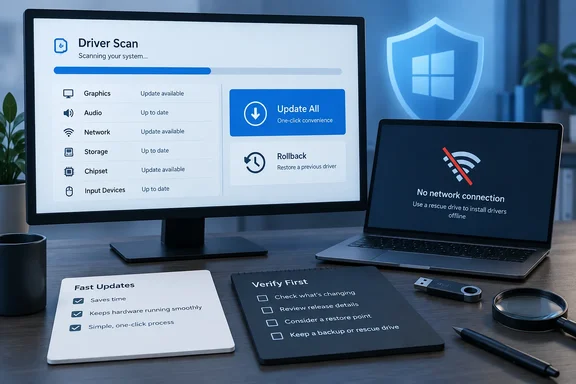
In the review's test, the reviewer removed the XPS 13's Wi-Fi driver. The tool downloaded a 72 MB Intel AX201 package, and the laptop was back online in 4 minutes 12 seconds. That's one test case, not a guaranteed time, but the workflow is practical. Snappy Driver Installer takes a different approach, using a USB-hosted driver database. Windows Update has no equivalent.
Backups and rollback
Before installing, the tool reportedly creates a System Restore point through Volume Shadow Copy, which took about 14 seconds each time. Its Rescue Center also keeps the old driver files (.inf, .sys, .cat). In the review, rolling back an updated Realtek 2.5GbE LAN driver on the desktop took 8.6 seconds, with no reboot.
Quick-fix tools
- Fix No Sound reportedly restored audio on the ThinkPad in 6 seconds.
- Fix Network Failure reset the Winsock catalog and flushed DNS.
- Clean device data: the review uses two names for this tool, "Clean Unplugged Device Data" and "Clean Invalid Device Data". It removed 18 leftover registry entries from old USB devices.
Section summary: The offline rescue and rollback features are the strongest practical reasons to consider the tool, especially for home users with no way to get a driver onto a PC that can't connect.
The downsides the review names
The review is candid about the free edition's drawbacks:
- Bundled offers: the installer includes optional third-party software with the boxes already ticked. Read every installer screen and untick them.
- Ads: the free build shows in-app banners.
- Alarmist labels: ordinary drivers get flagged as "Extremely Outdated" in red. The reviewer says this reads like pressure to update when an update may not be needed. That's a fair point. An old driver that works fine is not a problem to fix.
Where Microsoft's driver rules come in
This is the context the review leaves out, and it matters more in 2026 than it used to.
Windows Update is conservative on purpose. According to Microsoft's support documentation, Windows 11 installs recommended drivers automatically, while optional driver updates are never installed automatically. To see them, go to Settings > Windows Update > Advanced options > Optional updates. If Windows Update can't find a suitable driver, Microsoft tells you to check the hardware maker's website. The "four versus 17" comparison is partly a difference in approach. Windows Update offers what Microsoft and the OEM have validated for your device. A third-party scanner offers whatever newer version it can match.
Kernel driver signing is now enforced. Microsoft's Windows Driver Policy documentation says kernel Code Integrity restricts which kernel-mode drivers can load. With the April 2026 security update, drivers signed under the old, expired cross-signing program are no longer trusted by default. On systems where the policy is enabled and in enforcement mode, only WHCP-certified drivers and an allow-list of widely used legacy drivers will load. Enforcement doesn't start right away. The policy first runs in an audit-only evaluation mode until the PC has 250 hours of active use and three reboots without a violation.
In practice, the review's check that 16 of 17 drivers were WHQL-certified is the most important finding in the whole piece. Unsigned or cross-signed-only drivers from any source can simply fail to load on a current Windows install. If a device stops working after a driver update, Microsoft suggests checking Event Viewer > Applications and Services Logs > Microsoft > Windows > CodeIntegrity > Operational:
- Event ID 3076 means a driver was audited (it would have been blocked under enforcement).
- Event ID 3077 means a driver was blocked.
Microsoft's recommended fix is to check Windows Update's optional driver updates, then the manufacturer's official support page.
A sensible way to use it
If you try Driver Booster 14 Free, a cautious approach looks like this:
- Update Windows first. Move to a supported release. Per Microsoft, Windows 11, version 25H2, also known as the Windows 11 2025 Update, is the latest version of Windows available.
- Check Optional updates in Windows Update before running any third-party scanner.
- Read the installer carefully and untick the bundled offers.
- Update only what's broken or clearly needed. Graphics drivers for gamers and network drivers after a clean install are good examples. Ignore red labels on devices that work fine.
- Keep the restore point and Rescue Center backups on, and test each device after updating.
- On laptops, prefer the OEM's driver for chipset, power and audio. The review's own Intel INF example shows a scanner can offer something newer than what Lenovo validated.
- Check the CodeIntegrity log if hardware stops working after an update.
Bottom line
The review makes a reasonable case that Driver Booster 14 Free turns a slow hunt through OEM support pages into one scan, with good safety nets and a genuinely useful offline network rescue. It also rightly flags the bundled offers, slow free-tier downloads and fear-inducing labels.
Read it with the caveats in mind: it's one test, on OS builds that were out of support when it was published, it includes an affiliate disclosure, and it gives a footprint score with no published measurements. For casual users and gamers who want runtime fixes and easy rollback, it's a reasonable tool to try carefully. For IT admins, the review itself concludes it isn't the right fit: there are no scriptable, portable or ad-free controls. In managed environments, Windows Update, OEM tools and your own driver policies should stay in charge.
References
- IObit Driver Booster 14 Full Review: Does It Actually Make Updating Drivers Easier? - geeky-gadgets.com geeky-gadgets.com · 2026-09-28T07:00:40+00:00
- Driver Booster 14 Launches with New Game DLL Fixer and Expanded 23M+ Driver Database iobit.com
- The Windows Driver Policy | Microsoft Support support.microsoft.com