

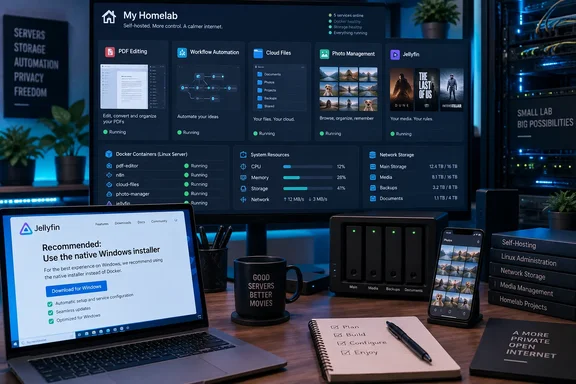
The useful question is which parts of that setup transfer to yours. BentoPDF’s and Jellyfin’s official documentation establishes concrete deployment requirements, including an important Windows limitation: Jellyfin does not support containers hosted on Windows or macOS and recommends native installation instead.
Patel’s savings remain a personal account, without an independently corroborated cost comparison or itemized total. Because he already had Docker running on his hardware, his starting point also differs from that of someone buying a server specifically to cancel subscriptions.
BentoPDF: a replacement for a defined PDF workflow
Patel reports using BentoPDF instead of Adobe Acrobat for merging documents, splitting pages, compression, rotation, and small changes before sharing files. That is a useful, limited replacement claim: it describes the work he actually performs rather than declaring equivalence with Acrobat’s entire feature set.
BentoPDF’s official self-hosting guide confirms that its self-hosted build retains all of its PDF tools, including editing, signing, OCR, and Office conversion. The project recommends the bentopdf-simple image for internal, team, and organizational deployments. “Simple” refers to removing the public website’s marketing interface, not removing PDF functionality.
For someone evaluating it, the practical comparison is therefore document-specific. A tool that handles your recurring merge-and-compress jobs may be sufficient to eliminate a subscription, even without establishing whether it covers every other Acrobat workflow.
Office conversion needs more than a running container
BentoPDF documents a deployment trap that can affect access from another PC on the network. Its LibreOffice-based Office conversion requires the browser’s SharedArrayBuffer capability, which depends on both a secure context and cross-origin isolation.
The official image supplies the required Cross-Origin-Opener-Policy and Cross-Origin-Embedder-Policy headers. However, plain HTTP access through a LAN address does not meet the secure-context requirement. The documentation permits localhost for same-device testing but calls for HTTPS when users connect through a LAN IP address or hostname.
This explains why a container can appear functional locally while Word or Excel conversion hangs or fails from another computer. BentoPDF documents conversion hanging around 55% as one possible symptom. Its browser-console checks are:
console.log(window.crossOriginIsolated);
console.log(typeof SharedArrayBuffer);
The expected results are true and "function". Adding headers alone cannot fix a non-loopback HTTP origin; that connection needs HTTPS.
There is another deployment consideration for administrators seeking an offline tool. BentoPDF’s documentation says advanced processing modules load from a CDN by default, with separate preparation available for air-gapped deployments. Hosting the interface yourself therefore does not automatically make every feature independent of external resources. An isolated deployment needs the processing modules and relevant OCR assets hosted internally as well.
n8n: replacing the automation service you actually use
According to Patel’s XDA account, n8n replaced his use of Zapier-style automation for connecting APIs, responding to webhooks, moving data between services, and running scheduled workflows. He describes greater control over those workflows and avoiding the per-task payments associated with his previous approach.
n8n’s official documentation confirms that it is a workflow automation tool and lists Docker Compose as an installation option. It describes the product as fair-code licensed. That wording is worth preserving: the availability of a self-hosted deployment does not, by itself, establish unrestricted licensing or that every feature and use case is free.
The meaningful comparison is at the workflow level. Patel’s report supports n8n as a candidate for his small automations; it does not establish that an arbitrary Zapier workflow can move unchanged, or that every connected service becomes free when the automation engine runs locally.
For a subscription decision, separate the automation layer from the services it connects. Running the workflow engine yourself addresses one part of the arrangement. Any pricing, access requirements, or limitations imposed by the connected APIs need their own assessment. The account supplies no migration benchmark or operating-cost breakdown that would justify a broader savings claim.
Nextcloud and Immich serve different storage needs
Patel’s account presents Nextcloud and Immich as complementary tools, rather than interchangeable answers to “cloud storage.”
According to XDA, his Nextcloud installation provides a central location for documents and work files, browser access, and folder synchronization across devices. The appeal is control over where those files reside and how much storage he makes available.
His Immich installation has a narrower role. Patel reports backing up photos from his phone, retaining originals on his own storage, and browsing the collection through web and mobile apps. In his assessment, that provides a more familiar photo-library experience than browsing folders of uploaded images.
That separation is useful when deciding what to replace:
- Nextcloud addresses Patel’s need for general-purpose file access and synchronized folders.
- Immich addresses his need for phone-photo backup and a dedicated browsing experience.
- Using both reflects two distinct workflows, rather than evidence that everyone needs two storage applications.
The account does not identify the paid storage plans he cancelled, quantify his libraries, or document a tested recovery process. These remain XDA-reported uses, not independently verified migration results.
The practical inference is that choosing storage capacity becomes your responsibility rather than a provider’s subscription-tier decision. Before treating either application as a complete replacement, distinguish access to the library from recovery of the library. Patel’s ability to manage his own backups is a statement about control; it is not evidence that a particular backup or recovery design has been validated.
For readers with valuable documents or irreplaceable photos, the missing recovery detail matters more than the appearance of the web interface. This account offers candidates to evaluate, not a documented procedure for safely retiring the previous storage service.
Jellyfin: your existing media, with a clear Windows boundary
According to XDA, Patel uses Jellyfin to organize movies, shows, and other video files he already owns into a streaming-style library accessible across his devices. His report describes replacing the way he accesses that collection. It does not demonstrate a replacement for the catalogue supplied by a paid streaming subscription.
Jellyfin’s official container documentation adds several details that materially affect the deployment decision.
First, its Windows and macOS warning is broader than a single missing feature. The project says container deployments on those hosts are unsupported and recommends installing Jellyfin natively instead. Hardware-accelerated transcoding is among the features known to be broken on non-Linux container hosts; scanning on macOS in Docker is another documented issue.
For a Windows user, this separates two decisions: choosing Jellyfin and choosing Docker. You do not need to reproduce the container approach to choose the media server. The project’s documented recommendation for a Windows host is the native installation.
Storage and updates need explicit choices
For supported container deployments, Jellyfin documents persistent storage for configuration and cache, with media folders mapped into the container. Its examples allow media to be mounted read-only, which is a useful option when Jellyfin does not need permission to modify the collection.
These mappings make the application’s storage requirements explicit. Configuration, cache, and media are separate parts of the deployment; downloading an image is only the beginning of the setup.
The official image also offers several update-tracking choices. The latest tag follows the newest stable release, including major and minor version changes. Major-version, minor-version, and exact-release tags provide progressively narrower tracking.
For administrators, that creates a practical choice between following new releases broadly and selecting a more constrained release line. Jellyfin’s documentation specifically warns that restoring a previous version after Podman automatic updates requires a backup. An update policy therefore needs to account for recovery, not merely image downloads.
Hardware acceleration adds another requirement: the container needs access to the render device, and vendor-specific configuration may also be necessary. The documentation does not support treating GPU access as something automatically delivered by the basic container setup.
What this five-application setup actually demonstrates
The strongest lesson from Patel’s account is to compare subscriptions with your recurring tasks, rather than with the full feature list of another product. Basic PDF operations, a few automation workflows, synchronized documents, a phone-photo library, and an existing video collection are concrete workloads that can be evaluated separately.
The official documentation also shows why the deployment choice matters. BentoPDF needs HTTPS for network-based Office conversion and additional preparation for fully offline operation. Jellyfin needs deliberate storage mappings and update choices, and its supported container path excludes Windows and macOS hosts.
For someone already operating suitable hardware, these applications provide specific alternatives worth assessing. For a Windows-only setup, start by respecting Jellyfin’s native-installation recommendation. For documents and photos, establish how recovery will work before cancelling the service that currently holds the dependable copy.
References
- 5 Docker containers replaced my most expensive subscriptions XDA · 2026-09-20T18:00:17+00:00
- Container | Jellyfin jellyfin.org
- Self-Hosting Guide | BentoPDF Docs bentopdf.com