

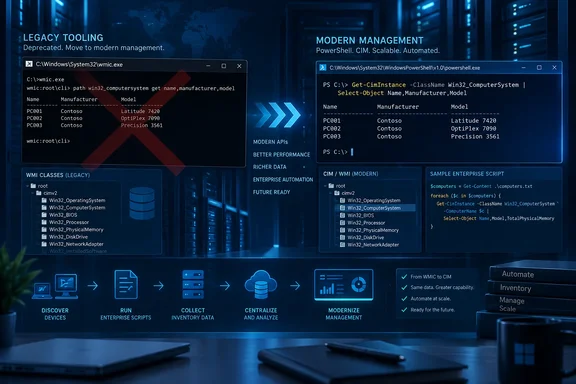
wmic.exe will fail on Windows 11 24H2, 25H2, and 26H1 unless administrators intervene. But XDA’s description of the tool being “gone for good” needs an important correction: Microsoft has removed WMIC as an inbox component and as a Feature on Demand, while also publishing a temporary downloadable package that can restore it for legacy workloads.
Microsoft’s own removal guidance, revised in August 2026, says the change applies to currently supported Windows 11 versions, not to Windows Management Instrumentation itself. WMI remains in Windows and remains accessible through PowerShell, APIs, and other management tools. The broken dependency is the old wmic.exe command-line wrapper—a distinction that matters enormously when an inventory agent, login script, installer, or monitoring check suddenly returns “‘wmic’ is not recognized.”
The immediate risk is not that Windows has lost its management interfaces. It is that organizations still treating a two-decade-old command syntax as an operating-system guarantee are now discovering that Microsoft meant its long-running deprecation notices.
KB5120998 marked the final removal phase
Microsoft announced the removal in the August 27, 2026 preview cumulative update, KB5120998. The update applies to Windows 11 versions 24H2 and 25H2, carrying builds 26100.9278 and 26200.9278 respectively. Its release notes say that WMIC is no longer included, is already absent from new installations of those releases, and can no longer be installed through the Optional Features interface or DISM’s normal Feature on Demand route.
Microsoft Learn’s list of removed Windows client features is more direct: WMIC was removed from Windows 11 version 24H2 and later as of August 2026. Code that depends on it will not function in releases where it has been removed or in later releases.
This did not begin with KB5120998. Microsoft deprecated WMIC for Windows Server in 2016 and for Windows 10 in 2021. In Windows 11 22H2, the utility was still installed and enabled by default. By 2024, Microsoft had stopped preinstalling it on newer Windows 11 releases while retaining it as a Feature on Demand. Windows 11 25H2 then uninstalled it during an upgrade if it was already present, although administrators could reinstall it.
The August 2026 change closes that last supported reinstall path for Windows 11. For an estate moving from 23H2 or an older image to 24H2 or 25H2, that is the inflection point: scripts that happened to survive an earlier feature update because WMIC could be re-added no longer have that safety net.
This is a Windows 11 change, not the death of WMI
The most damaging misunderstanding around this retirement is the conflation of WMIC with WMI. WMIC is a legacy executable and interactive command shell that turns WMI queries into textual output. WMI is the underlying Windows management infrastructure that exposes classes such as Win32_OperatingSystem, Win32_Process, Win32_ComputerSystem, and Win32_LogicalDisk.
Microsoft’s documentation is explicit that only the command-line utility has been removed. PowerShell’s CIM cmdlets, including Get-CimInstance, Invoke-CimMethod, New-CimSession, and Remove-CimInstance, continue to query and manage the same underlying WMI data. Applications using .NET’s System.Management, COM interfaces, or direct WMI calls also continue to work.
For a simple inventory task, the mechanical migration is straightforward:
# Legacy WMIC
wmic path Win32_Process get Name

# PowerShell replacement
Get-CimInstance Win32_Process | Select-Object Name
The change is less trivial when the old command is buried inside a .cmd file, parsed with for /f, and expected to return WMIC’s particular column spacing, headers, line endings, error codes, or locale-sensitive strings. WMIC’s output was designed for humans at a console, yet many scripts treated it as a stable machine-readable interface. PowerShell returns objects before formatting, which is a far better automation model—but it means a conversion should be tested as a rewrite, not as a global search-and-replace.
The transition risk is buried in old batch files and third-party tools
Administrators should not limit their search to files explicitly named after WMI. The problem surfaces anywhere a task shells out to wmic, including deployment packages, endpoint health checks, hardware inventory collectors, warranty lookups, application-detection rules, repair scripts, and vendor support bundles.
A useful first pass is to search source repositories, configuration-management content, logon scripts, scheduled tasks, software packaging scripts, and endpoint-management remediation scripts for the strings wmic and wmic.exe. Search for the executable name as well as the command itself; many tools call %SystemRoot%\System32\wbem\wmic.exe directly.
The most common legacy patterns include:
- Scripts that query
Win32_OperatingSystemfor version, build, serial, or boot-time information. - Hardware-discovery routines that inspect BIOS, baseboard, disk, network-adapter, or battery classes.
- Scripts that query or terminate processes through the
processalias. - Software inventory and uninstall logic that relies on
Win32_Product, a class administrators should avoid because querying it can trigger MSI consistency checks and unexpected repairs. - Remote-management routines that depend on WMIC’s
/node:syntax and DCOM-era connection behavior.
PowerShell’s CIM cmdlets usually provide a clean replacement, but remote execution deserves special attention. Get-CimInstance -ComputerName commonly uses WS-Man for a temporary remote connection, while local operations use COM. Existing WMIC scripts may have depended on DCOM connectivity, firewall exceptions, permissions, and authentication behavior that do not map one-for-one to a newer CIM session. Microsoft’s own PowerShell documentation notes that a remote target does not need PowerShell installed for CIM cmdlets to work, but it must have WMI running and the account needs appropriate administrative rights.
That means the safe migration process is: identify the WMI class and method the script requires, reproduce the query locally with PowerShell, then validate remote access, credentials, firewall rules, output parsing, and downstream consumption separately. A script that works interactively in an administrator’s PowerShell window is not proof that it will work under a service account at 2 a.m.
Microsoft’s temporary WMIC package changes the practical answer
Microsoft has not left every existing dependency without an escape hatch. Its WMIC removal article provides a downloadable wmic_dlc.zip package and installation script intended to restore the executable to C:\Windows\System32\wbem and register the necessary aliases.
That package does not reverse the platform decision. Microsoft describes it as a temporary mitigation, warns that it is not a secure long-term solution, and tells organizations to use it only at their discretion while moving away from WMIC. It is therefore a break-glass compatibility measure for a business-critical dependency—not a sound basis for standard imaging, deployment baselines, or a decision to defer script remediation indefinitely.
This is where the “gone for good” framing obscures the operational reality. WMIC is gone from the supported Windows 11 image and no longer available through Features on Demand. But Microsoft itself supplies a manual restoration path for organizations that need time to migrate. The distinction is meaningful: support teams can restore a failed line-of-business workflow while engineering teams convert it, but they should not portray that workaround as continued product support or assume it will survive every future Windows servicing change.
Microsoft also clarified on August 26 that the removal applies only to supported versions of Windows 11. Windows Server 2025 was removed from the article’s “Applies to” list after earlier documentation created ambiguity. Admins should therefore avoid assuming that a Windows 11 rollout result predicts the state of every Server release, LTSC image, or older Windows client still in their fleet.
Removing WMIC does not remove WMI abuse paths
XDA is right that WMIC has been used in attacker tradecraft, but the security argument needs precision. Removing wmic.exe narrows one familiar living-off-the-land tool, particularly in environments where attackers or commodity malware call it directly. It may also eliminate legacy code paths that Microsoft no longer wants to carry.
It does not remove WMI’s ability to query systems, start processes, interact with remote hosts, or support administration. Those capabilities remain available through PowerShell, WMI APIs, other scripting languages, and management products. An environment that treats the disappearance of wmic.exe as a broad defense against WMI-based activity will gain a false sense of security.
The lasting security benefit is more mundane: reducing reliance on an obsolete utility and bringing administrative automation into tools with current documentation, object-based output, clearer remoting models, and a more maintainable scripting surface. Defenders still need logging, least-privilege administration, PowerShell security controls, endpoint telemetry, and scrutiny of unusual WMI activity.
Treat the removal as an application-compatibility deadline
For home users, the change will usually pass unnoticed. For IT departments, the action item is not to hunt for a way to put an optional feature back; it is to find every unsupported dependency before a Windows 11 rollout exposes it in production.
Start with representative 24H2, 25H2, and 26H1 devices where wmic.exe is absent. Run deployment sequences, scheduled jobs, self-service repair actions, asset-inventory scans, support scripts, and vendor agents under their real service accounts. Record the exact WMI class, method, or property each failure needs, then replace the wrapper rather than attempting to preserve its old text output.
Microsoft gave enterprises years of warning, but the Feature on Demand option allowed many organizations to postpone the work. That option is now gone on current Windows 11. The practical consequence is simple: every remaining wmic call is technical debt with a known failure mode, and Windows 11 upgrades are now capable of collecting it.
Update: Removal reportedly reaches September security servicing (September 19, 2026)
TechJuice reports that WMIC’s removal is now being delivered through the September 2026 Windows 11 security update for versions 24H2 and 25H2, moving the change beyond the August preview-update phase.
If confirmed across affected devices, administrators should treat September servicing as the point at which remaining WMIC dependencies can begin failing during routine patch deployment—not only during feature upgrades or optional preview-update testing.
The practical response remains to validate critical scheduled tasks, deployment workflows, monitoring agents, and vendor scripts after monthly updates, particularly where legacy automation invokes wmic.exe indirectly.
References
- Microsoft Removes WMIC After 25 Years & Scripts Will Break - TechJuice TechJuice · 2026-09-19T10:56:37+00:00
- Microsoft deleted a Windows command that decades of scripts still depend on, and it's gone for good - XDA XDA · 2026-09-19T00:00:17+00:00