

Microsoft Ties KB5124008 and KB5124012 to Always On VPN Failures
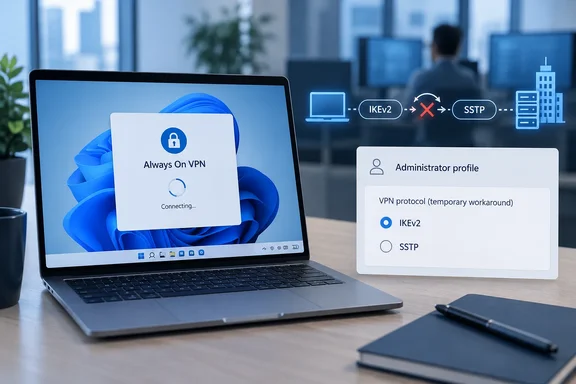
BleepingComputer first reported the service alert, which Microsoft MVP Susan Bradley also shared. Microsoft says some customers may have trouble reaching their organization's network through Always On VPN after installing the September 2026 updates. In Microsoft's words, the issue happens "when the VPN is configured to automatically try another connection method if the initial connection fails." Its example is automatic protocol selection with IKEv2 and SSTP.
Microsoft describes two symptoms. The connection can stay stuck at "Connecting" or keep retrying without ever succeeding. Later attempts can also show the error "The specified port is already in use."
Microsoft lists these affected releases and originating updates:
| Windows 11 version | Originating update |
|---|---|
| Windows 11, version 26H1 | KB5124012 |
| Windows 11, version 25H2 | KB5124008 |
| Windows 11, version 24H2 | KB5124008 |
The table only lists Windows 11. Always On VPN also runs on Windows 10 and Windows Server, but this alert names none of their updates, so nobody should assume every Always On VPN deployment is affected. Microsoft's release-health dashboard lists KB5124008 as OS Build 26100.9445, released September 8, 2026. Other reporting gives the 25H2 build as 26200.9445.
Automatic IKEv2-to-SSTP Fallback Is Where the Break Happens
Always On VPN replaced Microsoft's older DirectAccess. It works on domain-joined, non-domain-joined and Microsoft Entra ID–joined devices, and it opens a tunnel to the corporate network automatically whenever the device gets online. Admins can choose which apps and services use the tunnel. It supports IKEv2 and SSTP, and many organizations set profiles to "Automatic" so a client that can't use one protocol quietly tries the other.
That fallback is the setting Microsoft's alert singles out. One administrator on a Microsoft Q&A thread described it in detail. The setup was Windows 11 24H2 with KB5124008, RRAS and NPS on Windows Server 2019, and a user tunnel deployed through Intune using PEAP/EAP-TLS. That admin found IKEv2 with certificate authentication still worked end to end after the update, and so did an SSTP-only profile. What failed was the automatic switch to SSTP after an IKEv2 attempt failed.
The same admin traced it through RasClient events. Before the update, the client logged an IKEv2 attempt, then SSTP, then a successful connection, all within about a second. After the update, the SSTP attempt never happened and the client reported "connected" with no tunnel. The admin's conclusion was that any organization quietly relying on the SSTP fallback would lose VPN access after KB5124008.
This also explains why the break seemed random. If a client's IKEv2 connection works, as it will on networks that don't block it, the client never needs the fallback and never hits the bug. Clients whose IKEv2 attempt fails, for example on networks that block IPsec, used to drop to SSTP without anyone noticing. After the update they stop connecting. That link between the two is WindowsForum's inference from Microsoft's description and the admin's logs. Microsoft hasn't published a root cause.
A second admin on the thread saw a related pattern. When the device tunnel and the user tunnel both used IKEv2, whichever connected second reported that the port was already in use. That admin fixed it by keeping the device tunnel on IKEv2 and moving the user tunnel to only sstp. That's one environment, but it matches the port error Microsoft quotes.
Early KB5124008 Reports Blamed Certificates
The earliest detailed report came on September 9. An administrator described Windows 11 24H2 and 25H2 clients using certificate authentication, RRAS and NPS on Windows Server 2019, and an Intune-deployed profile. Always On VPN worked before KB5124008, failed after it, and uninstalling the update and rebooting restores the tunnel on multiple machines, which is why the reporter halted the rollout.
The first explanations focused on certificates. An independent advisor on the thread said the pattern strongly indicates that the update has altered the networking stack or IPsec certificate handling and recommended blocking KB5124008 until a hotfix shipped. At least one outside write-up claimed something in the update was breaking the IKEv2 machine-certificate validation chain.
Microsoft's alert doesn't say that. It frames the problem around fallback between connection methods, and the admin who separated the protocols found certificate authentication over IKEv2 still worked. Early coverage also noted that Microsoft's KB5124008 support article said the company was not currently aware of any issues with this update. The new alert replaces that position for Always On VPN, and it replaces the certificate theory as the working explanation too.
This changes what admins should do. Uninstalling a security update is a blunt fix. KB5124008 is a mandatory cumulative security update, and holding it back on VPN clients means giving up its protections. Microsoft's mitigation lets affected organizations keep the patch installed.
Choosing Between SSTP-Only and IKEv2-Only Profiles for Always On VPN
Microsoft's workaround is one change: move the Always On VPN profile from automatic protocol selection to "a single protocol, either SSTP only or IKEv2 only, depending on their environment and configuration." Microsoft doesn't say which to pick. It tells organizations to decide based on their environment, security and deployment requirements.
Here's what matters for that decision, based on Microsoft's alert and the admin reports:
- Clients that were actually connecting over SSTP through the fallback are the ones most likely to be down right now. An SSTP-only profile keeps them on the path they were already using.
- Clients that reliably connect over IKEv2 can move to IKEv2-only. The downside is losing the automatic safety net on networks where IKEv2 fails. The Q&A admin said fixing whatever was breaking the IKEv2 connection also restored service.
- Deployments with both a device tunnel and a user tunnel should check what protocol each one uses. One admin's fix was to split them, with the device tunnel on IKEv2 and the user tunnel on SSTP only.
The change happens wherever the profile is managed. In the reported cases that was Intune, and one respondent used an open-source profile-management tool called DPC. Microsoft's alert gives no step-by-step editing instructions or policy names, and exact steps depend on how each organization builds and deploys its profiles. As with any change to remote access, it makes sense to test the single-protocol profile on a small group of devices before pushing it everywhere, because a bad profile can cut off the users you'd need to reach to fix it.
After the change, the error should stop appearing. For diagnosis, the RasClient log in Event Viewer (Applications and Services Logs > Microsoft > Windows > RasClient) is where the Q&A admin tracked each protocol attempt. An advisor on the thread also suggested collecting NPS server logs for support cases.
KB5129195 Is Not a Documented Always On VPN Fix
Microsoft released out-of-band update KB5129195 on September 14. According to release health, it fixed the September Remote Desktop Services failures and the Hyper-V host-folder sharing problem, and it partly fixed a USB audio issue. KB5129195 is cumulative, so some admins hoped it would fix VPN too.
The reports conflict. One admin wrote that after KB5124008 the user tunnel showed a "port is already opened" error, and installing the subsequent out-of-band update KB5129195 resolved this issue, with both device and user tunnels working again on 24H2 and 25H2. Another admin using IKEv2 with SSTP failover and machine and user certificates said the opposite. According to that report, KB5124008, KB5129195 and hotpatch KB5129241 all broke Always On VPN. Only uninstalling all three fixed it, after the VPN went down three times across more than 100 laptops.
Microsoft's alert doesn't list KB5129195 as a fix, and it still describes the problem as unresolved with a permanent fix in progress. Mixed results on the Q&A thread fit the fallback explanation: a later update might seem to help on a network where IKEv2 happens to work, then fail on the next network where the client needs SSTP. For now, treat KB5129195 and later cumulative updates as possibly still affected until Microsoft says otherwise.
Always On VPN Joins a Crowded September 2026 Known-Issues List
The VPN bug is one of several problems from this month's updates. Microsoft's release-health page for Windows 11 24H2 lists these separate issues from KB5124008:
- Remote Desktop Services instability is marked Resolved by KB5129195.
- The Hyper-V Plan9 host-folder sharing failure that affected WSL is Resolved by the same update.
- USB Audio Class 1.0 devices failing with Code 10 are Mitigated, with the multichannel symptoms fixed in KB5129195.
- Domain-joined devices protected by Credential Guard losing their domain trust relationship are Mitigated. The workaround is to disable Machine Identity Isolation where domain controllers don't run Windows Server 2025 Domain Functional Level.
BleepingComputer also reports that Microsoft is working on a bug that can stop File History backups. None of these issues causes the VPN failure or shares its fix. They matter because an admin troubleshooting a broken laptop this month could be looking at more than one September regression.
What This Means for You
If your Always On VPN profiles use automatic protocol selection on Windows 11 24H2, 25H2 or 26H1, check them now. Profiles already set to one protocol match none of the scenarios Microsoft described. Home users without Always On VPN aren't affected. Windows 10 and Windows Server clients aren't on Microsoft's affected list for this issue.
- Check each Always On VPN profile, including device and user tunnels separately, for automatic IKEv2/SSTP protocol selection.
- Watch for connections stuck at "Connecting" or showing "The specified port is already in use" on devices with KB5124008 or KB5124012 installed.
- Use Microsoft's mitigation: switch affected profiles to SSTP-only or IKEv2-only, choosing whichever path your clients can reliably use, and test on a small group first.
- Keep KB5124008 installed where the profile change works. Uninstalling it fixed the problem for some admins, but Microsoft recommends the protocol change.
- Don't count on KB5129195 to fix the VPN issue. Admin reports conflict, and Microsoft hasn't named it as a fix.
- Use the RasClient event log to confirm which protocol each connection attempt used before and after the change.
Microsoft now says what earlier reports didn't: the September updates break automatic fallback between VPN protocols, not VPN connectivity as a whole. That gives admins a targeted mitigation that keeps the security patch in place, though it costs them the automatic fallback. Profiles moved to a single protocol should stay that way until Microsoft publishes the permanent fix it says is in progress and lists it in release health. After that, admins can decide whether to turn automatic protocol selection back on.
References
- Microsoft: September Windows updates break Always On VPN connections BleepingComputer · 2026-09-23T07:18:13-04:00
- Always On VPN fails after installing KB5124008 on Windows 11 - Microsoft Q&A learn.microsoft.com
- Windows 11, version 24H2 known issues and notifications | Microsoft Learn learn.microsoft.com