

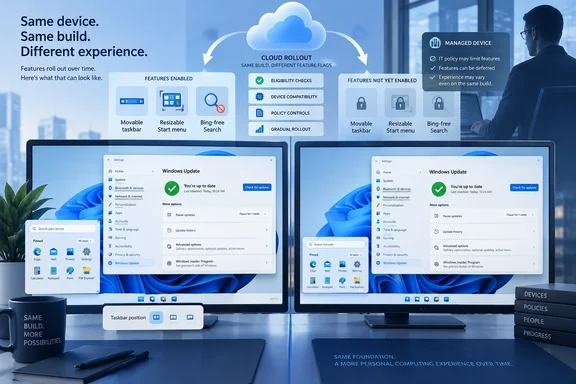
Marcus Ash, who leads Windows and Devices Design & Research at Microsoft, addressed that gap this week in a post highlighted by Windows Latest. His recommended remedy is familiar: open Settings > Windows Update and enable Get the latest updates as soon as they’re available. But the setting is a prioritization mechanism, not a master “turn on every hidden feature” switch. Microsoft’s own support documentation says the toggle gives a device earlier access only when an update or change is available for that device.
That distinction is the missing piece in Microsoft’s consumer-facing update story. The company has trained users to see Patch Tuesday as a single monthly delivery date, while it increasingly uses the package merely as a vehicle for features that may appear later, sometimes through cloud-delivered configuration changes. A fully patched Windows 11 PC can therefore be secure and current on build number yet look unchanged from one that received the same update days or weeks earlier.
For people waiting on the September changes, turning on the toggle can improve their position in the queue. It does not guarantee immediate access, and it does not erase Microsoft’s compatibility gates.
KB5124008 carries the code, not necessarily the experience
The September 8, 2026 Windows 11 security update, KB5124008, advances Windows 11 24H2 to build 26100.9445 and Windows 11 25H2 to build 26200.9445. Independent reporting from Pureinfotech and Windows Latest identifies the release as the delivery vehicle for several conspicuous changes: taskbar positioning, smaller taskbar options, new Start menu sizing controls, and additional Windows Search controls, including the ability to suppress web and Microsoft Store suggestions.
Those features are meaningful because they address long-running complaints about Windows 11’s more rigid shell. The taskbar can again be placed at the top, left, right, or bottom of the screen through Settings; Start can use different size modes; and Search is moving toward a cleaner local-results experience for users who do not want Bing results mixed into an app or file lookup.
But Microsoft’s release process separates installation from enablement. A cumulative update can install the binaries and interface assets. Controlled feature rollout, often abbreviated CFR, then determines whether a feature is enabled on the device. The result is a frustrating but intentional state: two PCs on the same Windows version and identical OS build can expose different Windows features.
Microsoft has formally described this arrangement for years. Its support guidance says Windows devices receive new functionality at different times because non-security changes can be delivered through several servicing technologies, including controlled feature rollout. The company also says the configuration changes can be enabled through the cloud and take only seconds to install. In other words, the later arrival often is not another conventional download that will be obvious in Windows Update history.
That is why repeatedly pressing Check for updates frequently changes nothing. It can retrieve a package offered to the machine, but it cannot compel Microsoft to declare an unreleased or withheld configuration safe for that machine.
The early-access switch is a queue preference
Ash’s advice is technically sound, but its practical limits need to be stated plainly. Enabling Get the latest updates as soon as they’re available tells Windows Update that the user is willing to receive optional non-security improvements, feature changes, and fixes earlier than the normal rollout population. It does not mean “receive every feature announced for this month immediately.”
Microsoft’s support page is unusually explicit on this point. The setting prioritizes a device for the latest available improvements “when they’re ready for your device.” That final qualification matters. It leaves Microsoft room to withhold a feature because of hardware, a driver, a region, a configuration, telemetry from earlier rollout rings, or a problem the company has not yet publicly documented.
The setting also has no bearing on regular security patching. Devices receive monthly security updates whether the option is enabled or disabled. Users should not turn it on in the mistaken belief that it makes a PC safer in the Patch Tuesday sense; it changes the pace of non-security innovation, which can also mean more restarts and earlier exposure to regressions.
This is the part of Ash’s response that only half solves the underlying complaint. It explains why the wait occurs and gives enthusiasts a way to be considered earlier. It does not give a date, a rollout percentage, a list of excluded hardware, or a clear way to tell whether a particular feature has been withheld for a known compatibility reason rather than simply being held for a later wave.
For a consumer release whose headline features are visual and easily noticed, that omission is especially aggravating. Microsoft can accurately say a feature is “rolling out” while a large share of PCs remain unable to see or use it. A Windows Update page that reports “You’re up to date” reinforces the opposite impression.
Managed PCs may be deliberately held back
The consumer setting is also not the whole story for businesses. Microsoft documents a separate layer called temporary enterprise feature control. Some Windows 11 features introduced through monthly servicing are intentionally disabled by default on managed devices because they may alter user workflows or require IT preparation.
A device is generally considered managed when update behavior is controlled through Windows Update policies, Microsoft Intune, Windows Server Update Services, or Configuration Manager. On those systems, new features behind temporary enterprise control can remain off until the organization installs the relevant annual Windows feature update or an administrator explicitly enables Microsoft’s policy for serviced features.
That makes the advice to flip the Windows Update toggle incomplete for work PCs. The setting itself can be managed by an administrator through the AllowOptionalContent client policy. On an Intune- or WSUS-managed fleet, an employee may not see the switch at all, may be unable to change it, or may still be blocked from the new interface by enterprise feature controls.
Administrators should therefore avoid treating the September changes as simple client-side customization. First confirm which Windows version and build the fleet has received, then check the KB article for features behind enterprise control. If the organization intends to enable those features before the next annual upgrade, test the relevant Windows Update policy in a pilot ring rather than inviting users to chase the consumer toggle.
Microsoft’s approach has a defensible enterprise rationale. A newly enabled Start layout, taskbar behavior, Search control, or AI feature can create help-desk load, break training material, affect kiosk configurations, or collide with existing policy. The trouble is that consumer and business Windows increasingly use overlapping servicing machinery while presenting very different expectations to the person sitting at the PC.
Early access now carries a real operational trade-off
There is another reason the “latest updates” setting should be considered a choice, not a default recommendation for every machine: KB5124008 has already attracted reports of post-update problems.
Microsoft and independent outlets have acknowledged issues affecting some USB audio devices after September’s Windows security updates. BleepingComputer also reported domain trust problems on some Windows 11 systems following KB5124008, while Citrix has documented Remote Desktop session hangs and black-screen login problems affecting some virtual desktop environments after the September rollout. Microsoft subsequently issued out-of-band updates for some of the Remote Desktop Services failures.
Those incidents do not prove that the new taskbar or Start controls caused the problems; the September package contains security, servicing, and platform changes beyond the consumer-facing interface additions. They do illustrate why Microsoft staggers feature exposure in the first place—and why getting earlier access is not automatically the right operational posture.
For a home enthusiast who wants the movable taskbar or Bing-free Search immediately, the toggle is reasonable after installing the security update and ensuring backups are current. For a machine that is critical for work, testing, remote access, audio production, or managed deployment, there is a better rule: install the security release according to the organization’s security timetable, but let visible feature changes arrive through validated rings.
The confusion will persist until Microsoft makes rollout state legible. Windows Update should say whether a requested feature is installed, pending a controlled rollout, blocked by device eligibility, or disabled by organizational policy. Until then, “up to date” remains an incomplete status message—and the September 2026 Windows 11 update is a clear example of why.
Update: Bing toggle also removes Search-panel Copilot shortcut (September 25, 2026)
According to How-To Geek’s hands-on testing, the new Search controls are split into separate Web Searches and Microsoft Store toggles under Settings > Privacy & security > Search, allowing users to suppress either source independently rather than applying one broad filter.
The outlet also reports that disabling web results removes the Copilot entry from the Windows Search panel. Users who rely on that particular shortcut will need to launch Copilot another way, although the change does not remove Copilot from Windows itself.
Search history is controlled separately, How-To Geek notes. Turning off web results may therefore leave prior searches visible on the Search home screen until history is disabled as well.
The report describes local file and app searching as noticeably cleaner and faster after web suggestions are switched off, but it does not provide benchmark data. That makes the performance claim directional rather than conclusive; the practical benefit is primarily that local results are no longer competing with Bing and Store suggestions.
Update: ViVeTool can force-enable the pending Start customization controls (September 25, 2026)
MakeUseOf reports that users who have installed KB5124008 but remain outside Microsoft’s controlled rollout can manually enable the new Start menu customization settings with ViVeTool, using feature ID 61754985. The command-line utility changes Windows FeatureManager configuration states rather than downloading missing feature code.
That provides an unofficial route around the rollout queue for PCs where the September package has already staged the feature but Microsoft has not enabled it. A restart is generally required before the change appears.
The workaround is not equivalent to official availability. MakeUseOf cautions that forcing dormant or experimental Windows features on can introduce instability, and recommends enabling one feature at a time, creating a restore point, and using ViVeTool’s reset option if problems emerge. Managed devices should not use it without IT approval, since it can bypass the testing and policy controls intended to govern feature exposure.
References
- Windows finally let me rip Bing out of my desktop. The speed boost is undeniable How-To Geek · 2026-09-25T17:00:13+00:00