

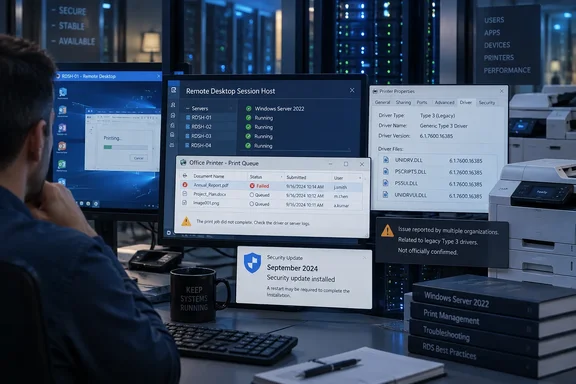
The narrow but important finding is that KB5129237 resolved Microsoft’s acknowledged Remote Desktop Services instability, but it has not resolved the reported print-driver behavior in the affected environment. Microsoft’s current release notes for both Server 2022 updates document RDS, WSUS reporting, and USB Audio Class 1.0 issues, but list no known problem involving printing, Unidrv, Pscript, Type 3 drivers, or shared printers.
That leaves IT teams with a familiar Patch Tuesday problem: a Microsoft update is necessary to address security flaws and, in this case, an RDS regression serious enough to require an emergency release, while a separate printing complaint remains outside Microsoft’s documented support path.
The report points to Windows shared driver components
The report originated in the r/sysadmin Reddit community and describes four Windows Server 2022 version 21H2 Remote Desktop Session Host machines. Each had KB5122882 installed and later received KB5129237. The administrator identified changes to five files in C:\Windows\System32\spool\DRIVERS\x64\3\:
PS5UI.DLLPSCRIPT5.DLLUNIDRV.DLLUNIDRVUI.DLLUNIRES.DLL
Those filenames matter because they are not vendor-specific HP, Adobe, or Dymo binaries. Microsoft documents Unidrv as a shared Windows print-driver framework: unidrv.dll renders print data for the spooler, while unidrvui.dll supplies common interface code for supported printers. A defect in one shared component can therefore affect different manufacturers’ drivers that depend on the same framework.
According to the Reddit report, HP Universal Printing PCL 6 version 8.2.0, Adobe PDF Converter, and a Dymo LabelWriter 450 Turbo were affected. All were Type 3, or v3, user-mode drivers. That is a key limitation on the evidence: it does not establish that all Windows printing, all HP drivers, or all print servers are broken. It does make legacy driver estates and RDS environments the first place administrators should look.
The most visible failure appeared when a 32-bit application printed through splwow64.exe, Windows’ compatibility process for 32-bit applications on 64-bit systems. The reported error said the process could not find RtlLogUnexpectedCodepath in UNIDRVUI.DLL. Separately, a client trying to connect to the shared Dymo printer reportedly received Windows error 0x00000006.
Neither symptom has been independently reproduced in public reporting so far. Neowin’s story is based on the same Reddit post, rather than a separately reported incident. A commenter on that discussion also described similar Dymo Type 3-driver behavior when a Windows 10 PC connected to a printer shared from a fully patched Windows 11 PC, but that observation remains unverified and should not be treated as evidence of a broader Windows 10 or Windows 11 defect.
KB5129237 fixed RDS, not the reported printing failure
Microsoft released KB5129237 for Windows Server 2022 on September 14, six days after KB5122882. It takes Server 2022 to OS build 20348.5631, replacing the September 8 build 20348.5622. Microsoft says the out-of-band package fixes an RDS issue that could cause RDP connection and sign-in failures, unresponsive servers during Remote Desktop configuration, and hangs in tools including MMC, RDS Licensing Diagnoser, File Explorer, and Windows Update.
That fix is real and documented. Citrix independently listed KB5122882 among the September Windows updates associated with RDS connection hangs in Virtual Delivery Agent deployments, and pointed customers to KB5129237 as the Server 2022 remedy.
But the printing report makes clear why “install the OOB update” should not become a blanket closure note in change-management tickets. The administrator reporting the issue says KB5129237 was already installed when the print failures persisted. Microsoft’s own KB5129237 notes describe it as cumulative, but only name the RDS and multichannel USB audio fixes. There is no indication in the release notes that Microsoft intended the OOB package to repair printing.
For teams that paused KB5122882 because of RDS, KB5129237 remains the supported path for the RDS issue. For teams already running KB5129237, its presence should not be used as proof that Type 3 print workflows have been validated.
Replacing old DLLs is evidence, not a fleet fix
The reporting administrator restored pre-September copies of UNIDRV.DLL, UNIDRVUI.DLL, and UNIRES.DLL from backup. HP Universal Printing PCL 6 reportedly began working again afterward. The post also notes that the affected UNIDRVUI.DLL was larger than the pre-update version, comparing 1,328 KB after the update with 1,220 KB before it.
That is useful diagnostic evidence. It strengthens the theory that the break lies in Windows’ shared print framework instead of a bad update from HP alone. It is not, however, a supported remediation for an enterprise fleet.
Mixing older print-framework files into an otherwise current cumulative-update installation can complicate future servicing, make troubleshooting harder, and potentially restore code Microsoft replaced for security or reliability reasons. The HP result is best read as an isolation test: it narrows the suspect component set. It does not establish which binary change is faulty, whether every affected driver is repaired, or whether the workaround is safe across reboots, driver updates, print-server failover, and later cumulative updates.
The same report found that Adobe’s converter no longer threw the entry-point error after the older files were restored, but its print dialog still showed disabled controls. That is an especially important warning against treating the file swap as a complete solution. It suggests that even within the one reported environment, different driver packages may fail at different points in the stack.
What Server 2022 administrators should test now
Organizations with Server 2022 print servers or RDS hosts should not assume they are affected, but they should test the configurations that most closely match the reported conditions before expanding September patch deployment. The priority is older Type 3 driver usage, shared printers, and applications that still run as 32-bit processes inside Remote Desktop sessions.
A practical validation pass should include the following:
- Confirm whether the server is on build 20348.5622 with KB5122882 or build 20348.5631 with KB5129237, because the latter addresses the separate RDS defect but has been reported not to fix this printing symptom.
- Print from a representative 32-bit business application in an RDS session, rather than testing only a modern 64-bit desktop application directly on the server.
- Test fresh connections to shared printers from a clean client or a client where the vendor driver package has been fully removed, since the Dymo failure was reportedly observed even after removal and reinstallation.
- Inventory print queues using Type 3 user-mode drivers and identify queues built on Unidrv or Pscript components, including HP Universal Printing PCL 6, Adobe PDF workflows, and older label-printer packages.
- Capture the exact dialog text, Windows event logs, driver versions, and versions of the five shared DLLs before attempting rollback or manual file replacement.
The last point matters if the issue reaches Microsoft support. A support case with a reproducible test, installed KB numbers, server build, printer model, driver package version, and the exact splwow64.exe error is far more likely to turn a community report into a documented known issue than a generic complaint that “printing stopped after Patch Tuesday.”
Microsoft has not acknowledged a printing regression
As of September 17, Microsoft has not added a printing-related known issue to KB5122882 or KB5129237. The September 14 OOB update is available through the Microsoft Update Catalog, Windows Server Update Services, and enterprise update channels, but its published purpose is to correct RDS instability and a USB audio issue—not printer connectivity or Type 3 drivers.
The immediate consequence is straightforward: organizations that depend on legacy shared-printer workflows should deploy KB5129237 where needed for the RDS fix, then validate printing as a separate acceptance gate. Until Microsoft either acknowledges the defect or publishes a corrected update, manually restoring older spooler-driver DLLs should remain a tightly controlled diagnostic measure, not the next broad Windows Server deployment.
References
- Latest Windows September 2026 update apparently breaks printing, again - Neowin Neowin · 2026-09-17T07:40:01+00:00