

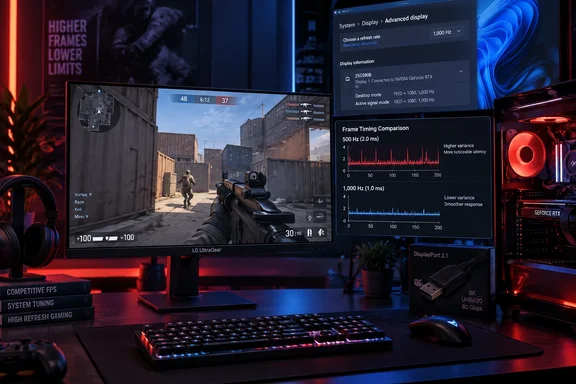
LG announced U.S. availability on August 24 at $999.99, describing the model as the first consumer-branded monitor with native 1,000Hz operation at Full HD rather than a lower-resolution 720p mode. The distinction is real: competing displays have reached four-digit refresh rates through dual-mode or reduced-resolution operation. But the useful distinction for a buyer is narrower still: a monitor accepting a 1,000Hz signal is not the same thing as a PC consistently producing 1,000 useful frames per second.
The 25G590B’s appeal rests on shaving fractions of milliseconds from the chain between an input, a rendered frame, and an image update. At 1,000Hz, a refresh interval is 1 ms; at 500Hz it is 2 ms; at 360Hz it is about 2.78 ms. The theoretical display-side gain exists, but it arrives after CPU simulation, game-engine scheduling, graphics rendering, input handling, frame queuing, and network conditions have already influenced what a player sees. The monitor can remove only the portion of latency that belongs to the display path.
For tournament-focused players in games capable of extreme frame rates, that can still be worth pursuing. For everyone else, LG’s first 1,000Hz panel looks like an expensive way to expose the limits elsewhere in the system.
Windows 11 and DisplayPort Are Part of the Product Requirement
LG’s own product documentation adds qualifications that matter more than the marketing shorthand. The company says the 1,000Hz feature requires the latest version of Windows 11, current graphics drivers, and a DisplayPort connection. It also says actual refresh rate and game performance depend on the CPU, GPU, memory, operating-system version, drivers, game settings, and even game-specific frame-rate limits.
That is unusually explicit, and it should change how prospective buyers approach the display. This is not a monitor that can be dropped into an existing setup and assumed to run at its advertised maximum. Users should first verify that Windows is offering the expected refresh-rate option under Advanced display settings, that the graphics driver exposes it, and that the system is connected through DisplayPort rather than HDMI.
The hardware qualification is also more exacting than it initially appears. LG lists DisplayPort 2.1 UHBR20 as the monitor’s DisplayPort capability. Its official testing references Nvidia GeForce RTX 50-series cards and AMD Radeon RX 7900-, RX 9060-, and RX 9070-series cards. PC Gamer similarly reports that a current DisplayPort 2.1-capable GPU is required for the full 1,000Hz mode, while PurePC’s independently published specification comparison identifies UHBR20 as the necessary connection standard.
The important caveat is that LG has validated particular configurations; it has not published a broad compatibility matrix for every graphics card, laptop, dock, cable, and display-routing arrangement. That omission is significant for Windows users with multi-monitor systems, USB-C docks, KVM switches, or hybrid-graphics laptops. A DisplayPort label alone does not establish that a chain supports UHBR20 end to end.
In practical terms, buyers should treat the 25G590B as a direct-GPU desktop-monitor purchase. Use a properly rated DisplayPort cable, update Windows 11 and the GPU driver before connecting it, and confirm the available refresh modes before assuming the PC can reach the target. An older high-end graphics card may remain excellent for gaming yet still fail the display-interface requirement.
A 1,000Hz Signal Does Not Create 1,000 FPS
LG acknowledges that its refresh-rate support does not guarantee a game will run at 1,000 fps. This is not a minor disclaimer. It is the central limitation of the entire product category.
PC Gamer’s testing illustrates the problem. The publication reported that Counter-Strike 2 became CPU-limited well before 1,000 fps on ordinary enthusiast hardware, with a Ryzen 7 9800X3D-class system reportedly reaching roughly 600 fps at medium 1080p settings, while its Intel 14th Gen Core i9 test system landed in the high 400s. In Valorant, a title designed to run at far higher frame rates, the reviewer reported roughly 500 to 800 fps depending on the scene.
Those are still exceptional numbers. Yet they also mean the display’s maximum refresh rate will frequently exceed what the game engine and system can deliver. The monitor can refresh on a 1 ms cadence while repeatedly presenting fewer newly rendered frames than the label suggests. Variable refresh rate can smooth delivery when it is available, but it cannot manufacture rendering performance.
This is why a purchase decision should begin with frame-time telemetry rather than a monitor spec sheet. A player considering the 25G590B should log real gameplay—not a menu screen, a benchmark fly-through, or an empty practice range—at competitive settings. If the game spends most of a match below 500 fps, the case for paying a four-figure sum for 1,000Hz becomes difficult. If it stays near 700 to 900 fps in the actual maps and fights that matter, the latency benefit becomes more plausible, though still finely marginal.
Aiming for raw fps can also create counterproductive tuning. PC Gamer notes that ultra-high mouse polling rates can impose CPU interrupt overhead rather than automatically lowering end-to-end latency. The same principle applies across the system: aggressive background software, capture utilities, power-management settings, poor memory tuning, thermal throttling, and GPU frame queues can matter more than another few hundred hertz of panel headroom.
The sensible setup is disciplined rather than maximalist. Keep the graphics driver current, enable the game’s low-latency path where appropriate, check CPU and GPU thermals during a real match, and avoid assuming that every “high performance” peripheral setting is beneficial. A system that delivers stable frame times at 600 or 700 fps may feel better than one that spikes toward 1,000 fps while suffering inconsistent pacing.
LG’s 1,100Hz Mode Gives Up Some of the Safety Net
The 25G590B can be overclocked to 1,100Hz, but LG’s documentation discloses a trade-off absent from the simplified pitch. At 1,100Hz, AMD FreeSync Premium is unavailable, and Nvidia G-Sync compatibility is certified only at the native 1,000Hz setting. LG also states that Motion Blur Reduction Pro disables both adaptive-sync technologies.
That turns the top mode into a deliberate competitive compromise. Fixed-refresh operation can make sense when a game runs comfortably above the monitor’s refresh ceiling and the player prioritizes latency consistency. It is less attractive when frame rates vary substantially, because disabling adaptive sync removes a tool that can reduce tearing and uneven presentation.
The same is true of backlight strobing. LG says its Motion Blur Reduction Pro lowers display persistence by controlling the backlight between frames, which is the normal approach for blur-reduction modes. PC Gamer found the feature reduced brightness without delivering much visible benefit at the panel’s highest refresh rates. The review is subjective, but its conclusion fits the basic buying logic: someone spending $999 on a native 1,000Hz display should not need to rely on a mode that trades brightness and adaptive-sync support for its gains.
LG’s more defensible achievement is that it has brought an IPS panel to this refresh range. IPS traditionally gives buyers better viewing angles and color behavior than the fast TN panels often used in esports displays. The company specifies an ATW polarizer, VESA DisplayHDR 400 support, and 99% typical sRGB coverage. Those features help prevent the monitor from becoming visually miserable, but they do not turn it into a premium general-purpose display.
The $1,000 Price Buys a Narrow Advantage
The panel remains 1080p on a 24.5-inch screen, with a specified 1,000:1 contrast ratio and basic DisplayHDR 400 certification. PC Gamer’s review correctly identifies the mismatch: at this price, buyers can choose larger, higher-resolution OLED and Mini LED displays that are stronger for desktop work, media, single-player games, and ordinary PC use.
The pixel-density penalty is especially straightforward. Full HD at 24.5 inches is familiar territory for competitive gaming, where large interface elements and predictable visual scale are valued. It is much less compelling for text-heavy Windows use, photo work, programming, spreadsheets, or a mixed-work-and-gaming desk. There is no resolution headroom here; the money is overwhelmingly paying for timing performance.
The closest comparison is not a 4K OLED ultrawide but the rapidly growing group of 360Hz, 480Hz, 500Hz, and 600Hz esports monitors. PurePC’s comparison places the 25G590B beside BenQ’s 600Hz Zowie XL2586X+ and Alienware’s 500Hz AW2524HF. Those alternatives do not equal LG’s maximum refresh rate, yet they address the same player and can be easier for real systems to feed consistently.
PC Gamer’s conclusion—that latency is where the monitor’s advantage is felt most strongly—is the fairest reading of the 25G590B. The review also makes clear that the change is subtle, not transformative, when compared with the best 480Hz-class panels. That is a vital distinction in a market where the number on the box can imply a leap in perceived fluidity that the panel, game, and PC may not reproduce together.
For a professional or aspiring esports player whose game, GPU, CPU, Windows 11 build, and direct DisplayPort connection have already been validated, the UltraGear 25G590B is the current extreme option. For a buyer looking for a better all-around gaming monitor, the 1,000Hz badge is not enough to overcome its 1080p resolution, limited HDR, and $999.99 price.
References
- LG UltraGear 25G590B review PC Gamer · 2026-09-17T14:16:29+00:00