

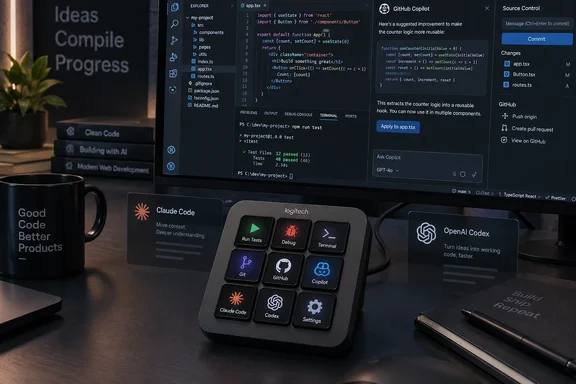
The timing also deserves a correction. The Register’s review was published September 16, but Logitech formally announced and began selling the MX Keypad on September 8, 2026. Logitech’s product listing now shows the graphite version in stock in the United States, while 9to5Mac separately reported the $99.99 price, nine full-color keys, USB-C connection, and Windows 10-or-later requirement.
For Windows users working in Visual Studio Code and GitHub Copilot, the MX Keypad’s practical appeal is straightforward: it takes repetitive controls that normally live behind keyboard chords, command palettes, terminal commands, or scattered app windows and gives them dedicated, labeled hardware buttons. That can be useful. It is also an unusually clear example of a peripheral vendor selling an increasingly common developer requirement: managing the interfaces around AI coding tools rather than improving the agents themselves.
The MX Creative Console keypad is now its own product
The MX Keypad is the keypad half of Logitech’s existing $199.99 MX Creative Console, sold without the separate dial controller that was aimed at timeline work, brush adjustment, and other creative-app tasks. Logitech has not concealed the lineage; the hardware is a compact 3-by-3 grid of programmable LCD keys, and the company is effectively repackaging the more broadly useful half of the Creative Console for developers.
That makes the $99.99 price easier to understand, but it also frames the purchase correctly. Buyers are not getting a specialized coding appliance with an onboard development environment, a wireless receiver, or a new input method. They are getting a small USB-C control surface that displays changing button artwork and sends actions configured in Logitech’s desktop software.
9to5Mac reports that two navigation controls let users access up to 15 pages of assignments. In theory, that means 135 possible slots rather than nine. In daily use, however, the value will come from keeping only the commands with genuine muscle-memory value on the first page: start a debugging session, toggle a terminal, run a known-safe build task, open a pull request workflow, or invoke a frequently used prompt.
There is a reason macro pads have endured despite decades of increasingly capable keyboards. A visible key labeled “Run tests” is easier to discover, remember, and share than a private chain of hotkeys. The LCD labels also eliminate the usual problem with programmable keyboards: a custom shortcut becomes opaque the moment the person who created it changes desks or leaves the team.
“AI control” still means controlling software that runs elsewhere
Logitech’s launch announcement says the MX Keypad has native integrations for GitHub, Visual Studio Code, and the GitHub Copilot app, and that community plugins for Claude Code and OpenAI Codex can provide agent-status displays and command-line control. Logitech also includes three months of GitHub Copilot Pro+ with each keypad, available to new and existing users through Logi Options+.
The distinction between controlling an agent and hosting one matters. Logitech’s own product page says that actions involving third-party AI services require both an active internet connection and accounts with those providers. A button can launch a prompt, trigger an action, focus an application, or surface a status signal, but the model, its account access, usage limits, policy controls, and project permissions remain in GitHub Copilot, Anthropic’s tooling, OpenAI Codex, or the connected IDE.
That limitation is not a defect. It is the correct architecture for a $99 peripheral. But it means a buyer should not expect a keypad to solve the more difficult parts of agent-assisted development: reviewing generated code, constraining repository access, protecting secrets, handling untrusted terminal commands, or resolving a stalled agent run. The MX Keypad can make an existing workflow faster to operate; it cannot make that workflow safer or better governed.
The strongest use case is therefore not “press a button and let an agent code.” It is reducing context switching for a developer already using several tools. Logitech’s app-aware switching can replace the key layout when the active window changes between VS Code, Slack, Figma, Zoom, and other supported applications. A physical control for starting a debugger or issuing a standard Git sequence is more useful when it appears only in the context where it makes sense.
Logi Options+ is the real product dependency
Logitech says its ready-made profiles and custom layouts require Logi Options+, and the software supports Windows 10 and later. Without it, the device can still expose basic default actions, but the dynamic layouts, icon design, marketplace extensions, macros, prompt assignments, and application-specific behavior that justify its price are tied to the Logitech client.
That is the main operational trade-off for Windows enthusiasts and IT departments. The keypad itself is a simple wired USB device, but the differentiated experience depends on a background configuration platform that interprets active applications and dispatches actions. Replacing the hardware later is simple; rebuilding a carefully designed Options+ setup, particularly one that relies on third-party marketplace plugins, may not be.
The Register found the Options+ experience unintuitive during its hands-on evaluation and recommended persistence to get the best results. That is one reviewer’s experience rather than a confirmed widespread fault, but it aligns with the nature of the product: the hardware is nine buttons; all of the sophistication is configuration work.
Before buying, Windows users should test the intended workflow in software first. If the actions are already cleanly handled by VS Code keybindings, PowerToys shortcuts, AutoHotkey, Windows Terminal profiles, a Stream Deck, or an existing programmable keyboard, the MX Keypad may merely duplicate them. If the workflow involves frequently switching between IDE commands, ticketing systems, conferencing controls, Git operations, and agent prompts, the changing visual labels may be worth more than another layer of hotkeys.
For managed environments, the same caution applies more strongly. A team should determine whether Logi Options+ is approved software, whether its marketplace plugins can be centrally governed, and whether individual developers are permitted to bind buttons to shell commands or automation scripts. The device does not create those policy problems, but it can make local automation easier to distribute—and easier to overlook.
The SDK gives the keypad a longer life than its default profiles
Logitech’s strongest technical argument is not the Copilot promotion. It is the Logi Actions SDK, which supports plugins written in JavaScript through Node.js or in C#. Logitech’s documentation describes plugins as a way to automate workflows, integrate applications, and create device actions that send commands, adjust system controls, or trigger events.
That gives developers a path beyond the vendor’s curated marketplace. A Windows developer could build a small integration for an internal build system, a local issue tracker, a deployment dashboard, or a monitoring tool and attach it to a key with an appropriate icon and state. The screen-equipped buttons can make status-oriented controls more understandable than blind shortcuts: a different image or color can communicate whether a service is healthy, a task is running, or attention is needed.
The SDK does not remove the integration burden. It moves it. Someone still has to maintain authentication, define safe actions, handle failures, package the plugin, and decide whether it belongs in the Logitech Marketplace or stays internal. Logitech’s own September 10 post acknowledged that agent-status capabilities depend on underlying APIs that do not yet exist consistently across all tools, which is a more useful admission than the broad “multi-agent” product branding.
In other words, some of the most attractive demonstrations—glancing at a physical key to see where an agent stands, then taking an action—will be uneven across providers. GitHub integration is the most concrete partnership Logitech has announced at launch. Claude Code and OpenAI Codex support rests on community plugins, and Logitech says functionality will expand over time.
A practical Windows buying test
The MX Keypad is easiest to justify when the cost is measured against interruptions rather than keystrokes. It can be a good desk accessory for a developer who repeats a small number of commands dozens of times daily and wants them visible, contextual, and separate from the primary keyboard.
It is a weaker purchase for anyone expecting wireless flexibility, local AI execution, broad platform independence, or a turnkey way to automate complex engineering work. USB-C is mandatory, and the most valuable features depend on Logi Options+ and compatible applications. Linux is not listed as a supported platform, which also matters for developers who move among Windows, WSL, remote Linux hosts, and native Linux workstations.
Logitech has made a sensible product split: the Creative Console keypad was always more broadly useful than its companion dial for many programmers, and selling it separately cuts the entry price in half. The real question is whether the company can keep its plugin layer reliable as Copilot, Codex, Claude Code, IDE extensions, and agent APIs change. Until then, the MX Keypad should be evaluated as a well-made programmable control surface for Windows workflows—not as a shortcut to autonomous software development.