

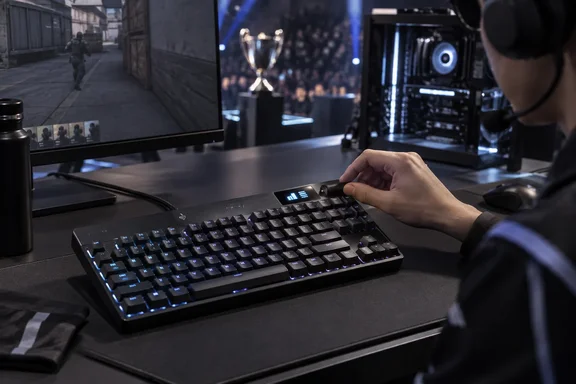
Logitech PRO X2 RAPID: the OLED is the upgrade, 8K is catch-up
Logitech launched the keyboard at its Logitech G PLAY 2026 keynote. It was one of four PRO Series products shown that day, alongside the PRO X3 LIGHTSPEED headset, the PRO X3 SUPERSTRIKE mouse and the PRO X CONTROL mouse pad. The US store lists it as an "8K Wired TKL Analog Gaming Keyboard With OLED" at $229.99, in stock. DLCompare and Notebookcheck both report that it went on sale through LogitechG.com on September 23 in Black, White and Magenta.
Logitech's product-development write-up explains why it added the screen. Stage PCs at professional tournaments are kept offline, and configuration software such as G HUB isn't allowed on them. PRO Series gear already stores profiles in onboard memory, but a player who wanted to check or tweak a saved profile between matches had no way to do it. Logitech says the OLED works without a network connection and without using the PC's processing power. It describes the result as a keyboard you can "check or adjust on stage with nothing installed."
Other launch coverage kept its praise measured. After hands-on time, TheGamer wrote that the board is packed with gaming features that have steadily become the norm, such as Hall Effect switches, adjustable actuation, and a form of key/input priority. The Shortcut reviewed a unit supplied by Logitech and found "nothing particularly new here that other keyboards don't already offer", although it still ranked the build quality and typing feel above rival boards.
How the KS-20 switches and Rapid Trigger work
The PRO X2 RAPID uses Logitech's own KS-20 POM magnetic analog switches, which are lubricated at the factory. Because the keyboard senses how far each key has travelled, rather than waiting for a metal contact to close, you can set the point at which a key registers anywhere from 0.1mm to 4mm, in 0.05mm steps, for every key individually. Logitech's Japanese press release lists 4.0mm ±0.2mm of total travel and 30g ±10g of actuation force. DLCompare and Notebookcheck describe the 30g figure as lighter than the 35g switches in the previous model.
Rapid Trigger builds on the same sensing. On a normal keyboard, a key has to rise back past a fixed reset point before it can register again. With Rapid Trigger, you set how far the key needs to rise before it resets. Logitech pitches this for very small, fast movement inputs. A player can stop strafing by lifting a key slightly instead of releasing it fully, then press again straight away.
A review of the original PRO X TKL RAPID on Gaming Nexus describes this in play. The reviewer was able to stop on a dime, wiggle about quickly, and continue on my way after firing off some shots when encountering an enemy, and credited Rapid Trigger for much of that responsiveness. That was the older keyboard. The new model mainly adds finer adjustment steps and faster reporting to the same mechanism.
KEY PRIORITY is Logitech's name for SOCD handling (simultaneous opposing cardinal directions), which decides what happens when two opposing keys such as A and D are held at once. According to Notebookcheck and DLCompare, Key Priority can resolve opposing inputs based on the latest key pressed, the key pushed furthest or a command assigned absolute priority. Players should check whether a particular game or tournament limits SOCD features before depending on them. Logitech's materials don't cover game-specific rules.
8,000Hz polling on the PRO X2 RAPID: a large number with a narrow payoff
Logitech says both key scanning and the USB report rate now run at 8kHz. According to Logitech's Japanese press release, the previous model topped out at 1,000Hz, so the keyboard can now report to the PC up to eight times as often. In theory, a key press waits less time before the next report goes out.
The evidence available stops there. Logitech describes the 8kHz rate as "stable" and tournament-ready. None of the launch coverage includes independent end-to-end latency measurements. The Japanese materials show that report rate is one of the settings you can change from the OLED, so players can lower it if their system or game gives them no benefit at 8kHz. The specifications don't say what the default is.
For Windows users, the connection requirements are modest on paper. Logitech's Japanese specification sheet lists a Windows or macOS computer with a USB 2.0 or later port. DLCompare and Notebookcheck give Windows 10 or later and macOS 12 or later as the supported versions.
What the OLED controls, and what still needs G HUB
According to Logitech's global product page, the OLED can adjust Rapid Trigger, actuation points, KEY PRIORITY and LIGHTSYNC lighting straight out of the box. Deeper customisation and saving profiles still happen in G HUB. The Japanese release is more specific: it pairs the OLED with an adjustment roller and adds report rate, Game Mode and volume to the list of settings you can change on the keyboard.
Sources disagree about switching profiles. Logitech's design account says the OLED can "swap through profiles." Dork reports that the display handles settings changes while the software still handles profile switching. The two claims may describe different things, such as switching between stored profiles versus creating and saving them. Still, if your workflow depends on flipping profiles away from your own PC, check this on the unit before buying.
In practice, the sensible setup is to build and save profiles in G HUB on your own Windows machine. The OLED is for adjusting them wherever you are. KEYCONTROL macros and multi-action commands are still part of the feature set. Logitech lists KEYCONTROL among the features the on-board interface had to account for, but it doesn't say that every macro function can be edited from the screen.
Build changes: stabilizers, dampening and a palm rest
Logitech's other changes concern feel and noise. It says the patent-pending screw-in stabilizers on the Space, Enter and Shift keys stop long keys from wobbling. Its sound dampening now has six layers. The Japanese release says the previous model had four layers of PORON and silicone. Notebookcheck and DLCompare say the six-layer stack combines PORON, IXPE, polyurethane foam and silicone dampening materials to reduce echo and metallic vibrations. Logitech's "thocky" sound claims are marketing copy, not acoustic measurements.
Logitech also says it tested switch designs and lubrication levels blind with esports players. It reports meeting almost 100 athletes during development, which ran from April 2025 to May 2026. That is the company's own account of how it built the product.
Carried-over features include doubleshot PBT keycaps, an aluminium key plate, three onboard profiles, per-key LIGHTSYNC RGB and a Game Mode. Logitech's Japanese release also says the switch sockets are hot-swappable, but only with magnetic analog switches, not mechanical ones.
In the box are an XL silicone palm rest, a USB-A to USB-C cable, replacement keycaps for Esc, Pause/Break, Page Up and Page Down, and a key puller. DLCompare says the tool pulls both switches and keycaps and that the cable is detachable. The palm rest drew the main criticism in The Shortcut's review, which found it has a habit of lifting off when your palms do.
The published dimensions don't quite agree. DLCompare and Notebookcheck list 363 x 143 x 38mm. Logitech Japan's specification sheet gives 363 x 143 x 36mm, a weight of 1,075g and a 180cm cable. If height matters for your desk setup, allow for the 2mm difference.
Where PRO X2 RAPID pricing differs by region
The US price is confirmed. Logitech's US store lists $229.99, and several outlets repeat it. The UK price of £209.99 appears in reports from both TheGamer and Dork. For comparison, Gaming Nexus put the original PRO X TKL RAPID at $169.99, which supports the $60 increase that Notebookcheck and DLCompare both report.
Europe is less clear. DLCompare gives €229.99. Notebookcheck says the keyboard costs $229.99 in the US and €249.99 in Europe and comes with a two-year limited hardware warranty, and Aroged also reports €249.99. Two outlets say €249.99 and one says €229.99, so European buyers should expect €249.99 until the store page for their own country says otherwise.
Launch timing also varies by market. Logitech Japan lists an October 15, 2026 release, a Logicool online store price of ¥35,750 including tax, and either one or two years of warranty depending on the model variant. Readers outside the US and UK shouldn't assume September 23 availability.
What this means for you
If you play competitive shooters and tune your actuation and Rapid Trigger per game, or use PCs where you can't install G HUB (LAN events, tournaments, shared machines), this keyboard is worth a look. That's the situation the OLED was built for. If you're already happy with a magnetic keyboard that has Rapid Trigger and SOCD handling, you can skip it. The switch features are now widespread, and nobody has published independent evidence that 8kHz polling makes a noticeable difference.
- The US price of $229.99 is confirmed by Logitech's own store, and it's $60 above the PRO X TKL RAPID's launch price.
- European pricing is reported as both €229.99 and €249.99, so check your country's Logitech store before comparing prices.
- The OLED adjusts actuation, Rapid Trigger, KEY PRIORITY and lighting without software, but you still need G HUB to save profiles and for deeper customisation.
- The 8kHz report rate can be changed from the keyboard itself, according to Logitech Japan, so you can drop it if your setup doesn't benefit.
- Official specifications list Windows or macOS with a USB 2.0 or later port. Reports name Windows 10 or later and macOS 12 or later as the supported versions.
- The keyboard is wired only, and one early review flagged the included palm rest for lifting off during use.
The PRO X2 RAPID brings Logitech's analog keyboard up to date on switch features and polling, and adds one useful extra: settings you can change without G HUB. Full reviews are on the way, and TweakTown says a complete review is coming after its hands-on. Those reviews will show whether the OLED makes on-device tuning genuinely convenient, and whether that convenience justifies a price that has risen by more than a third.