

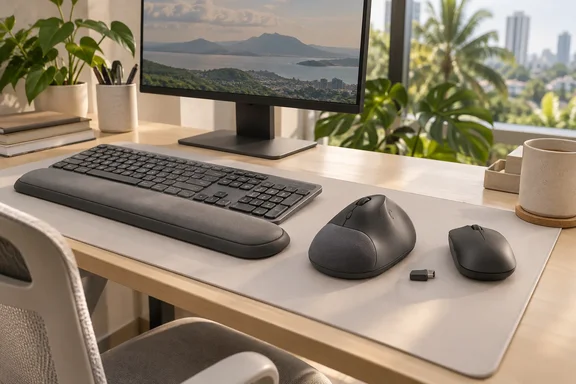
That timing matters. Philippine outlets, including LionhearTV, published the regional launch on September 29, 2026, and the copy opens with "today announced." Wire copy from Business Wire, however, is dated May 26, 2026. Logitech said the products will launch globally beginning in June 2026 through Logitech.com and authorized resellers. Read this as a regional rollout with local pricing, not a new product reveal.
What's in the box, and what's actually new
The lineup has three products:
- M850 L: The M850 L mouse debuts Logitech's palm cushion design, paired with a sculpted right-hand shape and rubber side grips for a more relaxed feel over long hours. Logitech's US product page calls it the company's first mouse with a palm cushion.
- MK880 combo: The MK880 Signature Comfort Plus combo also features a keyboard with deep cushioned keys, a dual-foam palm rest, and curved typing angles designed for extended desk sessions.
- M840 L: the same mouse without the palm cushion. The regional materials say it keeps all the other mouse features.
Shared features across the lineup include quieter mouse clicks, with Easy-Switch across up to three devices plus customizable shortcuts, meeting controls, and AI launch access.
Logitech says it tested the cushion with "real-world" professionals. Its US product page gives a number: 93% of surveyed users said they felt comfortable after a full workday. The page attributes that to a 2025 Logitech study in the US with 105 external participants of varying hand sizes over a five-day trial. That's a company-run comfort survey, not an independent ergonomic or clinical study. Take it as a data point, not a diagnosis.
Section summary: the palm cushion is the headline feature. The MK880 adds a comfort-focused keyboard. The M840 L is the cheaper option for people who don't want the cushion.
The spec sheet, for people who read spec sheets
The Philippine release lists these technical highlights:
Mouse (M850 L; the M840 L matches it minus the cushion)
- Right-hand sculpted shape with rubber side grips
- Silent clicking and scrolling
- SmartWheel precision and fast scrolling
- Customizable buttons and Actions Ring access via Logi Options+
- Easy-Switch across up to three devices
- Up to two years of battery life
Keyboard (MK880)
- Dual-foam palm rest and curved typing angles
- Adjustable tilt at 0°, 4° and 8°
- Deep cushioned keys
- Multi-OS layout for Windows, macOS and ChromeOS
- Customizable AI Launch Key
- Spill-resistant design
- Up to three years of battery life
The M850 L supports Logitech's SmartWheel scrolling system, allowing transitions between precision scrolling and faster navigation modes depending on user interaction. Logitech's US listing describes the retail M850 L as a Bluetooth mouse that switches between up to three devices with "no dongle needed." That affects compatibility, which I cover below.
B&H Photo's eXplora blog had hands-on time before launch. Its writer noted that the MK880 has buttons on it that reflect both Mac and Windows operating systems, adding that layer of utility needed for folks like me who use multiple operating systems. B&H sells the product, so weigh its enthusiasm accordingly.
The AI key: a shortcut, not a Copilot key
Windows users have seen plenty of "AI keys" lately, so it's worth being clear about this one. Logitech describes a configurable key, not hardware tied to Microsoft. Logitech additionally supports customizable controls and shortcut assignments through the Logi Options+ software platform, including AI launch shortcuts for tools such as Copilot, Gemini, and ChatGPT.
So it isn't the dedicated Copilot key Microsoft introduced on Windows 11 laptops. It's a programmable key, so you choose which assistant it opens. That will suit readers who don't want a keyboard pushing one vendor's chatbot. The trade-off is that you need Logi Options+ installed to set it up.
Meeting controls use a second app. Per Logitech's materials, Logi Tune lets users assign functions for Zoom Workplace and Microsoft Teams. If you live in Teams calls all day, you'll likely end up with both Options+ and Tune installed. On a managed Windows fleet, that's two more agents to approve, which brings us to IT.
Section summary: the AI key is programmable and not tied to any vendor. Teams and Zoom controls run through Logi Tune, a separate app.
Signature Comfort Plus for Business: the part IT will care about
For administrators, the business SKUs are the more interesting products. According to Logitech, the business versions include a Logi Bolt USB-C receiver for secure connections in high-density offices. That's the main difference from the Bluetooth-only retail M850 L. Logitech also says the devices can be monitored through Logitech Sync, which gives IT central visibility into device and firmware status.
The fine print: Logitech's footnote says Sync management requires Logi Tune on each user's machine. If your endpoint policy blocks third-party peripheral software, clear that with security before you order in bulk. An asset dashboard you can't populate is just a nice screenshot.
A practical deployment checklist for Windows shops, based on Logitech's stated requirements and general peripheral rollout practice:
- Choose the SKU on purpose. Retail units are Bluetooth with no dongle. Business units add a Logi Bolt receiver. If your security team prefers Bolt over plain Bluetooth, or your office has heavy 2.4 GHz traffic, buy the business version.
- Plan for USB-C. The Bolt receiver is USB-C, which suits modern laptops. Older desktops with only USB-A ports will need an adapter.
- Package the software. Firmware visibility through Sync depends on Logi Tune. Options+ is needed for button, Smart Actions and AI-key customization. Test both in your software distribution tool before rollout.
- Pilot the cushion. Comfort is personal. Logitech's 93% figure comes from its own five-day US study, so run a small pilot with users who have different hand sizes before a building-wide purchase.
- Remember left-handed staff. The M850 L is shaped for the right hand. Nothing in Logitech's materials mentions a left-handed version.
Section summary: the business SKUs add Bolt connectivity and Sync fleet visibility, but you have to deploy Logi Tune on every endpoint to get the management features.
Pricing: pesos, dollars and the business premium
Regional pricing varies, and the figures come from different sources:
| Model | US launch price (Logitech announcement) | Philippine price (as reported by LionhearTV) |
|---|---|---|
| M850 L (palm cushion) | $49.99 | PHP 2,995 |
| MK880 combo | $99.99 | PHP 6,295 |
| M840 L (no cushion) | $39.99 | PHP 2,595 (Lazada/Shopee online exclusive) |
| M850 L for Business | $59.99 | Not stated |
| MK880 for Business | $109.99 | Not stated |
Pulse 2 reported the US figures from Logitech's announcement: the M850 L palm cushion mouse will retail for $49.99, the MK880 Signature Comfort Plus combo for $99.99, and the M840 L non-cushion mouse for $39.99. Business versions of the M850 L and MK880 combo will retail for $59.99 and $109.99, respectively. Logitech's US store page also listed the M850 L at $49.99 in Graphite when that page was retrieved.
The Philippine release has an odd wording problem. It says the M850 L and MK880 will be available starting August 2026 through Logitech's authorized retail partners and on logitech.com for PHP 2,995 and PHP 6,295 respectively. The post went up in late September, so "will be available starting August" was already out of date on publication. That suggests either a delayed press cycle or stock that has been on local shelves for weeks. Logitech's global materials don't confirm the peso prices or the Lazada and Shopee exclusivity, so treat them as regionally reported figures and check your retailer. Colors are listed as Graphite, Off-White and Black, with more variants depending on region and channel.
The $10 business premium in the US is modest considering it adds the Bolt receiver and Sync support. For a 200-seat order, that's $2,000 for manageability and a dongle.
Sustainability claims, with the usual caveats
Logitech says plastic parts across the lineup contain between 49% and 77% certified post-consumer recycled plastic, depending on color, and that packaging uses FSC-certified paper. It also presents the long battery life as a sustainability benefit because users change batteries less often. These are company claims, and battery ratings are stated maximums, not guaranteed runtimes. Heavy scrolling and constant Easy-Switch hopping will shorten them.
The balanced take
The case for it: Logitech is going after a real everyday complaint. Many hybrid workers bounce between a work laptop, a personal machine and a phone. A quiet mouse that switches between three devices and a keyboard with a proper palm rest for about $100 is a reasonable offer. Rather than targeting gaming workloads, the Signature Comfort Plus range focuses on ergonomic comfort, quieter operation, simplified controls, and cross-device productivity.
The skeptic's view: a cushioned palm rest doesn't replace a proper ergonomic setup, such as desk height, monitor position, breaks, or a vertical mouse if you already have wrist strain. The only comfort data is Logitech's own. The foam cushion also raises a question the launch materials don't answer: how will it hold up after two years of daily palm sweat? Logitech's product page FAQ includes an "easy to clean" question, which suggests the company expects that concern.
For IT, the main question is whether Sync visibility is worth installing Logi Tune on every endpoint. Shops already using Logitech webcams or headsets with Sync probably won't mind. Shops that keep endpoint software to a minimum may decide the retail Bluetooth version with no extra software is easier.
Bottom line: Signature Comfort Plus is a sensible, reasonably priced update to Logitech's mainstream office peripherals. The palm cushion is new, the AI key isn't tied to any vendor, and the business SKUs give Windows admins a manageable option. Philippine buyers are getting the global May launch a few months late, with peso pricing that retailers should confirm.
References
- Long Desk Days Made More Comfortable: Logitech Introduces Signature Comfort Plus Lineup - lionheartv.net lionheartv.net · 2026-09-29T14:44:00+00:00
- Signature Comfort Plus M850 L logitech.com
- Logitech: Signature Comfort Plus Lineup Launches With Cushioned Palm Support And Multi-Device Features pulse2.com