

How the Mac Nano Turns an M4 Mac mini Into a Removable Computer Core
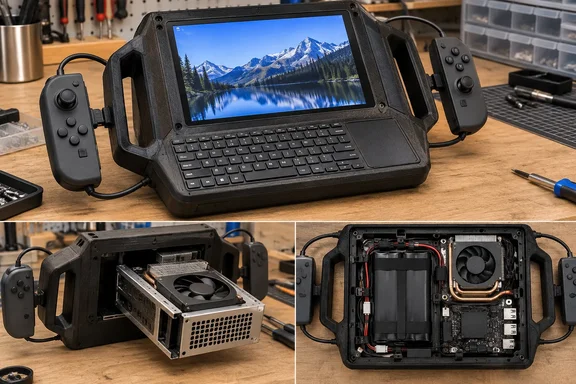
According to TechRadar, Shing Solutions stripped the desktop computer down to its motherboard and cooling system before rebuilding it inside a custom 3D-printed enclosure. The name has two layers. TechEBlog explains that once the retail shell came off and the board sat in a printed sleeve with Apple's original heatsink and blower still bolted on, that package became the Mac Nano. That sleeve then goes inside a second, larger body: a handheld deck that treats the whole computer like a giant Game Boy cartridge you can pull and replace.
The cartridge idea shapes the rest of the design. Inside the new chassis, the computer module sits on rails, allowing it to slide out without disturbing the screen, keyboard, or controllers. TechEBlog adds that a center plate carries a headphone jack and a USB-C connector, as well as some useful short extensions that allow you to use the original connections while outside the case. So the Mac can apparently still work as a small desktop when it's pulled out of the handheld.
The builder chose his starting hardware on purpose. TechEBlog notes that most home-built cyberdecks, meaning portable DIY computers with built-in screens and keyboards, begin with a Raspberry Pi for obvious reasons: it's inexpensive and small. This one begins with a fresh new M4 mini, as the idea was to condense desktop Mac performance into something you could actually carry around. Apple's specifications for the 2024 base model list a 10-core CPU with four performance and six efficiency cores, a 10-core GPU, 16GB of unified memory and a 256GB SSD. The stock desktop measures 12.7 cm square and 5 cm tall and weighs 0.67 kg. None of the reports says which configuration the builder used.
Why Keeping Apple's Original Heatsink Made the Handheld Thicker
The most interesting engineering choice was what the builder left in. The project retains Apple's original heatsink and blower fan instead of replacing them with smaller cooling hardware to save internal space. That decision allows the M4 processor to retain its factory thermal arrangement while the motherboard moves into a completely different enclosure.
That choice cost thickness. TechEBlog reports that the heatsink is 32.8 mm tall, thus the Nano case needs to expand somewhat to fit it, in this example to 37.5 mm. The extra depth turned out to be useful: the same report says it proves to be ideal for attaching Joy-Con rails on both sides, which is a much better solution than attempting to hack Apple's thermal stack and combat heat. Those measurements come from TechEBlog's account of the build, not from Apple.
Yanko Design and Hackster.io both say keeping the stock cooler lets the M4 handle heavy work without throttling. Hackster.io puts it this way: "keeping Apple's cooling system ensures that the" chip can take demanding loads. That is the builder's reasoning as the outlets relay it. None of the written coverage includes sustained-load benchmarks or temperatures for the finished handheld, so treat "no throttling" as a design goal, not a measured result.
For anyone planning a similar mod on a mini PC, the trade-off is easy to see. Aftermarket low-profile cooling makes a thinner device. The stock cooler makes a thicker device that at least starts from a thermal design the chip's maker has already validated.
Screen, Keyboard and a USB-C Power Handshake Fix
The front of the device pairs a 7-inch 120Hz touchscreen with a small QWERTY keyboard that has a touchpad built in. Hackster.io and TechEBlog both describe the display as an IPS panel. TechEBlog says it slips easily into the case thanks to the rails it rests on, and that the screen itself sits in a printed frame and can be unscrewed and replaced. No outlet names the panel's model, resolution or brightness.
The keyboard shows how many hobby-level power problems a build like this involves. It started out as a wireless accessory. The builder pulled its battery and rewired it to run from USB. TechEBlog gives the specifics: the builder had to remove the battery, solder in a USB-C line, and add a 5.1k ohm resistor to resolve the power handshake and allow the module to run off the internal bus without requiring a second radio or battery. As general background, not something the reports explain: USB-C devices use a resistor on the connector's configuration lines to tell the power source they're present and want power. A cheap accessory that skips it may get no power at all from a compliant USB-C port.
Removing the keyboard's battery also means one less rechargeable part to fail or run flat halfway through a session. Every input device now depends on the main battery pack.
Joy-Con Controls Rely on Steam Input Because macOS Won't Recognize Them
The gaming controls use salvaged Nintendo parts. TechRadar reports that the Mac Nano also includes physical gaming controls, using circuit boards taken from Nintendo Joy-Con charging grips and mounted inside both sides of the enclosure. Those controls are wired directly into the Mac instead of using Bluetooth, but macOS does not natively support wired Joy Con controllers.
Steam fills the gap. To make the controls usable, the project relies on Steam, whose controller mapping system can translate their input for compatible games. TechEBlog's account says the builder mapped the pads with almost no lag using circuit boards from authentic Nintendo charging grips, an offset breakout, and even a Steam wrapper, and that the same grips have to handle mouse input, shortcuts and games.
The key limit is the word "compatible." A mapping layer like Steam Input only helps in games that work with it. Outside Steam, macOS doesn't see the wired controls as a standard gamepad. So the Mac Nano is a capable general-purpose Mac with gaming controls attached. Nothing in the reports shows it can replace a dedicated handheld gaming PC. PC builders who have used Steam Input on Windows or Linux to rescue odd controllers will recognize the approach, and it carries the same caveat: support depends on the game, not the operating system.
Three-Port USB Hub and 36Wh Battery Solve the Hard Problems
Adding a touchscreen, keyboard and two controller boards quickly used up the available USB connections. Hackster.io reports that the builder solved it by taking two tiny USB 2.0 splitter boards, removing their bulky connectors, and combining them into a custom three-port internal hub. TechEBlog adds that the hub needed a few extra resistors to ensure everything enumerates properly and the keyboard's power request is on the up and up.
Power was the biggest job. As Hackster.io puts it, the Mac mini may be efficient, but powering it from batteries isn't quite as simple as plugging it into a USB power bank. For this reason, Shing Solutions built a custom power system around four high-drain 18650 cells, providing about 36Wh of usable capacity. A modified uninterruptible power supply (UPS) board handles the switch between battery and wall power. Pulling the power cable causes an immediate transition to the batteries without interrupting the computer. Plugging it back in starts a three-second validation period before the UPS switches power sources.
TechEBlog provides more of the power details:
- A battery management system cuts off the pack at 12V to protect the cells from over-discharge.
- Charging peaks at about 16.8V at 1A, so a full charge takes a little under three hours.
- A 100W USB-C Power Delivery supply is needed to work and charge at the same time.
- A 3.4mA parasitic drain on the UPS board, which could slowly empty the pack in storage, was fixed with an extra BMS.
The build also monitors its own battery. Shing Solutions also added a Seeed Studio XIAO ESP32S3 and a DFRobot INA219 to monitor the battery. Two thermistors keep track of cell temperatures, and voltage and current measurements are used to determine the remaining capacity. That information is sent over USB to a custom macOS menu bar application.
Reading the six-hour battery claim correctly
Hackster.io's headline says the build has six hours of battery life, and its text says 36Wh is enough to keep the system running for about six hours. TechEBlog is narrower: it says the battery lasts up to six hours when you're only watching videos. The narrower version is the one to trust. Simple arithmetic (our inference, not a measurement) shows that six hours from 36Wh means the whole system averages about 6W, including the 120Hz screen. That fits light video playback. It doesn't fit sustained compiling, rendering or gaming, where runtime would be much shorter. None of the outlets reports runtime under load, total weight or external dimensions.
What the Mac Nano Means for PC Builders and Cyberdeck Makers
The Mac Nano can't be bought, and nothing suggests a kit or published build files. For WindowsForum readers, its value is as a worked example of turning a desktop mini PC into a portable. Every problem the builder hit applies directly to x86 mini PCs and small-form-factor Windows boxes: fitting the cooler, powering USB-C accessories, running short of internal USB ports, and making the handover between wall and battery power seamless.
Anyone thinking about something similar should note which parts the builder didn't take shortcuts on. He kept the factory cooler and accepted a thicker case. He built a proper UPS-style power path with cell protection instead of relying on a power bank. He added telemetry so the battery's condition can be checked without opening the case.
- The Mac Nano is a single maker's M4 Mac mini build, reported by TechEBlog, Yanko Design, Hackster.io and TechRadar. It is not an Apple product or a retail device.
- The removable core slides out on rails and keeps Apple's stock heatsink and blower. That adds thickness, but it avoids reworking the M4's cooling.
- The wired Joy-Con-style controls only work through Steam's controller mapping. Games outside Steam Input support can't use them as a gamepad.
- The battery is about 36Wh from four 18650 cells behind a modified UPS board. The six-hour figure applies to light video playback, not heavy workloads.
- A comparable build needs USB-C power negotiation fixes such as the 5.1k-ohm resistor on the keyboard, plus a custom internal hub to fit enough peripherals in.
- No published benchmarks, thermal data, weight or dimensions exist for the finished handheld, so performance claims are the builder's intent, not measured results.
The builder has designed the handheld to outlast the computer inside it. TechEBlog reports that if Apple decides to remain with the same board layout for a future mini, the printed frame is designed to simply accept the new board without requiring a whole redesign. That depends on Apple keeping the same board layout, and so far no second board has been tested in it. Either way, the Mac Nano shows that a modern desktop mainboard can be built into a genuinely untethered device with off-the-shelf cells, salvaged controller boards and a 3D printer. It also shows how much careful power engineering that takes.