

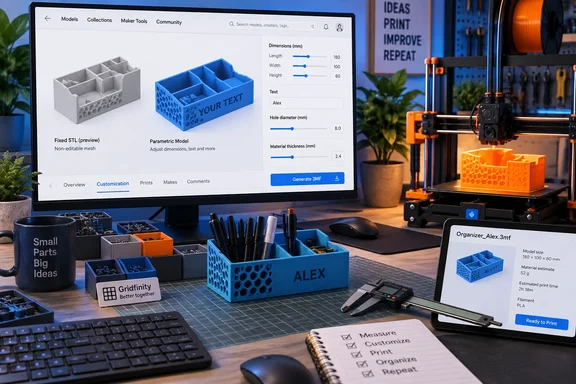
How-To Geek recently highlighted the growing number of “Customize” listings on MakerWorld, including generators for hardware, Gridfinity components, post caps, nameplates, and light boxes. The practical benefit is real for home 3D printing: instead of scaling an entire model and accidentally changing a critical hole diameter, grid pitch, or wall thickness, the user enters the measurements that the designer intended to be changed and receives a newly generated printable file.
MakerWorld’s own records show that this is not a brand-new 2026 capability, however. The platform’s Parametric Model Maker supported browser customization of OpenSCAD-based designs before 2025, and Bambu Lab added Autodesk Fusion 360 file support in June 2025. What has changed is the breadth of models built around the system and the fact that creators who prefer visual CAD can now publish configurable designs without converting everything into OpenSCAD code.
For PC users with a printer on the desk, that makes MakerWorld less like a conventional download repository and more like a limited manufacturing configurator. It lowers the barrier between “this organizer is almost right” and “this organizer fits the drawer I actually own”—provided the source model was prepared correctly.
A parameter is not the same thing as scaling
Conventional 3D-print repositories mostly distribute fixed geometry: an STL or 3MF file represents a particular object at a particular size. Slicers such as Bambu Studio, PrusaSlicer, and OrcaSlicer can scale that object, but uniform scaling changes every feature together.
That is harmless for a decorative figurine. It becomes a problem with functional parts. Scale a 20 mm hole down by 10 percent and it is no longer a 20 mm hole; scale a storage grid and its mating dimensions move with it; scale a threaded part and both the thread geometry and clearance change in ways that may make it unusable. Slicers can sometimes apply non-uniform scaling, but that introduces a different set of distortions and still does not preserve an engineered relationship between features.
A parametric design starts earlier in the chain. The designer assigns variables—such as width, depth, post size, magnet diameter, text, wall thickness, or mounting-hole spacing—to the underlying model. When one variable changes, the design regenerates according to the relationships the author created.
For a Gridfinity bin, that can mean changing the number of grid units while preserving the base geometry that mates with the grid. For a box, it can mean increasing internal height while retaining a lid clearance. For a personalized nameplate, it can mean recalculating the text layout instead of forcing longer text to collide with a border.
The reader-facing gain is precision, but it is precision within the author’s rules. A parameterized model is a configured design, not a blank CAD canvas.
MakerWorld moved customization from CAD to the listing page
The useful change for non-designers is that MakerWorld can present selected variables as browser controls. A model page with a Customize option may offer numeric fields, sliders, drop-down choices, color settings, and text boxes; the platform then generates a new model for download.
A March 2025 guide published on Bambu Lab’s community forum documented the OpenSCAD workflow behind those listings: MakerWorld runs the submitted model logic through its Parametric Model Maker, displays the variables the author exposed, and lets the visitor download the resulting printable 3MF. The guide also noted that users can run compatible OpenSCAD projects in the browser rather than installing the desktop application.
Bambu Lab expanded the system on June 30, 2025, when it announced Fusion 360 support in Parametric Model Maker 1.0. Creators can upload an F3D file, mark selected Fusion parameters as favorites, describe them for the user, and define defaults, minimums, maximums, and increments. Those favored parameters become the controls exposed in MakerWorld’s customizer.
That creator-side detail changes the consumer story. The browser is not reverse-engineering a finished model and guessing what should move. It is regenerating a design from a parameter set that the model author chose. If the creator exposed only width and height, those are the only two dimensions a visitor gets to alter.
The approach also means the feature is useful on an ordinary Windows PC without turning every printer owner into a CAD user. A person needs to understand the real-world measurement they are entering and whether the requested material and print orientation fit the job. They do not need to understand sketches, constraints, feature histories, booleans, or the difference between an STL mesh and a native CAD body.
The real limitation: fixed STL files remain fixed
The most important correction to the easy “no CAD required” pitch is that most downloaded 3D models still are not parametric. An existing STL that lacks a Customize button is not transformed into a configurable object merely because it is hosted on MakerWorld or opened in a modern slicer.
That distinction matters particularly for replacement parts. A user who downloads a fixed dishwasher clip, cable guide, rack bracket, or enclosure may be tempted to scale it until it appears to fit. But fit depends on the features that matter most: hole diameters, fastener clearance, clip flex, wall thickness, mating tabs, and the anisotropic strength created by print orientation. A 2 percent adjustment can be enough to turn a good model into a poor mechanical part.
Parametric listings reduce that risk only when the model author has designed for it. Good projects expose the dimensions that vary in the real world and constrain the rest. A post-cap generator should ask for a post’s measured dimensions and relevant clearance. A storage-bin generator should preserve its interface with the storage system. A text model should account for text length, font size, and emboss or engraving depth.
Poorly constructed parametric models can still produce unusable results. Bambu Lab’s Fusion 360 guidance itself warns creators that overly complex designs can time out during real-time generation. Community reports have also described designs breaking when a parameter changes, missing parameter types, and generated files that need closer scrutiny before printing. The browser interface removes CAD steps for the end user; it does not guarantee that the author’s model logic is robust.
That makes previewing the generated part essential. Check for missing bodies, thin sections, unsupported overhangs, inaccessible screws, and text that has become too small to print. Then inspect the generated model in the slicer rather than treating the browser preview as a manufacturing validation.
What to check before sending a custom model to the printer
For Windows users working from MakerWorld, the safe workflow is short but more disciplined than clicking Print:
- Measure the physical item with calipers where fit matters, rather than relying on a nominal lumber size, a product listing, or a tape measure estimate.
- Change only the fields that the model exposes, and read the author’s notes for units, tolerances, material recommendations, and whether dimensions refer to an inside or outside measurement.
- Download the regenerated model and open it in the slicer to confirm its scale, orientation, plate layout, supports, and estimated material use.
- Run a small fit test for clips, threads, magnets, holes, drawer interfaces, and other critical features before committing to a multi-hour print.
- Do not assume a generated 3MF carries the perfect printer profile. Review nozzle size, material, wall count, infill, temperature, and supports as you would with any community-supplied print file.
The fourth point is where parametric design earns its keep. A creator can expose a magnet-hole diameter or clearance value, letting the user print a small calibration sample and adjust one targeted number. That is a much better workflow than repeatedly reworking a mesh or scaling an entire finished object.
Fusion 360 support widened the creator pipeline
OpenSCAD remains a natural fit for this type of publishing because code-based models can cleanly define variables and repeatable relationships. But its programming-oriented workflow can be a barrier for designers who are comfortable building parts visually in Fusion 360.
MakerWorld’s Fusion support widened the potential catalog of browser-customizable models by allowing those creators to preserve selected parameters from their native F3D files. The platform specifically requires the author to choose which Fusion parameters are favorites; internal calculations can remain hidden while the visitor sees a simple control such as “width,” “depth,” or “material thickness.”
That is a better division of labor than asking every printer owner to learn CAD for a one-off organizer. The creator handles constraints, geometry, and allowable ranges. The person with the printer supplies the measurements of the object, space, or text they need.
There is one commercial caveat. In its June 2025 Fusion 360 announcement, Bambu Lab said the integration was free at launch but might consume MakerLab credits in the future because it relies on a third-party API. The company did not set a price or timetable in that announcement. Anyone building a workflow around a large number of custom generations should treat today’s access model as subject to change.
For now, the immediate result is straightforward: when a MakerWorld listing offers Customize, the best move is usually to configure the model for the exact job rather than download a fixed file and hope that global scaling preserves the dimensions that matter.
References
- You don't need CAD skills to customize 3D models anymore How-To Geek · 2026-09-17T23:00:13+00:00