

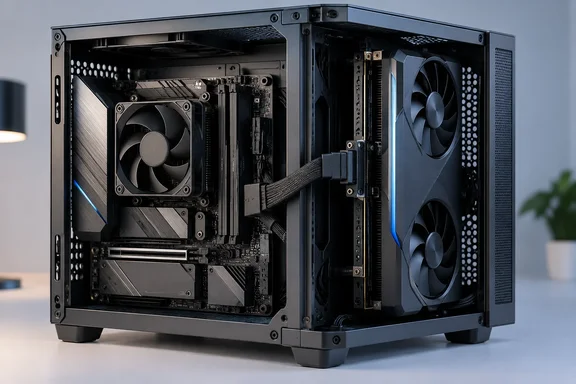
The important distinction is that this is a relocated internal GPU, not an external GPU enclosure. MAXSUN is changing where the graphics card can sit inside the computer—not demonstrating a separate graphics box outside it. That makes the design interesting for compact workstation builders, but the external-GPU implications remain a possibility rather than a demonstrated feature.
What MAXSUN demonstrated
According to VideoCardz, the system places the Z890 Mini-ITX motherboard and discrete graphics card back-to-back inside a Cooler Master i100 Air chassis. Other identified components include a Cooler Master Hyper 510 low-profile CPU cooler and a V850 SFX Gold power supply.
Notebookcheck’s September 29 coverage identifies the graphics hardware as an Intel Arc Battlemage GPU, although it does not establish an exact card model or provide benchmarks. That adds a little detail to the configuration without answering the larger performance questions.
A conventional desktop graphics card still needs an adapter or intermediary connection at its end of the cable. The motherboard may dispense with its usual PCIe x16 slot, but the graphics card has not suddenly acquired native MCIO sockets. The slot has left the motherboard; the need to connect a standard card has not disappeared.
Why an enterprise connector makes sense here
MCIO stands for Mini Cool Edge I/O. Amphenol’s documentation describes a compact, 0.60mm-pitch connector family supporting cable and card-edge applications, including PCIe Gen4 and Gen5, with server and storage systems among its intended markets. Its datasheet explicitly positions the slim connector format for compact data-center designs.
That is the useful connection between enterprise hardware and this workstation: high-speed expansion does not have to terminate in a large slot positioned directly beneath the device.
Amphenol also describes MCIO cable routing as a way to extend signal paths beyond conventional PCB routing while maintaining signal-integrity performance. This supports the engineering rationale for using cables, but it does not certify MAXSUN’s particular motherboard, adapter and cable combination. Component capability and complete-system validation are different things.
There is a further caution about future compatibility. Amphenol’s Gen6 documentation says its Gen6 implementation retains the Gen5 interface and footprint while changing the connector’s internal structure. A familiar-looking MCIO connector therefore should not be treated as proof that this workstation supports PCIe Gen6.
Lane splitting adds another design option
The workstation follows MAXSUN’s earlier MCIO-equipped Mini-ITX motherboard designs. VideoCardz’s earlier reporting describes the MS-Challenger MCIO ITX as replacing the conventional PCIe slot with two MCIO connectors, with Q870, Z890, H810 and B860 variants planned.
The reported Z890 and Q870 configurations support two useful lane allocations:
- x8+x8: two eight-lane connections.
- x8+(x4+x4): one eight-lane connection and two four-lane connections.
These are ways to divide a 16-lane allocation, not extra lanes created by the connector. The earlier reporting distinguishes them from the H810 and B860 variants, which use a combined x16 arrangement across the two interfaces. Those platform options should not be confused with the actual operating configuration of the displayed workstation.
The practical appeal is flexibility: designers can consider both device placement and lane allocation rather than treating one physical graphics slot as the fixed center of the expansion layout.
What remains unproven
TechRadar’s account provides no benchmark results, temperatures, noise measurements or sustained-load testing. It also leaves the achieved PCIe bandwidth unspecified. Consequently, the demonstration does not establish that this arrangement is faster, cooler, quieter or more reliable than a conventional compact PC.
VideoCardz likewise characterizes the workstation as a platform demonstration rather than a confirmed retail configuration and reports no announced retail date or pricing.
For prospective builders, the sensible checklist is therefore the evidence still needed:
- A complete motherboard, GPU-end adapter and cable specification.
- Confirmed operating link speed and width.
- Stability testing under sustained GPU workloads.
- Thermal and acoustic measurements.
- Clear compatibility, support and purchasing information.
MAXSUN’s supported achievement is layout freedom, not a measured performance breakthrough. Borrowing a compact interconnect from server hardware gives workstation designers another way to arrange their components. Whether that becomes a compelling Windows workstation will depend on the less glamorous details—validated cables, dependable operation and a product buyers can actually obtain.
References
- Chinese motherboard maker borrows cable tech from enterprise servers to eliminate graphic card slot pave way for more external GPUs — Maxsun uses MCIO to fast-track compact workstations TechRadar · 2026-10-02T00:25:00+00:00
- MAXSUN shows Z890 Mini-ITX workstation with GPU connected through MCIO - VideoCardz.com videocardz.com
- MaxSun replaces PCIe x16 slot on Mini-ITX motherboard with two MCIO connectors - VideoCardz.com videocardz.com