

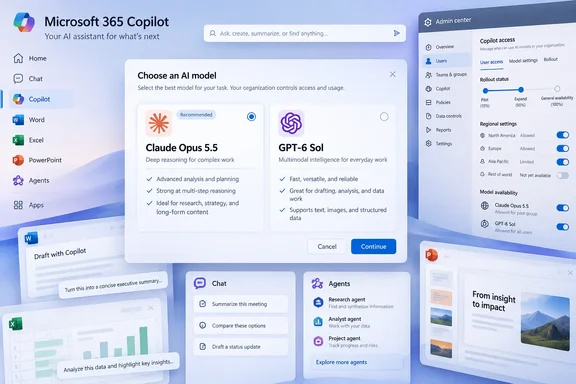
Claude Opus 5.5 and GPT-6 Sol Arrive in Microsoft 365 Copilot's Model Picker
The announcement appeared on the Microsoft Copilot Blog under the title "More Models, One Copilot." It says Anthropic's Claude Opus 5.5 and OpenAI's GPT-6 Sol are rolling out to Microsoft Copilot today across Word, Excel, PowerPoint, Chat, Cowork, and Copilot Studio. The Microsoft Community Hub listing dates the post September 22. Some secondary coverage gives September 23, but that appears to reflect when outlets picked up the story. Windows Report independently reported the same product list and wrote that the rollout kicked off yesterday following the launch of respective models.
Microsoft's reasoning is short. The blog states that no single model is ideal for every task. That's why Microsoft Copilot provides access to multiple frontier models, giving users the flexibility to choose the one that best fits the work they need to accomplish. It also points to Work IQ, the layer that grounds answers in company data. Through Work IQ, Copilot grounds responses in your organization's files, meetings, chats, and business data. In practice, whichever model a user picks still works from the same Microsoft 365 context and permissions.
Jared Spataro, Microsoft's CMO for AI at Work, made the same argument in a customer letter published September 23. The letter says the labs are in a constant game of leapfrog, and no model is best at everything. It describes a platform that brings in models from Anthropic, OpenAI, and others and embeds them in everyday apps. The letter explains the strategy but is not a feature announcement. The product-specific facts come from the Copilot Blog post.
This is the latest in a series of additions. According to Konsulteer, Microsoft added OpenAI's GPT-6 Astra to Copilot Cowork and Copilot Studio earlier in September, and Anthropic's Claude Fable 5.1 also joined Copilot. Each release has followed the same approach: Copilot's interface stays the same while the models behind it change.
Two Same-Day Frontier Launches Reach Copilot in Hours
Microsoft's timing followed the model launches closely. WinBuzzer reports that Anthropic released Claude Opus 5.5 as OpenAI introduced GPT-6 Sol and Luna on September 22, bringing lower API prices to three new models. Anthropic's model documentation also lists Opus 5.5 with a September 22 release date. Copilot therefore received both models on the day they became public.
Both vendors describe their models in similar terms. OpenAI's API documentation says GPT-6 Sol is built for complex coding and agentic workflows. It lists a 1,050,000-token context window and 128,000 maximum output tokens. DataCamp describes Opus 5.5 as the first model in its Claude 5.5 family, pitched as Fable 5.1-level performance at a lower running cost than Opus 5. It describes Sol as the mid-tier of the GPT-6 family, trained with the same methods as the flagship GPT-6 Astra.
Those figures describe the API versions of the models. Microsoft has not published context-window limits, reasoning settings or tool access for either model inside Word or Excel. A 1-million-token API context window does not mean Copilot in Excel will accept a workbook that large. The API prices also have no bearing on what a Microsoft 365 Copilot licensee pays. WinBuzzer lists API rates of $4 and $20 for Opus 5.5, $2 and $10 for Sol per million input and output tokens. Those rates apply to developers calling the models directly. Copilot is billed through the Copilot license and, for agentic work, Copilot Credits.
The same models are also arriving in other Microsoft products, each with separate controls. Microsoft announced GPT-6 Sol in Microsoft Foundry on September 22. GitHub also shipped Opus 5.5 to GitHub Copilot, where Copilot Enterprise and Copilot Business plan administrators can manage access to Claude Opus 5.5 through the model policy in Copilot settings. GitHub Copilot, Foundry and Microsoft 365 Copilot each have their own model controls, so enabling a model in one does not enable it in the others.
Why the Copilot Rollout Looks Different From Tenant to Tenant
The phrase "rolling out" should be taken literally. Microsoft has not published a per-app entitlement matrix or a date by which every tenant will have both models. The blog directs customers to the AI at Work Roadmap and the Microsoft Copilot release notes for current status.
One early user's report shows how uneven this can be. A Microsoft 365 consultant writing the M365 Copilot Connection newsletter compared the two models in Copilot. The author wrote that when I recorded, both models were in Copilot Cowork, but Excel was the only app where I had both. In Cowork, you pick the model from the model picker. GPT-6 Sol sits under GPT, and Opus 5.5 under Claude. In Word, the author found a model menu listing Auto, Claude, GPT and Grok. Grok is a separate xAI rollout outside this announcement.
This was one person's test in one tenant, and it reflects conditions at the time of recording. It is still useful for help desks. If a user can see Opus 5.5 in Cowork but not in PowerPoint, that is probably the staged rollout at work, not a fault. The author's own conclusion was Sol for speed, Opus for the richer workbook. That is an opinion based on a small number of tasks, not a benchmark, and it doesn't replace testing on your own workloads.
Microsoft's Excel documentation describes the same pattern for workbook editing. Users can choose Claude or GPT models, or let Copilot pick one automatically. Enterprise tenants may need administrator approval before Anthropic models appear.
Anthropic in Microsoft 365 Copilot Is a Subprocessor Switch Admins Control
GPT-6 Sol and Claude Opus 5.5 reach Copilot through different arrangements, and that affects what admins need to check. Microsoft Learn documentation lists Anthropic as a Microsoft subprocessor for relevant Microsoft Online Services. For covered enterprise use, the Microsoft Product Terms, the Data Protection Addendum and Enterprise Data Protection apply to Anthropic models. The exception is a separate class Microsoft labels "Anthropic models with Data Retention." Microsoft also says its Customer Copyright Commitment covers Anthropic models in covered products, including Copilot and Copilot Studio.
Defaults depend on geography and cloud:
| Tenant type | Anthropic models by default | Notes from Microsoft's documentation |
|---|---|---|
| Commercial cloud, most regions | Enabled | Admins can restrict access or turn it off |
| EU, EFTA and UK commercial tenants | Not enabled | Admins can opt in. Anthropic models are excluded from EU Data Boundary and in-country processing commitments |
| Non-federal GCC | Admin setting available since July 22, 2026 | Requires explicit admin action |
| Federal GCC, GCC High, DoD, other sovereign clouds | Unavailable | No Anthropic models |
For a European organization, turning on Claude Opus 5.5 means allowing processing outside the EU Data Boundary for that traffic. The data protection or compliance team should approve that decision, not the Copilot rollout team alone. Microsoft also notes that tenants that previously opted in under separate Anthropic terms may need to opt in again.
The Data Retention category is separate. Those models are off by default. Enabling them requires a tenant admin to act and accept Anthropic's terms. For those models, Microsoft's documentation says Anthropic may keep most inputs and outputs for up to 30 days, and may keep content flagged for possible policy violations for longer. These retention terms apply only to models with that label, not to all Claude use in Copilot. Admins should check which category each model in their picker belongs to.
Enabling or restricting Anthropic access in the Microsoft 365 admin center
Microsoft's documented steps require a Microsoft 365 AI Administrator or Global Administrator:
- Open the Microsoft 365 admin center and go to Copilot > Settings > View all.
- Select AI providers operating as Microsoft subprocessors.
- Enable Anthropic and save the change. In EU, EFTA and UK tenants, this step is the opt-in.
- Choose which users or groups can use Anthropic models.
Microsoft says these user and group assignments apply to both Microsoft Copilot and Copilot Studio. Access can be turned off later. Once it is working, users in the selected groups will see Claude options in supported pickers, and Copilot indicates when a Claude model is producing a response. Keep in mind that these settings control the Anthropic provider as a whole, not Opus 5.5 specifically. GPT-6 Sol comes through Microsoft's existing OpenAI arrangement and does not depend on this switch.
Copilot Studio Agents Need a Second Check in the Power Platform Admin Center
In Copilot Studio, agent makers choose a model when building an agent, so Opus 5.5 and Sol become agent-design options. Microsoft adds a second control layer here. After Anthropic is enabled in the Microsoft 365 admin center, Power Platform administrators can allow or block external model families for each environment. The setting is under Manage > Environments > [environment] > Settings > Product > Features. To apply the policy across many environments, use the External Models rule in an environment group and publish the change.
The documentation for Copilot Studio also lists compliance limits. Anthropic models are excluded from EU Data Boundary commitments. FedRAMP has not been achieved for Anthropic or xAI models. PCI DSS does not apply to Anthropic or xAI models handling cardholder data. An agent that processes payment data or runs in a regulated environment should not be switched to Claude Opus 5.5 just because the option is available.
This per-environment control helps organizations that separate development and production environments. Makers can test Opus 5.5 in a sandbox while production agents stay on approved models until the governance review is done. Microsoft's Spataro letter also notes that agentic work is billed through Copilot Credits, a shared currency that aggregates AI operations across the platform, so Copilot Cowork and other agentic capabilities draw on one meter. Microsoft has not said whether Opus 5.5 and Sol consume credits at different rates. Admins should check credit reports once agents start using the new models.
What this means for you
Your first step depends on your region and cloud. Commercial tenants outside Europe will likely get Claude Opus 5.5 automatically, so check whether the current user and group assignments are what you want. EU, EFTA and UK tenants won't see Claude until an admin opts in, and that should go through a data-residency review. Government cloud tenants beyond non-federal GCC won't get Anthropic models. End users need to do nothing. If a model is missing from one app but present in another, that is expected during the rollout.
- Review the AI providers operating as Microsoft subprocessors setting in the Microsoft 365 admin center and confirm which users and groups can use Anthropic models.
- In EU, EFTA and UK tenants, treat enabling Claude Opus 5.5 as a decision to process that traffic outside the EU Data Boundary, and get compliance approval first.
- Check that no "Anthropic models with Data Retention" are enabled unless you have accepted Anthropic's 30-day retention terms on purpose.
- Configure external-model settings for each Power Platform environment before makers switch production Copilot Studio agents to the new models, especially agents covered by PCI DSS or FedRAMP requirements.
- Don't assume GPT-6 Sol's API context window or prices apply in Word or Excel. Microsoft hasn't published Copilot-specific limits.
- Before recommending a default model, test Opus 5.5 and Sol on your own common tasks, such as Excel models and document summaries.
Microsoft now adds frontier models to Copilot on the day they launch, which leaves little time between a model's release and its arrival in users' pickers. Organizations that have already set their subprocessor, regional and Power Platform policies will get the new models on their own terms. Others will get whatever the defaults allow, and in most commercial tenants outside Europe that currently includes Claude. The next model will arrive the same way. For current per-app availability, the AI at Work Roadmap and the Copilot release notes are the places to check.