

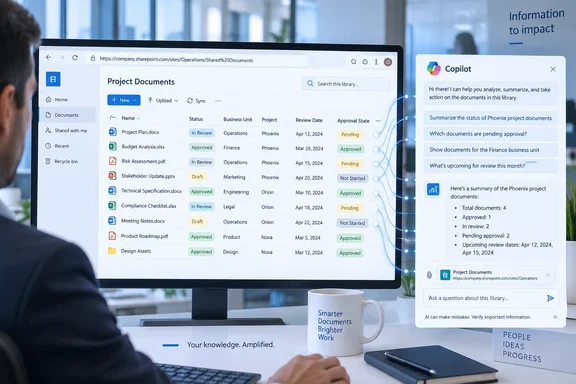
Microsoft’s roadmap entry and the company’s Microsoft 365 Copilot release notes describe the same behavior: metadata fields from the selected library now contribute context to answers and search-like responses. For organizations that organize documents with columns such as contract status, business unit, project, retention category, effective date, or approval state, that can make a scoped Copilot query materially more useful than one based on filenames and document text alone.
The important limitation is in the scope. This is not an announcement that Copilot now understands every SharePoint metadata field across a tenant by default. Microsoft says the metadata is used when a specific SharePoint document library or folder is attached, or when its URL is provided. Admins and users expecting a tenant-wide metadata-aware Copilot search experience should read the launch far more narrowly.
What changed in the SharePoint grounding path
SharePoint libraries have long supported custom columns, managed metadata, choice values, dates, people fields, and other properties that help organizations classify information outside the body of a document. Those columns are often the authoritative indicator of a document’s role: a file called Agreement_Final_v7.docx may be tagged as a draft, tied to a vendor, assigned an expiry date, or marked as restricted for a particular department.
Before this update, Microsoft says Copilot queries scoped to a library or folder did not use that column metadata, limiting its contextual understanding. The new behavior adds those fields to the information Copilot can consider when responding to a prompt grounded on that selected location.
In practical terms, a user can attach a contracts library and ask for expiring supplier agreements, or provide the URL of a project folder and ask for material associated with a particular workstream or approval state. Whether an answer improves will depend on the quality and consistency of the columns. Copilot cannot turn contradictory, blank, or loosely governed tags into reliable records.
Microsoft’s own SharePoint support documentation already establishes that Copilot can be scoped to an entire document library, selected folders, or selected files in the SharePoint experience. Roadmap 516044 extends that concept by making the classification data held in library columns part of the context for library- and folder-scoped requests.
The feature’s launch history is longer than the roadmap date suggests
Microsoft originally created the roadmap item on October 17, 2025, with a general-availability target of November 2025. An archived copy of the Microsoft 365 Message Center roadmap record still showed the item as Rolling out on February 26, 2026. The current roadmap status was updated to Launched on September 16, 2026.
That sequence matters for IT teams auditing feature availability against old rollout notices. November 2025 was a target date, not evidence that every eligible tenant received the capability then. Microsoft’s roadmap definitions distinguish “Rolling out” from “Launched”: the former means availability is still expanding, while the latter means the update is generally available to applicable customers.
Even so, a Launched badge should not be mistaken for proof that every user will instantly see identical attachment or URL-scoping behavior. Microsoft 365 services commonly use staged deployment and service-side controls, while documentation and interface changes can arrive on different schedules. The roadmap does not identify a tenant setting, a rollout report, a feature flag, or a diagnostic method an administrator can use to verify that this exact metadata behavior is active.
For that reason, the productive test is functional rather than administrative: run the same narrowly scoped prompt against a library with clear, populated columns, then compare the response with a prompt that relies only on document text. Use a known subset of files where the metadata supplies an answer that the file body does not, such as “show policies whose review date is before December 31” when the review date is stored in a SharePoint column rather than written inside each policy.
Metadata governance now affects Copilot answer quality
The launch makes an existing SharePoint administration discipline more consequential. Metadata that once mainly powered views, filters, retention workflows, and manual discovery can now influence how Copilot interprets a library- or folder-grounded request.
That is useful only if the columns carry stable meaning. A “Status” choice column with values such as Active, Current, Live, and In force is likely to yield uneven results compared with a centrally governed vocabulary. The same applies where an “Owner” field is optional, a date column has mixed conventions, or old documents were never backfilled.
Microsoft’s current documentation for Copilot-powered Autofill columns adds another operational wrinkle. The feature can create and populate metadata based on file contents, but it has stated limits: it supports specified column types, does not support some types including Person or Group, Location, Image, and Lookup, and cannot analyze encrypted files for metadata extraction. It also says that processing is limited to files, not folders, even though the new Copilot query enhancement can be scoped to a folder.
Those are separate features, but together they create a clear boundary. Copilot may now use the existing column metadata of a selected folder or library; that does not mean Copilot can automatically create complete, trustworthy metadata for every item in that folder. Organizations should keep those two capabilities separate in planning and user training.
A small pilot can expose whether the launch helps
SharePoint administrators do not appear to need a new configuration switch for Roadmap 516044. Microsoft’s announcement identifies the platform as web, the release ring as general availability, and the cloud instance as Worldwide Standard Multi-Tenant, but it does not disclose a new admin control or a separate licensing exception.
A sensible validation pilot should use a library where metadata has already been treated as production data rather than decoration:
- Choose a library with a small, well-understood set of required columns and consistently populated values.
- Test prompts against a library URL and, separately, a folder URL, because Microsoft explicitly names both scopes.
- Ask for results based on fields that are absent or ambiguous in the documents themselves, such as a controlled status value, a business category, or a review date.
- Compare Copilot’s answer with a filtered SharePoint view or manually verified item list before presenting the result as authoritative.
- Review whether participants accidentally infer access they do not have; Microsoft has not said this feature changes SharePoint permissions, and scoped grounding should not be confused with a permission bypass.
The last point is especially important in compliance repositories. Better use of metadata may make a response appear more definitive, but it does not replace a governed SharePoint view, a retention label audit, an eDiscovery workflow, or a records-management process. Copilot answers remain an interface over enterprise content, not a new system of record.
The real payoff is for libraries built around classification
Microsoft’s description promises “more accurate and meaningful results,” but it does not publish benchmarks, supported-column detail for this query feature, or examples showing how conflicts between document text and metadata are resolved. Those omissions leave a real verification task for customers whose document metadata drives business decisions.
The strongest early use cases are likely to be contract repositories, policy libraries, project-deliverable collections, regulated procedures, and knowledge bases where column values convey information that titles and content do not. A library that has been carefully classified gains a new conversational access path; a library filled with optional, stale, or inconsistent columns merely gives Copilot more unreliable signals.
For SharePoint owners, the immediate consequence is straightforward: test Copilot against the metadata you already trust, then fix the fields you would hesitate to use in a filtered view. Roadmap 516044 does not make SharePoint metadata governance optional. It makes its quality visible in Copilot’s answers.
References
- Microsoft Copilot (Microsoft 365): Metadata understanding support for queries scoped to SharePoint document libraries or folders Microsoft 365 Roadmap · 2026-09-16T22:57:03.3982718Z