

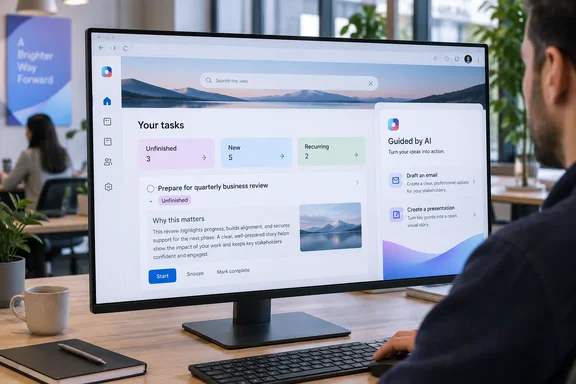
The feature is still being built. The roadmap lists it as "In development," so none of this is in anyone's browser yet. Still, the description gives a good picture of where Microsoft is taking the Edge new tab page for business users.
What the Roadmap Says
Here are the details from roadmap entry 561040:
| Field | Roadmap detail |
|---|---|
| Feature | Microsoft Edge: Commercial Journeys – AI-powered task completion for Microsoft 365 Copilot users |
| Status | In development |
| Products | Microsoft Edge, Microsoft Copilot (Microsoft 365) |
| Platform | Web |
| Release ring | General Availability |
| Cloud instance | Worldwide (Standard Multi-Tenant) |
| Preview (estimated) | November 2026 |
| General availability (estimated) | January 2027 |
| Licensing | Users with a Microsoft 365 Copilot Premium license |
The listing describes the experience in three steps:
- Detection. AI surfaces three kinds of tasks on the Copilot new tab page: unfinished, new and recurring.
- Context. Each task shows up as a card that explains why it matters right now.
- Execution. One click opens a guided flow that produces ready-to-use outputs, with emails, documents and presentations given as examples.
Microsoft's stated goal is to help information workers finish outstanding work faster and to a higher standard.
Section summary: Commercial Journeys is a planned task layer for the Edge new tab page. It finds work, explains why it's urgent and helps produce the result. Preview is expected in November 2026 and GA in January 2027, and both dates are estimates.
Not the Journeys You Already Know
The name will sound familiar to Edge users. Consumer Copilot Journeys is already available. On its Copilot in Edge page, Microsoft says Copilot groups your browsing into journeys — related pages, searches, and chats, which users can come back to with one click.
Microsoft's support documentation describes how that feature works:
- Copilot Journeys is turned off by default. To start using Journeys, turn on the Copilot new tab page and Journeys in Microsoft Edge.
- Once there's enough browsing activity, new Journeys appear as cards at the bottom of your Edge new tab page, up to three at a time.
- Turning off the feature in Edge Settings stops data collection right away and deletes information previously stored to create your Journeys.
- A 2026 guide from iTechGuides, citing Microsoft, says older Journeys and their underlying data are automatically deleted after 14 days. It also says desktop support is limited to specified English markets.
Consumer Journeys works from your browsing history. The Commercial Journeys description talks about tasks instead: unfinished, new and recurring work items, plus generated deliverables. That suggests a shift from "here's what you were researching" to "here's what you still need to do, and a draft to start from."
To be clear, that comparison is my reading of the two descriptions. Microsoft hasn't said whether Commercial Journeys is built on the consumer feature, whether it uses the same browsing signals, or whether it keeps the same 14-day retention and opt-in defaults. Don't assume the consumer controls apply until Microsoft documents them.
Section summary: Consumer Journeys organizes browsing. Commercial Journeys, as described, targets tasks and outputs. The shared name doesn't tell you what the shared rules are.
Where It Will Appear: The Copilot New Tab Page
Commercial Journeys will appear on a surface Microsoft has been building out all year. In June 2026 Microsoft added roadmap item 566703 for an upgraded Copilot new tab page, and WindowsForum reported that it was aimed at worldwide commercial tenants, with preview availability planned for July 2026 and general availability scheduled for September 2026.
Microsoft's admin documentation describes the current page as a work start surface. It combines Microsoft 365 Copilot chat, web search and work content, and its proactive work cards surface files and calendar events. A Copilot side rail gives access to chat, agents and skills, tasks, and Cowork. The CopilotNewTabPageEnabled policy documentation adds that users without a Microsoft 365 Copilot license may see less relevant content in Copilot prompt cards.
That documentation describes today's page. It doesn't say Commercial Journeys' task detection, "why now" explanations or guided execution flows are already there.
What IT Admins Can Control Today
Microsoft hasn't published admin controls for Commercial Journeys. What admins can manage today is the page it will sit on.
Policy basics (per Microsoft Learn):
- The
CopilotNewTabPageEnabledpolicy controls the Copilot new tab page in Edge for Business. It's supported from Edge 148 on Windows, macOS, Android and iOS. - It applies only to Microsoft Entra ID profiles, not personal Microsoft account (MSA) profiles.
- Enabled turns the page on. Disabled turns it off. When the policy is not configured, the page is off but users can turn it on themselves in settings.
- On Windows, the Group Policy setting is "Enable the Copilot new tab page" in
MSEdge.admx. The registry value isCopilotNewTabPageEnabled(REG_DWORD) underSOFTWARE\Policies\Microsoft\Edge, and recommended policies go under...\Edge\Recommended.
Enabling it through the Edge management service:
- Make sure you have a Microsoft Entra group with your target users.
- Navigate to the Edge management service inside the Microsoft 365 Admin Center and sign in with Global admin or Edge admin rights.
- From the top navigation bar, switch to the Copilot tab.
- Click the dropdown beside Copilot new tab page and select Enabled. Microsoft notes that the other settings recommended for Copilot to work successfully will also be set to Enabled, so check what else gets switched on.
- Assign the configuration to an existing or new configuration policy, scoped to all users or to specific groups.
Verifying it worked: Microsoft says changes can take up to 90 minutes to reach targeted devices. For testing, go to edge://policy, click Reload Policies, confirm CopilotNewTabPageEnabled shows TRUE, restart Edge and open a new tab.
Common problems: If work cards show errors, Microsoft's guidance is to make sure the user is signed in to Edge with sync on. If sync says "Setting up sync" or "Not syncing," sign out and back in, then restart Edge or the device. If prompts show "This prompt is no longer available," sign out of and back into m365.cloud.microsoft so the Edge and Copilot accounts match.
None of these controls is confirmed to govern Commercial Journeys. Microsoft may add a separate toggle, reuse existing ones or do something else.
Section summary: Admins can pilot the Copilot new tab page now, which is where Commercial Journeys will appear. Whether the feature gets its own policy is still unknown.
The Licensing Question
The roadmap says Commercial Journeys will be available to users with a Microsoft 365 Copilot Premium license. Keep that separate from the "Microsoft 365 Copilot license" mentioned in the existing new tab page documentation. They aren't necessarily the same thing, and the roadmap doesn't say whether other Copilot SKUs or bundles will qualify. Before promising this to users, check eligibility with your Microsoft licensing contact.
What Microsoft Hasn't Said
The roadmap entry is short, and these questions are still open:
- Data sources. What signals detect the tasks: browsing, email, calendar, files? The listing doesn't say.
- Human review. Will users review and edit generated emails and documents before they're sent or saved?
- Scope of action. Which apps can the guided flow produce outputs in?
- Retention and privacy. Do task cards and their underlying data expire, as consumer Journeys data does?
- Admin controls. Will there be a dedicated policy, separate from the new tab page switch?
- Requirements. No minimum Edge build, language or market limits, or rollout timeline is listed.
Microsoft's roadmap also warns that its dates are estimates, that details may change, and that entries can be removed when features ship, are cancelled or are postponed.
Analysis: Turning the Browser Into a To-Do List
The idea makes sense. Plenty of people open a new tab, forget why, and end up in their inbox. A browser that says "you owe Finance a deck, and here's a draft" could be useful.
There are trade-offs, though. A feature that surfaces your unfinished work needs to know a lot about that work. The more it knows, the more privacy reviewers, works councils and compliance teams will ask about. "Ready-to-use outputs" also raises a quality question: AI-drafted emails can save time or create cleanup work, depending on how well the system understands context. And proactive cards only help if they're right. A new tab full of wrong "urgent" tasks would just be clutter.
For now, there's a sensible way to prepare. Pilot the Copilot new tab page with a small Entra group, confirm who in your organization holds Premium licenses, and watch for preview documentation in November. If Microsoft spells out the data sources and admin controls, Commercial Journeys could be useful. If it doesn't, expect a lot of questions from your security team.
References
- Microsoft Edge: Commercial Journeys - AI-powered task completion for Microsoft 365 Copilot users Microsoft 365 Roadmap · 2026-10-02T22:01:21.517047Z
- Configure Edge’s Copilot New Tab Page: 2026 Guide itechguides.com
- Microsoft Edge Browser Policy Documentation CopilotNewTabPageEnabled | Microsoft Learn learn.microsoft.com