

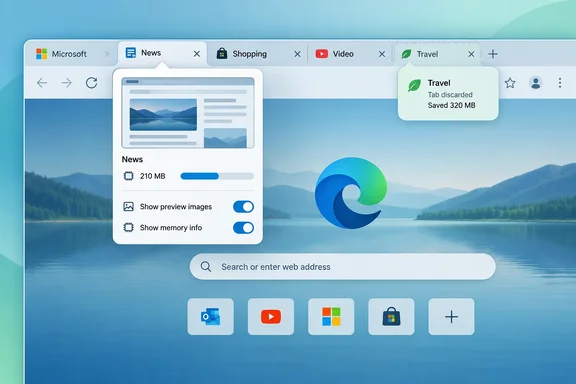
The item is marked in development, with general availability targeted for October 2026. That is a target, not a release announcement: Microsoft says roadmap dates are estimates and feature details can change. The item’s description was supplied with the roadmap record, but its individual text was not independently retrievable from the rendered roadmap page.
Why “discarded” matters
A sleeping tab and a discarded tab are not the same thing. Microsoft’s Edge support documentation says sleeping pauses a background page, reducing CPU activity and releasing some memory while allowing a quick return. Discarding removes the page content from memory; revisiting that tab requires a full reload. The planned hover-card information specifically mentions savings from discarded inactive tabs, so it should not be read as a promise that every idle tab will be discarded.
The appeal is straightforward: a hover card could give someone with dozens of open tabs quicker context without sending them into a diagnostic screen. Separating the preview-image and memory-information controls should also let users choose which details they want to see. Those are practical implications of the roadmap description, not a hands-on account of a finished interface. Microsoft has not specified the new settings’ names or locations, how the figures are calculated, a minimum Edge version, or an exact rollout day.
What you can do now
If Edge is already using more memory than expected, Microsoft documents tools that do not depend on this planned update:
- Press Shift+Esc in Edge to open Browser Task Manager, then sort by Memory to identify busy tabs, extensions, or other browser processes.
- Enter
edge://discardsin Edge’s address bar to inspect its discarded-tabs report. - For a support request, record the full browser version shown at
edge://settings/help.
Microsoft also places existing sleeping-tab controls under Settings > System and performance > Performance, including an inactivity timeout and an Always keep these sites active list. Those settings manage sleeping behavior; the roadmap item does not say they are changing. For now, the hover-card update is best understood as planned visibility into Edge’s memory behavior, not a new guarantee of memory savings.
Update: Microsoft moves Edge hover-card memory update to November 2026 (October 2, 2026)
Microsoft’s roadmap now lists general availability for the updated Edge tab hover cards as November 2026, rather than the previously targeted October 2026. The feature remains marked in development and is listed for worldwide standard multi-tenant availability.
The roadmap description is otherwise unchanged: Edge is expected to show clearer per-tab memory-use details and memory savings when inactive tabs are discarded, with separate settings for hover-card preview images and memory information. Microsoft has still not published an exact rollout day, Edge version requirement, or the names and locations of the new controls.
For Windows users and IT administrators, the revised date means the feature should still be treated as planned rather than available. Organizations tracking it for browser-support guidance should allow for phased availability during November and the possibility of further roadmap changes.
References
- Microsoft Edge: Updated performance information in tab hover cards Microsoft AI at Work Roadmap · 2026-10-01T23:00:07.038613Z
- Fix High CPU or memory usage in Microsoft Edge browser - Microsoft Edge | Microsoft Learn learn.microsoft.com
- Learn about performance features in Microsoft Edge | Microsoft Support support.microsoft.com