

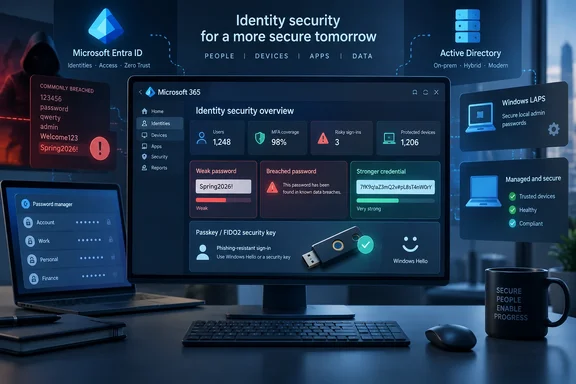
The distinction is already visible in current policy. NIST’s SP 800-63B guidance tells verifiers not to require arbitrary mixtures of uppercase letters, lowercase letters, numbers, and symbols. Its reasoning is practical: people reliably comply in predictable ways, appending !, capitalizing the first letter, or making substitutions such as @ for a. Attackers build those transformations into their guessing rules.
Yet Microsoft’s current products show why security teams cannot reduce this to “special characters no longer matter.” Microsoft Entra ID still requires cloud-only passwords to use three of four character classes, with an eight-character minimum, while also applying Microsoft Entra Password Protection’s global banned-password list. Classic Active Directory’s built-in “Password must meet complexity requirements” policy likewise still demands three character categories. The standards advice has moved ahead of much deployed identity infrastructure.
The result is a more nuanced conclusion than the headline suggests: symbols are useful when they appear in a long, randomly generated secret; they are weak protection when users add them mechanically to a familiar word.
Why Password1! Fails the Real Test
MakeUseOf correctly calls out the pattern that has defined corporate password creation for years: capital letter first, word in the middle, number near the end, punctuation last. The problem is not that ! has ceased to exist in an attacker’s character set. The problem is that human-selected passwords do not resemble random strings.
A password-cracking operation typically begins with likely words, names, keyboard patterns, company terms, and passwords exposed in prior breaches. It then applies common transformations: capitalize a letter, append a year, add an exclamation point, replace selected letters with symbols. A password such as Spring2026! technically meets many old complexity policies while remaining close to the top of a sensible attacker's candidate list.
NIST’s current guidance recognizes this behavior directly. Rather than asking sites to force a category checklist, it emphasizes checking a newly chosen password against lists of commonly used, expected, or compromised values, while allowing users to choose substantially longer secrets. It also calls for rate limiting and storage practices that resist offline cracking.
That last point is often absent from consumer password advice. Password strength is only one part of the system. If a service permits unlimited online guesses, stores passwords with an obsolete hashing scheme, or allows credential-stuffing attempts to proceed unchecked, a user’s punctuation choice is not the control that will decide the outcome.
For users, the immediate lesson is straightforward: stop making tiny edits to a password you have used before. CoffeeMug!, CoffeeMug!1, and CoffeeMug!2026 are variations of the same problem, especially if any version has appeared in a breach or been reused across services.
Length Helps Only When the Choice Is Unpredictable
The MakeUseOf article is also correct that length can matter more than character variety, but this needs a technical qualification. A 20-character lowercase string selected uniformly at random has a far larger search space than an eight-character random string using a broad character set. Adding characters raises the number of possible guesses exponentially.
Human beings, however, rarely create either kind of genuinely random string unaided. A long lyric, quotation, sports slogan, family reference, or sentence assembled from personally meaningful words may be easy to remember precisely because an attacker can make educated guesses about it. Length alone does not transform ilovethechicagocubs into a high-quality password.
The example passphrase in the MakeUseOf article — “sweet mocha apple rum” — illustrates the limitation. It should not be copied, nor should readers create a similar food-and-object phrase from words they choose themselves. It is now public, and a password that follows an obvious semantic theme has less uncertainty than a set of words selected independently and randomly.
A proper passphrase uses randomly selected words from a sufficiently large word list, with enough words to provide meaningful resistance to guessing. Diceware is one established method: physical dice select entries from a predefined word list, removing the user’s tendency to choose memorable or thematic terms. A password manager’s random-password generator takes the same burden off the user, generally producing a long random credential that need never be typed or memorized regularly.
For most personal web accounts, a password manager-generated credential is the cleaner answer. A random 20- to 24-character password can include symbols without requiring the user to remember which punctuation was used. For a password that must be memorized, such as a password-manager master password, a randomly created multiword passphrase is usually more workable than an abbreviated sentence with predictable substitutions.
Microsoft Entra Still Enforces Composition Rules
Here is the operational wrinkle for Windows and Microsoft 365 shops: NIST’s recommendation does not rewrite Microsoft Entra ID or Active Directory policy.
Microsoft’s current Entra documentation says cloud-only accounts require a password from three of four groups: uppercase letters, lowercase letters, numbers, and symbols. It also specifies an eight-character minimum and blocks entries caught by its banned-password systems. The length and character rules are service requirements for those accounts; administrators cannot simply decide that a four-word lowercase passphrase should be accepted if it fails Entra’s policy.
Synchronized identities are different. Microsoft says that for users synchronized from on-premises Active Directory Domain Services, the on-premises password policy normally takes precedence for length and complexity. That means an organization may have several password experiences at once: Entra cloud-only identities, hybrid accounts governed by AD DS, Windows local accounts, and privileged accounts managed separately through Windows LAPS.
Classic AD DS makes the legacy model especially visible. Its built-in complexity setting rejects passwords that do not include three of four categories and sets only a six-character minimum. A six-character password satisfying the policy is not a modern security target. Disabling the policy without raising the minimum length and deploying screening against known weak passwords would make the environment worse, not more NIST-aligned.
Microsoft Entra Password Protection is the more important control in that transition. It uses a global banned-password list and supports organization-specific banned terms, including company names, abbreviations, product names, cities, and internal jargon that attackers can reasonably predict. Microsoft says its matching also accounts for common character substitutions such as a becoming @ or o becoming 0. That directly targets the habits that composition rules unintentionally taught users.
For hybrid organizations, Entra Password Protection can also extend weak-password screening to on-premises domain controllers. It is not a drop-in replacement for every AD password policy decision, but it gives administrators a way to reject Contoso2026! even if it technically has the expected mixture of characters.
Windows LAPS Shows the Better Split Between Humans and Machines
Windows LAPS offers a useful example of why a single password rule should not govern every account type. Managed local administrator credentials are machine-generated, stored and rotated by the management system, and retrieved only when administrative work requires them. Usability for human memory is not the primary constraint.
Microsoft’s current Windows LAPS policy supports randomly generated passwords using several character-set choices, including special characters. It also supports passphrase modes using long or short word lists. Passphrase settings are available on Windows 11 version 24H2, Windows Server 2025, and later releases, with the default passphrase length set to six words when that mode is chosen.
That support does not mean every LAPS deployment should immediately switch to words. Microsoft’s own LAPS policy documentation defaults to the complex random-password option and recommends a complexity setting of four or higher. The important point is that LAPS can generate secrets rather than asking a technician to invent them. A 64-character machine-created password can safely contain punctuation because no person has to reproduce it from memory.
Administrators also need to test the local account policy before changing LAPS options. Microsoft warns that an incompatible Windows LAPS PasswordComplexity setting can cause password creation to fail, producing event ID 10027 in the Windows LAPS event log. Older supported clients do not understand the newer passphrase settings; when they receive an unsupported configuration, they fall back to the default complexity behavior. Mixed estates need separate policies rather than an assumption that every Windows endpoint has the same capabilities.
Passwords Cannot Solve Phishing
The missing piece in the MakeUseOf article’s otherwise sound advice is that a very strong password can still be stolen in real time. A fake Microsoft 365 sign-in page does not need to crack a 30-character passphrase if it can persuade a user to type it into the attacker’s site. Malware, session-token theft, help-desk social engineering, and infostealers operate outside the familiar password-strength calculation.
Multi-factor authentication reduces the damage from a disclosed password, but the method matters. App-based one-time codes are an improvement over passwords alone, yet they can still be phished or approved through fatigue attacks. FIDO2 security keys, passkeys, and Windows Hello for Business use cryptographic credentials tied to a device or security key and are designed to resist the credential replay that makes phishing so effective.
Microsoft documents Windows Hello for Business as a two-factor model combining a device-bound credential with a PIN or biometric gesture. The Windows PIN is not a shorter version of the user’s corporate password; it is local to the device and unlocks the credential protected there. For supported websites and applications, Windows Hello and FIDO2 can remove the password from the routine sign-in path altogether.
That is where identity policy is heading. Users should keep long, unique passwords for services that still require them, with a password manager handling the volume. Administrators should retire forced annual resets absent evidence of compromise, screen for breached and organization-specific weak terms, rate-limit failed authentication, and prioritize phishing-resistant authentication for administrators and high-risk users.
Special characters were never the enemy. The belief that a final ! turns a short, reused, predictable password into a safe one is.
References
- I stopped obsessing over special characters and my passwords got stronger MakeUseOf · 2026-09-16T10:01:13+00:00