

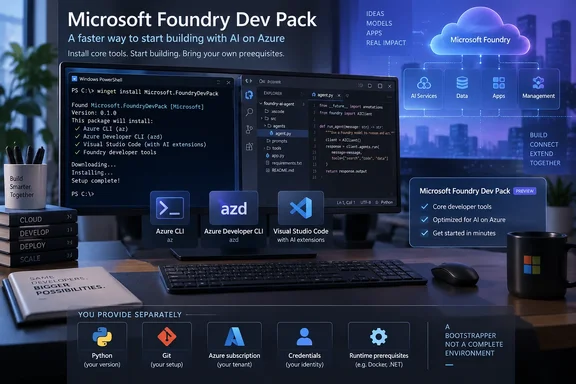
winget command to install the core tooling around Microsoft Foundry, but it should be treated as a bootstrapper rather than a complete AI development environment. The package is available through winget install Microsoft.FoundryDevPack and is intended to reduce the initial setup work for developers building and deploying Foundry-based agents.As Neowin reported, the pitch is straightforward: instead of collecting the Azure CLI, Azure Developer CLI, Foundry extensions, Visual Studio Code integration, and coding-agent guidance separately, developers can start with one installer. Microsoft’s Foundry blog confirmed the release on September 15 and describes Dev Pack as its recommended installation route for the development tools.
The important qualification is in Microsoft’s own documentation: Dev Pack does not provision a programming-language runtime, Git, an Azure subscription, a Foundry project, credentials, SDK packages, or an application’s dependencies. It shortens the machine-preparation stage. Teams still have to build a repeatable development standard around it before anyone can turn a blank Windows PC into a working, governed production environment.
What Dev Pack installs on Windows
Microsoft says the Windows package installs its Foundry command-line stack, which includes the Azure CLI (az), Azure Developer CLI (azd), and Microsoft’s Foundry extension for azd. Those tools are the terminal-facing portion of the workflow: they are used to scaffold a project, deploy an application or hosted agent, run evaluations, and automate repeatable deployment tasks.
The installer can also add the Microsoft Foundry Skill for supported coding-agent workflows. Microsoft describes the Skill as reusable guidance that helps an agent understand Foundry operations, rather than an AI model or a runtime in its own right. That distinction matters for organizations using GitHub Copilot or other coding agents: installing a Skill does not grant that agent Azure access, configure tenant policy, or remove the need to review generated deployment code.
On machines already running Visual Studio Code, Dev Pack can install Microsoft Foundry Toolkit, the extension formerly known as AI Toolkit. Microsoft’s public project documentation says the toolkit covers model discovery, agent creation and testing, evaluations, tracing, and Foundry-resource management without leaving the editor. It is an optional host-specific addition, though, not a reason to install VS Code fleet-wide.
A fourth component, Foundry Canvas, is marked preview and is installed only where the GitHub Copilot app is already present. Canvas is Microsoft’s guided interface for designing and deploying hosted agents. Windows admins should read that conditional behavior literally: Dev Pack detects existing host software and expands what it installs accordingly. Two developer workstations running the same Dev Pack command may not end up with the same set of tools.
The “one command” claim leaves important setup work behind
Microsoft’s developer-environment guidance makes clear that a supported programming language and Git remain prerequisites. Python users, for example, still need a supported Python installation and a project virtual environment; Microsoft lists Python 3.9 as the minimum supported version and recommends Python 3.10 or later. C#, Java, and JavaScript or TypeScript projects require their own runtimes and package management paths.
That means Dev Pack is useful for standardizing the Foundry-specific layer, but it does not replace endpoint configuration. A developer starting with a fresh Windows installation may still need a language runtime, source-control client, enterprise certificate configuration, proxy access, Azure sign-in, role assignments, and approval to create or modify cloud resources.
Microsoft also says the Foundry Toolkit itself depends on the .NET Runtime. Its Dev Pack documentation presents the bundle as the complete route for Foundry developer tools, but the public announcement does not spell out how the Windows installer handles every prerequisite of every conditionally installed component. Organizations that lock down runtime installation should test the package in their standard desktop image rather than assuming the bundle will satisfy their compliance or software-distribution rules.
The first practical post-installation step is therefore verification, not immediately prompting an agent to build something. Microsoft advises reopening the terminal—and restarting VS Code where applicable—so changes to PATH are recognized. Developers should then confirm that az and azd are available, check that the Foundry extension is present, and verify that Visual Studio Code or GitHub Copilot integrations appeared only where expected.
Dev Pack is already published as a pre-release installer
There is a notable mismatch between the polished launch language and the project’s release channel. Microsoft’s September 15 Foundry blog labels Foundry Canvas as preview, but does not apply that label to the Dev Pack in the announcement. The public GitHub release history for the installer, however, marks recent DevPack Installer releases—including version 0.1.4—as pre-releases.
That does not invalidate the launch. Microsoft has published the package through Winget and now recommends it in Foundry documentation, so the route is real and supported as a setup option. But it is a material deployment detail for enterprise IT: the installer is on a fast-moving 0.1.x pre-release track, with several releases issued from late July through early September.
For individual developers, that may be entirely reasonable. The bundle exists to remove repetitive installation friction, and its pieces can still be installed separately if a component has a problem. For managed endpoints, it argues for version pinning, test-ring deployment, and an explicit rollback plan rather than treating winget upgrade --all as harmless maintenance.
The release history also undercuts any reading of Dev Pack as a brand-new technology created on September 15. Microsoft’s GitHub repository shows that the installer had been iterating publicly for weeks before the announcement, while Foundry documentation was updated in late August to call Dev Pack the recommended installation path. The September announcement is best understood as the public productization of an already active installer, not the first moment the code existed.
The operational benefit is consistency, not automatic governance
Microsoft Foundry’s larger promise is governed AI development: models, agents, observability, traceability, networking, and role-based controls managed through Azure. Dev Pack helps teams reach the tooling that interacts with those capabilities, but it does not configure those safeguards for a project.
A developer can install Azure CLI and azd on a laptop without gaining permission to create Foundry resources. Conversely, a developer with broad Azure rights can use the newly installed tools to deploy quickly. The security boundary remains Azure identity, RBAC assignments, subscription policy, network configuration, and the deployment definitions stored alongside the application.
That is why the package is more useful for platform-engineering teams than as a consumer-style “install AI” button. A team can document a supported Dev Pack version, define required language runtimes, distribute hardened VS Code extensions, provide approved Foundry templates, and limit Azure permissions through least privilege. The result is a more consistent starting point for developers working across terminal, editor, and coding-agent workflows.
Without those surrounding controls, Dev Pack merely makes it easier to assemble tools that were already individually available. That is still valuable—especially where developers repeatedly waste time aligning az, azd, and editor extensions—but it does not solve the more difficult questions of cost ownership, model approval, data grounding, network isolation, or agent evaluation standards.
What Windows developers should do next
For a developer using Microsoft Foundry for the first time, the sensible sequence is to install Dev Pack through Winget, restart the terminal, confirm the command-line tools are available, and then select a language and project template. Microsoft’s suggested CLI starting point is azd ai agent init, which initializes an agent project from a template after the tools are in place.
For an IT-managed deployment, start smaller. Validate Dev Pack against the organization’s Windows version, existing Azure CLI installation, Visual Studio Code configuration, GitHub Copilot app presence, proxy rules, endpoint protection, and software-update process. Record which components were actually installed on each host; the conditionally installed editor and Copilot features make that inventory more important than the “one command” branding suggests.
Microsoft has made Foundry setup easier to begin, but the package does not erase the engineering work after installation. The immediate consequence is a cleaner on-ramp for Azure-hosted agent development; the practical test for enterprise teams is whether they can turn that on-ramp into a versioned, supportable workstation baseline before the pre-release installer changes again.