

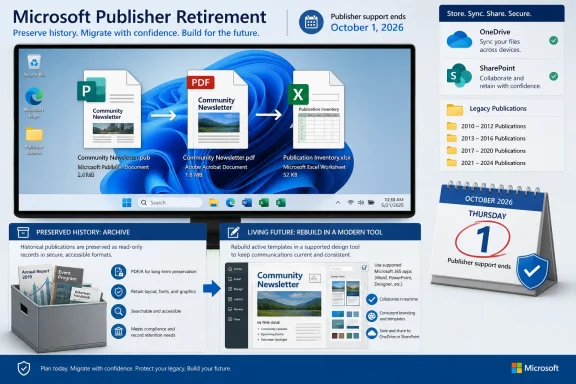
.pub, create and validate PDFs for records, and rebuild living templates in a supported tool rather than treating PDF as an editable successor.
Publisher export runbook
- Open the
.pubfile in Publisher. - Select File > Export.
- Select Create PDF/XPS Document.
- Select Create PDF/XPS.
- Choose the file name, file type, destination, and required publishing options.
- Complete the export.
Immediately follow that manual-export plan with discovery: use File Explorer to search for .pub, then repeat the search in OneDrive and SharePoint. Microsoft identifies those locations in its Publisher retirement guidance.
What changed / what to do
- Publisher leaves Microsoft 365 after October 2026.
- Microsoft 365 subscribers lose Publisher-based opening and editing.
- Inventory important
.pubfiles across PCs, OneDrive, and SharePoint. - Preserve records as PDFs while retaining the native source files.
- Validate important exports instead of assuming that a created PDF is correct.
- Rebuild publications that must remain editable in a supported tool.
- Complete discovery, preservation, validation, and template rebuilding before October 1, 2026.
WindowsForum’s “Farewell Microsoft Publisher: Transitioning from 365 Subscriptions” discussion characterized Publisher as a simple, specialized desktop-publishing application whose departure creates a practical migration problem for people who relied on it for routine design work. The forum’s “Microsoft to Discontinue Publisher by 2026: What You Need to Know” discussion focused more specifically on file compatibility, legacy-file migration, replacement design tools, collaboration, and the changing software landscape. Those concerns point to the same operational answer: do not wait until an old publication is urgently needed to discover that it has no preserved output or editable successor.
Start with a controlled .pub discovery pass
Do not begin by converting whichever files happen to be visible on a desktop. First establish an inventory. The larger risk is not one current brochure or newsletter; it is the forgotten folder containing years of letterhead, event programs, labels, signs, business cards, mailers, certificates, print-ready documents, and reusable layouts.
Search Windows PCs through File Explorer using:
.pub
Repeat the search in OneDrive and SharePoint. A local-only search can miss cloud libraries, shared folders, files synchronized through another account, and publications retained by a former document owner.
Where relevant to the organization, also check external drives, departmental file shares, backup locations, archived user folders, and storage inherited from older workstations. These additional locations are an editorial recommendation for finding legacy material, not an expansion of Microsoft’s stated search scope.
Record every result in a central inventory. This provides a way to identify missing outputs, assign ownership, distinguish records from templates, and track files requiring manual attention.
Useful inventory fields include:
- Original file name
- Full source location
- Publication owner or responsible department
- Last modified date
- Historical-record or living-template classification
- Planned PDF destination
- Export status
- Validation status
- Replacement-tool decision, if future editing is required
- Exception status
- Notes about duplicates, damaged files, missing resources, or unclear ownership
A small organization can use a spreadsheet. A larger organization may need a list maintained by IT, records management, or the business team responsible for the publications. The particular system matters less than having one authoritative view of the work.
| Classification | Preservation action |
|---|---|
| Historical record | Retain the original .pub and create a validated PDF for viewing, printing, and reference. |
| Living template | Retain the original .pub, create a PDF reference copy, and rebuild the design in a supported tool before its next required revision. |
| Unknown or duplicate | Export and compare related versions, then determine whether the file is a record, a template, a duplicate, or no longer required. |
| Failed conversion | Retain the source and place it in a managed exception queue for investigation while Publisher remains available. |
The archive-versus-template distinction is where migrations often go wrong. A PDF can preserve what a finished flyer looked like, but it does not preserve Publisher as an editable layout source. A monthly newsletter template, business-card master, branded program, recurring certificate, or frequently updated mailer belongs in the living-template category even if its PDF export looks perfect.
Conversely, not every old publication needs to be rebuilt. A completed event program retained only for reference may need an intact source and a readable, verified PDF—not hours of redesign in another application. Classification prevents the project from becoming either too shallow, with PDFs but no future editing plan, or unnecessarily expensive, with every historical publication reconstructed.
Treat unclear files as unresolved rather than guessing. If a publication has no obvious owner, record that fact and assign someone to decide whether it is a business record, an active template, or an obsolete duplicate.
Export small collections manually and large collections with PowerShell
For a small collection, use Microsoft’s documented PDF export route:
File > Export > Create PDF/XPS Document > Create PDF/XPS
Choose the destination, file name, file type, and appropriate publishing options, then complete the export. This is an export operation, not a File > Save As workflow.
Store exported PDFs in a separate, clearly named destination where practical. Keeping native sources and preservation outputs distinct makes it easier to verify that the .pub files were retained, identify missing PDFs, and conduct validation without confusing an original with an export.
For larger collections, Microsoft provides a sample PowerShell bulk-export approach with recursive processing. Obtain the current sample from Microsoft’s Publisher retirement guidance rather than copying an unverified command line from a third-party article.
The supplied material establishes that Microsoft offers a sample PowerShell approach and that it can process Publisher files recursively. It does not establish arbitrary folder paths, parameters, command syntax, reporting behavior, overwrite rules, or error handling. Inspect the current script and its accompanying instructions before deciding how to use it.
Do not assume that the script:
- Continues after every type of error
- Produces a particular converted-versus-failed report
- Protects against every same-name output conflict
- Preserves the exact source-folder structure
- Handles permissions or cloud synchronization in a particular way
- Detects whether an exported PDF is visually correct
Those behaviors must be confirmed from the script actually obtained from Microsoft and from controlled testing in the relevant environment.
Run a representative pilot before processing an entire archive. Include examples such as:
- A simple one-page publication
- A multi-page publication
- A document containing photographs or other graphics
- A text-heavy publication
- A business-critical recurring template
- A file stored in a nested folder
- Publications with similar or identical file names in different folders
- An older file that has not been opened recently
- A file from OneDrive or SharePoint
- A publication whose expected output is already known
The pilot is a risk-control recommendation, not a Microsoft-mandated step. Its purpose is to expose local problems—destination structure, storage permissions, naming collisions, synchronization behavior, or problematic source documents—before they affect a larger collection.
Keep the original .pub files untouched while PDFs are generated and reviewed. If automation is used, operate on controlled copies or maintain a documented backup and recovery plan appropriate to the environment.
Do not discard native files merely because PDF exports have been created. Microsoft’s retirement guidance makes accessible conversion urgent, but the supplied material does not promise what will happen to every stored .pub file under every storage or account scenario. The safe action is to protect and back up the sources deliberately rather than relying on assumptions about retirement behavior.
Validate the files that matter instead of assuming export equals preservation
A successful export means that a PDF was created. It does not prove that the result is complete, visually accurate, readable, printable, or fit for the purpose for which it is being retained.
Open each high-priority PDF and compare it with the source publication while Publisher-based access remains available. A practical review can include:
- Confirming that every expected page exists
- Checking that pages are in the intended order
- Looking for clipped, missing, or unexpectedly repositioned text
- Inspecting logos, photographs, graphics, and other identity-critical elements
- Confirming that the output is readable at normal viewing sizes
- Checking that a print-oriented document remains suitable for its expected printing purpose
- Verifying that the PDF opens from its final archive location
- Confirming that the original
.pubremains in the intended source or archive location - Recording who reviewed the file and when
- Recording any discrepancy that still requires attention
Validation should reflect actual risk. Check every living template and every high-value historical record. For lower-risk material, a documented sampling approach may be reasonable, but sampling is an operational compromise rather than proof that unchecked files are correct.
Organizations subject to legal, records-management, accessibility, print-production, branding, or other formal requirements should apply their own standards. A general visual inspection is not a substitute for an applicable compliance or production process.
Maintain an exception queue for files that:
- Fail to open
- Fail to export
- Produce questionable output
- Lack a clear owner
- Appear to be duplicates but cannot yet be discarded
- Contain uncertain or incomplete content
- Have no agreed replacement path
- Require specialist review
“Exception queue” simply means a managed list of unresolved cases. It is an editorial workflow recommendation, not a Microsoft product feature.
Each exception should record:
- The source path
- The reason it was flagged
- The owner of the next action
- The required next step
- A target review date
- The final resolution
That is safer than leaving failed or uncertain files scattered throughout folders where they may be forgotten until after Publisher is retired.
The preservation model should retain both forms where possible: the .pub as the native source artifact and the PDF as an accessible representation. The PDF supports viewing, sharing, reference, and printing. The original may still be needed for verification, recovery, or reconstruction. Neither file should be mistaken for the other.
Editable migration is separate from record preservation
A PDF should not be treated as an editable replacement for a Publisher source file. It is primarily a preserved output showing what the finished publication was intended to look like.
A living publication needs a separate migration decision. Identify the content that will change in the future, assign an owner, select a supported destination tool appropriate to the work, and rebuild the design deliberately. The PDF can serve as a visual reference during reconstruction, while the original .pub can be used for comparison while Publisher-based access remains available.
Choose the replacement tool according to the publication rather than applying a blanket “move everything to one application” rule. A simple notice, a complex multi-page program, a recurring newsletter, a business-card sheet, and a print-production template may not belong in the same destination.
The migration inventory should record both the publication’s owner and the tool selected for its next editable version. It should also record whether reconstruction has been completed and reviewed.
WindowsForum’s “Microsoft to Discontinue Publisher by 2026: What You Need to Know” discussion identified the changing design-software landscape and the implications for collaboration, content creation, file compatibility, and legacy systems. That is particularly relevant here because Publisher occupied a practical niche between ordinary word processing and more complex design applications. Replacing it is therefore not only a format-conversion decision. It can affect training, workflow, collaboration, and the effort needed to maintain familiar designs.
Track preservation and reconstruction as two related but distinct workstreams.
Preservation workstream
- Discover the
.pubfiles. - Record their owners and locations.
- Classify them by business purpose.
- Retain the native originals.
- Export important files to PDF.
- Validate the outputs.
- Resolve failed or questionable conversions.
- Store sources and PDFs according to retention requirements.
Living-template workstream
- Identify publications that will need future revisions.
- Assign a responsible owner.
- Select a supported replacement tool.
- Rebuild the design using the original and PDF as references.
- Review the reconstructed version for its intended use.
- Confirm that users can complete the expected editing workflow.
- Update instructions and shortcuts so users do not return to an obsolete Publisher template.
Combining both goals under a vague “convert everything” project creates false confidence. A folder full of PDFs can be a useful archive while still leaving an organization unable to update next month’s newsletter, replace an address on a business card, revise a recurring certificate, or prepare an annual program.
Build the schedule backward from October 1, 2026
Microsoft says Publisher reaches end of life in October 2026 and recommends finding and converting important files before October 1, 2026. Treat October 1 as the completion target, not the day on which discovery begins.
The project should reach a point before that date when every important .pub has:
- A known location
- A responsible owner
- A classification
- An intact native source copy
- A PDF where preservation is required
- A completed validation record appropriate to its importance
- A documented exception if conversion or review remains incomplete
- A replacement plan if future editing is required
- A rebuilt and reviewed successor if the publication must remain active
A useful sequence is:
- Discover: Search PCs, OneDrive, and SharePoint, then check other relevant organizational storage.
- Inventory: Create one authoritative list of files, owners, locations, and statuses.
- Classify: Separate historical records, living templates, duplicates, unknown files, and exceptions.
- Pilot: Test manual or automated export on representative publications.
- Export: Generate PDFs without replacing the native sources.
- Validate: Review outputs according to business importance and applicable standards.
- Resolve exceptions: Investigate failed, uncertain, or ownerless files while access remains available.
- Rebuild living designs: Move active templates into supported tools and test their new workflows.
- Close the project: Confirm that required files, outputs, owners, and migration decisions are documented.
The concern about future file compatibility is legitimate, but the answer is not to panic-convert every file and discard the originals. It is to inventory, classify, preserve, validate, and rebuild only what must remain alive.
Frequently Asked Questions
When should Microsoft 365 users finish converting Publisher files?
Microsoft recommends converting important Publisher files before October 1, 2026. Starting earlier leaves time to find forgotten publications, investigate failures, validate important PDFs, and rebuild designs that must remain editable.
Will retirement delete my .pub files?
The supplied material does not explicitly promise what will happen to every stored .pub file in every environment. Protect and back up the originals deliberately. The confirmed Microsoft 365 impact is the loss of Publisher-based opening and editing, so retaining only a .pub file is not an adequate accessibility plan.
Should every publication be rebuilt?
No. Rebuild living templates that will need future changes. Historical publications may only require a retained native source and a validated PDF, depending on the organization’s records and business requirements.
Does Microsoft provide a bulk-export method?
Yes. Microsoft provides a sample PowerShell approach with recursive processing. Obtain the current sample from Microsoft’s Publisher retirement guidance and confirm its actual behavior before relying on it.
Can undocumented PowerShell examples be trusted?
Do not assume that third-party syntax, paths, parameters, overwrite handling, error behavior, or reporting details match Microsoft’s current sample. Review the script you obtain and test it against representative files before wider use.
What should happen when a file does not convert correctly?
Retain the original and add the case to a managed exception queue while Publisher-based access remains available. Record the problem, owner, next action, target date, and resolution. The eventual answer may be another export attempt, recovery from a better source, manual correction, or direct reconstruction in the replacement tool.
What is the most important action to take now?
Find and classify every important .pub. Preserve records as validated PDFs while retaining their native sources, and rebuild living templates in supported tools. Complete the work before Microsoft’s recommended October 1, 2026 conversion deadline.
Update: Additional details (September 14, 2026)
MakeUseOf reports that Publisher support for the perpetual Office 2021 release ends on October 13, 2026, after Microsoft 365 subscribers lose Publisher access on October 1. That creates two closely spaced deadlines: October 1 for Microsoft 365 access, and October 13 for Office 2021 support.
The report also says Microsoft’s migration guidance includes creating a PDF archive copy, then opening that PDF in Word and saving a Word version where future text editing is needed. This is not a layout-preserving editable conversion: Word may rearrange visually complex publications, so any Word result should be compared against the original PDF and rebuilt where necessary.
References
- Microsoft Publisher is shutting down in October 2026 — here's how to save your files MakeUseOf · 2026-09-14T13:55:24+00:00
- Microsoft Publisher Deadline: Inventory and Export .pub Files Before October 1, 2026 learn.microsoft.com
- support.microsoft.com support.microsoft.com