

The difference is consequential. Similarity Checker is a smaller change than Publisher’s removal, but colleges, writing centers, compliance teams, and departments that incorporated it into document-review guidance should not rush into a replacement procurement based on a deadline that Microsoft extended by a year. Seton Hall’s advisory, published September 16, appears to reflect an earlier timeline; the Message Center item was updated on September 10.
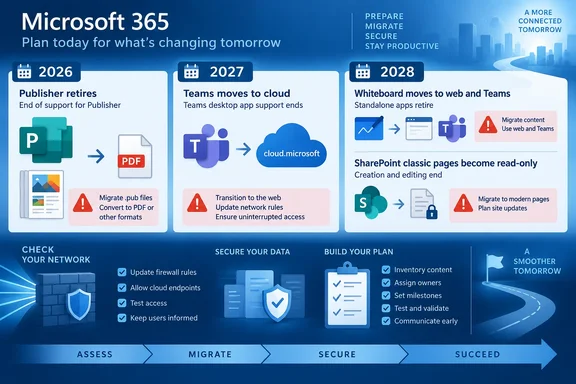
The larger pattern is less about one application disappearing than about Microsoft withdrawing standalone or legacy routes into services it wants customers to use through its current Microsoft 365 stack. For IT administrators, the work is uneven: some changes require a firewall and embedded-app review, some require content conversion, and some are primarily a communications problem. Treating all of them as routine “no action required” notices would miss the practical breakpoints.
Teams moves to a new web domain
Microsoft Teams web users are being redirected from teams.microsoft.com to teams.cloud.microsoft through the end of September 2026. As Seton Hall reports, saved Teams links and bookmarks will continue redirecting, and Microsoft describes the change as a domain move rather than a product redesign.
For most users, the change should be invisible beyond the address bar. Microsoft says cloud.microsoft is a Microsoft-controlled top-level domain, so its appearance is not itself a phishing indicator. Help desks should nevertheless tell users that the new domain is expected; otherwise, a legitimate login page with an unfamiliar ending is precisely the kind of event that users are trained to question.
The administrative caveat is more important than the end-user messaging. Microsoft’s Message Center guidance says organizations need to ensure that *.cloud.microsoft is permitted by proxies, firewalls, secure web gateways, and other network controls. Older Teams web applications can also fail if they hard-code the prior Teams domain or use restrictive Content Security Policy, framing, authentication, redirect, or older Teams JavaScript SDK settings.
Microsoft has left a temporary tenant-admin control that can disable the automatic redirect while an organization fixes a compatibility problem. That escape hatch expires on December 31, 2026; from January 1, 2027, the redirect cannot be disabled. The operational instruction is clear: test browser-based Teams apps and embedded tabs now, rather than waiting for a staff member to report a broken internal tool after the redirect becomes compulsory.
Google calendar syncing ends, but meeting creation remains
The Google Workspace calendar integration in Teams is due to stop working beginning in October 2026. Seton Hall identifies October 1 as the action date, while Microsoft’s current Teams documentation gives only the broader timing of “beginning October 2026.” Administrators should plan against the earlier date, but they should recognize that Microsoft has not published an exact day in its support guidance.
This is a synchronization retirement, not a ban on scheduling Teams meetings from Google Calendar. Microsoft says users can continue creating Teams meeting links from Google Calendar with the Microsoft Teams Meeting add-on for Google Workspace. What ends is the ongoing display and update of Google Workspace calendar events inside Teams, along with the Teams Admin app’s calendar-sync management capability.
That distinction will matter most in mixed Google-and-Microsoft environments, where staff may assume that a Teams meeting link proves their Google calendar is still feeding availability into Teams. It does not. After the retirement, meeting creation can continue while calendar synchronization does not.
Admins should identify users or departments that depend on Teams as a consolidated calendar view, document what information is currently synchronized, and make a choice: move scheduling to Microsoft 365 calendars, retain Google Calendar as the calendar of record, or accept the divided view. The last option is workable only if users understand that it is deliberate.
Publisher is the urgent file-format problem
Publisher’s Microsoft 365 deadline is October 1, only two weeks after Seton Hall’s notice. Microsoft’s own support documentation says Microsoft 365 subscribers will no longer be able to access Publisher or open and edit .pub files in the application after that date. The immediate risk is not that every existing Publisher document vanishes; it is that an organization discovers too late that its source file can no longer be opened in the subscription software used to maintain it.
Seton Hall’s recommendation to save view-only material as PDF is sensible, but PDF is preservation rather than a genuine editing migration. Microsoft suggests converting Publisher files to PDF and then opening the PDF in Word for further work. Microsoft also warns that the resulting Word document is optimized for text editing and that its layout may vary, particularly for graphic-heavy work. A newsletter, brochure, program, or form should therefore be validated page by page after conversion rather than assumed to have survived intact.
There is another distinction missing from broad retirement notices. Microsoft 365 subscription customers lose Publisher access on October 1. Perpetual-license Publisher users are in a different position: support for the perpetual version ends on October 13, 2026, alongside Office LTSC 2021 and consumer Office 2021, but Microsoft says the installed perpetual application can still be used afterward. That is not a recommendation to keep a retired publishing workflow alive—unsupported software creates security, compatibility, and continuity problems—but it means the file-access outcome is not identical for every license type.
Organizations with sizable .pub archives should inventory them before conversion starts. Search Windows endpoints, OneDrive, and SharePoint for the extension; separate records that need only retention from files that are regularly revised; then migrate a representative sample of each major layout before committing to Word, PowerPoint, or another publishing tool. Microsoft provides a PowerShell example for bulk PDF export, but bulk exporting solves archival access, not the design-review problem.
Whiteboard remains, while the installed apps stop opening boards
Microsoft is retiring the standalone Whiteboard apps on October 16, affecting Windows, iOS, and Android and applying to both work or school accounts and personal Microsoft accounts. The installed applications are not necessarily removed from devices automatically. Microsoft says they will instead show a retirement experience rather than opening the Whiteboard gallery or existing board content.
This is an app retirement, not the retirement of Microsoft Whiteboard for organizational users. OneDrive-backed boards remain accessible through Whiteboard on the web, the Whiteboard app inside Teams, Teams meetings, Teams chats, and supported OneDrive entry points. Seton Hall’s core advice—to move users to Teams or the web—is accurate, but IT teams should be precise when communicating it. Saying “Whiteboard is going away” will cause unnecessary exports and needless concern; saying only “no action is required” leaves users stranded when their familiar Windows app stops opening content.
The practical preparation is to replace app shortcuts, managed-app catalog entries, device-image references, onboarding guides, and support scripts that direct people to the standalone client. Affected users should also be shown where their OneDrive-backed .whiteboard files appear in the replacement experience before October 16. The change is likely to be most disruptive for users who launch Whiteboard independently of a Teams meeting and rarely use the browser version.
Learning Coach disappears; SharePoint has a longer migration clock
Microsoft 365 Copilot’s Learning Coach agent is scheduled for removal during the first week of October, according to Microsoft Message Center notice MC1454391, reproduced by several Microsoft 365 administration tracking sites. The agent has already been removed from search and new installation flows, those reports say; existing users can still reach it through the agent tray until the removal begins. Administrators can reportedly manage it until the second week of October, when it is expected to disappear from the Microsoft 365 admin center as well.
Microsoft directs users to Learning Agent, but organizations should not assume that a recommended successor is a one-for-one replacement. Teams responsible for internal learning or skills programs should review saved prompts, documented workflows, permissions, and any training materials that instruct staff to use Learning Coach. Users who need information from prior conversations should save it before the agent is removed.
SharePoint’s retirement has the longest runway and the greatest potential remediation cost. Microsoft’s SharePoint documentation confirms that on March 1, 2027, all tenants will lose the ability to create new classic publishing sites or activate classic publishing features. The AllowClassicPublishingSiteCreation setting will be enforced as false. New tenants created on or after that date face additional restrictions: they cannot create classic pages, and custom scripting is disabled by default.
On October 1, 2028, those page and scripting restrictions extend to remaining existing tenants. Classic user-created wiki pages, Web Part pages, blog pages, publishing pages, and certain custom ASPX pages become read-only. Microsoft says the content is not deleted and remains viewable, but “read-only” is a production deadline for any page that still needs maintenance.
Microsoft recommends the Microsoft 365 Assessment Tool and Purview audit events to identify classic-page use. That is the work organizations should begin now, especially where publishing sites rely on custom master pages, scripts, or third-party components. Microsoft warns that highly customized pages may require redesign or manual rebuilding, which makes this a content and development project rather than a simple switch to the modern SharePoint interface.
The immediate calendar is straightforward: verify Teams web compatibility before September ends, find and preserve Publisher source files before October 1, correct any Similarity Checker plans to the October 3, 2027 date, move Whiteboard users before October 16, and begin a measured SharePoint inventory well before March 1, 2027.
References
- What’s New in Microsoft 365 – September 2026 - Seton Hall Seton Hall · Wed, 16 Sep 2026 19:13:32 GMT