

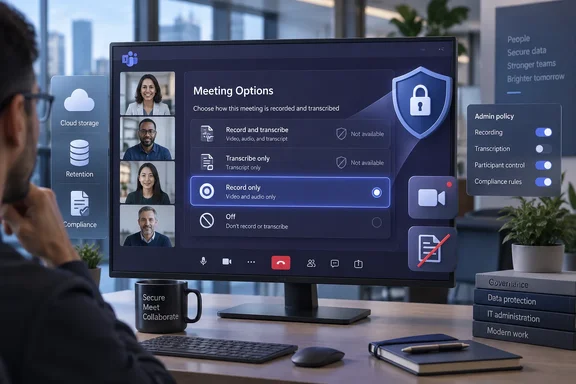
The practical change is less about adding a switch than making Teams’ Meeting Options reflect the policy state already assigned to the organizer. Depending on whether that user is permitted to record meetings, transcribe meetings, or both, Teams will offer some combination of Record and transcribe, Transcribe only, Record only, and Off. If policy disables both recording and transcription, the automatic setting disappears.
That is a useful correction to an interface that has historically exposed a single “Record and transcribe automatically” control while the underlying capabilities were governed by separate administrator policies. Microsoft’s existing Teams documentation confirms that recording, transcription, automatic recording, storage, expiration, consent, and Copilot access are separate controls. The roadmap entry suggests the meeting-creation UI will finally present those distinctions to organizers rather than treating all automatic capture as one bundled feature.
Record only changes the default capture decision
The new Record only choice is the notable addition. Teams has long supported recording without a transcript during a live meeting; Microsoft’s support documentation describes stopping transcription while leaving a recording running, and it documents audio-only recording as another separate choice. But the automatic meeting option has conventionally been presented as a combined recording-and-transcription setting.
For organizations that need the video, audio, and shared-screen record but do not want searchable speech-to-text content created by default, that distinction has consequences. A transcript is easier to search, copy, retain, analyze, and surface to AI features than a video file alone. Removing it from the automatic workflow can reduce the number of text artifacts created from routine meetings, even though it does not make the meeting recording itself disappear.
It also gives teams that rely on recordings for training, operational review, or regulated evidence a more precise default. A meeting can begin with a capture of what occurred without automatically creating a written account of every participant’s remarks. Whether that is appropriate depends on the organization’s retention, eDiscovery, and legal requirements, but the choice is materially different from merely asking organizers to remember to stop transcription after a meeting starts.
Microsoft has not published a separate implementation guide for Roadmap ID 570468. The company’s current support guidance still describes the automatic control in singular terms as “Record and transcribe automatically,” so administrators should expect the documentation and screenshots to lag the November rollout.
The policy model is still doing the real work
The roadmap item does not introduce a tenant-wide command that forces Record only or Transcribe only for every meeting. It says the available choices will align with existing meeting policies. In other words, the UI is becoming policy-aware; it is not replacing policy assignment with organizer preference.
Microsoft Learn says the -AutoRecording setting on Set-CsTeamsMeetingPolicy controls whether an organizer can access the automatic-recording setting at all. When enabled, the setting is normally off for ordinary meetings, and the organizer must turn it on meeting by meeting. Microsoft explicitly says that this automatic-recording policy does not apply to transcripts in its current documentation.
That last point is where the roadmap needs to be read carefully. The forthcoming menu will apparently let an organizer automatically start transcription without recording when transcription policy allows it. Yet Microsoft’s present auto-recording policy documentation says it does not govern transcripts. The most likely reading is that Teams will evaluate the existing recording and transcription permissions separately, then show only automatic actions that fit those permissions. It should not be read as proof that -AutoRecording Enabled alone authorizes automatic transcription.
Administrators should therefore verify the policies that actually permit cloud recording and transcription for their organizer population. A user with AutoRecording enabled but transcription disabled should not expect the Transcribe only or Record and transcribe choices. Conversely, enabling transcription at the meeting-policy level does not automatically mean an organizer will see an automatic-start option unless Microsoft’s final rollout documentation says how that choice is exposed.
A cleaner interface will expose inconsistent policy assignments
Microsoft’s broader recording-and-transcription documentation warns that Teams meetings, events, group calls, and one-to-one calls can be controlled through different policy families. That matters for organizations that have tuned calling policies but left users on the global meeting policy.
Microsoft gives an example of a finance team barred from recording or transcribing calls through its calling policy but still able to record and transcribe meetings and events because no custom meeting or event policy was assigned. Roadmap ID 570468 will not solve that configuration error. It may make it more visible: an organizer’s available automatic choices will reveal what Teams believes their meeting policy allows.
That is potentially valuable for support teams. A user who reports that the automatic option is missing is no longer necessarily describing a client problem or a rollout delay. Under the announced design, missing choices are an expected result when the relevant capabilities are blocked. The diagnostic path should begin with the effective Teams meeting policy, not with clearing the Teams cache or reinstalling the desktop client.
The expected options should also be treated as a quick policy sanity check:
- Organizers who may both record and transcribe should be able to select the combined automatic option, subject to the final rollout behavior.
- Organizers authorized for recording but not transcription should see Record only rather than a combined capture setting.
- Organizers authorized for transcription but not recording should be offered Transcribe only.
- Organizers blocked from both should not see the automatic setting at all.
Microsoft has not yet published the precise policy-to-option matrix, including whether another setting besides -AutoRecording gates the transcription-only path. That omission matters because current public documentation uses a combined name for the user setting while separately saying that AutoRecording does not apply to transcripts.
Templates and sensitivity labels remain the enforcement tools
The feature also does not change the boundary between giving organizers a choice and enforcing a meeting behavior. Microsoft’s May 2026 guidance on automatic Teams recording makes the distinction plainly: enabling the meeting policy does not make every meeting record itself. It grants the organizer access to the option, which remains off by default for standard meetings.
Organizations that need automatic capture to happen reliably rather than optionally must continue to use a mechanism that applies a configured value to meetings. Microsoft says Teams Premium meeting templates can set and lock the automatic recording-and-transcription behavior for organizers assigned those templates. The company also documents sensitivity labels and meeting templates as tools for managing certain recording and transcription settings in Teams Premium.
That licensing boundary is important. The November feature should improve what ordinary organizers see in Meeting Options, but Microsoft has not said it turns the new selection menu into an enforcement facility for all Microsoft 365 tenants. A policy that exposes a control is not the same as a template or label that requires a particular outcome.
For IT administrators, the reasonable preparation is to inventory who receives custom Teams meeting policies, compare them with calling and event policy assignments, and test the four expected UI states in a pilot tenant once the update appears. Document the intended behavior for groups with heightened requirements—legal, HR, finance, healthcare, customer support, and executive teams—before users discover the new Record only option themselves.
Recording still creates a governed artifact
Choosing Record only removes the automatic transcript; it does not remove the storage, access, notification, consent, or retention questions attached to a recording. Microsoft says Teams records meeting audio, video, and screen sharing, and stores recordings in OneDrive for work or school or SharePoint. Participants receive a notification when recording begins, and regional law or company policy may require broader consent procedures.
Microsoft’s support guidance also says that the meeting organizer owns the recording and that access varies by meeting type. For private meetings, invited attendees and chat members can normally view the recording; for channel meetings, access follows the Team. Administrators can separately control expiration and, in some scenarios, downloading.
The same separation applies to AI. Microsoft identifies transcript availability and licensing as controls for Intelligent Recap, while some Copilot configurations can operate during a meeting without a saved transcript. A Record only default may therefore change what is available after the meeting far more than what participants can do while it is underway. Teams administrators should test their own Copilot, recap, retention, and eDiscovery configurations instead of assuming “no transcript” means “no AI-derived meeting data.”
There is one small but telling rollout wrinkle. The Roadmap entry was published on September 2, 2026; the Microsoft 365 Message Center Archive shows Microsoft updated its tags and release phase on September 3 to include both General Availability and Targeted Release. The roadmap still gives November 2026 as the target, not a firm ship date, so organizations should treat it as a deployment window rather than schedule a policy change around a particular day.
When it arrives, the visible result should be simple: organizers will get only the automatic capture choices their Teams policies permit. The administrative work is less simple. The new menu will make mismatched meeting policies easier to spot, but it will also expose any gap between an organization’s intended recordkeeping rules and the policies actually assigned to the people scheduling its meetings.
References
- Microsoft Teams: Automatic recording and transcription choices align with admin policies Microsoft 365 Roadmap · 2026-09-02T22:56:59.2759925Z