

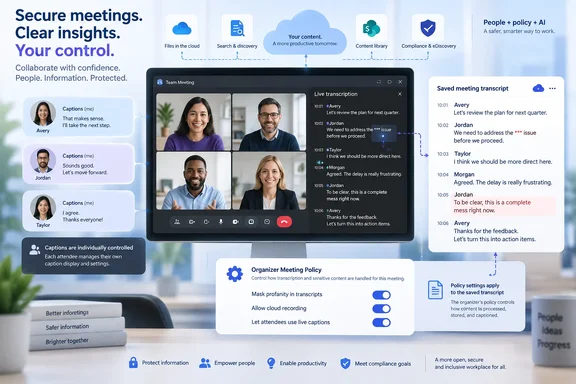
Microsoft’s Microsoft 365 Roadmap entry 570467 says transcript filtering will remain enabled by default. Once the feature ships, assigning an organizer a policy with filtering disabled will allow unmasked language to appear in both the live transcription pane and the transcript retained after the meeting. The entry is still marked In development as of September 16, 2026, so this is a deployment target rather than a setting admins can rely on today.
Microsoft Learn already exposes the underlying PowerShell setting, FilterProfanityInTranscript, in the CsTeamsMeetingPolicy reference. Its documented default is Enabled, and it accepts Enabled or Disabled. But the same documentation carries an unusually direct warning: the feature has not been fully released and the setting currently has no effect. That is the practical line for administrators: the switch may already appear in tooling or scripts, but it is not evidence that transcript output has changed in production.
A transcript policy, not a universal language control
The planned feature shifts control of stored meeting text from an attendee preference to an organizer-based administrative policy. Teams has long offered an individual setting for profanity filtering in live captions and live transcription, but Microsoft described that earlier control as user-level and outside the organizer’s or tenant administrator’s control.
Roadmap 570467 narrows the new administrative authority to meeting transcripts. An organizer assigned a policy that disables filtering can create meetings where spoken profanities are shown rather than replaced with masking characters in the live transcription and the saved transcript. A policy that retains the default setting should keep those words masked in transcript content.
That may sound cosmetic, but transcripts are routinely treated as meeting records. Microsoft’s Teams documentation says recordings and transcripts are subject to expiration policies, with a default deletion period of 120 days, and it distinguishes those automatic cleanup controls from compliance retention. In private meetings, related recording content is stored in the organizer’s OneDrive; channel-meeting material is stored in the associated SharePoint site. Microsoft 365 Search can index recording content, while transcript and recording access can also be governed through Teams policies, meeting templates, sensitivity labels, file permissions, and Purview controls.
For an organization that uses transcripts in internal investigations, regulated workflows, HR matters, sales records, or AI-generated recap, the difference between an asterisked term and the word actually spoken can change the evidentiary usefulness of the record. It also changes what may turn up in search results, discovery collections, exported material, or downstream systems that ingest a transcript.
Captions are deliberately left out
The most easily missed part of Microsoft’s description is the line excluding live captions from the new admin control. Live captions will continue to honor the individual participant’s existing profanity preference, even when the organizer’s meeting policy allows unfiltered transcript text.
Microsoft’s Teams release notes show why that distinction matters. In June 2026, Microsoft changed the default live-caption profanity-filter preference from on to off for users who had never set it themselves, saying the change was intended to improve accessibility and align with European Union requirements. Existing user preferences were preserved.
The result is a two-track experience that administrators should document clearly:
- A participant may see unfiltered language in live captions because their personal caption preference is off.
- The saved transcript may still mask the same language because the meeting organizer is assigned the default transcript-filtering policy.
- Conversely, an organizer assigned a policy that disables transcript filtering can create an unmasked transcript even while some attendees continue to see filtered captions because of their own preference.
This is not an inconsistency in the feature as Microsoft has described it. It is a deliberate separation between accessibility-facing captions, which are personal and immediate, and transcripts, which are retained meeting artifacts. But it creates a support problem if staff assume that the captions they saw are an exact preview of the record that will exist after the call.
Organizations that communicate strict conduct or recordkeeping rules should avoid saying that Teams “filters profanity” without specifying whether they mean captions, live transcription, or the saved transcript. After rollout, each can produce different output in the same meeting.
The policy assignment is the real scope boundary
Microsoft says the setting is applied through a Teams meeting policy assigned to an organizer. That is more consequential than a tenant-wide toggle because it permits targeted use: a company could keep the Global policy at the default filtered setting and create a separate policy for designated organizers whose meetings require verbatim transcription.
Teams’ policy model supports that approach. Microsoft documents that administrators can apply the Global meeting policy to unassigned users, create custom meeting policies, and assign them directly to users or to groups. In this case, the individual who schedules and organizes the meeting is the relevant policy target—not every participant joining it.
That makes the feature suitable for narrowly defined populations, such as legal teams, internal investigations, clinical documentation teams, call-quality review groups, or accessibility programs that decide a verbatim transcript better serves their work. It also means it should not be deployed casually to broadly assigned executive, all-staff, or contractor groups. Organizers can host meetings containing highly varied subjects and attendees, and the transcript’s storage and sharing settings may persist independently of the organizer’s intent.
Microsoft has not yet published a rollout notice detailing whether the control will be available in the Teams admin center at launch, whether administrators must use PowerShell, how quickly a changed policy applies to organizers, or whether the option will extend to all meeting types such as webinars, town halls, and Teams Rooms. The roadmap lists Android, Desktop, iOS, Mac, and web among supported platforms, but that should be read as client reach for the meeting experience rather than proof that every administrative configuration surface will launch everywhere.
There is also a rollout-scope discrepancy worth watching. The submitted roadmap metadata identifies Worldwide Standard Multi-Tenant as the cloud instance. The updated roadmap record preserved by the Microsoft 365 Message Center Archive additionally lists GCC. Microsoft’s underlying description has not changed, but the cloud tags did after the original September 2 posting. GCC administrators should therefore treat the archive’s tag as a signal to monitor their own Message Center rather than assume October availability without a tenant-specific notice.
Audit the data path before enabling unmasked transcripts
Turning off profanity filtering should be handled as a content-governance decision, not a Teams user-experience tweak. It does not enable transcription by itself, and it does not grant access to transcripts. It changes the content that can be retained when transcription is already enabled.
Microsoft’s current guidance provides separate controls for recording, transcription, explicit participant agreement, access to recordings and transcripts, expiration, sensitivity labels, and meeting templates. It also offers a distinct tenant setting governing whether agents and applications can read Teams meeting transcripts through Microsoft Graph. Graph transcript access is off by default, according to Microsoft Learn, but organizations that have enabled it should include external and internal apps in their assessment before allowing verbatim text.
A sensible October change-control review should cover the following:
- Identify which organizers, if any, have a business reason to preserve unmasked language in meeting transcripts.
- Keep the Global policy filtered until that review is complete, then use a custom meeting policy for approved organizers rather than changing the default for every employee.
- Confirm who can view, download, retain, search, export, or process the affected meeting artifacts, including Microsoft Graph-connected apps and agents.
- Check existing Purview retention, eDiscovery, OneDrive, SharePoint, and meeting-template rules, because the masking decision affects content that those systems may store or surface.
- Update user communications so attendees understand that their caption preference does not dictate the content saved in the official meeting transcript.
- Test the policy with a controlled meeting after Microsoft marks the feature launched, including transcript display during the meeting, the retained transcript, search behavior, and any recap or workflow that consumes transcript text.
Teams already lets organizations make consequential decisions about whether meetings can be recorded or transcribed and who may access the results. Roadmap 570467 adds a finer-grained decision: whether the written record should obscure language that participants actually used. Microsoft’s documented default preserves masking, and the policy’s current no-effect status gives administrators time to decide whether any exception is necessary before the October 2026 release window arrives.
References
- Microsoft Teams: Admins can control profanity filtering in meeting transcripts Microsoft 365 Roadmap · 2026-09-02T22:56:59.2759925Z