

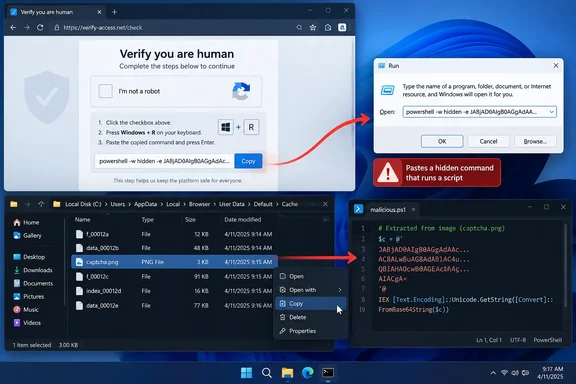
The lure: a CAPTCHA that wants you to leave the browser
The opening move will look familiar to anyone who has followed ClickFix over the past couple of years. According to GBHackers' account, a visitor lands on a compromised site and sees a fraudulent verification or repair window. The instructions are always the same three steps: press Windows key + R, paste, press Enter.
That is the giveaway. A real CAPTCHA checks your interaction inside the browser. This one asks you to run code on your own machine. Security writers have explained the difference in much the same way: real CAPTCHAs are simple tasks you do right in the browser. You click the squares, drag or rotate something, or check a box. Everything happens inside the webpage.
The disguises keep changing. In its earlier analysis of the technique, Microsoft noted that early landing pages mimicked Google's "Aw, Snap!" crash error or Word Online extension missing message, while recent ones spoof Google's reCAPTCHA and Cloudflare's Turnstile solution.
Section summary: The "test" is just a delivery mechanism. When a page tells you to press Win+R, Ctrl+V and Enter, you are the one running the attack.
The new trick: the payload is cached before you paste
This is the main news in Microsoft's findings. As GBHackers describes it, the injected webpage doesn't wait for the victim to run a command and then fetch the main payload. It pre-fetches a larger script into the browser cache and disguises it as a PNG image. When the victim pastes the command into Run, the command only has to find content that is already on disk.
That gives attackers two advantages:
- A short command. Microsoft says the staging helps attackers get around the Run dialog's character limit, because the pasted line doesn't have to carry the whole payload.
- No obvious download. Defenses that watch for a fresh payload download have less to see at the moment of execution.
Here is the mechanism Microsoft reportedly observed:
cmd.exerecursively searches browser profile directories, including%LOCALAPPDATA%\Mozilla\Firefox\Profiles, for files whose names start withf_.- It compares each candidate's size in bytes against an expected value. That value differs between campaign variants.
- The matching cached file is copied to
%LOCALAPPDATA%\Temp\t.vbs, which turns it into a VBScript. - It runs through
wscript.exe, with command output and errors suppressed so the user sees nothing.
Microsoft isn't the only one to describe this approach. Independent researchers have documented the same "browser cache smuggling" pattern in recent months. Crimson7's write-up describes a proof of concept in which the server responds with executable content, but lies about the Content-Type, sending it as image/jpeg with aggressive cache headers. The pasted stager then does a cache walk: for /r ... in (f_*) finds the payload by exact size match, and the file is copied to %TEMP%\t.cmd and executed, with no download and no network activity. The resemblance to the chain Microsoft reportedly saw is close.
The technique is also being packaged for other criminals. BleepingComputer reported on SOCRadar research into a service called DOUBLECUP: a new Russian loader-as-a-service named DOUBLECUP uses ClickFix attacks to hide malicious code in PNG images cached by victims' browsers. SOCRadar says it has operated since early June 2026. To be clear, none of the available reporting ties Microsoft's newly described campaign to DOUBLECUP. The point is that cache staging is no longer one actor's party trick.
A note on the hype: You may have read that this "completely bypasses" antivirus. The evidence doesn't support that. Microsoft names specific Defender detections for this activity, covered below. A fair reading is that cache staging weakens one class of defense, download-focused scanning. Behavioral detection is untouched.
Section summary: The malicious file arrives quietly as an "image" while you browse. The command you paste just finds it, renames it and runs it.
What happens after the paste
According to GBHackers' summary of Microsoft's analysis, the first script is only the start of a multi-stage infection:
- Reconnaissance: The VBScript collects host information through Windows Management Instrumentation (WMI). It then retrieves a PowerShell script,
v.ps1, fromcocojambo[.]us[.]com/alfa. - PowerShell stage: PowerShell runs without loading a user profile and with execution-policy protections bypassed. A later stage downloads
cab.dat, executes its contents in a hidden window, and triggers .NET compilation activity involvingcsc.exeandcvtres.exebefore it launchestimeout.exe. - In-memory payloads: Later stages load .NET assemblies directly into memory and inject code into
timeout.exe. The targets are browser-stored credentials and device data. - More infrastructure: The injected process uses PowerShell to pull another memory-resident stage from
capsysnet[.]vgand connects tociliabula[.]cc. - Persistence: The malware changes the per-user PowerShell configuration to apply a Bypass execution policy, extracts Python components with
tar.exe, and creates a scheduled task that starts a Python payload throughpythonw.exe.
These are campaign indicators, not universal ones. Domains, filenames and byte sizes change between variants, so treat this list as hunting leads rather than a complete detection rule.
Section summary: One paste can lead to credential theft, in-memory payloads and a scheduled task that survives reboots.
How this fits Microsoft's wider ClickFix warnings
This campaign arrives in the middle of a steady run of ClickFix variants. About a month ago, Microsoft Threat Intelligence posted on LinkedIn about a separate cluster of compromised sites that combine ClickFix lures with EtherHiding, which fetches next-stage instructions from a blockchain smart contract. In that post Microsoft described ClickFix and its sibling TerminalFix as a high-volume initial access technique. It said campaigns target thousands of enterprise and consumer devices every day and deliver payloads including Lumma Stealer, XWorm and AsyncRAT.
TerminalFix is worth knowing about in its own right. Microsoft's Security Blog explained in late August that while traditional ClickFix campaigns direct victims to the Windows Run dialog, TerminalFix campaigns apply the same technique but direct users to Windows Terminal or PowerShell instead, increasing the likelihood that complex, multi-line scripts execute successfully. TechSpot reported that those pages impersonate Cloudflare and other trusted services.
Look at the two developments together and a pattern appears. Attackers are working around the Run dialog's limits in two ways: TerminalFix moves to a roomier shell, and cache staging shrinks the command that has to be pasted. Both show that the Run box is an attack surface defenders should pay attention to.
Section summary: This is one part of a broader, fast-changing ClickFix family, not a one-off.
Microsoft's detections and recommendations
According to GBHackers, Microsoft says its Defender stack covers this activity at several layers:
| Layer | Reported coverage |
|---|---|
| Defender SmartScreen / Defender for Office 365 | Block malicious sites, links, attachments and fake CAPTCHA lures |
| Defender for Endpoint | Behavioral alerts such as "Possible ClickFix activity" |
| Defender Antivirus | Detections Trojan:Win32/ClickFix and Trojan:Win32/TermFix |
Microsoft's recommended hardening for security teams:
- Enable cloud-delivered protection, web protection and network protection
- Deploy application control
- Turn on PowerShell script-block logging
Microsoft also advises hunting beyond downloaded files. Look at browser activity, the RunMRU registry key, suspicious child processes of WScript or PowerShell, and newly created scheduled tasks.
Microsoft's Security Intelligence entry for the related Behavior:Win32/ClickFix.SD detection adds broader guidance. Use Group Policy to restrict or disable the Run dialog where it isn't needed, and use AppLocker or Windows Defender Application Control to block scripts and tools such as mshta.exe, wscript.exe and curl.exe from launching out of user-writable locations. That entry describes a general ClickFix detection, so its specific indicators shouldn't be read as IOCs for this campaign.
A practical checklist for Windows admins
The policy locations below come from general Windows administration knowledge, not from Microsoft's campaign report. Test them in a pilot group before you roll them out widely.
- Hunt RunMRU first.
HKCU\Software\Microsoft\Windows\CurrentVersion\Explorer\RunMRUrecords commands typed into Run. Longcmd /cone-liners that refer to browser profile folders,f_files orwscriptshould get immediate attention. - Watch the parent-child chain. In this campaign the path runs
explorer.exe→cmd.exe→wscript.exe→powershell.exe, followed bycsc.exe/cvtres.exeand an injectedtimeout.exe. That sequence matters more than any single filename. - Turn on script-block logging under Computer Configuration → Administrative Templates → Windows Components → Windows PowerShell.
- Consider removing Run for standard users with the "Remove Run menu from Start Menu" policy under User Configuration → Administrative Templates → Start Menu and Taskbar. Be realistic about it: TerminalFix-style lures send users to Terminal or PowerShell instead, so restricting Run reduces risk without removing it.
- Block
wscript.exefrom user-writable paths with WDAC or AppLocker. The first payload stage here,%LOCALAPPDATA%\Temp\t.vbs, depends on exactly that kind of execution. - Review scheduled tasks for new entries that launch
pythonw.exeor other unexpected interpreters.
Already pasted something? What to do next
Microsoft's general ClickFix guidance starts with disconnecting the affected PC from every network, including wired, Wi-Fi and Bluetooth. Microsoft's LinkedIn guidance tells organizations to treat ClickFix alerts as a possible initial-access incident: isolate the device, investigate credential exposure and persistence, and hunt for related activity.
For home users, general incident-response practice adds a few steps:
- Run a full Microsoft Defender scan after updating definitions, but don't assume a clean result means you're safe. This campaign targets stored browser passwords.
- From a different, clean device, change passwords for important accounts, starting with email, banking and work accounts. Sign out other active sessions where the service allows it.
- Turn on multi-factor authentication wherever you haven't already.
- If it's a work machine, call your IT or security team immediately. The sooner they know, the better their chances of containing it.
The bottom line
The cache-staging trick is clever, but the whole chain still depends on you pressing three keys. Microsoft's rule is simple: no legitimate CAPTCHA, browser verification service or IT support process will ask you to paste commands into Run, Terminal, Command Prompt or PowerShell. If a webpage asks you to do that, it's an attack. Close the tab and, if you're at work, report it to your security team.
References
- Your Browser Already Downloaded the Malware. You Just Haven't Run It Yet. crimson7.io
- New DOUBLECUP ClickFix service hides malware in browser cache images bleepingcomputer.com
- Microsoft warns fake CAPTCHA tests are hijacking Windows PCs - geekspin geekspin · 2026-10-05T00:19:51+00:00