

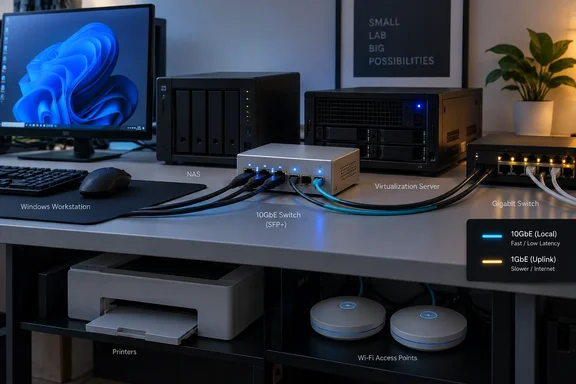
Writing for How-To Geek on September 21, Umair Khurshid described adding a MikroTik CRS305 to a mostly Gigabit network for storage and Proxmox virtualization workloads. MikroTik’s specifications support that approach: the CRS305-1G-4S+IN has four 10GbE-capable SFP+ ports and one Gigabit copper port that can carry ordinary network traffic as well as management access.
For Windows workstation owners and homelab administrators, the decision comes down to which machines exchange substantial amounts of local data—and whether both ends can use a faster connection.
Build a faster local path, not a replacement network
The CRS305 is a compact way to connect a few demanding endpoints. It does not replace the port count of an eight-port or 24-port Gigabit switch, and it does not need to.
A practical arrangement is to retain the existing Gigabit switch for printers, access points and ordinary PCs, then connect the storage-intensive machines to the CRS305 through compatible 10GbE interfaces. Its Gigabit copper port can provide the connection back to the existing network.
The important boundary is where traffic travels:
| Traffic path | What limits the network speed |
|---|---|
| Two 10GbE endpoints communicating through the CRS305 on the same local network | Their 10GbE links, subject to switch configuration and endpoint performance. |
| A 10GbE workstation accessing a NAS that still has only 1GbE | The NAS’s 1GbE connection. |
| A fast endpoint accessing a device through the Gigabit uplink | The 1GbE uplink, shared with other traffic using it. |
| Traffic routed through an existing router over that uplink | The Gigabit path and the router’s capabilities. |
This explains why the router and internet connection need not change. Local switched traffic between the fast endpoints does not have to pass through the router. However, placing machines in different VLANs or subnets can introduce a routed path; a Gigabit connection to the router remains a bottleneck for traffic taking that route.
Both endpoints and the path between them need faster connectivity. Moving only the workstation to 10GbE while leaving its NAS behind a Gigabit uplink will not remove the transfer limit.
What the speed numbers actually mean
Gigabit Ethernet carries one billion bits per second, equivalent to a raw ceiling of 125MB/s before overhead. A 10GbE link raises that ceiling to 1,250MB/s, or 1.25GB/s, using decimal units. Neither figure is a promised file-copy speed.
Khurshid reports seeing 85–90MB/s on his Gigabit setup. That is his observed result, not a universal Ethernet limit. His account does not establish a controlled before-and-after benchmark, and the other reporting available here does not independently reproduce his measurements.
There is also an important numerical correction to the buying advice in the How-To Geek account. It suggests that storage capable of around 150MB/s cannot benefit from replacing 1GbE because the network is not the bottleneck. 150MB/s is already above Gigabit Ethernet’s raw 125MB/s ceiling. Such storage could gain some throughput from a faster connection, although it would still be far from using all of a 10GbE link.
The distinction changes the purchasing decision. Storage that can sustain only a little more than Gigabit speeds may justify removing that bottleneck, but it does not automatically justify the cost of a full 10GbE setup. Conversely, a system capable of delivering several hundred megabytes per second has much more room to benefit.
Application throughput still depends on the complete workload. The source disks must read quickly enough, the destination must accept the data, and the CPU, filesystem and transfer protocol must keep up. A negotiated 10GbE link establishes network capacity; it does not demonstrate that a NAS can fill it.
Why virtualization can justify a small fast segment
According to Khurshid’s account in How-To Geek, his multi-node Proxmox environment generates traffic through VM migration, ZFS replication, network-hosted VM images and backup operations. These are the workloads behind his purchase, rather than faster web browsing or printing.
They also illustrate why a few upgraded machines can be enough. If the substantial transfers occur among a storage server and several virtualization hosts, those machines can share the fast switch while low-demand devices retain their existing connections.
Migration traffic depends on the storage arrangement: moving a running VM does not always require copying its virtual disks between hosts. The useful principle is to identify the actual memory, disk or replication traffic crossing the network, rather than treating every virtualization task as an identical transfer.
A faster segment can shorten the time that large transfers occupy a network link. Khurshid reports that this makes his automated migrations, replication and test-environment refreshes more practical, but his account does not provide migration timings from which to predict another cluster’s improvement.
SFP+ changes the purchase checklist
The CRS305’s four fast ports are SFP+ cages, not ordinary RJ45 Ethernet sockets. MikroTik’s manual explicitly says the modules are not included. Buyers must account for the connection hardware as well as the switch and endpoint adapters.
The available approaches serve different layouts:
- A compatible direct-attach copper, or DAC, cable connects nearby SFP+ equipment without separate optical transceivers.
- Fiber connections use compatible transceivers and fiber cabling, allowing the physical link to suit a more distributed layout.
- Compatible SFP+ copper modules provide RJ45 connectivity where the endpoint uses twisted-pair Ethernet.
Independent deployment reporting supports the practicality of combining these options. In an April 29 account, Giles Thomas described connecting an Asus XG-C100F SFP+ PCIe adapter to a CRS305 using a DAC cable, while using a 10GBASE-T adapter for a connection to a wall socket. That is a separate implementation example, not a benchmark of Khurshid’s network.
Compatibility still requires attention. MikroTik documents support for 1.25Gbit SFP modules as well as 10Gbit SFP+ modules, but this does not mean every cage, module and endpoint combination automatically supports every intermediate Ethernet speed. Select the adapter, module or DAC, and supported link speed as a complete connection.
The same distinction applies to Khurshid’s alternatives. He reports trying a Thunderbolt-to-10GbE adapter and a direct DAC connection between two machines. The adapter required suitable Thunderbolt-equipped computers, while the direct link did not give him the shared connectivity he wanted for more than two devices. A switch addresses that multi-device requirement; it does not eliminate the need for compatible interfaces in each computer.
Switching capacity is not routing performance
MikroTik publishes 41Gbps of non-blocking Layer 1 throughput and 82Gbps of Layer 1 switching capacity for the CRS305. The first figure corresponds to four 10Gbps ports plus one 1Gbps port; the second accounts for traffic in both directions.
These are aggregate hardware-switching figures. They do not turn an individual port into an 82Gbps connection, nor do they establish equivalent routing performance.
That boundary is especially relevant because the CRS305 can run either SwOS, focused on switching, or RouterOS, which also exposes routing features. MikroTik’s separate routing tests report about 1.27Gbps for its 1518-byte, no-rules fast-path test, with lower results in other listed configurations. Those vendor measurements should not be confused with the switch-chip capacity.
For this upgrade, the useful role is therefore straightforward: connect the high-traffic local endpoints through the switching hardware. Do not interpret RouterOS availability as a promise that the device will also serve as a full-speed 10Gbps router.
Decide which links earn the upgrade
Before buying, map the transfer you want to improve: the sending machine, receiving machine and every link between them. Then establish whether storage and application performance can exceed the existing Gigabit path, and include endpoint adapters, modules and cables in the budget.
The CRS305 makes sense when several machines have a concrete need to exchange more local data than Gigabit Ethernet comfortably carries. If every endpoint remains at 1GbE, the purchase provides expansion capacity rather than an immediate speed increase. Upgrade the machines responsible for the bottleneck, and keep the existing network equipment where it still meets the workload.
References
- I bought a 10GbE switch for my 1GbE network, and it’s not as crazy as it sounds How-To Geek · 2026-09-21T11:00:13+00:00
- CRS305-1G-4S+IN - User manuals - MikroTik Documentation help.mikrotik.com
- 10Gb/s Ethernet: what I actually did to get it working in my home :: Giles' blog gilesthomas.com