

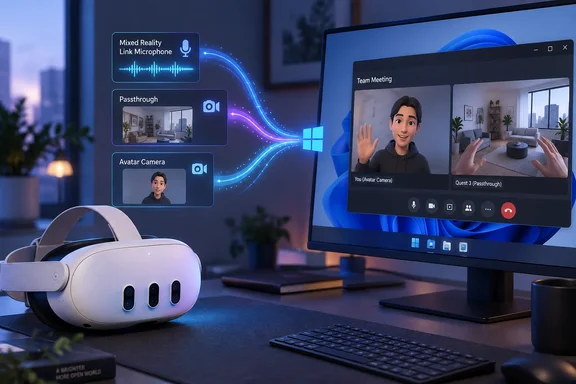
The update is consequential less for virtual-reality demos than for the limitation it removes. Mixed Reality Link already let a Quest user place Windows 11 desktops on large virtual displays; it did not make the headset a practical all-in-one setup for a Teams call, a browser meeting, or a recording session. A user still needed another microphone and webcam attached to the PC. With the reported update, Windows applications should be able to select audio and video originating at the headset instead.
Microsoft has not published a standalone announcement or public changelog for this build. The company’s current Mixed Reality Link support documentation nonetheless now includes a procedure for recording what the user sees through the headset in the Quest Camera app, with audio included, a sign that capture has become part of the supported workflow rather than an afterthought. Neowin is the only outlet located that has reported the specific version number and the new source names, so administrators and users should treat the exact implementation details as reported rather than independently confirmed by Microsoft.
A Quest headset becomes a Windows input device
The microphone feature is straightforward: the Quest headset’s built-in mic reportedly appears in Windows as “Mixed Reality Link Microphone.” Once selected in a supported application, it should eliminate the awkward split setup in which a user wears the headset but speaks into a desktop USB microphone or laptop array somewhere outside the field of view.
That solves a real practical problem for people using Mixed Reality Link as a workstation. The headset is already positioned at the user’s mouth, and its microphones are designed for voice communication. For one-person calls, dictation, or screen-recorded walkthroughs, using it as the input device is more coherent than maintaining a second audio path.
It is still a streamed microphone, however, not a direct USB audio device. Mixed Reality Link requires the PC and headset to communicate over the local network, and Microsoft recommends 5 GHz or 6 GHz Wi-Fi, a strong signal, and a Gigabit-capable local network. A voice call that sounds poor when virtual displays are active may be experiencing network contention, not a defective Quest microphone.
Microsoft’s support guidance also makes clear that firewalls, proxies, or managed-network policies can interrupt the streaming connection. The app uses TCP ports 8264 and 8265 and UDP port 8266. On a corporate network, that means the feature is not simply a matter of updating the Microsoft Store app: network policy may determine whether the headset can connect at all.
Passthrough video is useful, but it is not a webcam replacement in every sense
The more ambitious reported addition is “Mixed Reality Link Passthrough,” which makes a Quest headset camera feed available to Windows as a video source. That can let a person share their first-person view of the physical room, a repair task, a lab bench, or a remote-support scenario without setting up an external webcam in the usual position.
For technical support and training, the distinction is important. A conventional webcam shows the user. A headset-mounted passthrough camera shows what the user is looking at. Those are different tools. A remote colleague can be guided through hardware cabling, equipment inspection, or a physical procedure from the operator’s viewpoint, provided the camera stream is available to the Windows application being used.
The limitation is equally important: Quest passthrough cameras were designed primarily to help the wearer understand their surroundings and place virtual objects in the room. They are wide-angle, head-mounted cameras subject to the wearer’s movement, lighting conditions, and headset position. They should not be assumed to deliver the framing, stability, low-light performance, or visual quality of a dedicated conference webcam.
For video meetings, a head-mounted point of view can also be distracting. A presenter who turns frequently between displays, notes, and the room will send that movement directly to participants. The best early use case is likely task-focused sharing, not leaving passthrough active for every ordinary meeting.
Avatar Camera offers a different answer to being on camera
Neowin also reports an “Mixed Reality Link Avatar Camera” feed that can present the wearer’s Meta avatar to Windows applications. If it works across standard webcam-selection menus as described, it gives headset users a way to participate visually in calls without broadcasting the passthrough view of their home or office.
That is a potentially useful privacy feature, particularly for remote workers in shared spaces. It also avoids an uncomfortable compromise that has defined headset-based desktop work: either remove the headset to appear on a conventional webcam or remain invisible during a camera-on meeting. The avatar feed gives users a third option, although it is inherently not the same thing as facial video.
Organizations should be measured about where it fits. An animated avatar may be appropriate for internal brainstorming, virtual events, informal stand-ups, or immersive collaboration. It may be less appropriate for client calls, regulated workflows, interviews, or meetings where identity verification and facial cues matter. Windows will see a camera source; company policy still decides when its use is acceptable.
Microsoft’s existing Teams documentation already supports immersive events on Meta Quest 3, including avatar-based participation. The reported Mixed Reality Link camera integration would broaden that idea beyond an immersive Teams experience by making avatar video potentially available to other Windows conferencing and communication tools.
Windows privacy controls and managed PCs can block the new feeds
Windows 11 treats camera and microphone access as privacy-controlled capabilities. Users who update Mixed Reality Link but cannot select or activate its inputs should first check Settings > Privacy & security > Camera and Settings > Privacy & security > Microphone. Both device-level access and application access must be enabled for the relevant application.
There is an administrative wrinkle. Microsoft says desktop-app camera permissions cannot generally be granted or denied on a per-desktop-app basis in the same way as Microsoft Store apps. Instead, Windows provides broader desktop-app access controls. An IT department that disables camera or microphone access through policy may prevent a conferencing client from using Mixed Reality Link’s new devices even when the headset itself pairs successfully.
That makes this update more significant for managed endpoints than its consumer-facing framing suggests. It adds two categories of sensor-derived input — room-facing video and headset audio — to a PC workflow that may already be governed by recording, confidentiality, or data-handling rules. IT teams should decide whether headset passthrough belongs in their approved-camera inventory before encouraging employees to use it in support calls or internal meetings.
Microsoft’s own data-handling documentation says pairing a Windows PC with a third-party headset shares the computer display name, a unique computer identifier, and IP address with the headset operator; for Meta products, that operator is Meta. The documentation also says users can unlink the devices and separately opt in or out of optional diagnostic data for Mixed Reality Link and the Windows App. Adding microphone and camera functionality makes reviewing those settings more important, even though the existing pairing-data disclosures have not changed.
What is supported, and what Microsoft still has not said
Mixed Reality Link remains limited to the Meta Quest 3 and Quest 3S. Microsoft lists Windows 11 version 22H2 or later as the operating-system minimum, and its current requirements now include Snapdragon X PCs alongside supported Intel, AMD, and Nvidia graphics configurations. The general availability milestone came in October 2025 after a public preview that began in December 2024.
The company’s support page recommends 5 GHz Wi-Fi and preferably 6 GHz, says both headset and PC must be on the same network or subnet, and warns that a locked or sleeping PC cannot accept a headset connection. Those conditions matter even more now that a connection can carry live audio and video rather than only virtual displays and input.
What remains unaddressed publicly is just as useful to know. Microsoft has not said whether Passthrough and Avatar Camera are available to every existing Mixed Reality Link user immediately, whether a particular Meta Horizon OS version is required, which Windows camera APIs and conferencing apps have been tested, or whether there are quality and latency targets for the video stream. It has also not specified whether the passthrough feed reaches Windows as one view or an image processed from the headset’s multiple cameras.
For now, the practical test is simple. Update Mixed Reality Link from the Microsoft Store, pair a Quest 3 or Quest 3S with an eligible Windows 11 PC, then check the input selectors in a conferencing app or the Windows Camera app for the three reported device names. If they do not appear, check Windows camera and microphone permissions before assuming the update has failed.
The change does not revive Microsoft’s discontinued Windows Mixed Reality headset platform. It does show that Microsoft is continuing to build a Windows productivity path through Meta’s hardware — and, for the first time, is letting the headset contribute its own microphone and cameras to the PC on the other side of that link.
Update: Microsoft now officially confirms Quest microphone and camera inputs (September 21, 2026)
Contrary to the earlier uncertainty around the build, Microsoft has now published a Tech Community post confirming that Mixed Reality Link version 26.9105.9070.0 and later adds the three Windows-selectable sources: Mixed Reality Link Microphone, Mixed Reality Link Passthrough, and Mixed Reality Link Avatar Camera.
As reported by vr.org, Microsoft says the inputs can be selected like ordinary Windows devices. That makes the headset microphone, first-person passthrough feed, and Meta avatar feed available through standard camera and audio selectors in desktop applications, rather than being an undocumented or Neowin-only reported change.
The official confirmation strengthens the case for testing the feature in Teams, Zoom, Windows Camera, and other software that supports conventional webcam and microphone selection. It does not, however, resolve the privacy concern for managed PCs: passthrough remains a room-facing camera source, and Windows’ broad desktop-app camera permission model can expose it to compatible Win32 applications when camera access is enabled.
References
- Microsoft hasn't given up on mixed reality, brings mic and camera streaming to Meta Quest - Neowin Neowin · 2026-09-19T05:28:01+00:00
- Mixed Reality Link Now Puts Your Meta Avatar in the Windows Camera List - vr.org vr.org · 2026-09-21T00:00:00+00:00