

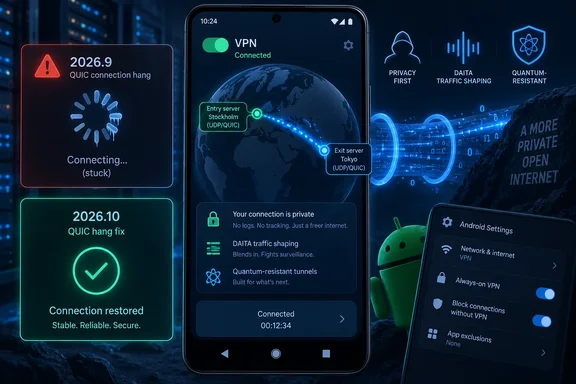
TechRadar reported September 18 that Mullvad had “silently revamped” the Android app with an interactive server map and smarter multi-hop routing. Mullvad’s own signed GitHub release records confirm the new build, but they show an important versioning distinction: 2026.9 introduced the map and multihop redesign; 2026.10 is principally a hotfix for 2026.9’s QUIC failure.
That distinction is useful for anyone evaluating whether to update immediately. Version 2026.10 is the build Mullvad tells users to choose over 2026.9, yet it is not a clean all-clear release: Mullvad says both the new and prior builds can fail on the first connection attempt when quantum-resistant tunnels or DAITA are used.
Version 2026.9 carried the redesign
Mullvad released Android version 2026.9 on September 15, according to its public GitHub release history. That version added an interactive map with panning, pinch-to-zoom, and fling controls, displaying server locations and the route of an active connection. It also added the redesigned multihop controls and location-search highlighting.
The visual change is less substantial than some of the coverage suggests. Mullvad had a 3D map in its Android app years ago; the change in 2026.9 is that the map is now explicitly interactive and intended to make server discovery and connection-path viewing easier. It does not alter the VPN protocol, encryption, or the trust model of the service.
The consequential feature is the new “When needed” multihop mode. A traditional multihop VPN route sends traffic through an entry server and then an exit server rather than using a single VPN server. That can add a privacy layer by reducing the amount any one server sees of the complete route, but it also adds latency and can reduce throughput.
Before this redesign, users generally had to choose whether multihop was on or off. Mullvad’s new mode lets the app stay on a direct, one-server connection until an enabled feature cannot work with the chosen exit location. The app can then select a compatible entry server automatically while retaining the user’s selected exit location.
Mullvad described the design in an August 24 blog post, before the Android stable release, and said Android version 2026.9 would receive it after the iOS rollout. The company’s documentation says the available modes are “When needed,” “Always,” and “Never.”
For users who previously had multihop disabled and DAITA disabled, Mullvad says the upgrade migrates them to “When needed.” Users who had multihop enabled are generally moved to “Always,” sometimes with an automatically selected entry location. That migration matters: a person who had intentionally enabled two-hop routing should verify the post-upgrade setting rather than assume that a familiar-looking connection screen preserves every prior preference.
DAITA can trigger an automatic second hop
DAITA, short for Defense Against AI-guided Traffic Analysis, is Mullvad’s traffic-shaping feature. The company says it aims to make network traffic patterns harder to analyze by altering observable characteristics of traffic. It is a separate privacy mechanism from encryption: a VPN tunnel encrypts content between the device and VPN server, whereas traffic analysis tries to infer activity from timing, size, and volume patterns.
Not every Mullvad server supports DAITA. Under the old arrangement, a user who selected a non-DAITA location could need to change locations, alter settings, or manually use multihop. With “When needed,” the app can establish a second hop through a compatible server while preserving the requested exit location.
Mullvad says this behavior replaces its older “Direct only” DAITA setting. In practical terms, the new modes turn a previously separate exception into a connection-policy choice:
- “When needed” uses one server by default and adds an entry hop when the selected exit location cannot satisfy the active feature set.
- “Always” routes every connection through two servers, with either a chosen or automatic entry location.
- “Never” insists on a one-server route, which can make some locations unavailable when DAITA or another selected feature is unsupported there.
The company’s own guidance acknowledges the trade-off. Always-on multihop can improve anonymity properties but costs performance; Never offers better performance but can limit available locations and reduce the privacy protections associated with a second hop.
For most users, “When needed” is a sensible default because it avoids paying the latency cost of a second hop for every connection. It is not, however, a guarantee that every connection will have the same privacy characteristics. A user who needs a predictable two-server route for a particular threat model should select “Always” and inspect the entry and exit locations, rather than treat automatic behavior as a substitute for deliberate configuration.
DAITA itself also has a practical cost. Mullvad’s support documentation warns that the feature increases network traffic and battery usage. On a metered cellular plan, enabling DAITA and allowing automatic multihop can have a larger impact than the release notes’ usability language implies.
The 2026.9 QUIC problem was serious enough for Mullvad to reject the release
The reason 2026.10 deserves attention is a defect in 2026.9’s QUIC obfuscator. Mullvad’s GitHub release notes say cancellation while the tunnel is in its connecting state can cause the entire tunnel state machine to hang. Once that happens, the app may be unable to alter the tunnel state normally; Mullvad said users may have to disconnect through Android system settings or force-stop the app.
Mullvad explicitly advised users not to use 2026.9 and recommended 2026.10 instead. The newer release, published September 17, lists the QUIC hang as its only change from the preceding stable Android release.
This is an availability and usability failure, rather than a disclosed vulnerability or a claim that tunnel contents are exposed. But it matters most to the people who need obfuscation: QUIC-based transport is used to make VPN traffic harder to block on restrictive networks. A frozen tunnel can leave a user disconnected, unable to reconnect through the app, or forced into Android settings to regain control.
Users who installed 2026.9 from GitHub should move to 2026.10 rather than wait for the application to recover from recurring connection loops. If the app is stuck, force-stopping it or disconnecting its VPN profile from Android’s VPN settings is Mullvad’s stated workaround; restarting the app alone was required in the earlier release notes.
Version 2026.10 still has a connection caveat
The hotfix does not resolve every connection issue. Mullvad warns that 2026.10 — and previous releases — can cause the first connection attempt to fail in some cases when quantum-resistant tunnels or DAITA are active. The company says a fix is planned for the next release, but it has not published a version number or schedule.
This appears to be a narrower failure than the 2026.9 QUIC state-machine hang. Mullvad describes a first-attempt failure, not a permanently frozen tunnel, and the release notes do not say that traffic leaks or cryptographic protections fail. Still, users who rely on DAITA or post-quantum key exchange should test a fresh connection after updating rather than assume the VPN is active merely because the app has launched.
The practical implication is straightforward: if the first connection fails after updating to 2026.10, retry before weakening privacy settings. If the behavior is repeatable and connectivity is more urgent than those optional protections, temporarily disabling DAITA or the quantum-resistant tunnel setting may isolate the issue — but that is a trade-off, not a vendor-provided fix.
Google Play users remain on the older build
As of September 18, Mullvad’s official Android download page still identifies version 2026.8 as the latest version, and Google Play’s public listing shows it was last updated on July 15. That means the official GitHub release channel is currently ahead of both Mullvad’s primary download page and the Play Store.
This is the material omission in the “new version is available” framing. The 2026.9 redesign and 2026.10 QUIC fix are available as signed APK releases through Mullvad’s GitHub project, but they have not yet reached the standard Google Play update path. Mullvad has not publicly explained the delay or given a Play rollout date.
That creates two distinct user populations. People still on 2026.8 are not exposed to the specific 2026.9 QUIC regression, but they do not have the new multihop modes or interactive map. People who manually installed 2026.9 should update to 2026.10. Google Play users should not install an APK from an unofficial mirror merely to get the new features; the safe choices are to wait for the Play update or use Mullvad’s own signed distribution channels and verify what they are installing.
For Windows users who also use Mullvad on Android, there is no evidence that this Android hotfix changes the desktop client. Mullvad’s August announcement said the multihop redesign would reach desktop apps later in 2026, but Android’s 2026.10 release is a separate mobile build. The near-term consequence is confined to Android: avoid 2026.9, treat 2026.10 as a targeted fix rather than a flawless upgrade, and check the multihop mode after installing it.