

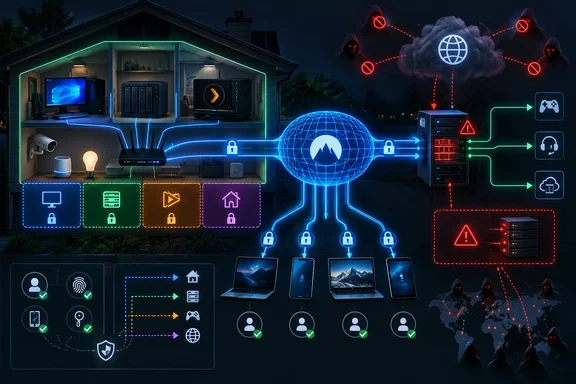
That is a meaningful improvement over treating every self-hosted dashboard as an internet-facing application. But the security boundary has moved rather than disappeared: from a router’s forwarding table to NetBird’s identity provider, peer enrollment controls, routing policies, the VPS firewall, and whatever public proxy services remain. A careless mesh configuration can turn a phone, laptop, or compromised peer into a broad path back into the home LAN.
NetBird’s own current documentation supports the basic mechanism described by XDA. A peer initiates outbound connections and uses NAT traversal rather than requiring an inbound firewall rule at the home network. Devices can form direct encrypted paths when NAT permits it, or use relay infrastructure when it does not. That makes the model particularly useful for homes behind carrier-grade NAT, where traditional inbound forwarding may be unavailable.
The real win is removing private applications from internet discovery
A forwarded port does not automatically mean an application is unsafe. A properly patched service with strong authentication, a restrictive host firewall, and well-maintained TLS can be exposed responsibly. The operational problem is that opening a port makes that service part of the public internet’s routine scanning and attack traffic, whether its owner expects it or not.
For a private photo library, media catalog, Home Assistant instance, NAS administration page, or SSH endpoint used by one household, that exposure is usually unnecessary. A mesh VPN changes the default posture: the service listens only on the local network or overlay, and a remote device must first become an authorized VPN peer before it can even attempt the application’s own login flow.
That is stronger than relying on a web app’s password prompt as the first and only gate. It is also closer to the remote-access model CISA has promoted for sensitive systems: reduce direct public exposure, apply least privilege, and protect remote access with strong identity controls and multifactor authentication.
The practical benefit for Windows users is straightforward. A Windows 11 PC, a Windows Server file share, Remote Desktop host, or Hyper-V lab machine can remain unreachable from arbitrary internet clients while still being available to an enrolled laptop or phone. It avoids the common and dangerous shortcut of forwarding TCP 3389 for Remote Desktop, or publishing SMB ports for file access. Neither should be exposed directly to the public internet from a home connection.
A NetBird peer is not automatically a pass to the entire LAN
The XDA account correctly notes that a phone can use the mesh to reach private services remotely, including SSH and Samba. What it leaves understated is the configuration required to make that safe.
NetBird distinguishes between a device enrolled as a peer and a routing peer that bridges the overlay network into a local subnet. Reaching a NAS, printer, media server, or Samba host that does not itself run the NetBird client requires a routing peer and an explicit network resource or route. For new deployments, NetBird recommends its newer Networks feature, where access is denied until a policy permits it.
That distinction matters more than it may seem. Publishing an entire 192.168.1.0/24 home subnet to every peer is convenient, but it also gives every enrolled laptop and mobile device a route to routers, cameras, printers, smart-home hubs, and management interfaces. A better home configuration grants the phone or travel laptop access to the few addresses and services it needs: perhaps the NAS, the media host, and a management jump box.
The setup should also separate ordinary user devices from administrative peers. A family member’s phone that needs Jellyfin does not need access to Proxmox, a Windows Server console, a router administration page, or an SSH daemon. The mesh gives an operator the tools to make those distinctions, but it does not enforce sensible groups and policies automatically.
There is another implementation detail for homelabs where one box both routes traffic and hosts services. NetBird’s documentation says access to the network behind a routing peer is controlled separately from access to services running on that routing peer. Depending on the platform and configuration, reaching the routing peer’s own LAN address may require an additional policy and local-forwarding setting. Treating the routing host as a general-purpose server makes that separation especially important.
The VPS still has an attack surface
The most useful corrective in the XDA account is its acknowledgement that the exposure has moved to the VPS. That is exactly right, and it is where an otherwise good design can become weaker than expected.
A current self-hosted NetBird deployment generally requires public HTTPS access for the dashboard, management, signaling, and relay functions, plus public UDP for STUN. NetBird’s current self-hosting documentation lists TCP ports 80 and 443 and UDP port 3478 for the recommended reverse-proxy arrangement. Port 80 is commonly needed for certificate issuance and redirects; it is not captured by a shorthand description of “HTTPS plus STUN.”
Older NetBird installations can be more exposed. NetBird says deployments and clients from before version 0.29 may still require legacy service ports, and its documentation urges operators to retain those ports only where old clients require them. That makes version inventory a security task, not mere housekeeping: an upgrade can reduce the number of services that must be reachable, while abandoned legacy clients can preserve a larger perimeter.
The VPS should therefore be treated as a small internet-facing production system, even if it exists only to support a home lab. That means timely operating-system and container updates, SSH restricted to key-based login, firewall rules limited to necessary ports, backups of the NetBird data volume and configuration, and monitoring for failed logins or unexpected proxy traffic. The control plane holds sensitive state: user accounts, peer registrations, policies, setup keys, and cryptographic configuration.
A single VPS also creates a dependency. NetBird documents that existing connections can continue through established paths during some management-server outages, but new peer coordination and public reverse-proxy access depend on the services that remain online. The XDA author is right that a home internet outage would also take down home-hosted services; still, a VPS outage is an additional failure domain with a different provider, billing account, DNS dependency, and maintenance burden.
Layer 4 proxying preserves convenience, not privacy
The reverse-proxy portion of the design solves a real usability problem. Friends joining a game server or TeamSpeak instance should not need to enroll in a private overlay network just to connect. NetBird’s Layer 4 proxy feature can accept TCP, UDP, or TLS traffic at a public proxy endpoint and carry it through the encrypted mesh to a service that has no public IP address and no open home-router port.
For a homelab behind carrier-grade NAT, that is a practical way to publish selected services. The home server does not have to be directly reachable, and the VPS can absorb the public-facing role.
But a Layer 4 proxy does not authenticate a game client or voice client the way an HTTP reverse proxy can present a login page. NetBird’s current documentation says browser-based SSO, passwords, PINs, header authentication, and NetBird-only access are HTTP-layer features. For raw TCP, UDP, and TLS services, operators instead have connection-level restrictions such as IP allowlists, geographic restrictions, and IP-reputation controls.
That means the XDA author’s planned allowlist is not an optional finishing touch for a private server; it is the primary perimeter control when the application protocol lacks its own dependable authentication. A public UDP game service can still be scanned, probed, flooded, or abused at the VPS even though the backend remains hidden at home. The VPS firewall and the proxy’s access restrictions must be sized and configured for the service actually being published.
NetBird also labels its reverse-proxy feature as beta in its documentation. That does not make it unsuitable for a hobby deployment, but it is a reason not to assume the public-proxy layer is maintenance-free or interchangeable with a mature, independently operated edge service. Updates, configuration changes, certificate behavior, logging, and failure handling deserve testing before moving a community server or paid service behind it.
A safer home-lab pattern is narrower than the article describes
The design works best when it follows a strict rule: private services stay private, and every public service gets an individual reason to exist.
A defensible starting configuration looks like this:
- Keep Immich, Jellyfin administration, Home Assistant, SMB, SSH, Windows Remote Desktop, NAS dashboards, and hypervisor consoles reachable only through the mesh.
- Use separate peer groups for personal devices, household media devices, and administration devices, then write policies for the smallest practical set of destinations.
- Configure a routing peer only where access to non-NetBird LAN devices is needed, and expose individual hosts or
/32addresses instead of the full home subnet where possible. - Put public game, voice, or web services behind the VPS proxy only when non-members genuinely need clientless access.
- Apply IP allowlists to Layer 4 services whenever participants have stable addresses, and use the application’s own authentication and moderation features where it supports them.
- Keep the VPS, NetBird server, reverse-proxy components, and enrolled Windows and Linux clients patched, while removing old peers and revoking unused setup keys promptly.
The key lesson is not that port forwarding is categorically reckless. It is that a router’s public forwarding rule is a poor default for services meant only for the owner’s devices. A mesh VPN gives home users a way to make remote access deliberate and identity-based instead of discoverable by every scanner on the internet.
For the services that must remain public, the work does not end at the reverse proxy. Those ports still exist, their traffic still arrives from the internet, and the VPS now becomes the system that has to withstand it.