

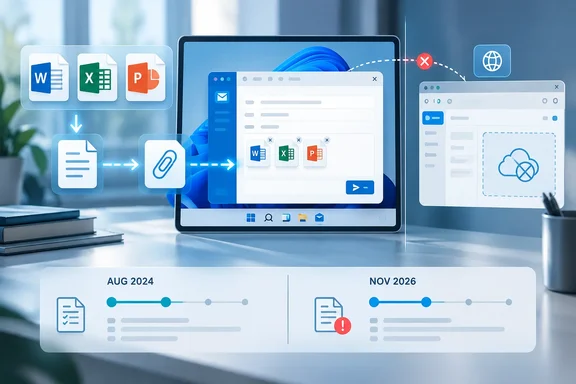
The roadmap entry, last updated September 1, says the feature will make the new Outlook for Windows appear as a sharing target while a Word, Excel, or PowerPoint document saved on the device is open. Selecting it is meant to compose an email with a copy of that local file ready to send. Microsoft assigns the item to Outlook desktop, says it is planned for Worldwide and GCC tenants, and gives November 2026 as the general-availability date.
Yet Microsoft Support’s What’s new in new Outlook for Windows page has an August 2024 entry with the identical feature name and essentially identical description: a local Office file can be shared by email because new Outlook appears as a share target. The support page also explicitly says the capability is unavailable in Outlook on the web.
For users, that means this is not a reason to wait until November before trying the workflow. For administrators, it means the item should not be treated as proof that a wholly new file-sharing mechanism will arrive in their tenant that month.
Roadmap ID 557675 duplicates an older published feature
Microsoft’s wording leaves several plausible explanations, but it does not identify which one applies. The November 2026 item may represent a reimplementation after a regression, a staged availability expansion, a repair to an integration that has not been reliable on all Windows configurations, or simply a duplicate roadmap record. Microsoft has not said that it is restoring a removed capability, extending it specifically to GCC, or changing the behavior documented in 2024.
That omission matters because Microsoft 365 Roadmap dates describe planned rollout timing, not a contractual product state. “In development” also does not establish that every user who has the new Outlook client today lacks the feature. In this case, the product’s own support history says the opposite for at least some supported configurations.
The distinction is easy to miss because the expected action is not Outlook’s ordinary attach-file button. New Outlook can already attach a file from a compose window, including a local file selected from the PC. Microsoft’s current attachment documentation says local selections are attached as copies, while cloud documents can be shared as OneDrive links with permissions controls.
Roadmap ID 557675 instead concerns an app-to-mail sharing path: start in Word, Excel, or PowerPoint, invoke the application’s sharing experience, select new Outlook, and create a message around the current local document. It removes the need to switch into Outlook, start a draft, and browse for the file manually.
That is a modest desktop integration, but it is the kind of small gap that has been conspicuous during Microsoft’s transition from classic Outlook to its WebView2-based new Outlook client.
The feature depends on Windows integration, not Outlook on the web
Microsoft describes new Outlook for Windows as a native Windows application built around Outlook on the web and WebView2, with a Native Windows Integration Component providing access to local resources and Windows-specific capabilities. That architecture is why its interface and mail behavior can resemble Outlook on the web while still being able to interact with local files.
The local-file sharing command is a useful example of where that distinction surfaces. A document opened in desktop Word, Excel, or PowerPoint exists on the PC and may never have been uploaded to OneDrive or SharePoint. A browser-only mail client cannot simply register itself as a Windows share target for that document in the same way. New Outlook can; Outlook on the web cannot.
Microsoft’s August 2024 feature note makes that separation explicit, and the 2026 roadmap entry carries the same practical limitation by naming new Outlook for Windows rather than Outlook generally. Users working in a browser should continue to expect the regular attachment or cloud-link workflow, not a one-click handoff from Office’s desktop apps.
This also explains why “local” is the central word in the feature description. It does not promise a better coauthoring workflow, a new permission model, or a way to mail a live document link. The result is a copy sent as an email attachment, which is operationally different from sharing a OneDrive or SharePoint file.
With a link, recipients can receive access to a single cloud-hosted file and see later edits if permissions allow it. With a local attachment, every recipient receives a separate snapshot. That may be exactly what a user wants for a finalized invoice, an offline presentation, or a document that must not be put into a shared cloud location. It also means subsequent changes to the source file remain private unless another attachment is sent.
Why the attachment-versus-link choice still matters
Microsoft’s new Outlook attachment guidance makes clear that the client supports both traditional attachments and OneDrive sharing for files handled in a message. A cloud file can be shared as a link and given recipient permissions; a local file is attached as a copy. The new Office sharing path appears to fall squarely on the attachment side of that divide.
That has consequences for organizations with strict data-handling rules. Sending a local document by email can bypass the collaboration and revocation advantages of a cloud link, even though it remains subject to Exchange transport rules, mail-flow controls, and whatever attachment policies the organization has applied. It can also create multiple uncontrolled copies in recipients’ mailboxes and archives.
Administrators should therefore avoid describing Roadmap ID 557675 internally as a new collaboration feature. It is a desktop convenience feature that makes attachment-based distribution easier from Word, Excel, and PowerPoint. The appropriate review is the same one an organization would apply to ordinary Office attachments: file-size limits, external-recipient rules, sensitivity labeling behavior, data-loss prevention policies, and retention.
Microsoft’s policy documentation for new Outlook says admins can configure the file extensions users are allowed to open or download through Outlook on the web mailbox policies. It also documents controls for additional online storage providers. Those controls are relevant context, but Microsoft has not published a Roadmap 557675-specific policy, registry value, Exchange PowerShell parameter, or Intune setting.
In other words, there is no announced switch an admin can preconfigure to turn on this Word-to-Outlook handoff in November. If Microsoft intends one, it has not documented it.
The rollout scope is thinner than the roadmap label implies
The roadmap identifies both Worldwide standard multi-tenant and GCC environments. It does not provide a build number for new Outlook, a minimum Microsoft 365 Apps version for Word, Excel, or PowerPoint, an update channel, or a tenant rollout sequence. It also does not say whether a user needs a Microsoft 365 work account, an Outlook.com account, or whether third-party accounts configured in new Outlook will work.
Those details cannot be assumed from the fact that new Outlook itself supports several account types. Microsoft’s supported-account documentation includes Microsoft 365 work and school accounts, Outlook.com, Gmail, Yahoo, iCloud, IMAP, and POP accounts, while excluding on-premises Exchange. That support matrix concerns access to mail, not necessarily every Windows and Office integration around composing it.
The gap is particularly important for enterprises that are deliberately keeping classic Outlook available side by side. Microsoft’s deployment guidance still recommends that approach for organizations relying on features that remain tied to classic Outlook components, including some integrations with other Office applications. The same guidance lists “Share To in Windows” among integrated email features that may still require classic Outlook libraries until equivalent new Outlook support is fully available.
That language provides a credible reason why Microsoft may be tracking the Office local-file path again in 2026. But it is not confirmation that Roadmap ID 557675 is a replacement for a missing classic Outlook feature, or that the 2024 support note was inaccurate. Microsoft has not connected the two records.
Test the exact workflow before changing deployment guidance
The sensible action is to test the narrow feature Microsoft actually describes. Open a document that is stored locally rather than in OneDrive or SharePoint, use Word, Excel, or PowerPoint’s share control, choose new Outlook if it is offered, and verify that the message contains a non-empty attachment sent from the expected account. Then compare that outcome with a normal attachment created from a new Outlook compose window.
Do not infer support from a successful cloud-sharing test. The local-file handoff is the relevant scenario. Likewise, do not assume behavior in a browser-based Office app proves anything about the Windows desktop integration.
There is some reason to be cautious about broad claims around Windows sharing. In June, a Microsoft Q&A moderator acknowledged a report that sharing a PDF from a web application into new Outlook through the Windows Share Sheet could produce a zero-byte attachment. The moderator described that as a limitation in that app-to-mail flow and suggested Outlook on the web as a workaround. That report concerns a PDF shared from a web application, not Word, Excel, or PowerPoint’s local-document workflow, so it does not demonstrate a defect in Roadmap ID 557675. It does show that one successful attachment path should not be mistaken for proof that every Windows share source works reliably.
For now, the practical conclusion is simple: Microsoft has scheduled something for November 2026, but its own published feature history says users may already have the same Office-to-new-Outlook local-file sharing capability. Until Microsoft explains the duplicate timing, organizations should validate the behavior on their deployed builds and treat the roadmap date as a possible expansion or correction—not as the first confirmed arrival of the feature.
References
- Outlook: Share Word, Excel, and PowerPoint local files via the new Outlook for Windows Microsoft 365 Roadmap · 2026-09-01T23:00:02.5707589Z