

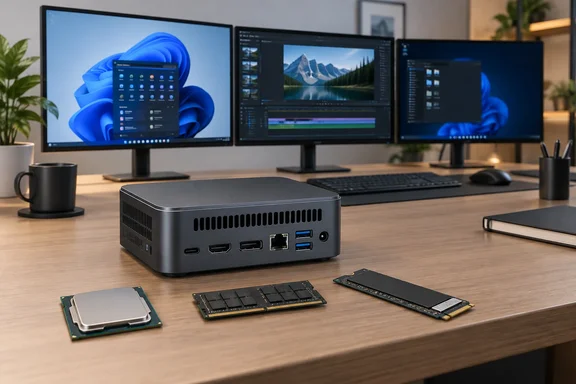
The review unit came with 16 GB of LPDDR5X-8533, a 512 GB NVMe SSD and Windows 11 Pro. TechPowerUp listed it at €699, about US$795 when the review was published. The opening section doesn't include benchmark, noise, temperature or power results, so this piece sticks to what can be supported: the hardware, the design choices, and what they mean for someone buying one.
Spec sheet at a glance
| Component | Ninkear L20 (as reviewed) |
|---|---|
| CPU | Intel Core Ultra 5 226V, 4P + 4E cores, 8 threads, up to 4.5 GHz, 17 W base / 37 W max turbo |
| GPU | Intel Arc 130V, 7 Xe cores, up to 1.85 GHz |
| NPU | Intel AI Boost, up to 40 TOPS |
| Memory | 16 GB LPDDR5X-8533, on-package, not upgradeable |
| Storage | 512 GB RAYSMEM RM512GSSD510 PCIe 3.0 NVMe; 2× M.2 2280 slots |
| Display outputs | HDMI 2.1, HDMI 1.4, DisplayPort 1.4, USB4; up to three displays |
| Front I/O | 2× USB-A 5 Gbps, 1× USB4, 3.5 mm audio, power button |
| Rear I/O | 1× USB-A 10 Gbps, 2× USB-A 5 Gbps, 1× USB-A 480 Mbps, HDMI 2.1, HDMI 1.4, DP 1.4, 2.5 GbE, USB-C power in |
| Wireless | Wi-Fi 6, Bluetooth 5.3 |
| Cooling | Active blower-style |
| Power | 100 W USB-C adapter (20 V/5 A) |
| Size / weight | 129 × 129 × 43 mm (0.66 L), 625 g, dark grey |
| In the box | Power adapter, HDMI cable |
Ninkear's product page sells the L20 in two versions, 16 GB with 512 GB or 16 GB with 1 TB. It lists the same 129 × 129 × 43 mm size, 625 g weight, two M.2 2280 slots and VESA mounting support.
Summary: On paper this is a modern, well-connected small desktop. The key point is that the memory and the processor come as one package.
A laptop chip in a desktop case
The Core Ultra 5 226V isn't the usual mini PC processor, and TechPowerUp says so. According to CPU Monkey, it uses 8 cores without Hyper-Threading: 4 performance cores (Lion Cove) at up to 4.5 GHz and 4 frugal efficiency cores (Skymont) at up to 3.5 GHz. The same site notes that Lunar Lake is Intel's platform for thin and light notebooks with very long battery life and a direct answer to Apple's M chips and Qualcomm's Snapdragon X.
That tells you what the L20 is for. It's an efficiency machine, not a workstation. Notebookcheck describes the 226V as one of the 2 slowest Lunar Lake family processors as of Nov 2024. That fits Ninkear's own pitch, which targets everyday desktop and office work. TechPowerUp adds that the Arc 130V, multi-monitor support and port count leave room for media, lighter creative work and some gaming.
Can eight threads keep up? For email, browsers, spreadsheets and video calls, very likely yes. CpuTronic says the 226V is fine for office work and occasional editing, but that limitations become apparent during long rendering tasks, compiling large projects, and other activities that can keep all cores constantly busy. That's the general view of this chip class, not something measured on the L20.
On graphics, CPU Monkey says the Arc 130V is based on the Xe2 architecture (Battlemage) with 7 Xe cores (896 shaders), runs at up to 1.85 GHz. It adds that compared with the Arc 140V in the larger models, it has one graphics core less. Expect 1080p gaming at modest settings, not a replacement for a dedicated GPU.
Summary: The L20 runs a low-power notebook processor on a desk. It should be good at quiet, efficient everyday work, but it isn't built for long all-core workloads.
The 16 GB ceiling: blame the processor model
TechPowerUp calls the fixed 16 GB the main limitation of this configuration. The reviewer says it's enough for office and everyday use, but heavy multitasking, virtual machines, big creative projects and local AI work can push past it.
The reason goes beyond soldered RAM. On Lunar Lake the memory sits inside the processor package, and each chip model comes with a set amount. Notebookcheck explains that the only difference between this chip and the Ultra 5 228V is the amount of on-package, non-replaceable RAM: 16 GB vs 32 GB respectively. CpuTronic puts it more directly: the amount of memory essentially becomes part of the CPU model and is independent of the laptop manufacturer.
So Ninkear couldn't simply offer a 32 GB L20. That would need a different processor. For buyers, the memory you order is the memory the machine will have for its whole life. If you run Hyper-V labs, Docker stacks, big Lightroom catalogues or local language models, think hard about this before ordering.
Summary: The 16 GB limit comes from the 226V itself, not from Ninkear being cheap. Either accept it or look at a different platform.
Storage: one limit you can fix
Storage is easier. The bundled 512 GB RAYSMEM drive is a PCIe 3.0 NVMe SSD, and a second M.2 2280 slot is free for more capacity. TechPowerUp suggests adding a second drive once the first one fills up.
There's a gap between the platform and the product here. Notebookcheck says the 226V supports Thunderbolt 4 and PCIe 5 SSDs, but Ninkear's spec sheet lists PCIe 3.0 storage. Neither the review excerpt nor the manufacturer says how fast the second slot is wired, so don't assume a fast PCIe 4.0 or 5.0 drive will run at full speed. It's worth asking Ninkear before you buy a premium SSD for it.
A practical Windows tip: after installing a second drive, open Disk Management, initialise the new disk, create a volume, and format it as NTFS. Then point large folders like Downloads, Steam libraries or project archives at it so the system drive stays clear.
USB-C power is a nice touch
TechPowerUp singles out the rear USB-C power input, which is rare on mini PCs. Ninkear includes a 100 W, 20 V/5 A USB-C adapter instead of a barrel-plug power brick. The reviewer points out that this avoids a proprietary brick, makes replacement easier if the charger is lost or fails, and helps if the machine moves between desks. The rear USB-C port is only for power, so the front USB4 port stays free for fast external storage, docks and displays.
A caution: a USB-C socket doesn't guarantee that any charger will work. The available material doesn't include a compatibility list or power-negotiation details. If you replace the adapter, match the 20 V/5 A (100 W) rating and use a cable rated for 5 A.
Three screens, but not three identical ones
The L20 can run up to three displays at once, across HDMI 2.1, HDMI 1.4, DisplayPort 1.4 and USB4. Ninkear advertises a "triple 4K" setup, but the outputs aren't equal. Ninkear's spec listing gives HDMI 2.1 as capable of 4K at 120 Hz or 8K at 60 Hz, while HDMI 1.4 tops out at 4K at 30 Hz. That's fine for a spreadsheet and painful for moving the mouse.
Setup tip: plug your main high-refresh monitor into HDMI 2.1 and your second screen into DisplayPort 1.4 or USB4. Leave HDMI 1.4 for a mostly static third screen, such as a status dashboard or reference documents.
The AI pitch
Ninkear calls the L20 a compact AI workstation and advertises 97 TOPS with Copilot+ PC support. The two numbers measure different things. The NPU alone is rated at 40 TOPS. The 97 TOPS figure is Intel's combined rating for the CPU, GPU and NPU together. CPU Monkey confirms that the 226V meets the requirements for Copilot+ PCs: the NPU 4 (Intel AI Boost) reaches 40 TOPS.
Meeting the hardware threshold matters, but TOPS numbers don't tell you how fast real AI workloads will run. Which Copilot+ features you actually get also depends on Windows builds, rollout timing and region. And local AI models are exactly the kind of work that pushes against a fixed 16 GB of memory.
Is €699 fair?
TechPowerUp puts the L20 toward the top of the price range it would consider for an everyday office mini PC. Ninkear's store currently shows the 512 GB model at €699, down from a crossed-out €799. The roughly $795 figure is TechPowerUp's conversion at publication time, not a confirmed US shelf price.
The premium pays for:
- A 3 nm-class efficiency processor
- USB4
- 2.5 GbE
- Three-display support
- USB-C power
- A second M.2 slot, all in a case smaller than many external drive enclosures
You give up memory headroom, and the SSD is modest. Whether that's a fair trade depends on your workload. For a front desk, a home office or a clean living-room PC, it could be. For a developer running virtual machines, probably not.
Bottom line: The Ninkear L20 is a well-connected small desktop built around Lunar Lake's efficiency. The biggest caveat comes with the chip itself: 16 GB of memory, permanently. Buy it for what it is, and use the second M.2 slot when you need more storage.
References
- Ninkear L20 Review - TechPowerUp TechPowerUp · 2026-09-28T18:33:07+00:00
- Ninkear L20 AI Mini PC Intel® Core™ Ultra 5 226V 97 TOPS AI Performanc ninkear.com
- Notebookcheck Logo notebookcheck.net