

NTLite’s official changelog dates the release to September 20, 2026; Neowin reported it on September 21. These are documented product changes, rather than independently measured improvements in deployment speed or Windows performance.
Features on Demand gets its own workspace
NTLite can modify a Windows installation image before deployment or edit an existing installation. Its work includes integrating updates and drivers, configuring settings, removing components, and preparing unattended setup.
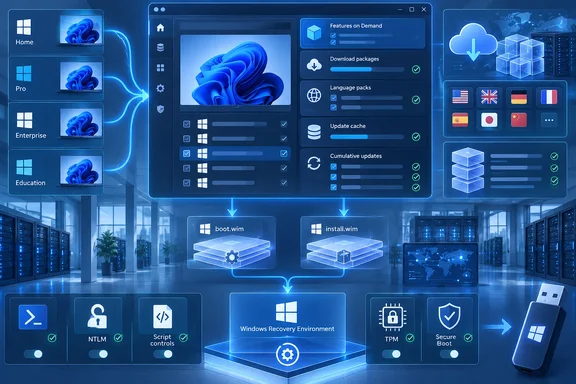
In version 2026.09.12200, Features on Demand moves to a dedicated tab that lists the image’s features and automatically downloads packages. A language-pack downloader joins the same Features page, according to NTLite’s release notes.
The practical change is a more direct workflow for optional Windows functionality: administrators can work from the features present in the target image instead of treating every addition as a separate package-management task. Bringing language downloads into that workspace also puts two related image-preparation jobs together.
Automatic downloading should not be read as a guarantee that every feature or language combination will work with every image. The changelog establishes the new download workflow, but does not promise universal compatibility across Windows editions and builds.
Update management becomes more cache-aware
The redesigned downloader groups cumulative updates with Security and Optional selections and simplifies update-channel selection. It also adds Windows Security app update integration and lists OOBE updates—the updates associated with Windows’ out-of-box setup experience.
Several changes address repeated servicing work:
- The downloader toolbar can delete superseded, duplicate, and unlisted cached files.
- Individual updates display their duplicate paths in the update cache.
- Cached update information, matched by hash, can be reused to load update information faster.
- Offline mode can assemble an update list from packages already in the cache.
- Holding Ctrl permits selection of a second cumulative update, while checkpoint dependencies are handled automatically.
Offline mode is particularly useful when preparing media from an existing package collection. Its boundary is important: it reuses cached updates; it cannot supply a missing package without obtaining that package first.
The release also consolidates cache storage for Windows releases that NTLite treats as sharing a servicing base. The vendor gives 24H2/25H2/26H2 → 11.26000 as its cache-folder example. That is NTLite’s storage organization, not a direction to assume that every update is interchangeable between those Windows releases.
Downloaded does not mean verified
NTLite’s Download Windows Updates guide explains that the tool’s update lists come from NTLite, while the actual update packages are downloaded from Microsoft’s servers. The downloader verifies package hashes, and its background verification scan runs when the downloader opens.
For an administrator deciding whether a cache is ready to use, the status indicators are more useful than file presence alone:
| Downloader indication | Documented meaning |
|---|---|
| Downloaded with a green mark | The cached file’s hash has been verified. |
| Downloaded with a question mark | The file exists, but its hash has not yet been checked against the expected value. |
| External | The file was added manually rather than supplied through the online list, so that list provides no expected hash for verification. |
| Incomplete, marked red | The file is partial or corrupted and can be selected for download again. |
| Installed | The loaded image already contains the update. |
These distinctions help prevent a full cache folder from being mistaken for a validated package set. NTLite’s guide also notes that cumulative updates remain selectable even when already integrated, because deliberately reapplying one is a supported manual choice.
For image integration, the documented workflow is to load the target on the Image page, open Updates → Add → Latest online updates, and use Enqueue to add selected packages to the integration queue. Missing packages are downloaded when Apply → Process starts. The separate Download operation pre-downloads packages without integrating them.
Multi-edition media gains shared WinRE servicing
The new WinRE “Sync” and “Individual” options address recovery-image maintenance. WinRE is the Windows Recovery Environment; NTLite says the release can group identical images across editions and service a shared WinRE for all editions at once.
For a multi-edition image, the practical benefit is the opportunity to avoid repeating the same recovery-image work for each edition. The “Individual” option preserves a separate servicing choice where a shared operation is not wanted.
Setup-image handling changes too. A new “Include boot.wim updates by default” option in Menu-Settings controls whether the cumulative update also covers the boot.wim Setup image. Administrators should distinguish this from servicing the main installed Windows image: updating one target does not, by itself, establish that every setup and recovery target has been covered.
There is also a consequential change to “Keep image mounted.” NTLite says that option now applies only to loaded images and install.wim editions; boot and WinRE side tasks save anyway. Anyone relying on mounted-image behavior during a staged editing session should account for that narrower scope.
New security settings need deliberate choices
NTLite 2026.09.12200 expands the settings available for image configuration. Under Security, the release adds:
- Administrator protection controls for Windows 11 24H2 and newer desktop editions.
- NetBIOS name-resolution broadcast settings.
- Outgoing NTLM authentication choices of Audit only or Blocked.
- A PowerShell group covering execution policy, script-block logging, module logging, and transcription.
- A Windows Script Host control that blocks
.vbs,.js, and.wsffiles from running.
These are new configuration controls in NTLite, not a statement that the release automatically applies a hardened baseline. The Administrator protection entry also has an explicit Windows version and edition boundary; it should not be generalized to all Windows or Server images.
The operational implications follow directly from what the controls change. Blocking Windows Script Host execution can prevent deployment scripts using those file types from running. Choosing Blocked for outgoing NTLM is more consequential than choosing Audit only. Administrators should evaluate those selections against their authentication and scripting workflows before incorporating them into a widely deployed preset.
Network settings also gain File sharing and Printer sharing groups with presets, including legacy-compatibility choices. CPU vulnerability mitigation settings gain forced-on states for Intel and AMD.
Separately, a “TPM / Secure Boot (anti-cheat)” compatibility option is enabled by default for new presets. That qualification matters for anyone reusing an established configuration: the announcement does not say existing presets are automatically changed. This is a component-compatibility option, not a claim that NTLite enables TPM or Secure Boot in firmware or guarantees acceptance by every anti-cheat system.
Fixes that affect existing deployment presets
Several fixes are worth checking against configurations already in use:
- Removing Code Integrity no longer causes the documented Setup crash when the driver blocklist is off.
- Removing Windows User Experience — AOT no longer causes the documented Start menu breakage.
- The Apply page fixes a crash during task-list rebuilding, including when a task is clicked.
- The unattended computer-name Prompt option now asks again on every installation from the same USB stick.
- Preset page selections are correctly retained when selected within a preset row.
These are specific compatibility and reliability fixes. Resolving a crash associated with removing a security component does not establish that removing that component is a sound security choice.
NTLite also fixes cumulative-update detection for Windows 11 26H2 build 26300 images. According to the vendor, updates could incorrectly be detected as already present because of their 26100 base. Its earlier September 1 release identified 26H2 support as preview support, so this fix is especially relevant to administrators maintaining those preview images.
For existing NTLite users, the strongest reasons to adopt 2026.09.12200 are its package-management improvements, shared recovery-image servicing, and fixes matching an existing deployment workflow. When carrying forward a preset, pay particular attention to the new-preset-only anti-cheat default and the changed save behavior for boot and recovery-image side tasks.
References
- NTLite 2026.09.12200 - Neowin Neowin · 2026-09-21T15:26:01+00:00
- Changelog | NTLite ntlite.com
- Download Windows Updates | NTLite ntlite.com