

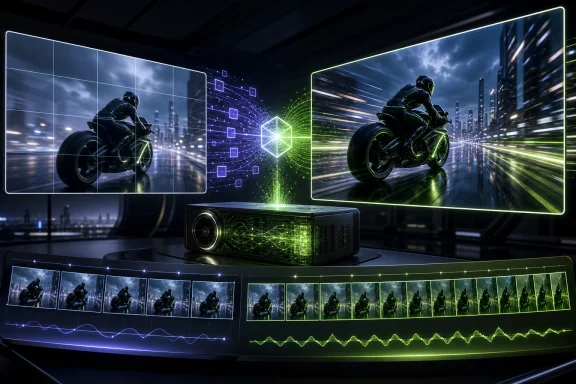
That possibility deserves attention, but so do the limitations. The headline performance figure came from a short, vendor-led show-floor demonstration with crucial configuration details unknown. The particular frame-generation component is also still marked “Coming Soon” in NVIDIA’s current developer material as of September 8, 2026. Windows creators should therefore see RTX Spark’s so-called half-frame approach as a promising workflow direction, not a ready-to-buy productivity guarantee.
What RTX Spark is — and what it is not
RTX Spark is NVIDIA’s planned Windows PC platform for local AI workloads. NVIDIA describes it as a “superchip” pairing a Blackwell RTX GPU with a 20-core Grace CPU and up to 128GB of unified memory. The company has also described the GPU as capable of one petaflop of AI performance and equipped with fifth-generation Tensor Cores supporting FP4 precision. RTX Spark Windows PCs are slated to arrive in October 2026.
That specification matters because local video generation is particularly demanding of both compute throughput and memory capacity. Video models need to maintain information across many frames, and larger resolutions or longer sequences raise the burden quickly. A system with substantial unified memory could allow more ambitious local workloads than a conventional PC configuration can comfortably hold.
But RTX Spark is a hardware platform, not the name of a single video application or an exclusive interpolation technique. The IFA demonstration joins multiple pieces: video generation using NVIDIA’s NVFP4 low-precision format, RTX video upscaling, and RTX Video Frame Generation. Treating all of that as a single “RTX Spark tool” risks obscuring what would need to be installed, supported, and validated separately on a future Windows system.
The half-frame workflow shown at IFA
The reported demonstration used NVFP4 to generate a lower-resolution clip at 30 fps. RTX video upscaling and frame generation then produced a higher-resolution 60-fps version. In plain terms, the generator creates fewer original frames, and an interpolation stage synthesizes the frames between them.
That is a sensible idea. Generating 30 frames each second instead of 60 should reduce the amount of work assigned to the initial video model. If a subsequent stage can plausibly infer the intervening motion, the finished clip may appear smoother without paying the full cost of native 60-fps generation.
The reported example was a roughly two-second Full HD clip. The complete-generation route reportedly took about 6 minutes 30 seconds, while the 30-fps-plus-processing pipeline took about 1 minute 25 seconds. Taken literally, that is approximately 4.6 times less elapsed time for that specific demonstration.
It is an eye-catching comparison, but it is not yet a broadly useful benchmark. There is no supplied independent replication, and key details are absent: the model used to generate the video, RTX Spark configuration, available memory, driver and software versions, prompt, seed, generation steps, source and final resolution, encoding configuration, and the measurement method. It is also unclear whether both paths were identical apart from frame rate and interpolation, or exactly which stages were included in each elapsed-time figure.
Those omissions matter. A two-second clip can conceal problems that become more obvious over a longer sequence, while elapsed time can change dramatically with model choice, resolution, memory pressure, file encoding, and the visual complexity of the prompt. The result is best understood as evidence that the pipeline can be demonstrated, rather than evidence that every Windows creator should expect the same gain.
Why NVFP4 helps, and why it cannot guarantee quality
NVFP4 is a low-precision numerical format designed for Blackwell-era hardware. Reducing precision can lower memory consumption and improve inference speed and energy efficiency. Those are meaningful advantages for generative video, where memory capacity and bandwidth can be as constraining as raw GPU horsepower.
NVIDIA has shown that NVFP4 can retain accuracy close to higher-precision paths in particular systems and workloads. Yet its own deployment guidance includes the necessary qualification: quantization can change model quality and should be evaluated for the specific use case. Accuracy depends on such factors as model design and scaling, not simply on selecting a four-bit path.
For a Windows-based creative workflow, that means NVFP4 should be tested against the material that actually matters. A small visual defect in a stylized background may be acceptable. The same defect around a product logo, text, a face, fine fabric, or a detailed architectural edge might not be. The lower-precision generation stage and the interpolated-frame stage can each introduce their own compromises, so a faster workflow does not automatically mean an equivalent master.
Frame interpolation’s built-in blind spot
NVIDIA describes RTX Video Frame Generation as an AI effect that can double or quadruple a video’s frame rate. Its public description says the effect interpolates between successive frames without broader video context. That limited window is important: it means the system is reasoning from the images immediately before and after the missing frame, rather than from an understanding of the whole scene.
This can work well when movement is regular and image content remains visible. It is inherently harder when an object becomes hidden, suddenly reappears, changes direction abruptly, or crosses detailed foreground textures. Research into video-frame interpolation identifies occlusion and discontinuous motion as conditions where blurring and spurious artifacts can emerge.
The practical test cases are easy to picture: a dancer’s fast-moving hands, a football obscured by a player, water spray, hair moving in wind, handheld camera pans, rapidly edited footage, or animation with deliberately sharp motion changes. These are not corner cases for many creators. They are normal stress tests.
The IFA presenter reportedly said the interpolated 60-fps result showed no visible difference from a fully generated 60-fps output, and the attending reporter similarly found the result persuasive. That is useful early observational reporting, but it is not a controlled quality finding. There is no indication of blinded viewing, objective image or temporal metrics, or stress testing across varied subjects. A workflow that looks convincing in one carefully selected two-second example may still fail visibly on material where timing and detail are central to the creative intent.
“Real time” versus the reported offline demo
There is a terminology issue worth keeping straight. The IFA report characterized the showcased interpolation workflow as entirely offline. NVIDIA’s current product description, in contrast, calls RTX Video Frame Generation a real-time effect and says it can turn 15-fps video into 30- or 60-fps output.
The available material does not establish whether the IFA setup used a distinct offline-only implementation, whether “offline” referred to the wider generative-video pipeline rather than interpolation itself, or whether the descriptions are simply using different definitions. It would be inaccurate to resolve that conflict by declaring the effect exclusively offline or exclusively real-time in every setting.
For Windows users, the distinction has consequences. A real-time effect suggests potential use during playback, preview, or interactive review. An offline stage can still be highly valuable for finishing generated clips, but it affects render queues and export workflows rather than the immediacy of an edit. Until NVIDIA provides a public release and clearer workflow documentation, creators should not purchase hardware on the assumption that one specific mode will be available.
Availability is the key caveat
NVIDIA’s June announcement said RTX Video Frame Generation would arrive as a Python wheel and a ComfyUI node alongside RTX Spark. Yet the company’s current AI-for-media material still labels the feature “Coming Soon.” That does not necessarily contradict the planned October RTX Spark launch window, but it does mean public availability should not be assumed as of the dossier’s September 8 status check.
There is more certainty around some neighboring RTX Video capabilities. NVIDIA’s RTX Video SDK currently documents real-time Super Resolution, artifact reduction, and SDR-to-HDR tone mapping. This corrects the idea that HDR support is merely an undeveloped future module within that SDK.
It is also true that an RTX-special VLC build has supported RTX Video Super Resolution on RTX 30- and 40-series GPUs. However, that fact should not be stretched into proof that VLC, or any ordinary Windows video player, supports the newly announced RTX Video Frame Generation feature. Upscaling availability is not the same as an end-to-end generative-video and interpolation workflow being ready in consumer software.
What Windows creators should do next
Creators considering an RTX Spark system should separate three decisions: whether local AI generation is worth the cost and complexity, whether their preferred generation software will support the required NVIDIA components, and whether interpolated output is acceptable for their intended delivery format.
When the frame-generation component becomes available, a credible evaluation should use the same prompts and settings to compare native 60-fps generation with a 30-fps generation-plus-interpolation route. Test clips should include slow camera movement as well as rapid action, occlusions, close facial detail, high-frequency patterns, text, and the longest duration the project requires. Inspect frames individually, but also watch the footage at normal speed and in the final codec and display environment.
The potential benefit is real: if fewer generated frames can deliver a satisfactory result, local AI video could become more practical on Windows rather than merely faster on paper. But the acceptable threshold is a creative judgment, not a benchmark number. A social-media concept clip may tolerate artifacts that a client commercial, film insert, or training asset cannot.
The broader labor concern also deserves a measured response. Faster generation could encourage tighter turnarounds or alter expectations for small teams, but the supplied evidence does not demonstrate that RTX Spark or this feature has already caused such effects. Technology can reduce a mechanical bottleneck while increasing review, correction, quality-control, and client-approval work. The outcome will depend on how studios and clients choose to use the saved time.
RTX Spark’s IFA demonstration makes the right question sharper: not “can AI add frames?” but “which frames must be generated expensively, and which can be reconstructed without undermining the work?” NVIDIA has shown an intriguing answer for one short clip. The next step is public software, reproducible testing, and proof that the shortcut survives the difficult footage creators actually need to deliver.
References
- Quantize Models to NVFP4 with NVIDIA Model Optimizer NVIDIA Build
- RTX Video SDK Getting Started NVIDIA Developer
- Sparks Fly: NVIDIA Accelerates Local AI at IFA 2026 NVIDIA Blog