

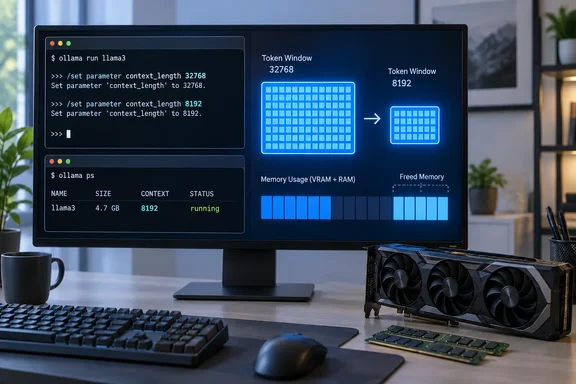
What "context length" actually means
Ollama's documentation defines context length as the maximum number of tokens the model has access to in memory. In other words, it's a ceiling, not a meter. It covers the system prompt, the running conversation history, your current input and the model's generated output.
Much of the cost is the key/value (KV) cache. This stores attention data for tokens the model has already processed, so it doesn't have to recompute the whole conversation for each new token. One third-party explainer says the cache is allocated for the whole of num_ctx when the model loads, not as the conversation grows. That means a one-line prompt in a huge window still pays the full price.
This is also why a model's download size misleads. A 5 GB quantized file describes the weights only. The KV cache and compute buffers come on top, and the total depends on the model architecture and the runtime. XDA Developers, which prompted this piece, says the cache can add several gigabytes. That's plausible, but it isn't a universal figure. One third-party estimate puts the f16 cache for a 7B model at 32K context at roughly 4GB, and the real number varies by model.
Ollama's defaults depend on your hardware
Ollama no longer uses a single default. Its context-length page lists automatic defaults chosen from detected VRAM:
| Detected VRAM | Default context |
|---|---|
| Under 24 GiB | 4k |
| 24–48 GiB | 32k |
| 48 GiB or more | 256k |
These are defaults, not requirements, and you can override them. Older documentation is inconsistent. One analysis notes that the FAQ says 4096 tokens, the Modelfile reference says 2048, and the context length page picks from available VRAM. Treat the context-length page as the current one.
The practical point: if you have a high-VRAM GPU, you may be getting a far larger window than your workload needs without ever choosing it.
How to set a smaller window
Ollama documents several routes. Pick the one that matches how you run it:
- App: change the context slider under Ollama's settings.
- Server-wide: start the server with the
OLLAMA_CONTEXT_LENGTHenvironment variable, for exampleOLLAMA_CONTEXT_LENGTH=64000 ollama serve. That's the documented form, and you'd substitute your own number. On Windows, the variable has to be set where the server reads its environment. One guide says that's the user environment on Windows. - One CLI session: type
/set parameter num_ctx 8192. - A persistent per-model setting: add
PARAMETER num_ctx 8192to a Modelfile and build a custom model from it. - API calls: pass
num_ctxin the request'soptions.
The 8K figure is a starting point to test, not a rule. XDA suggests it for chats that stay within a few thousand tokens. Ollama's own guidance points the other way for heavier work: tasks like web search, agents and coding tools should be set to at least 64000 tokens. If you use Ollama as a backend for a coding assistant or agent, shrinking the window can break the tool.
Size the window from real usage
Ollama's API responses report prompt_eval_count (input tokens processed) and eval_count (tokens generated). Log these over a normal week and include your longest sessions, not just typical ones. Then leave headroom for the system prompt, retained history and a long answer.
Reasoning models need extra care. They can produce "thinking" tokens before the final answer, so the visible reply understates what the model generated. Budget for that output when you pick a number, and check the counts rather than guessing.
A simple test: run a conversation that depends on something said many messages ago. If the model forgets it, the window is too small. XDA notes that when truncation is on, Ollama drops older messages and keeps the system message and the latest one.
Verify what you got with ollama ps
Ollama's documentation shows ollama ps listing a PROCESSOR column and a CONTEXT column. Use them to confirm two things after a change:
- The context value matches what you set.
- The processor column shows the model on the GPU rather than split with the CPU.
Ollama's docs say to verify the split under PROCESSOR with this command. If part of the model has moved to the CPU, a smaller context or a quantized cache may bring it back onto the GPU. One caution: Ollama's guide recommends the maximum context for best performance. Shrinking the window doesn't automatically make inference faster. It mainly frees memory, which can indirectly help if you were spilling to slower memory.
Two other settings that multiply memory
Parallel requests
Ollama's FAQ says OLLAMA_NUM_PARALLEL sets the maximum parallel requests per model, default 1, and required RAM scales by that value times OLLAMA_CONTEXT_LENGTH. The FAQ's example is a 2K context with four parallel requests, which produces an effective 8K context and extra allocation.
If you run a single chat window, the default of 1 is fine. If you've raised it, or a front-end has, for several users or apps, the cache multiplies. One community troubleshooting guide warns that some setups allocate KV cache for 4 × 2048 = 8,192 tokens simultaneously. The extra memory can come as a surprise.
KV cache quantization
Ollama can also store the cache at lower precision. According to its FAQ, this works when Flash Attention is enabled, and the setting is OLLAMA_KV_CACHE_TYPE, which defaults to f16. It's a global option, so all models run with the specified type.
| Cache type | Approx. memory vs f16 | Documented trade-off |
|---|---|---|
| f16 (default) | Baseline | Highest precision |
| q8_0 | About half | Very small loss, usually no noticeable impact |
| q4_0 | About a quarter | Small to medium loss, more visible at larger contexts |
Ollama also warns that the effect depends on the model and task. It can be larger for models with high grouped-query-attention counts. Only the cache shrinks, not the weights, so total memory won't halve. Try q8_0 first, compare answers on a few prompts you know well, and keep q4_0 for when you're truly short of memory.
Does this apply beyond Ollama?
Partly. LM Studio's model-load API exposes a context_length option, defined as the maximum number of tokens the model will consider. It also has an offload_kv_cache_to_gpu flag. LM Studio says that if it's false, the KV cache is stored in CPU memory/RAM. LM Studio states that this flag, along with Flash Attention, only affects models loaded by its llama.cpp-based engine.
So the principle carries over: a larger configured window costs more memory. The exact controls and where the memory lands differ by runtime. XDA says Apple Silicon draws from unified memory, and discrete-GPU systems normally use VRAM and can spill into system memory. That's broadly plausible, but check it on your own machine with the tools above.
A quick tuning checklist
- Find your real ceiling using
prompt_eval_countandeval_countacross normal and long chats. - Set a window with headroom, such as 8K for short chats, and test it with a long-memory conversation.
- Confirm the result with
ollama ps. - Keep
OLLAMA_NUM_PARALLELat 1 unless you need concurrency. - Try q8_0 cache quantization with Flash Attention enabled.
- Raise the window again for agents, coding tools or long-document work. Ollama recommends 64K or more for those.
Bottom line
The advice holds up against Ollama's own documentation. A configured context window costs memory whether or not you fill it, and right-sizing it can free a meaningful amount on a constrained PC. It isn't free, though. Too small a window drops history and breaks agent workloads, and the savings vary by model, runtime and hardware. Measure your own usage, change one setting at a time, and check the result with ollama ps.
References
- Your local LLM is quietly wasting RAM on context you never use, and one setting gives it back XDA · 2026-10-05T17:30:18+00:00
- Ollama context length: setting num_ctx · SSD Nodes ssdnodes.com
- ollama/docs/context-length.mdx at main · ollama/ollama · GitHub github.com