

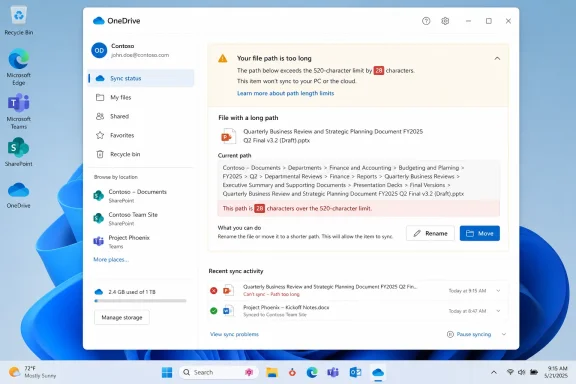
Microsoft has marked the feature In development for worldwide general availability in September 2026. It applies to the OneDrive desktop client, rather than the web experience.
A Sync Blocker Gets a More Practical Repair Path
The 520-character threshold is not simply a filename restriction. For OneDrive sync, it reflects the combined local OneDrive root path and the item’s relative path. Long organization names, deeply nested SharePoint libraries, Teams-connected folders, and migrations from other repositories can push an otherwise reasonable file structure beyond the client’s limit.
Microsoft’s support documentation says paths over 520 characters produce a sync error, and the sync client may stop until the offending item is resolved. The new workflow should reduce the trial-and-error involved in finding enough characters to cut from an old project hierarchy.
For users, the expected benefit is straightforward: rather than being told only that a path is too long, they will be able to see the size of the problem and act from the error experience itself.
The Limit Still Matters Elsewhere
The redesign does not increase OneDrive’s path-length limit. Microsoft continues to document a 400-character limit for OneDrive and SharePoint cloud paths, while the desktop sync calculation can reach 520 characters because of the local OneDrive folder path. Windows File Explorer and Office desktop applications can encounter tighter practical limits, commonly around 260 characters.
That makes this an operational improvement, not a compatibility cure. IT teams moving legacy departmental shares into SharePoint or deploying OneDrive shortcuts should still identify deeply nested structures before they become desktop sync failures.
Microsoft’s OneDrive Sync release notes already describe separate work to improve maximum-path checks for OneDrive folder shortcuts, reducing cases where files are incorrectly flagged. Roadmap 557563 addresses the next part of the problem: making genuine over-limit failures easier for users to correct when they occur.
Update: OneDrive’s improved path-limit error workflow is now targeted for October (September 22, 2026)
Microsoft has revised the expected worldwide general-availability timing for Roadmap item 557563. The Microsoft 365 roadmap now lists the improved OneDrive desktop max-path error experience for October 2026, rather than the September 2026 target previously shown.
The feature remains marked In development. When released, it is intended to tell desktop sync users exactly how many characters an affected path exceeds the 520-character limit by, then offer a guided rename-or-move flow to resolve the blocked item and resume syncing.
Update: OneDrive path-error improvements delayed to January (October 28, 2026)
Microsoft’s roadmap now targets January 2027 for worldwide general availability of the improved OneDrive desktop path-error experience. That replaces the October 2026 target in the previous update; the feature remains In development.
According to MWPro’s report of Microsoft’s updated Message Center announcement, rollout is expected to begin in January and finish by the end of that month. The announcement says the sync client will continue running when users encounter these errors, and the guided rename experience will allow renames even when a path exceeds 260 characters.
The announcement also says the current error already shows how many characters the path exceeds the limit, contrary to the earlier article’s description. Administrators should plan around the revised schedule rather than assume the guided repair flow is already available.
References
- OneDrive: Improved max path error experience on desktop Microsoft AI at Work Roadmap · 2026-10-27T23:05:02.193936Z