

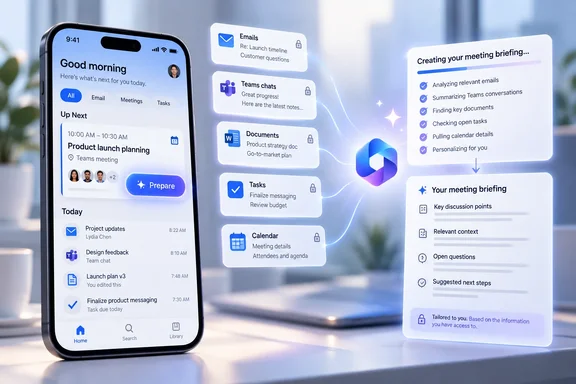
The September 2 roadmap update describes the change in one sentence, but Microsoft’s own Outlook support documentation explains what the button actually opens: a per-user briefing built from related emails, chats, tasks, documents, and other material the user is permitted to access. Microsoft says the feature is available on Outlook mobile as well as Outlook on the web, the new Outlook for Windows, Teams, and Mac, although the experience can differ by client.
For Outlook mobile users, the practical change is the entry point. The briefing capability already existed in calendar events; Roadmap ID 529850 places it on the surface Outlook already uses to alert people that a meeting is close.
The button appears during Outlook’s narrow Up Next window
Microsoft’s Outlook support documentation says the mobile Up Next card appears at the top of the inbox for accepted meetings and calendar commitments marked Busy, beginning 30 minutes before the start time and continuing until five minutes after it begins. All-day events do not appear in Up Next.
That timing puts Prepare at the point where it is most likely to be useful: a user is away from a PC, sees the meeting reminder, and has a few minutes to review context. It also limits expectations. The button is not a persistent “prepare for every event” shortcut in the mobile inbox, and it will not surface for every calendar item.
The distinction matters for organizations planning user guidance. A person who wants to prepare well in advance can still open the meeting from the Outlook calendar, where Microsoft says Prepare for your meeting remains available. The new Up Next action is a timely mobile reminder and shortcut, not a replacement calendar workflow.
Microsoft lists the rollout as generally available for Android and iOS in its worldwide multi-tenant cloud, GCC, GCC High, and DoD. The roadmap does not name minimum Outlook mobile app versions, describe a staged rollout percentage, or say whether tenants that cannot yet see the button need an app update, a service-side change, or both.
Prepare produces a personalized briefing, not a shared meeting record
Microsoft’s support material describes Prepare as a context-gathering feature. It can summarize relevant communications and pre-reads, identify action items, and offer prompts to ask Copilot follow-up questions about the meeting’s objectives or history.
The briefing is governed by the requesting user’s permissions. Microsoft says Copilot summarizes only content that user can access, and two participants in the same meeting can therefore receive different results. An executive may see a document, email thread, or Teams chat that is absent from an individual contributor’s preparation view; the reverse can also be true for work held in private locations.
That is a useful security boundary, but it creates an operational limitation: the Prepare screen should not be treated as an authoritative shared agenda or a complete project history. It is a permission-filtered synthesis of available material. Users should still open the source documents before relying on a detail for a decision, particularly when the meeting involves approvals, deadlines, customer commitments, or incident response.
Microsoft itself documents a second constraint. Meetings without related files, prior email exchanges, or chat history may result in generic output rather than a substantive summary. The service can prepare for any meeting in the sense that users can ask it questions, but the automated insights are strongest for one-to-one meetings and meetings with material that Copilot can summarize.
The roadmap’s February date is not the September launch date
The record lists general availability as February 2026, while its status was changed to Launched on September 2, 2026. A Microsoft 365 Message Center archive that preserves roadmap history records the original entry in January and the status-and-tag change in September.
That means administrators should not interpret the September timestamp as evidence that the feature first reached customers that month. It is a roadmap-status update attached to a feature with a February general-availability target. Microsoft has not published a precise date on which every cloud instance or client build received the Prepare action.
This is a recurring problem with roadmap tracking: a target month, a back-end rollout, a mobile-store release, and a later administrative status change are different events. For help desks, the relevant question is whether an affected user has the expected Copilot entitlement, an eligible work account, a supported Outlook mobile build, and a qualifying upcoming meeting—not whether the roadmap card was recently edited.
The product documentation also places a control in the Microsoft 365 admin center under Search & Intelligence, Configurations, and Meeting Insights settings. Microsoft says admins should ensure that setting is enabled for the tenant. Despite its older-sounding name, that control remains relevant to the current meeting-preparation experience.
The feature arrives as Outlook’s older Meeting Insights disappears
Windows Central reported in August that Microsoft was retiring Outlook’s legacy Meeting Insights by early September 2026 and positioning Copilot’s preparation experience as its replacement for eligible users. The two experiences overlap, but they should not be described as identical.
Legacy Meeting Insights surfaced related files and emails in event details. Microsoft’s documented Prepare experience creates an AI-generated briefing from relevant material and lets users continue with Copilot questions. A summary can save time, but it does not provide the same immediate visibility into every underlying file or message that a conventional related-content panel may have offered.
Licensing is another point where the terse roadmap entry leaves important details unstated. Microsoft’s Outlook FAQ says Copilot features are available to customers with a Microsoft Copilot work license, while the Prepare support page says the capability is available to Copilot users and directs administrators to the tenant setting. The roadmap itself does not name a subscription SKU or explain what a user without the necessary Copilot access sees when the Up Next card appears.
Administrators should therefore test the full path with a real mobile user before announcing availability:
- Confirm that the user’s work account has the Copilot access required by the organization’s Microsoft 365 licensing arrangement.
- Verify that Meeting Insights is enabled in the Microsoft 365 admin center.
- Use an accepted, non-all-day event marked Busy and check Outlook mobile in the 30 minutes before it begins.
- Test meetings with known related mail, Teams chat, and documents, then compare the summary with those source items.
The new button will be most valuable where employees already receive useful meeting context but fail to seek it out on their phones. For everyone else, its arrival exposes the harder issue: Copilot cannot synthesize a useful brief from project material that was never shared, cannot access, or is too sparse to interpret.