

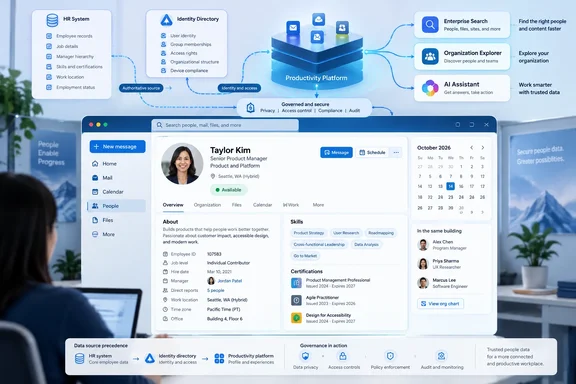
The notable change is not that Microsoft 365 profile cards can show extra employee details; they already can. The Roadmap entry says admins will be able to add organization-specific properties, assign a display name and icon, and show them in the Contact Information section. Microsoft’s current documentation on people-data connectors makes clear what that wording means in practice: a company can ingest data from an HR, recruiting, talent-management, or custom people system, map it to Microsoft 365 user profiles, and expose it through profile cards, Microsoft Search, Org Explorer, and Microsoft 365 Copilot.
For IT departments, this creates a useful employee-directory integration point — and a data-governance decision that should be made before any connector is turned on. Information that used to remain in a specialized HR system can become visible wherever a user opens a colleague’s card, rather than only to HR staff or line managers.
October replaces an earlier July target
Microsoft’s September 16 Roadmap update lists general availability in October 2026. That date is later than the July CY2026 target recorded by the Microsoft 365 Message Center Archive from Microsoft’s earlier Roadmap entry. The archive shows the item was first published on November 18, 2025, updated on June 2, 2026, and then carried a July rollout estimate.
Microsoft has not publicly explained the schedule change or said whether the delay reflects engineering work, customer feedback, connector readiness, or a wider profile-card rollout dependency. What is clear is that the Roadmap entry still says the feature is in development. Organizations should therefore treat October as a planning estimate, not a deployment date they can rely on for a production HR integration.
The timing also puts this feature next to another profile-card change already scheduled for late September. Microsoft has separately told administrators that 11 existing attributes — including division, role, employee number, employee type, cost center, UPN, alias, fax, and portions of the business address — will begin appearing by default when they contain data. That rollout is expected to begin in late September, with Microsoft recommending that tenants which do not want those values visible take action before September 24.
The two changes are related in their user impact even though they are technically distinct. The September change exposes populated existing attributes by default. Roadmap ID 529851 is about bringing in organization-specific attributes, including data from external systems, and presenting those custom fields with tenant-defined labels and icons.
For administrators, the practical lesson is to review both changes as one profile-data project. A tenant could otherwise spend October designing custom labels and icons while unintentionally exposing employee numbers, cost centers, or location data through Microsoft’s preceding default-visibility change.
This goes beyond the older Entra custom-attribute model
Microsoft Graph has supported a narrower form of profile-card customization for years. The existing Profile Card Properties API can expose selected Microsoft Entra ID fields, such as fax number, postal code, alias, street address, and state. It can also display values from the 15 legacy Entra extension attributes, configured as CustomAttribute1 through CustomAttribute15.
Those fields have limits that matter. Microsoft’s Graph documentation says the legacy custom properties are not searchable and cannot be used to find people across Microsoft applications and services. They are also tenant-wide display choices: enabling one requires precautions because it appears on profile cards for all users in the organization who have a populated value.
The upcoming Roadmap item points to the newer people-data connector architecture instead. Microsoft’s documentation says a connector can import data from HR, recruiting, talent, or other people platforms into Microsoft Graph, associate that data with an Entra user, and make the resulting profile information available across people experiences. Custom connector properties can be defined outside the pre-labelled set of familiar properties such as skills, certifications, awards, publications, projects, languages, and work history.
This distinction is important for developers and identity teams. An Entra extension attribute is typically a fixed directory field populated by an identity workflow. A people-data connector is an integration workload: it needs an external connection, a schema, account matching, item ingestion, source registration, synchronization, and profile-source precedence rules. Microsoft recommends reusing standard people-property labels where possible and using custom fields only when the organization genuinely needs them.
A recruiting requisition ID, internal professional designation, plant or site credential, union classification, safety clearance indicator, or specialist support tier may all be reasonable custom properties. But putting a field on a profile card turns it into information intended for ordinary employees to encounter. A database field that is technically convenient for HR is not automatically suitable for company-wide display.
Connector data is broadly exposed unless governance says otherwise
Microsoft’s own connector guidance contains the most consequential limitation absent from the brief Roadmap wording: people data supplied through a Copilot connector is visible to all users in the organization by default. Microsoft also says the data is stored in the user’s Microsoft 365 profile and retained while the user remains active and licensed, unless an administrator deletes it or a data-subject request removes it.
That makes this a broader decision than an Outlook user-interface customization. Once connected, the same data may support profile cards, Microsoft Search, Org Explorer, and Copilot experiences. Microsoft says the source system remains authoritative, but it also says imported connector data can be indexed by default and used by Microsoft 365’s people experiences.
An admin should not assume that a custom property restricted in the originating HR platform will preserve that same audience when it enters Microsoft 365. Microsoft’s documented connector model requires an access-control list granting access to everyone for people data. Information barriers can apply to connector data, but they are a compliance boundary for restricted groups, not a substitute for deciding whether a field should be tenant-visible in the first place.
This is especially sensitive for attributes such as employee IDs, compensation bands, workplace accommodations, performance classifications, background-screening state, immigration-related status, internal investigations, or nonpublic contact details. The Roadmap entry does not describe field-level audience targeting, conditional visibility by department, or separate privacy controls for individual custom properties. Microsoft’s public guidance instead frames the data as part of a company-wide people profile.
Organizations in regulated industries should involve HR, privacy, legal, information security, and their Microsoft 365 administrators before treating this as a harmless directory enhancement. The visible card is the last stage of a process that copies data from a business system into Exchange Online-backed Microsoft 365 profiles.